Note
Access to this page requires authorization. You can try signing in or changing directories.
Access to this page requires authorization. You can try changing directories.
In this article, you learn how to:
- Deploy a service catalog template for a Key Vault into an existing workload from the Azure portal.
Note
This sample deployment is just for demonstration purposes and doesn't represent all the best practices for network, systems, or applications administration.
Before you begin
This article assumes a basic understanding of networking and Azure Enclave concepts. For more information, see Best practices of Azure Enclave.
You need an Azure account with an active subscription. If you don't have one, create an account for free.
You need a community, enclave, workload, and at least one workload resource group, with permissions to create resources in the workload resource group.
Configure maintenance mode for your enclave and include the deploying principal in the maintenance mode configuration. The required mode and justification depend on your deployment configuration.
Prerequisites
Before you deploy, identify an existing subnet for the private endpoint and make sure the required private DNS zone exists in the appropriate DNS-zone resource group. You also need permissions to use the existing virtual network, subnet, and private DNS zone.
- Create or identify a subnet for the private endpoint. You can use a subnet created during enclave creation or create a new subnet. The private endpoint subnet must not have subnet delegation.
- Create or identify the
privatelink.vaultcore.azure.netprivate DNS zone in the specified DNS-zone resource group. The Key Vault template creates a private DNS zone group that links the private endpoint to this existing zone; it doesn't create the zone. For more information, see the Private DNS Zones service catalog template.
Deploy the template
Go to the workload where you want to deploy the Key Vault.
Select the
+Add an Azure Servicebutton.Select the
Key Vaultservice template from the service catalog list dropdown list, confirm the version you need, and selectNext.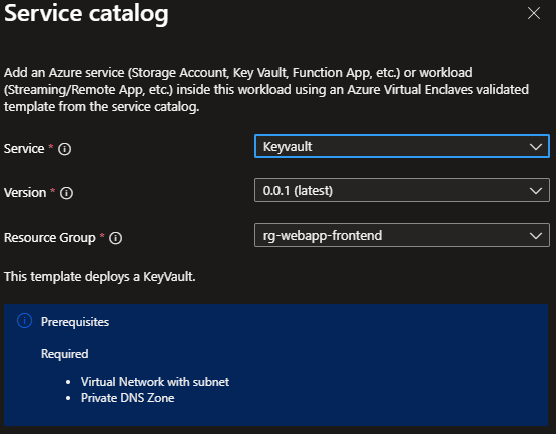
Enter all required parameters on each tab.
Adjust the prepopulated parameters as needed.
Select
Review + Create, and then selectCreate.
Deployment time depends on the resources and configuration. Wait for the deployment to complete successfully before using the deployed resources.
Validate the deployment
Go to the specified resource group and confirm that the deployment created a Key Vault, or Managed HSM when enableHsm is enabled, and a private endpoint.
Delete the deployment
If you don't plan on keeping these resources, delete the Key Vault or Managed HSM and private endpoint to avoid Azure charges. Before deleting a resource group, confirm that it doesn't contain resources used by other deployments, including shared subnets, private DNS zones, managed identities, or keys.
Recommendations
- Add tags to service catalog deployments to track important information for that resource such as:
- Owner:
<main POC> - Deployer:
<yourName> - Purpose:
<shared secrets> - Service Catalog Name:
<Key Vault> - Service Catalog Version:
<version you deployed>
- Owner:
- Consider adding an Azure Policy to enforce and inherit tags.