Community Center | Not monitored
Tag not monitored by Microsoft.

This browser is no longer supported.
Upgrade to Microsoft Edge to take advantage of the latest features, security updates, and technical support.
' cx='32' cy='32' r='32' /%3E%3Ctext x='50%25' y='55%25' dominant-baseline='middle' text-anchor='middle' fill='%23FFF' %3EMH%3C/text%3E%3C/svg%3E)
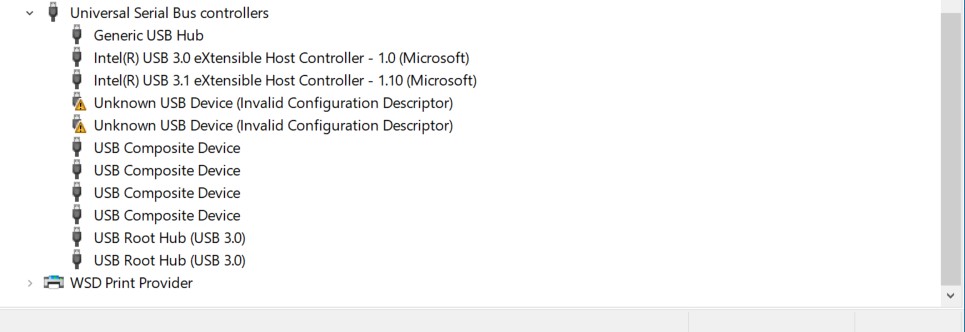
I have having a couple setup issues with my newly purchased kinect camera. I am not getting a response from the device when the included power jack and power adapter are plugged into the wall. When using a usb C to usb C connector, the indicator light flashes white, and I get the following error messages in the device manager. Thanks for your help! 
Tag not monitored by Microsoft.
Answer accepted by question author
' cx='32' cy='32' r='32' /%3E%3Ctext x='50%25' y='55%25' dominant-baseline='middle' text-anchor='middle' fill='%23FFF' %3EQ%3C/text%3E%3C/svg%3E)
Hello @Matt H ,
Flashing white means that the camera does not have a data connection to the host PC. Is the cable you are using a power+data capable or just power? Some USB-C cables are power only.
Azure Kinect known issues and troubleshooting
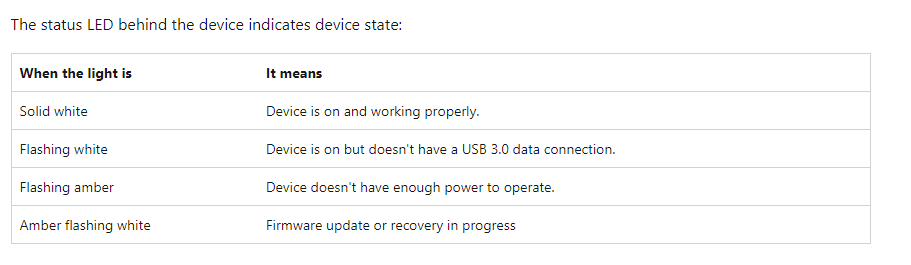
Flashing white : Double check your cable.
Try another PC if you have one available. It will help confirm if you are having a USB port issue or a cable/device issue.
I think you have a bad USB cable. If the device connects on multiple PC's and you get the same state in Device Manager for each then the issue is not likely the host controller. Charging over the cable though is not enough to eliminate the cable of having USB3 issues.
Please comment in the below section for further help.
If the response is helpful, please click "Accept Answer" and upvote it.
I wanted to close the loop on this. I bought a new cable (a belkin active thunderbolt 4 cable) from amazon, and once connected the machine powered on normally. Thanks for your help!