Microsoft Teams | Microsoft Teams for business | Other
Additional features, settings, or issues not covered by specific Microsoft Teams categories

This browser is no longer supported.
Upgrade to Microsoft Edge to take advantage of the latest features, security updates, and technical support.
' cx='32' cy='32' r='32' /%3E%3Ctext x='50%25' y='55%25' dominant-baseline='middle' text-anchor='middle' fill='%23FFF' %3EAC%3C/text%3E%3C/svg%3E)
Cannot find Teams Admin site to enable external organization see my organization. Does anyone have step by step instructions?
Additional features, settings, or issues not covered by specific Microsoft Teams categories

Hi AlisonCook,
You can log in Microsoft Teams Admin Center by this link: https://admin.teams.microsoft.com/teams/manage.
You can turn on “User can communicate with other Skype for Business and Teams users” to enable external access as the following image.
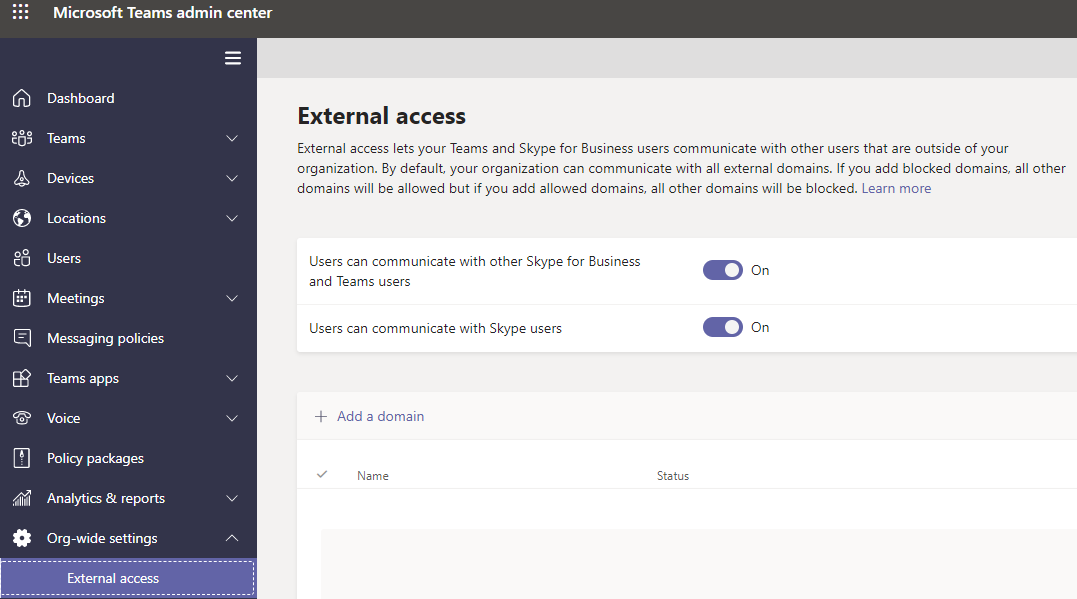
By default, external access is turned on in Teams, which means that your organization can communicate with all external domains. For more details, please refer to this link: https://learn.microsoft.com/en-us/microsoftteams/manage-external-access.