I am facing a very strange behavior, in my opinion in Windows. My Windows 7's base language (the language my installation DVD is) is Romanian. So, my copy of Windows 7 has its UI in Romanian by default. Two days ago, I downloaded and installed the German
Language Pack (for Windows 7 Ultimate) via Windows Update and changed my user account's display language to German (I do this because I want to better learn German, and Windows is a good starting point). Then, I saw that German was added as a keyboard layout
in my language bar, so I removed it because I don't need it: right now, I don't write anything in German, just want my Windows UI to be in German. So I kept my previous keyboard layouts in the language bar: Romanian (standard), Romanian (legacy) and English
(U.S.). All went good, I am used to switching languages frequently using Ctrl + Shift and I am used to 2 languages, so keeping German would just trouble the way I work.
All went good that day, but today, after starting my PC, I saw that German was added again in my language bar as a keyboard language. Okay, so I went to Language settings (right-click the DE or EN or RO symbol in the taskbar and chose Settings) in order
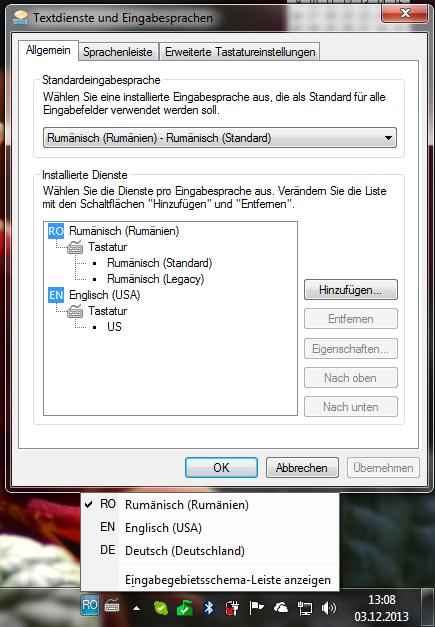
to remove it from that list. But surprisingly, German is not in the list of installed input languages !!!
So now, my question is: is this problem solved by some update or some trick? Even upgrading to Windows 8.1 is a solution if it gets rid of this bug. I attach one image as a proof of the situation I am facing.
Thanks for your answers.
' cx='32' cy='32' r='32' /%3E%3Ctext x='50%25' y='55%25' dominant-baseline='middle' text-anchor='middle' fill='%23FFF' %3EA%3C/text%3E%3C/svg%3E)
