In trying to get the latest Win 10 update to stop plaguing me and just load I followed a post that suggested something in Safe Mode. The post did not mention the fact that there is a ridiculous problem where I can get stuck in (un)Safe Mode Hell. This is
where you land on the Safe Mode start screen but it doesn't recognise your password used in nnormal mode start, yet there is no Reboot to Full Windows selection on the start/shutdown button, lower right of screen, so I'm stuck.
Using wife's laptop I've already spent 3 two hour slots watching the Windows installation/repair file fail to load onto my 32GB USB stick only to find a post where someone discovered the file had to be moved onto the stick in order to run. Another two hours
later the install/repair file succeeded to load to the USB stick then run on my PC.
I followed some locked posts here including Time Lady's clear instructions which worked for others but for me it worked up to the black DOS screen, where I got stuck.
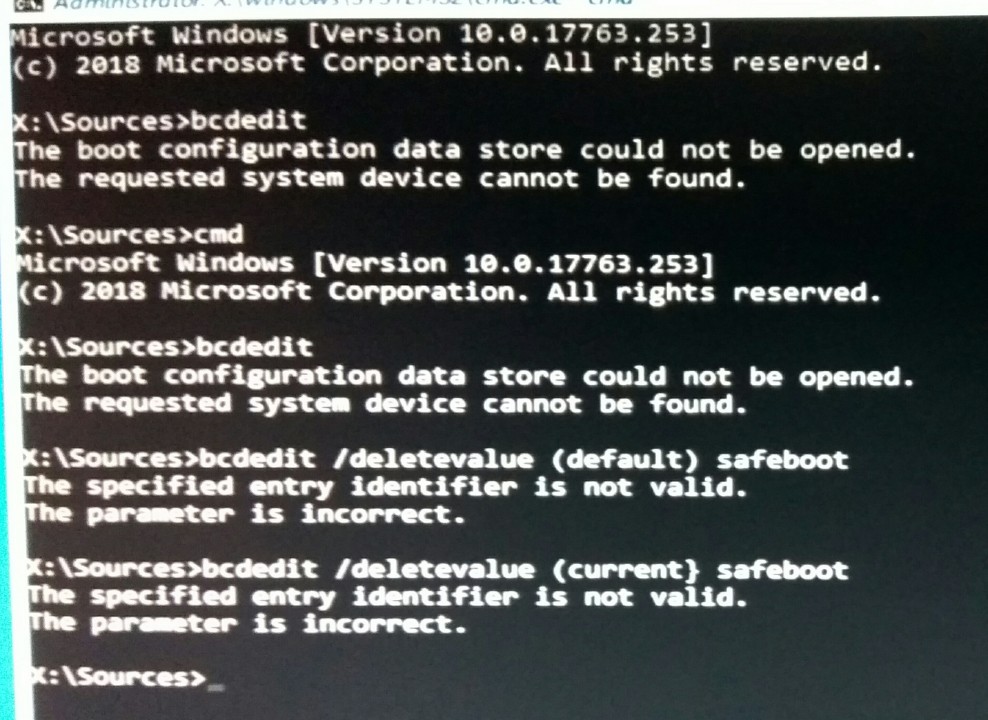
I tried the bcdedit command in order to check my Identifier before entering the deletevalue command line. The bcdedit line couldn't complete (??) so I couldn't read my actual identifier, which meant I had to try the deletevalue command using the two identifiers
(current & default) mentioned in posts. Neither of these identifiers worked (see pic below).
Can anyone see where I might be going wrong (syntax? / my spelling?) and can anyone suggest a way of getting the bcdedit command to work so that I can see my identifier. With the correct identifier I could rerun the deletevalue command, then hopefully get out
of the Loop of Death?
' cx='32' cy='32' r='32' /%3E%3Ctext x='50%25' y='55%25' dominant-baseline='middle' text-anchor='middle' fill='%23FFF' %3EA%3C/text%3E%3C/svg%3E)

