Dear respected Shalini_787,
Greetings! Thanks for posting in Microsoft Community and I'm glad to offer any support for you here.
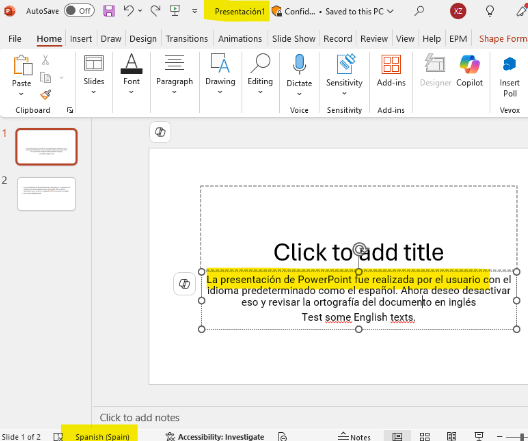
I went through your post carefully and just now I simulated a complete test environment with a presentation originally created and edited as Spanish. As you can see from the below screenshot I attached for a better and clear reference, the language proofing and spell check is in Spanish so it will mark some English words as wrong. Please correct me if I made any misunderstanding on trying to simulate the scenario for you.
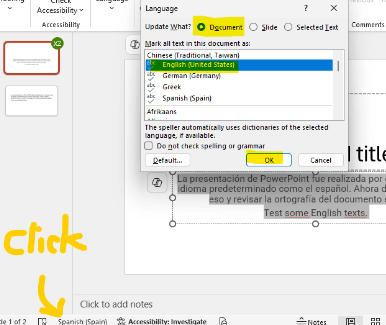
If my understanding is correct, now you want to recover back the language spell check into English for this entire file. This can be achieved easily in the PowerPoint desktop application via clicking the Language setup in bottom bar and update to English for entire Document. I also highlighted for you in second screenshot.
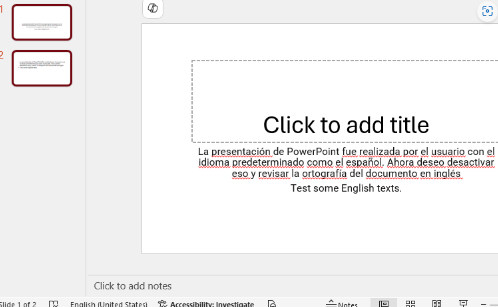
After so, the entire document will become English as spell check language, and it will show like this.
Besides, I noticed you post under Android category, but it's sorry to convey that currently it can only be achieved by PowerPoint desktop app to easily change the entire document into English proofing. And if it is not convenient for you to use PowerPoint desktop app, another workaround is to upload and open the presentation in http://powerpoint.office.com/ and manually select all contents and change to English, which might be bit low-efficient.
If you need urgent help on changing language for this file and it is not sensitive, you can contact me further and I will provide you a way to enable you share me file and I will help on doing that to send back for you as a temporary workaround if there has any urgent work.
Please correct me if I made any misunderstanding and I will be here waiting for your updates to offer any further support.
Your effort and time are greatly appreciated! Hope you a nice day and stay safe!
Sincerely,
Mia | Microsoft Community Moderator
' cx='32' cy='32' r='32' /%3E%3Ctext x='50%25' y='55%25' dominant-baseline='middle' text-anchor='middle' fill='%23FFF' %3EA%3C/text%3E%3C/svg%3E)
