Hi Rob Flint,
Greetings. Thank you for posting the thread to our community.
I understand your concern, it seems the Video Shape button is missing in the PowerPoint for Mac on your side. For the situation you’ve encountered, I do understand the inconvenience caused and feel very sorry about it.
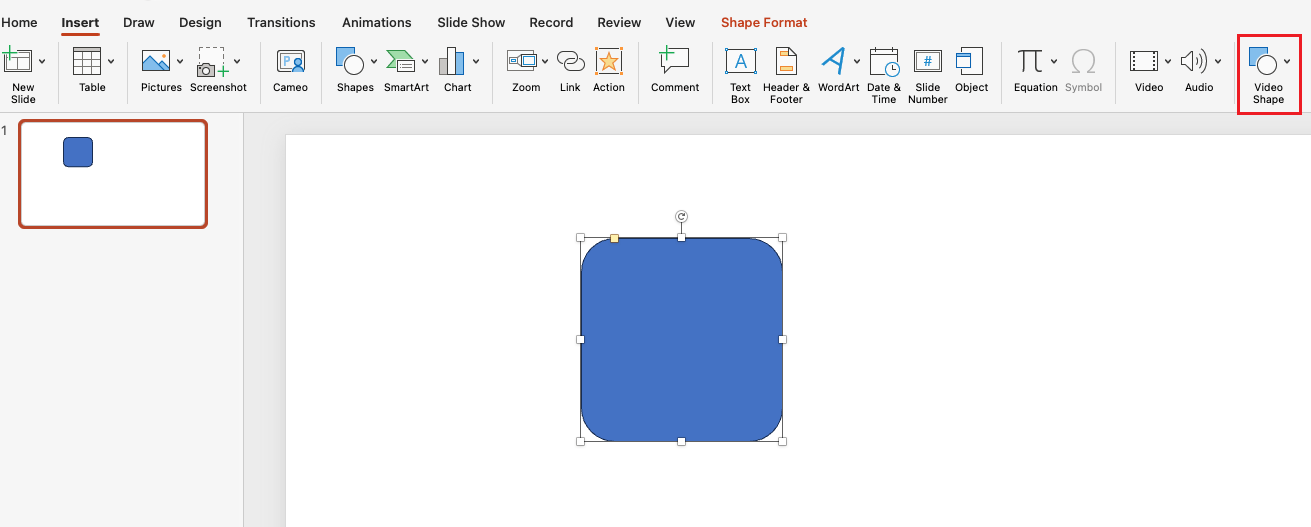
After my test on PowerPoint for Mac version 16.93 (25011212), I can repro your situation as the Video Shape button is currently not a default command in PowerPoint for Mac, it needs to be manually added from the Preference > Ribbon & Toolbar menu. Here is my test result as reference for you:
In the test result I add the command into the Insert Tab:
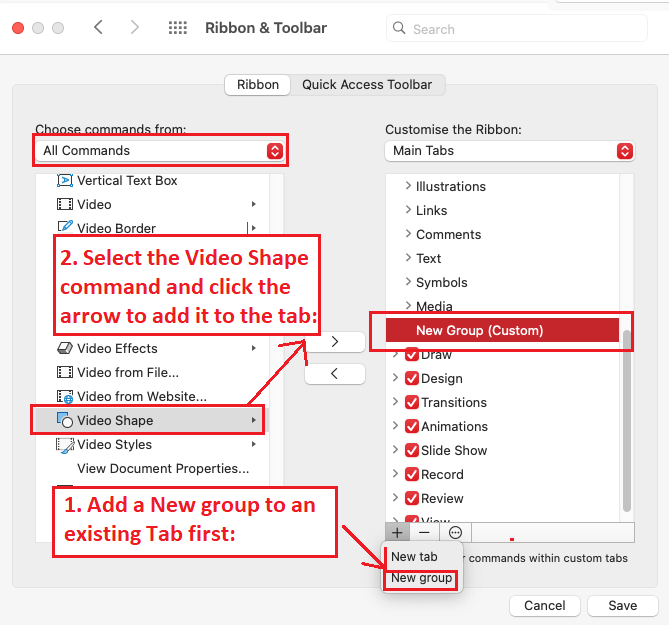
Here is also the support article as reference for you: Customize the ribbon in Office - Microsoft Support. In that case, I suggest you can try to follow the steps above or follow the article and check whether you can find the Video Shape button or not.
If you cannot find this button, May I confirm the following information with you?
- May I confirm when did this issue happen?
- May I confirm whether your classmate have the same issue or not?
- May I confirm your MacOS version and the full version number of your PowerPoint: About Office: What version of Office am I using? - Microsoft Support? Please provide me a screenshot of your PowerPoint version and your MacOS version.
Appreciate your understanding that sometimes the initial reply may not resolve the situation very soon. However, we can work together to narrow down and resolve the situation. Please kindly provide the requested information so that I can work further. And Thank you in advance for your cooperation!
Hope you having a nice day and warm regards to you as well! 😊
Sincerely,
Harry | Microsoft Community Moderator
' cx='32' cy='32' r='32' /%3E%3Ctext x='50%25' y='55%25' dominant-baseline='middle' text-anchor='middle' fill='%23FFF' %3EA%3C/text%3E%3C/svg%3E)

