Microsoft 365 and Office | OneDrive | For business | Windows
A Microsoft file hosting and synchronization service.

This browser is no longer supported.
Upgrade to Microsoft Edge to take advantage of the latest features, security updates, and technical support.
' cx='32' cy='32' r='32' /%3E%3Ctext x='50%25' y='55%25' dominant-baseline='middle' text-anchor='middle' fill='%23FFF' %3EAB%3C/text%3E%3C/svg%3E)
I'm a developer for a C++ MFC desktop application. The application does many file manipulations (read, write, move, copy, delete, etc). When one of these operations fails, we usually log it and retry. After a number of retries, we try to figure out what is locking the file, print that to the logs, and give up. We've noticed that OneDrive is often the application locking the files (I can post portions of the source code if needed).
So my questions are:
1) Is it actually OneDrive locking the file perhaps during sync operations? Or is there something else going on and it just looks like it's one drive?
2) If OneDrive is actually the one locking the files, is there a way we can "play nice" with OneDrive so that we don't keep stepping on it? E.g. debounce our save processes or something?
A Microsoft file hosting and synchronization service.

Hi @Al Boggess
Welcome to Q&A forum ~
At present, I have not found relevant documents to directly answer your question 1: Will OneDrive lock the file perhaps during sync operations?
Thanks for your understanding.
As far as I know, if an app is using a file that you have stored on OneDrive, it cannot be synced while the file is open, there would be a message like following image.
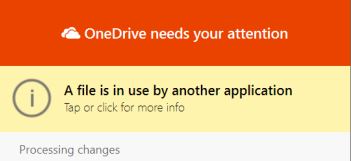
Once you have saved your work, and closed this app, OneDrive will sync the file.
So in my opinion, during the synchronization of the file with OneDrive, it must be the case that other software is not doing something on the file.
For the second question, it is recommended that your application process the files before OneDrive synchronizes the files, or after the OneDrive sync files are completed.
Hope the information is helpful to you.
If the answer is helpful, please click "Accept Answer" and kindly upvote it. If you have extra questions about this answer, please click "Comment".
Note: Please follow the steps in our documentation to enable e-mail notifications if you want to receive the related email notification for this thread.
Hi @Al Boggess ,
If you have a chance to be back, please check whether my information is helpful.
Any updates, welcome to disscuss with us.
Hi emilyhua-msft,
For the second question, it is recommended that your application process the files before OneDrive synchronizes the files, or after the OneDrive sync files are completed.
Is there a way we can programmatically detect when OneDrive is doing a sync so our application can wait for it to complete?
Al
Hi @Al Boggess ,
Sorry for the dealy.
> Is there a way we can programmatically detect when OneDrive is doing a sync so our application can wait for it to complete?
As we handle general issue of OneDrive client, including deployment, installation, and troubleshooting like file synchronization.
If you need the code help which is out of my support scope, I would sugget you post new threads on following forums. Thanks for your understanding.
Microsoft Tech Community --- OneDrive Develper
OneDrive developer community
Besides, I find a realted thread, you could have a look.
How can I check local OneDrive folder is in sync?
Hope the information could be helpful.
@Al Boggess ,
As this your reply is not the answers for your issue, I have converted it to be a comment.
Thanks for your understanding.