Note
Access to this page requires authorization. You can try signing in or changing directories.
Access to this page requires authorization. You can try changing directories.
Azure DevOps Services | Azure DevOps Server | Azure DevOps Server 2022
The Capability Maturity Model Integration (CMMI) process provides a structured framework for managing software development in regulated and compliance-heavy environments.
CMMI is ideal for teams working in regulated industries, those requiring formal change-control procedures, or organizations adopting process improvement frameworks. This article introduces CMMI work item types, queries, charts, and dashboards. If you're new to CMMI, start here.
Prerequisites
- An Azure DevOps organization.
- Basic access level or higher and Project Creator permission.
- Familiarity with work item tracking concepts and process templates.
- Optional: Read access to process template settings.
If CMMI isn't suitable for your team, consider alternative process templates:
- Agile process — Best for teams using iterative development with flexible ceremonies
- Scrum process — Best for teams practicing sprint-based development with formal reviews
Background: Capability Maturity Model Integration
The Capability Maturity Model Integration (CMMI) is a maturity framework developed by the Software Engineering Institute (SEI) at Carnegie Mellon University. CMMI helps organizations assess process maturity and guides process improvement to produce more predictable results and higher-quality products. It provides a structured approach to risk management and measuring how well an organization manages risk.
Note
This article bases its guidance on CMMI version 1.3, which Azure Boards supports. The content isn't being updated to later CMMI versions. In CMMI, requirements represent customer needs and project scope, while tasks represent the implementation work. Link requirements to tasks to enable rollup tracking and progress monitoring across teams. Use change requests and bugs to track formal modifications and defects.
What is the purpose of CMMI?
CMMI helps teams and organizations:
- Improve predictability — Higher-maturity organizations tend to apply quantitative management practices, show lower process variability, and use leading indicators for defensible management decisions.
- Manage risk — The ability to manage risk contributes directly to an organization's capacity to deliver high-quality, compliant results.
- Streamline communication — CMMI provides a common framework and language that improves communication about process improvement.
- Balance innovation and control — CMMI focuses process standardization in regulated environments while supporting continuous improvement.
Work item queries help you list items by type - change requests, bugs, tasks, and requirements. Use queries to focus on current work, triage problems, and prepare for planning and reporting.
Use CMMI as a foundation for a process-improvement program, not as a prescriptive checklist you must follow verbatim. Treat appraisals as one way to measure progress rather than the primary goal. Remember that higher maturity can reduce innovation speed, while lower maturity may foster innovation but with less predictability.
CMMI defines 22 process areas that help organizations improve across engineering, project management, and organizational support. The model provides two complementary representations:
- Staged representation: Groups the 22 process areas into five maturity levels (1–5), yielding a single maturity level for an organization. This representation helps executives and managers understand organizational capability.
- Continuous representation: Assesses capability per process area, letting you focus improvement where it delivers the most business value.
CMMI process areas
The CMMI-DEV model defines 22 process areas in version 1.3:
| Acronym | Process Area |
|---|---|
| CAR | Causal Analysis & Resolution |
| CM | Configuration Management |
| DAR | Decision Analysis & Resolution |
| IPM | Integrated Project Management |
| MA | Measurement & Analysis |
| OID | Organizational Innovation & Deployment |
| OPD | Organizational Process Definition |
| OPF | Organizational Process Focus |
| OPP | Organizational Process Performance |
| OT | Organizational Training |
| PI | Product Integration |
| PMC | Project Monitoring & Control |
| PP | Project Planning |
| PPQA | Process & Product Quality Assurance |
| QPM | Quantitative Project Management |
| RD | Requirements Definition |
| REQM | Requirements Management |
| RSKM | Risk Management |
| SAM | Supplier Agreement Management |
| TS | Technical Solution |
| VER | Verification |
| VAL | Validation |
Get started with CMMI
To create your first CMMI project in Azure DevOps, follow these steps:
To get started, follow these steps:
Create a new project with CMMI — Select the CMMI template during project creation.
Plan your first work — Create requirements to capture customer needs and tasks to break down implementation work. Requirements and tasks work together to enable rollup tracking across your team.
Set up queries and dashboards — Build work item queries to focus on current work and create charts to monitor progress. Queries help you analyze dependencies and maintain compliance.
For detailed workflow guidance, see CMMI work item types and workflow.
CMMI work item types and workflows
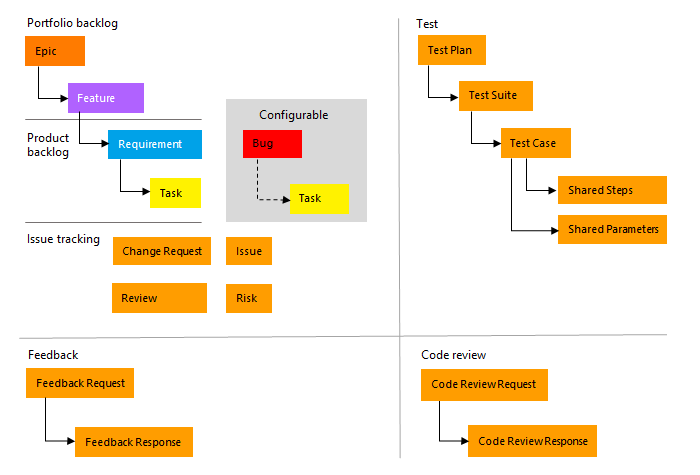
CMMI includes five primary work item types, each with a defined lifecycle. Understanding these types and their workflows helps you apply the CMMI process effectively.
| Work Item Type | Purpose | Workflow | Unique to CMMI? |
|---|---|---|---|
| Requirement | Capture customer needs and project scope | Proposed → Active → Resolved → Closed | Equivalent to "User Story" in Agile/Scrum |
| Change Request | Formally request modifications to requirements or design | Proposed → Active → Resolved → Closed | Yes—enables formal change management |
| Task | Break down work and track implementation steps | New → Active → Completed → Closed | Available in all processes |
| Bug | Document defects in code or design | New → Active → Resolved → Closed | Available in all processes |
Key difference: Unlike Agile and Scrum, CMMI includes Change Requests to enforce formal change-control procedures. This approach enables teams to maintain audit trails and comply with regulations in controlled environments.
Note
- You can customize the work tracking system for your project by creating and customizing an inherited process and applying that process to your project. For more information, see Process customization and inherited processes.
- You can also customize a process template. For more information, see Default processes and process templates.
Note
- You can customize the work tracking system for your project by customizing an Inherited process or an On-premises XML process. For more information, see Process customization and inherited processes or On-premises XML process customization. The latest version of each process uploads automatically when you install or upgrade to the latest version of Azure DevOps Server. Other artifacts, such as SQL Server reports, are only available when you connect to a project. Other resource requirements apply.
- You can also customize a process template. For more information, see Default processes and process templates.
Plan and track work with CMMI
In CMMI, requirements represent customer needs and project scope, while tasks represent the implementation work. Link requirements to tasks to enable rollup tracking and progress monitoring across teams. Use change requests and bugs to track formal modifications and defects.
For more information about how to create requirements, link tasks, and manage work item workflows, see CMMI work item types and workflow.
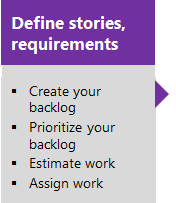
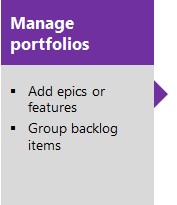
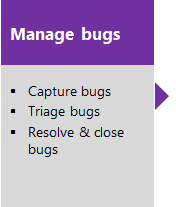
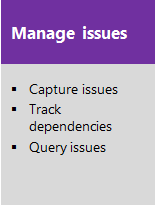
The following image shows the essential flow for getting started. For more information, see Get started with Agile tools to plan and track work.
Select one of the following images to go to the linked article.
Note
A work item is a database record that contains the definition, assignment, priority, and state of work. Work item types define the template of fields, workflow, and form for each type. Work items can be linked to each other to support tracking dependencies, roll up of work, and reports.
List work items with queries
Work item queries help you list items by type - change requests, bugs, tasks, and requirements. Use queries to focus on current work, triage problems, and prepare for planning and reporting.
Common CMMI query patterns:
- Show all requirements linked to an epic or feature
- List change requests awaiting approval or in review
- Show bugs blocking a release
- Find tasks not yet started in the current sprint
- Show requirements by status (Proposed, Active, Resolved, Closed)
These queries help you analyze progress, identify dependencies, and maintain compliance with your process.
Note
When you create a new project, there's no longer a default set of Shared Queries. The definitions for Shared Queries were removed from the process template. For on-premises deployments, you can add them to a custom process template as described in Add work item queries to a process template.
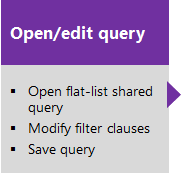
View and run queries from the web portal or from the Team Explorer plug-in for Visual Studio. Modify a query using the query editor to apply different filter criteria and add queries to team dashboards.
Tips for shared queries
Enhance your workflow using the following tips:
- Add @Me as the value for the Assigned To field in a query clause to find work items assigned to you.
- Open the query editor to modify any query by adding criteria for a product area, iteration, or another field.
- Open a query in Excel to update fields of one or more work items and publish changes to the database.
- Create a pie-chart, column chart, or trend chart to visualize status or progress for flat-list queries.
- Create queries and folders under the My Queries area with standard access. To create queries and folders under Shared Queries, ensure you have the Contribute permission and at least Basic access. For more information, see Set permissions on queries.
Monitor progress
CMMI supports building status and trend charts and dashboards that populate automatically based on work tracking tools in Azure Boards. Key chart types include:
- Cumulative flow: Shows requirement, task, and bug progress over time
- Burndown: Displays sprint progress toward iteration goals
- Velocity: Reveals completed work across sprints
- Trend: Reveals patterns in bug discoveries and resolutions
These charts appear in the web portal and help teams make data-driven decisions about process improvement and progress.
Create light-weight charts
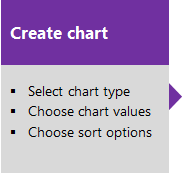
You can define a shared flat query and create a chart based on your tracking interests. Chart types include:
- status: pie, bar, column, stacked bar, and pivot
- trend: stacked area, line, and area
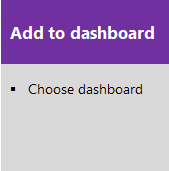
Select one of the following images to go to the linked article.
Analytics widgets and Power BI reports
The Analytics Service can answer quantitative questions about the past or present state of your projects. You can add Analytics widgets to a dashboard or use Power BI to create charts and reports.
For more information, see What is the Analytics Service?
CMMI process versions
As the CMMI process template evolves, its version number changes. The template provides a version element that specifies major and minor versions. The following table maps template versions used by Azure DevOps on-premises releases; Azure Boards (cloud) always uses the latest template.
| Version | CMMI name | Major version |
|---|---|---|
| Azure DevOps Services (2026) | CMMI | 18.4 |
| Azure DevOps Server 2022 | CMMI | 18 |
| Azure DevOps Server 2020 | CMMI | 17 |
Version context: Azure Boards Services uses version 18.4. Organizations running on-premises Azure DevOps Server use the versions mapped in the previous table based on their server release.
Use the CMMI process effectively
To effectively implement CMMI, tailor the framework to your organization's context and maturity level. Explore these resources to guide your CMMI adoption:
- Manage projects: Get guidance on managing, planning, and coordinating software development and maintenance using the CMMI model.
- Explore engineering activities: Discover value-added activities for designing and building software products aligned with CMMI practices.
Use the CMMI template and guidance as part of a process improvement program and adapt them based on:
- Product type and history
- Project scale
- Team skills and backgrounds
- Accepted practices in your organization
CMMI capability maturity levels
CMMI defines five capability levels that guide process improvement. As your team matures, you advance through these levels by implementing CMMI practices and work tracking:
- Incomplete: Processes are unpredictable and poorly controlled.
- Performed: Teams document and understand processes.
- Managed: Teams proactively manage processes with metrics and controls.
- Defined: Teams tailor processes from organizational standards.
- Optimizing: Teams continuously improve processes through innovation and optimization.
Frequently asked questions about CMMI (FAQs)
Q: What's the difference between a Change Request and a Task?
A: Tasks break work into implementation steps. Change Requests formally request modifications to requirements or design, with approval workflows and compliance tracking. Use Change Requests in regulated environments. Use Tasks for routine work breakdown.
Q: What if I created a project with the wrong process template?
A: Create a new project with CMMI or change your process template to CMMI.
Q: How do I customize CMMI for my team?
A: See Customize the CMMI process for guidance on tailoring work item types, fields, and workflows to your team's needs.
See also
- CMMI work item types and workflow
- Create a project with CMMI
- Customize the CMMI process
- CMMI background and context