Note
Access to this page requires authorization. You can try signing in or changing directories.
Access to this page requires authorization. You can try changing directories.
Important
These features and functionality are part of the 2026-05-01-preview REST API. The 2026-05-01-preview is licensed to you as part of your Azure subscription and is subject to the terms applicable to "Previews" in the Microsoft Product Terms, the Microsoft Products and Services Data Protection Addendum ("DPA"), and the Supplemental Terms of Use for Microsoft Azure Previews.
The 2026-05-01-preview supports connections to other Microsoft services and third-party services. Use of these services is subject to their respective terms and might result in data processing or storage outside of the Azure compliance boundary, as well as data flowing into the Azure compliance boundary.
The 2026-05-01-preview can't modify access permissions that were set outside of the 2026-05-01-preview. If you use the 2026-05-01-preview with access- or permission-restricted content, a timing lag will occur before the 2026-05-01-preview recognizes changes to those access or permission restrictions.
It's your responsibility to manage whether your data will flow outside of your organization's compliance and geographic boundaries and any related implications, and that appropriate permissions, boundaries, and approvals are provisioned.
You're responsible for carefully reviewing and testing applications you build in the context of your specific use cases and making all appropriate decisions and customizations. This includes implementing your own responsible AI mitigations, such as metaprompts, content filters, or other safety systems, and ensuring your applications meet appropriate quality, reliability, security, and trustworthiness standards. For more information, see the Azure AI Search Transparency Note.
This article explains how to ingest an access control list (ACL) alongside other content from SharePoint in Microsoft 365 using an Azure AI Search indexer. Permissions from SharePoint are preserved as permission metadata for each indexed document. When users query an index containing content from SharePoint, their search results consist of only those documents for which they have permission to access.
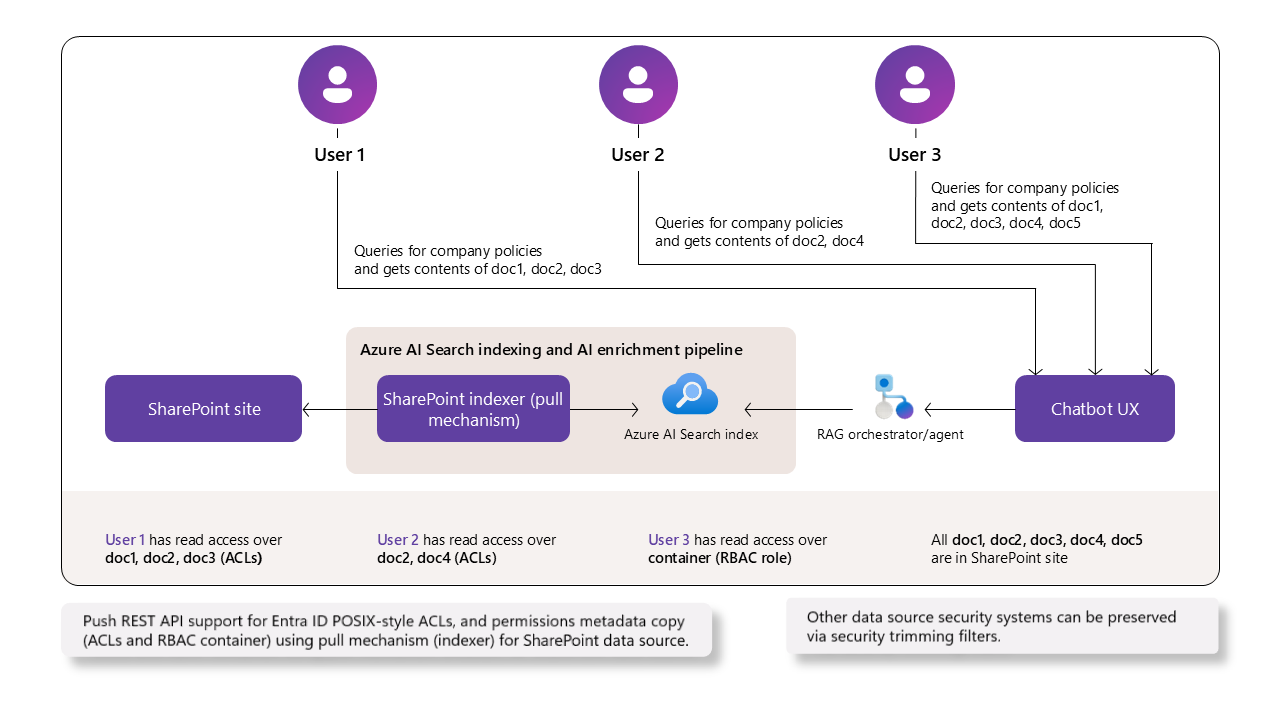
Important
For scenarios that require the full SharePoint permissions model, sensitivity labels, and out-of-the-box security trimming, use a remote SharePoint knowledge source. This approach calls SharePoint directly via the Copilot retrieval API. Governance remains fully in SharePoint, and query results automatically respect all applicable permissions and labels.
Prerequisites
Azure AI Search on a billable tier (Basic or higher) in any region.
SharePoint in Microsoft 365 sites, libraries, folders, and files with configured permissions.
Complete all configuration steps in the SharePoint indexer documentation, applying the ACL-specific requirements described in this article.
Configure Microsoft Entra application permissions and a credential appropriate for your scenario. See Permissions by ACL scenario. ACL ingestion requires application permissions. Delegated permissions aren't supported. For the application vs delegated decision, see Choose your permissions setup.
REST API version 2026-05-01-preview or an equivalent preview SDK package.
Permissions by ACL scenario
The Microsoft Entra application permissions and credential type required for ACL ingestion depend on which item types and group types you index. In the app registration, all permissions are added under API permissions > Add a permission, and the federated credential is added under Certificates & secrets > Federated credentials. For step-by-step instructions and screenshots, see Step 3: Create a Microsoft Entra application registration and Configuring the registered application with a managed identity.
| Scenario | API permissions to add | Credential |
|---|---|---|
| ACLs on document library files, when access is granted only through Microsoft Entra users and standard groups (Microsoft Entra security groups, Microsoft 365 groups, mail-enabled security groups) | Microsoft Graph: Files.Read.All, Sites.FullControl.All (or Sites.Selected for scoped access) |
Client secret or federated credential |
| ACLs on document library files, when SharePoint site groups (Owners, Members, Visitors, or custom site groups) must also be honored | Microsoft Graph: Files.Read.All, Sites.FullControl.All (or Sites.Selected)SharePoint: Sites.FullControl.All (or Sites.Selected) |
Federated credential (required) |
| ACLs on SharePoint list items | Microsoft Graph: Files.Read.All, Sites.FullControl.All (or Sites.Selected), User.Read.AllSharePoint: Sites.FullControl.All (or Sites.Selected) |
Federated credential (required) |
| Content and ACLs on ASPX site pages | Microsoft Graph: Sites.FullControl.All (or Sites.Selected), User.Read.All (keep Files.Read.All from the rows above if you're also indexing document libraries or lists)SharePoint: Sites.FullControl.All (or Sites.Selected) |
Federated credential (required) |
Query-time resolution of SharePoint site groups via sharePointConnectorAppRegistration |
Add SharePoint: User.Read.All to the same app registration used by the indexer |
Federated credential (required) |
Note
When you add a permission, you choose between two API surfaces: Microsoft Graph and SharePoint. Both expose similarly named permissions. For example,
Sites.FullControl.Allexists under both. Add each permission under the API surface indicated in the table.Use a federated credential whenever the scenario adds SharePoint API permissions. Client secrets work only for the Microsoft Graph–only document-library row.
User.Read.Allis required for list items and ASPX site pages because the indexer reads those permissions through the SharePoint REST API, which returns only the user's email. The indexer then calls Microsoft Graph to resolve each email to its Microsoft Entra object ID, and that lookup requiresUser.Read.All.When you use
Sites.Selected, grant the app explicit access to each target SharePoint site before indexing.
A federated credential authenticates the app using a trusted managed identity instead of a client secret. The same federated credential covers both ingestion (indexer) and query-time evaluation of SharePoint site groups. For setup steps, see Configuring the registered application with a managed identity.
Before you enable ACL ingestion
Complete these steps on your registered Microsoft Entra application:
- Identify your scenario in the previous table based on what you plan to index (document library files, list items, ASPX site pages) and whether SharePoint site groups must be honored.
- Open your app registration in the Microsoft Entra admin center and go to API permissions > Add a permission.
- Add the Microsoft Graph permissions listed for your scenario. Grant admin consent.
- If your scenario also requires SharePoint permissions, select Add a permission again, choose the SharePoint API, and add
Sites.FullControl.All(orSites.Selected). Grant admin consent. - Configure the credential:
- For Microsoft Graph–only scenarios, you can use either a client secret (Certificates & secrets > Client secrets) or a federated credential.
- For any scenario that includes SharePoint permissions, add a federated credential under Certificates & secrets > Federated credentials. See Configuring the registered application with a managed identity.
- Grant the application access to the target SharePoint sites (especially important when you use
Sites.Selectedfor scoped access) so it can read the content and permissions you want to index.
Limitations
Incremental ACL updates require the 2026-05-01-preview REST API or later. In earlier preview API versions, ACLs are captured only on the first ingestion of each item, and later permission changes require explicit reindexing. For migration steps, see Synchronize permissions between indexed and source content.
Parent-scope permission changes aren't picked up automatically on subsequent indexer runs. For the refresh options, see Synchronize permissions between indexed and source content.
The Azure portal doesn't support this feature.
The following aren't supported in this preview:
SharePoint Information Management policies applicable to user access. These policies aren't evaluated, ingested, or honored at query time.
Shareable links scoped to "Anyone" or "People in your organization." Only links scoped to "Specific people" are supported.
SharePoint groups (such as Owners, Members, and Visitors groups) are supported starting in the 2026-05-01-preview REST API. See Configure SharePoint groups support. In earlier preview API versions, only SharePoint groups that resolve to Microsoft Entra groups are supported.
The following indexer features don't support permission inheritance in indexed documents originating from SharePoint. If you use any of these features in a skillset or indexer, document-level permissions aren't included in the indexed content.
Support for the SharePoint permission model
This preview supports basic ACLs for documents, list items, and modern ASPX site pages.
| SharePoint Feature | Description | Supported | Notes |
|---|---|---|---|
| Site, library, list, and page inheritance | Site → library/list → folder → file/item/page. | ✔️ | Evaluated at ingestion; effective ACLs computed per item. |
| Folder, file, list item, and page unique ACLs | Item-level access. | ✔️ | Included when present at first ingestion and on subsequent runs that detect ACL changes for items with unique permissions. |
| SharePoint list items | Permissions on list items (allSiteLists and allSiteContent containers). |
✔️ | Preview, starting in the 2026-05-01-preview REST API. |
| ASPX site pages | Permissions on modern site pages (allSitePages and allSiteContent containers). |
✔️ | Preview, starting in the 2026-05-01-preview REST API. |
| Microsoft Entra (Microsoft 365 and security) groups | Group-based access. | ✔️ | Group IDs included when resolvable to a Microsoft Entra identifier (ID). |
| SharePoint site groups | Owners/Members/Visitors and custom site groups. | ✔️ | Preview, starting in the 2026-05-01-preview REST API. Requires the SharePoint groups configuration. Group IDs are emitted with the spg: prefix. |
| Shareable "Anyone links" or "People in your organization links" | Org-wide or public access. | ❌ | Not supported in preview. |
| External/guest users | Access for guests. | ❌ | Not supported. |
| Information Management policies | Policies to define specific permissions requirements. | ❌ | Not supported in preview. |
| Purview sensitivity labels | Document-level security for privacy, categorization, permissions, and encryption | ❌ | Supported via a separate feature: preserving and honoring sensitivity labels. |
How hierarchical permissions are evaluated
SharePoint permissions inherit the hierarchy of Site → Library → Folder → File, unless inheritance is broken.
During ingestion, the indexer gathers user and group identifiers (ID) at each level and computes the effective ACL for each file.
Configure your search service for ACL ingestion and query-time enforcement
These steps configure your search service for ACL ingestion and enable ACL honoring at query time.
Choose where to populate ACL fields
Where you map the ACL metadata fields depends on whether the indexer writes one document per source item or multiple chunks per source item.
| Scenario | Populate ACL fields via | Why |
|---|---|---|
| No skillset or skillset without chunking; one search document per source item | Indexer field mappings only (metadata_user_ids → UserIds, metadata_group_ids → GroupIds, and for SharePoint groups metadata_sharepoint_site_url → SharePointSiteUrl). |
The indexer writes a single document to the target index, and field mappings carry source metadata to index fields. |
Skillset with chunking (for example, Text Split skill for integrated vectorization), single index with parent fields repeated on each chunk (projectionMode: skipIndexingParentDocuments) |
Index projections in the skillset (mappings from /document/metadata_user_ids, /document/metadata_group_ids, and for SharePoint groups /document/metadata_sharepoint_site_url). |
The parent document isn't indexed; only chunks are. ACL values must be projected onto every chunk so query-time filters apply on the chunk returned in results. Indexer field mappings for these fields are bypassed in this mode. |
| Skillset with chunking, two-index pattern (parent index + child chunk index) | Both: indexer field mappings populate ACL fields on the parent index, index projections populate ACL fields on the child chunk index. | Both indexes are queryable, and each needs the metadata it filters on. |
In all chunked scenarios, every chunk must carry the ACL fields. Permission filters apply per document, so a chunk missing ACL fields can't be returned to the right caller.
1. Data source configuration
This section is a delta on top of the base Step 4: Create data source walkthrough. Set indexerPermissionOptions in the data source definition to allow indexing of userIds and groupIds from SharePoint documents.
{
  "name": "my-sharepoint-acl-datasource",
  "type": "sharepoint",
  "indexerPermissionOptions": ["userIds", "groupIds"],
  "credentials": {
    "connectionString": "<connection-string>;"
  },
  "container": {
    "name": "<library-name>",
    "query": "<optional-folder-path>"
  }
}
2. Add permission fields to the index definition
Add fields to your index schema definition to store ACLs and support query-time filtering.
{
  "fields": [
    { "name": "UserIds",  "type": "Collection(Edm.String)", "permissionFilter": "userIds",  "filterable": true, "retrievable": false },
    { "name": "GroupIds", "type": "Collection(Edm.String)", "permissionFilter": "groupIds", "filterable": true, "retrievable": false }
  ],
  "permissionFilterOption": "enabled"
}
Set retrievable attribute to true only during development to verify values. You can change retrievable from true to false with no index rebuild requirement.
3. Configure index projections in your skillset (if applicable)
When chunking is enabled, the parent document isn't written to the index when projectionMode is skipIndexingParentDocuments. Carry the ACL metadata onto each chunk through indexProjections.selectors[].mappings.
If your indexer uses a skillset with data chunking, such as the Text Split skill when enabling integrated vectorization, make sure to map ACL properties to each chunk using index projections. The // lines in the following example are illustrative annotations and aren't valid JSON. Remove them before submitting the request.
PUT https://{service}.search.windows.net/skillsets/{skillset}?api-version=2026-05-01-preview
{
  "name": "my-skillset",
  "skills": [
    {
      "@odata.type": "#Microsoft.Skills.Text.SplitSkill",
      "name": "#split",
      "context": "/document",
      "inputs": [{ "name": "text", "source": "/document/content" }],
      "outputs": [{ "name": "textItems", "targetName": "chunks" }]
    }
    // ... (other skills such as embeddings, entity recognition, etc.)
  ],
  "indexProjections": {
    "selectors": [
      {
        "targetIndexName": "chunks-index",
        "parentKeyFieldName": "parentId",          // must exist in target index
        "sourceContext": "/document/chunks/*",     // match your split output path
        "mappings": [
          { "name": "chunkId",           "source": "/document/chunks/*/id" },     // if you create an id per chunk
          { "name": "content",           "source": "/document/chunks/*/text" },   // chunk text
          { "name": "parentId",          "source": "/document/id" },              // parent doc id
          { "name": "UserIds",  "source": "/document/metadata_user_ids" },
          { "name": "GroupIds",  "source": "/document/metadata_group_ids" },
          { "name": "SharePointSiteUrl", "source": "/document/metadata_sharepoint_site_url" } // include when the index has sharePointConnectorAppRegistration (SharePoint groups support)
        ]
      }
    ],
    "parameters": {
      "projectionMode": "skipIndexingParentDocuments"
    }
  }
}
The UserIds, GroupIds, and SharePointSiteUrl mappings read source-level metadata emitted by the SharePoint indexer (/document/metadata_*) and write the values onto each chunk.
4. Configure the indexer field mappings for ACLs
Use indexer field mappings when the indexer writes one document per source item (no chunking) or when you maintain a separate parent index alongside a chunk index. If your skillset chunks documents into a single target index with projectionMode: skipIndexingParentDocuments, the field mappings shown here are superseded by the indexProjections.mappings from the previous step for the chunk index.
Besides your required indexer configuration, map raw metadata ACL fields from SharePoint to your index fields.
{
  "fieldMappings": [
    { "sourceFieldName": "metadata_user_ids",  "targetFieldName": "UserIds" },
    { "sourceFieldName": "metadata_group_ids", "targetFieldName": "GroupIds" }
  ]
}
5. Run the indexer
ACL metadata is ingested when the indexer runs. After you create or update the indexer (see Step 6: Create an indexer), trigger a run so the indexer ingests ACLs alongside content.
POST https://[service name].search.windows.net/indexers/[indexer-name]/run?api-version=2026-05-01-preview
api-key: [admin key]
If you enabled ACL ingestion on an existing indexer that already indexed items, call /resync with options: ["permissions"] to backfill ACLs for those items, or /resetdocs to re-extract specific items.
6. Verify ACL ingestion
To confirm ACL values populated correctly:
- Temporarily set
retrievabletotrueonUserIdsandGroupIdsin your index definition. Changingretrievabledoesn't require an index rebuild. - Run an elevated-read query that selects
UserIdsandGroupIds, and confirm the collections aren't empty. For chunked scenarios, confirm every chunk carries both fields. - Return
retrievabletofalseafter verification.
Configure SharePoint groups support
Starting in the 2026-05-01-preview REST API, the SharePoint indexer can ingest SharePoint site group memberships (Owners, Members, Visitors, and custom site groups). It honors these groups at query time. SharePoint group IDs are emitted in the metadata_group_ids field with the spg: prefix to distinguish them from Microsoft Entra group object IDs.
This walkthrough is self-contained: complete the steps in order to configure the index, indexer field mappings, and query the index with SharePoint site group enforcement.
The following components work together to enable SharePoint site group resolution:
| Component | Where | Purpose |
|---|---|---|
sharePointConnectorAppRegistration (with applicationId, tenantId, federatedCredentialId) |
Index definition | Provides the authentication configuration required for the search service to call the SharePoint REST API as the calling user and resolve site group membership at query time. |
SharePointSiteUrl field (with sharepointSiteUrl: true) |
Index schema + indexer field mapping from metadata_sharepoint_site_url |
Identifies which SharePoint site a document belongs to, so SP group resolution is scoped correctly. |
spg:-prefixed values in GroupIds |
Document permission metadata | Distinguish SharePoint site group IDs from Microsoft Entra group object IDs. |
1. Prerequisites
- SharePoint indexer already configured for ACL ingestion. See Configure the indexer field mappings for ACLs.
- Microsoft Entra app registration with a federated identity credential. See Configuring the registered application with a managed identity.
- REST API
2026-05-01-previewor later.
2. Configure the index
Add the sharePointConnectorAppRegistration configuration and the SharePointSiteUrl field alongside the UserIds and GroupIds permission-filter fields, so the full index shape is in one place. Keep permissionFilterOption: "enabled".
PUT https://{service}.search.windows.net/indexes/{index}?api-version=2026-05-01-preview
{
  "name": "my-sharepoint-acl-index",
  "sharePointConnectorAppRegistration": {
     "applicationId": "<entra-application-id>",
     "federatedCredentialId": "<federated-identity-credential-object-id>",
     "tenantId": "<sharepoint-tenant-id>"
  },
  "fields": [
    { "name": "UserIds",           "type": "Collection(Edm.String)", "permissionFilter": "userIds",  "filterable": true, "retrievable": false },
    { "name": "GroupIds",          "type": "Collection(Edm.String)", "permissionFilter": "groupIds", "filterable": true, "retrievable": false },
    { "name": "SharePointSiteUrl", "type": "Edm.String", "sharepointSiteUrl": true, "filterable": false, "retrievable": false }
  ],
  "permissionFilterOption": "enabled"
}
The federatedCredentialId value is the object ID of the federated identity credential previously configured on the Microsoft Entra application registration used by the indexer.
3. Configure the indexer field mappings
Map the SharePoint metadata fields to the index fields in a single combined mapping block. The first two mappings are the same ones used for standard ACL ingestion; the third mapping activates SharePoint groups resolution.
{
  "fieldMappings": [
    { "sourceFieldName": "metadata_user_ids",             "targetFieldName": "UserIds" },
    { "sourceFieldName": "metadata_group_ids",            "targetFieldName": "GroupIds" },
    { "sourceFieldName": "metadata_sharepoint_site_url",  "targetFieldName": "SharePointSiteUrl" }
  ]
}
If your skillset chunks documents (for example, with the Text Split skill for integrated vectorization), project SharePointSiteUrl onto each chunk through indexProjections.mappings instead. See Choose where to populate ACL fields.
4. Query the index
No client-side change is required. The same x-ms-query-source-authorization token activates both Microsoft Entra and SharePoint site group enforcement. The search service resolves SharePoint group memberships server-side using sharePointConnectorAppRegistration on the index.
For the request shape, see the general query example and the SharePoint-specific example with SharePoint site group enforcement.
5. Verify
To confirm SharePoint group IDs landed in the index, run an elevated-read query that selects GroupIds and look for spg:-prefixed values in the response.
Synchronize permissions between indexed and source content
Starting in the 2026-05-01-preview REST API, ACL changes for items with unique permissions are detected and refreshed on each successful indexer run. The indexer uses SharePoint change tokens to pick up role assignment additions and removals incrementally, in the same way it picks up content changes.
Some scenarios still require an explicit refresh:
| Change scope | Detected automatically | Recommended action |
|---|---|---|
| Permissions on a specific item with unique permissions (file, list item, or page) | Yes | No action required. The change is picked up on the next successful indexer run. |
| Content change on a specific item (which also re-evaluates effective ACLs for that item) | Yes | No action required. |
| Permissions change on a parent scope (site, library, list, or folder) that's inherited by child items | No | Call /resync with options: ["permissions"] to refresh ACLs across the data source, or call /resetdocs with the affected document keys to refresh both content and ACLs. |
| ACL ingestion enabled on an existing indexer | No | Call /resync with options: ["permissions"] to backfill ACLs for previously indexed items. |
Reset specific documents
You can reset specific documents to fully ingest again content and ACLs.
POST https://{service}.search.windows.net/indexers/{indexer}/resetdocs?api-version=2026-05-01-preview
{
  "documentKeys": ["doc123", "doc456"]
}
Resync ACLs across the full data source
You can resync the full data set ACL content after initial ingestion. To fully succeed, this operation requires an indexer run after completion.
POST https://{service}.search.windows.net/indexers/{indexer}/resync?api-version=2026-05-01-preview
{
  "options": ["permissions"]
}
Important
If you change SharePoint permissions without triggering an update mechanism, the index serves stale ACL data for previously ingested files.
After indexing your data and ACLs, you can query the index.
Troubleshooting
| Symptom | Cause and resolution |
|---|---|
UserIds or GroupIds are empty in indexed documents |
If your skillset uses projectionMode: skipIndexingParentDocuments, indexer field mappings for ACL fields are bypassed. Set ACL fields via indexProjections.mappings on every chunk instead. |
SharePoint site group IDs are missing, or GroupIds values don't have the spg: prefix |
Confirm the index has the sharePointConnectorAppRegistration configuration, the SharePointSiteUrl field exists with sharepointSiteUrl: true, and the metadata_sharepoint_site_url mapping is present in either indexer field mappings or index projections. |
| The indexer returns 401 or 403 | Grant admin consent on both Microsoft Graph and SharePoint API permissions for your scenario. Use a federated credential (not a client secret) when the scenario requires it. See Permissions by ACL scenario. |
| Permissions are stale after changing a site, library, list, or folder ACL | Call /resync with options: ["permissions"]. See Synchronize permissions between indexed and source content for context. |
federatedCredentialId is rejected when configuring sharePointConnectorAppRegistration |
Use the ID (GUID) of the federated identity credential on the app registration, not the app object ID or the managed identity principal ID. |