Note
Access to this page requires authorization. You can try signing in or changing directories.
Access to this page requires authorization. You can try changing directories.
Remote Desktop Protocol (RDP) Multipath improves session stability by continuously monitoring multiple network paths and dynamically selecting the most reliable one. This intelligent switching mechanism helps reduce the likelihood of disconnections and contributes to a smoother and more consistent user experience across different network conditions.
It offers several key benefits:
Seamless integration: No configuration changes are needed beyond ensuring your environment supports RDP Shortpath.
Intelligent path management: ICE discovers and evaluates multiple Remote Desktop Protocol (RDP) Shortpath routes using User Datagram Protocol (UDP) over STUN (Simple Traversal Underneath NAT) and TURN (Traversal Using Relays around NAT) protocols.
Enhanced reliability: Backup paths remain on standby. If the active path becomes unstable or fails, RDP Multipath automatically switches to the next best path, reducing session drops and interruptions.
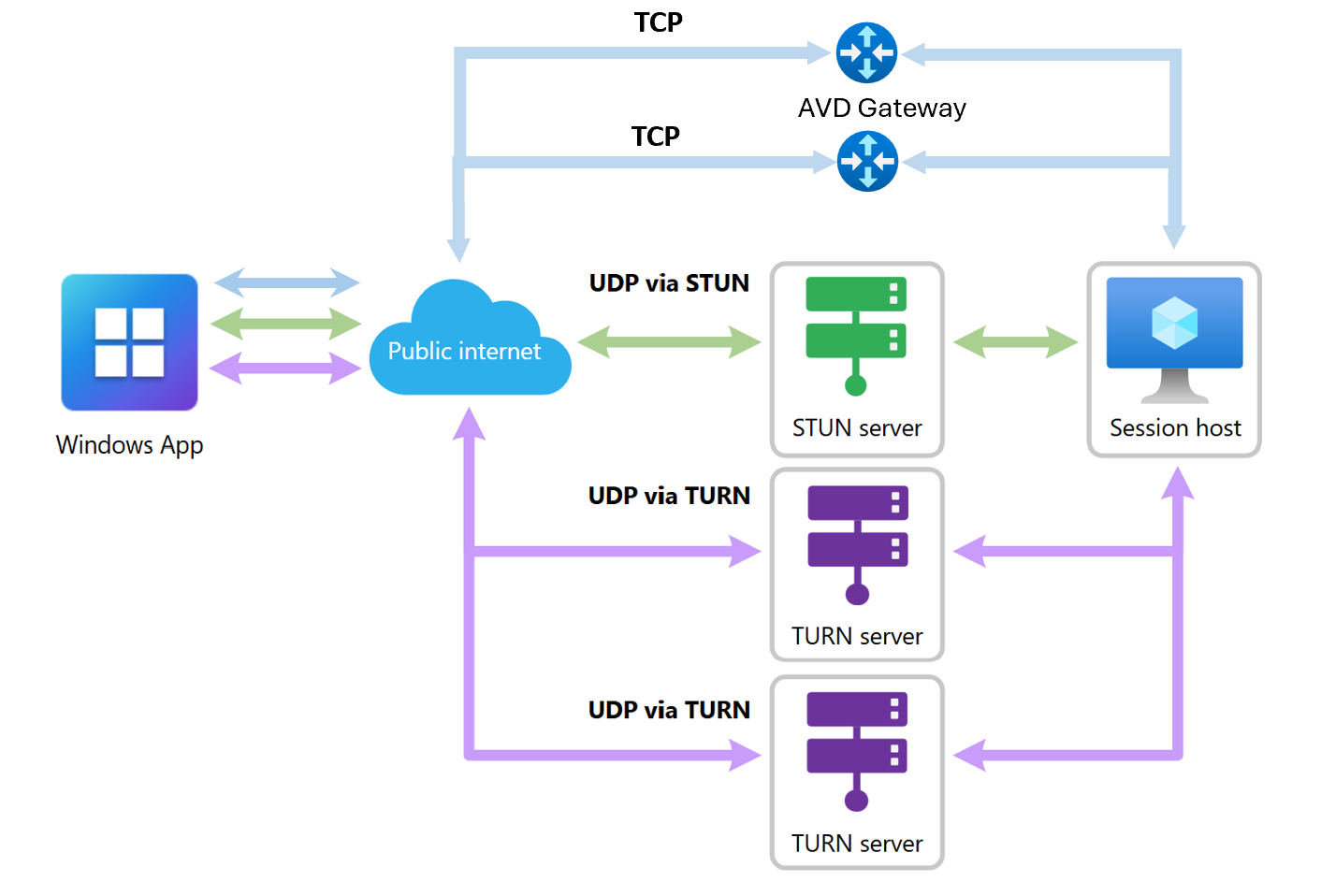
RDP Multipath uses multiple network paths to improve connection reliability. These paths can include combinations of UDP-based STUN or TURN connections when UDP connectivity is available, along with redundant TCP-based Reverse Connect paths established using Rendezvous.
If the main transport path becomes degraded or fails, the system automatically switches to a backup available UDP or TCP transport path. If all paths are lost—such as during a network outage—the system attempts to reconnect once network connectivity is restored.
Note
Redundant TCP transport paths are currently available in public preview. To experience redundant TCP Multipath resiliency, customers must opt in to the Validation ring and use a supported Windows app Client Version (Version 2.0.1069.0 or later).
The following diagram illustrates how RDP Multipath works with Azure Virtual Desktop. In this user scenario, the primary active transport path is UDP via STUN, supplemented by redundant UDP connections through a TURN server.
When UDP‑based RDP Shortpath connectivity is available, UDP remains the preferred transport protocol for optimal performance and reliability. In addition to maintaining redundant UDP paths, Azure Virtual Desktop can establish redundant TCP standby transport paths to improve overall session resiliency.
Prerequisites
RDP Multipath works automatically when the following prerequisites are met:
Ensure that RDP Shortpath is configured as the primary transport protocol. For more information, see Configure RDP Shortpath.
Connections must be from a local Windows device using Windows App, version 2.0.559.0 or later. Other platforms aren't currently supported.
With the introduction of redundant TCP transport paths (public preview), users connecting over TCP can now also benefit from Multipath resiliency.
To experience redundant TCP‑based transport paths:
Host pools must be opted in to the Validation ring during public preview.
Connections must be from a local Windows device using Windows App Version 2.0.1069.0 or later.
Required network endpoints for RDP transport
To support RDP connectivity using UDP‑based Shortpath and Multipath, as well as TCP‑based connections over Reverse Connect, ensure outbound connectivity to the following endpoints:
| # | RDP Method | FQDN | IP | Protocol/Port | Description |
|---|---|---|---|---|---|
| 1 | TCP-based RDP | *.wvd.microsoft.com | 40.64.144.0/20 | TCP 443 | TCP-based RDP connection. Initial connection made by every connection to a session host or Cloud PC. |
| 2 | UDP-based RDP via TURN | n/a | 51.5.0.0/16 | UDP 3478 | Relayed UDP-based RDP connection using TURN servers. Works when direct connectivity isn't possible. |
| 3 | UDP-based RDP using STUN | n/a | 51.5.0.0/16 | UDP 1024-65535 (Default: 49152-65535) | Direct 1:1 UDP connection between user device and session host or Cloud PC. |
Note
UDP-based connectivity remains the preferred transport protocol for optimal performance and reliability. In environments where UDP connectivity is restricted or unavailable due to firewall or proxy requirements, Azure Virtual Desktop connections rely on TCP-based transport over port 443. Support for redundant TCP transport paths is currently available in public preview and requires opt-in to the Validation ring along with a supported Windows App client version (2.0.1069.0 or later).
Verify RDP Multipath connectivity
There are two ways to verify that RDP Multipath is being used for a connection:
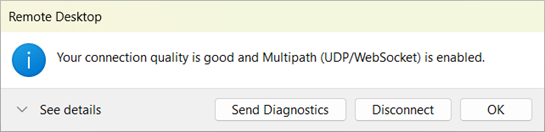
Users can check the connection status of a remote session from the connection bar, which shows RDP Multipath is enabled, as shown in the following example screenshot:
Azure Virtual Desktop administrators can view connection reliability information in Azure Virtual Desktop Insights. For more information, see the connection reliability use case for Azure Virtual Desktop Insights.
If you find some connections aren't using RDP Multipath, check that a firewall or other network restrictions doesn't block RDP Shortpath connections. A connection using STUN or TURN protocols is required.
Manage RDP Multipath Availability
RDP Multipath is being rolled out in phases. If you’d like to manually control the feature availability on your session hosts, you can use the following registry key to either opt in or opt out.
To enable RDP Multipath early (opt in):
To enable RDP Multipath ahead of the full rollout, set the following registry key value to 100:
reg add "HKLM\SYSTEM\CurrentControlSet\Control\Terminal Server\RdpCloudStackSettings" /v SmilesV3ActivationThreshold /t REG_DWORD /d 100 /f
To disable RDP Multipath early (opt out):
If you prefer to disable RDP Multipath until the rollout is complete, set the registry key value to 0:
reg add "HKLM\SYSTEM\CurrentControlSet\Control\Terminal Server\RdpCloudStackSettings" /v SmilesV3ActivationThreshold /t REG_DWORD /d 0 /f
Note
After updating the registry key, users must disconnect and reconnect to the session host for the change to take effect.
Related content
To learn more about RDP Shortpath, see RDP Shortpath for Azure Virtual Desktop.