Note
Access to this page requires authorization. You can try signing in or changing directories.
Access to this page requires authorization. You can try changing directories.
Important
This feature is in preview and the supplemental preview terms apply. A preview feature is a feature that is not complete, but is made available before it’s officially in a release so customers can get early access and provide feedback. Preview features aren’t meant for production use and may have limited or restricted functionality.
These capabilities incorporate the AI technology from Azure OpenAI. Learn more about Azure OpenAI.
This article uses questions and answers to explain important aspects about the AI technology behind Copilot and the text it generates.
What is Copilot?
Copilot provides AI-generated text suggestions for items in Business Central. It's intended for users who write marketing text for items to help them produce engaging and compelling content. Some key benefits include:
- Decreases the time used on copy writing, which can accelerate time-to-market for items being sold in online shops.
- Unlocks creativity to provide more engaging product descriptions.
- Improves consistency of marketing material for product lines.
Users should consider the AI-generated text as a suggestion that must be reviewed and edited for accuracy before it's publicly available.
Why isn't Copilot available for marketing text on my items in Business Central?
For Copilot to be available, the following requirements must be met:
The language you're using in Business Central must be English. Any of the available English locales will work, like English (United States), English (United Kingdom), or English (South Africa).
To change the language, in the upper-right corner, select the Settings icon
 > My Settings > Language. For more information, go to Change Basic Settings.
You must be using Business Central online version 22 or later (if you're an existing customer) or a trial.
To check the version, select the question mark in the upper-right corner, then select Help & Support. Under Troubleshooting, look for the application version. For information about how to get the correct preview version, go to Get started with a Business Central preview version.
The Create AI-powered product descriptions with Copilot feature must be enabled.
For more information, go to Enable or disable the "Create AI-powered product descriptions with Copilot" feature.
An admin has consented to the terms and conditions.
For more information, go to Consent to or reject the preview and privacy terms and conditions for all users.
Is Copilot available for preview in Business Central on-premises?
No, it's currently not supported in Business Central on-premises.
How does Copilot work, where does the suggested text come from?
Copilot uses Microsoft's Azure OpenAI Service to access powerful language models that analyze and generate natural language. These models have been trained on a wide body of text datasets. As a result, Copilot can generate suggested, personalised responses in English based on a minimal amount of input data, like an item's attributes, category, or description.
What's the quality of the text suggested by Copilot?
Because the underlying technology behind Copilot uses AI that has been trained on a wide range of sources, the generated content isn't always factual or suitable. Some suggestions may even include questionable or inappropriate content. It's your responsibility to review and edit generated suggestions to ensure it's accurate and appropriate.
For information about inappropriate suggestions, go to What's done about abusive and harmful text suggestions?.
How can I improve the suggestions I get from Copilot?
There are a few things you can do to get the most out of suggestions from Copilot:
- Add more attributes to an item to promote the specific features and characteristics you're interested in.
- Change the options for tone of voice and emphasis of quality to match your personal preferences.
- Improve the item's description.
- Make sure the item is assigned the most suitable category.
To learn more, go to Improve and tailor text suggestions.
What if I'm not satisfied with the generated text?
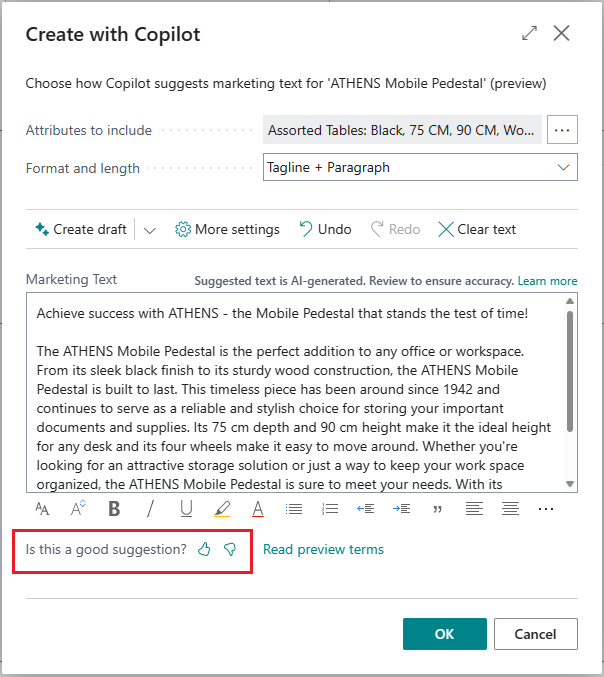
To help us improve the text, select Is this a good suggestion? on the Create with Copilot page, which you can answer with a thumbs-up (I like it) or thumbs-down (Needs improvement).
Can admins disable Copilot? If so, how?
Business Central offers admins two ways to disable Copilot in the preview:
Disagree to the Azure OpenAI privacy notice for all users.
or
Turn off the Create AI-powered product descriptions with Copilot feature on the Feature Management page.
To learn more, go to Configure AI-powered item marketing text (preview) with Copilot as an admin.
See also
Overview of AI-powered item marketing text with Copilot
Configure AI-powered item marketing text with Copilot as an admin
Create marketing text to items using Copilot