Note
Access to this page requires authorization. You can try signing in or changing directories.
Access to this page requires authorization. You can try changing directories.
Applies to:  External tenants (learn more)
Authentication approach: Embedded native authentication.
Sign-in discovers the methods allowed for a customer's identifier and completes the required credential checks. Email-with-password and email one-time passcode (OTP) first-factor sign-in use the same response-driven model. The application selects allowed operations from the response through user choice or application flow logic, then satisfies the remaining authentication requirements before resuming authorization.
For existing V1 integrations, use the V1 API reference.
The examples use a tenant-verified custom-domain authority. custom_domain is the authentication domain and tenant is the tenant GUID.
Start sign-in discovery
Important
The Native Authentication API V2 is in preview. The Native Authentication API V1 remains generally available. See the Supplemental Terms of Use for Microsoft Azure Previews for legal terms that apply to preview features.
The diagram shows one possible sign-in sequence. Policy requirements can add, repeat, or reorder actions; always follow the current response.
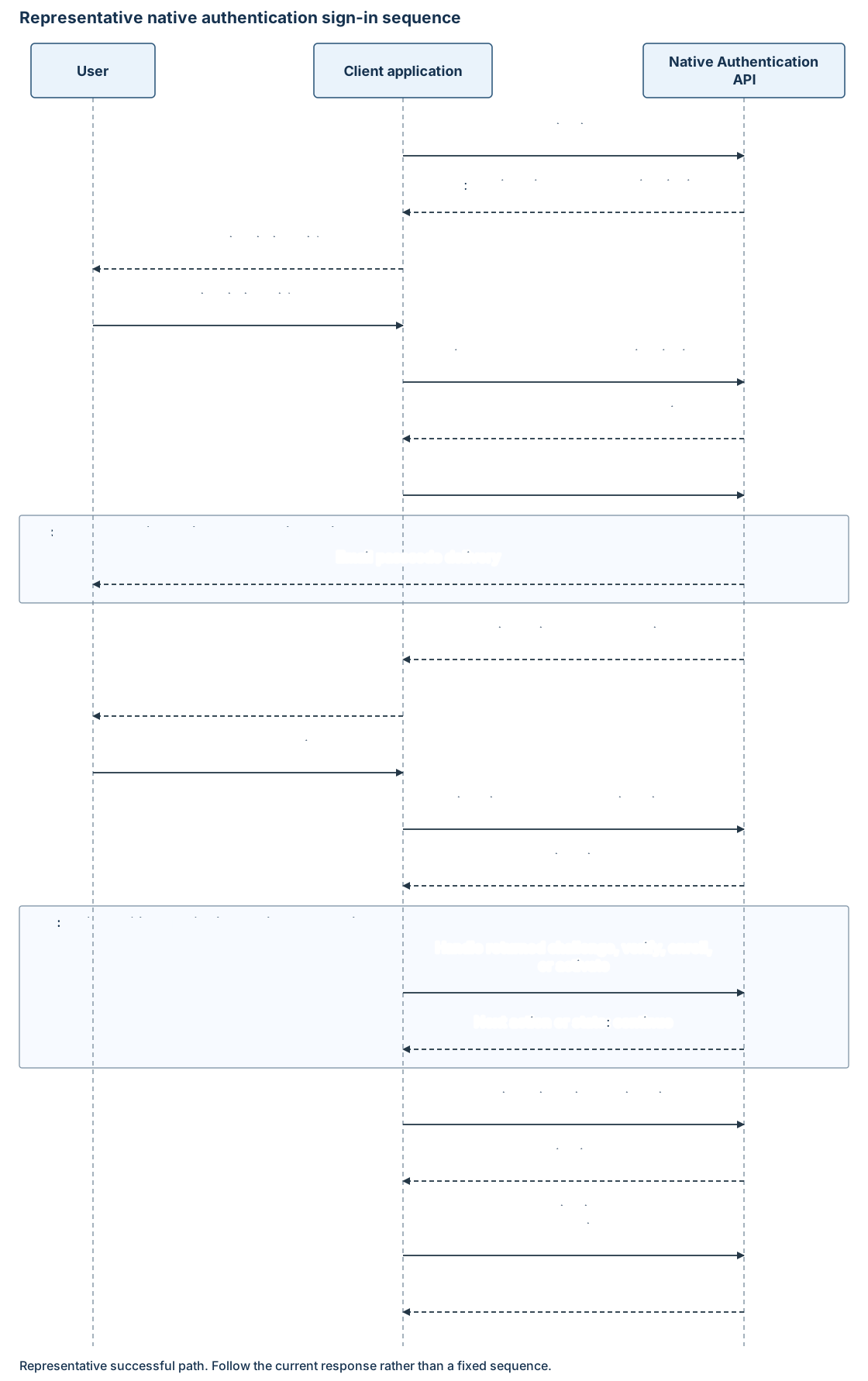
Start authorization, then follow the returned sign_in link. Send the OAuth response's continuation_token value as continuationToken:
POST https://{custom_domain}/{tenant}/api/v2.0/signin/start
Content-Type: application/json
Accept: application/hal+json
{
  "continuationToken": "******",
  "username": "user@contoso.com"
}
| Property | Type | Required | Description |
|---|---|---|---|
continuationToken |
String. | Yes. | Token from the current authorization challenge. |
username |
String. | Yes. | Sign-in identifier accepted by tenant policy. This example uses email. |
A password method-selection response can be:
{
  "continuationToken": "******",
  "state": "interactionRequired",
  "action": "challenge",
  "_embedded": {
    "methods": [
      {
        "id": "{password_method_id}",
        "type": "password",
        "_links": {
          "challenge": {
            "href": "/{tenant}/api/v2.0/auth/methods/password/{password_method_id}/challenge"
          },
          "verify": {
            "href": "/{tenant}/api/v2.0/auth/methods/password/{password_method_id}/verify"
          }
        }
      }
    ]
  }
}
Email-OTP sign-in returns an email method with its own id, masked hint, and allowed links. Your app can present returned choices or select an available method through application flow logic. Not every account offers both password and email OTP. Use generic discovery failures and protect account-existence information.
Challenge the selected method
Follow the method's challenge link with POST and the latest continuation token:
{
  "continuationToken": "******"
}
The shared challenge contract defines headers, response fields, and resend behavior.
| Returned method | Interaction |
|---|---|
password |
No code is sent. Collect the password when the response requests verify. |
email |
Collect the delivered passcode. Use the returned masked hint and codeLength. |
sms |
When advertised for a required factor, collect the SMS passcode using its own hint, length, and links. |
Use resend only when the service advertises it and the customer requests another code. Don't resend automatically after a delivery delay.
Verify the credential
Follow the current verify link using POST. Use JSON, Accept: application/hal+json, and one of these bodies.
Password:
{
  "continuationToken": "******",
  "password": "******"
}
Email or SMS one-time passcode:
{
  "continuationToken": "******",
  "otp": "{one_time_passcode}"
}
Use the credential field for the returned method type. Don't submit a password in otp or a passcode in password. Don't automatically replay verification after an ambiguous network failure.
Complete additional policy requirements
A successful verification can return another interactionRequired response with action: challenge and _embedded.methods. Select an advertised method and repeat challenge and verification with the new token and links.
Multifactor authentication (MFA) uses the same shared credential operations and supports email and SMS one-time passcodes as second factors. MFA through system policies is supported. Select a method from those returned for the required factor. The SMS example describes a second-factor interaction.
If the next response requires enroll or activate, use the inline registration contract. Email-with-password accounts can register an offered email or SMS factor. Email-OTP first-factor accounts can't reuse email as their second factor; use an offered alternative such as SMS.
If a required interaction isn't supported by your client, or the service returns state: redirect, stop native requests and offer a separately configured browser sign-in or a clear failure.
Resume authorization and acquire tokens
When policy requirements are satisfied, a response can return:
{
  "continuationToken": "******",
  "state": "continue",
  "_links": {
    "continue": {
      "href": "/{tenant}/oauth2/v2.0/authorize-challenge"
    }
  }
}
Post the token as form-encoded continuation_token to the returned link. Then exchange the authorization code for tokens. Neither a challenge response nor a successful verification response substitutes for that exchange.
Errors
Use the shared error envelope with these sign-in conditions:
| Condition | Status or error | Handling |
|---|---|---|
| Missing username or token | 400 |
Correct the request. |
| Incorrect email or SMS passcode | 400 invalidGrant, with innerError.code: invalidOneTimeCode |
Let the user correct the code using the usable current state or an advertised resend. |
| Missing passcode | 400 invalidRequest |
Correct the missing input. |
| Invalid transaction state | 400 with the native error envelope |
Restart instead of replaying an earlier token. |
| Throttling | 429 |
Stop automatic retries and honor server guidance. |
| Unsupported native interaction | state: redirect, or OAuth invalid_grant with web_redirect_required |
Stop native requests. A separate browser sign-in restarts authentication. |
For other credential, discovery, or delivery failures, handle the actual status and stable error codes without exposing account-existence details. This table isn't an exhaustive error catalog. Preserve only safe request IDs, correlation IDs, timestamps, and status information, not credentials or whole response bodies.