Note
Access to this page requires authorization. You can try signing in or changing directories.
Access to this page requires authorization. You can try changing directories.
Connecting an organizational asset library (OAL) to Copilot enables brand content access in the Create experience of the Microsoft 365 Copilot app, while also enabling Copilot Chat access in PowerPoint and Word.
To learn more, see Connect organizational asset libraries to Copilot for an on-brand experience.
What happens after setup
Once the OAL is provisioned and configured as searchable by an admin, the following capabilities become available to your organization:
Organization-wide access to brand content All users in your tenant can browse and use the brand assets stored in the designated OAL. These assets include logos, illustrations, and other approved visuals that support your brand identity.
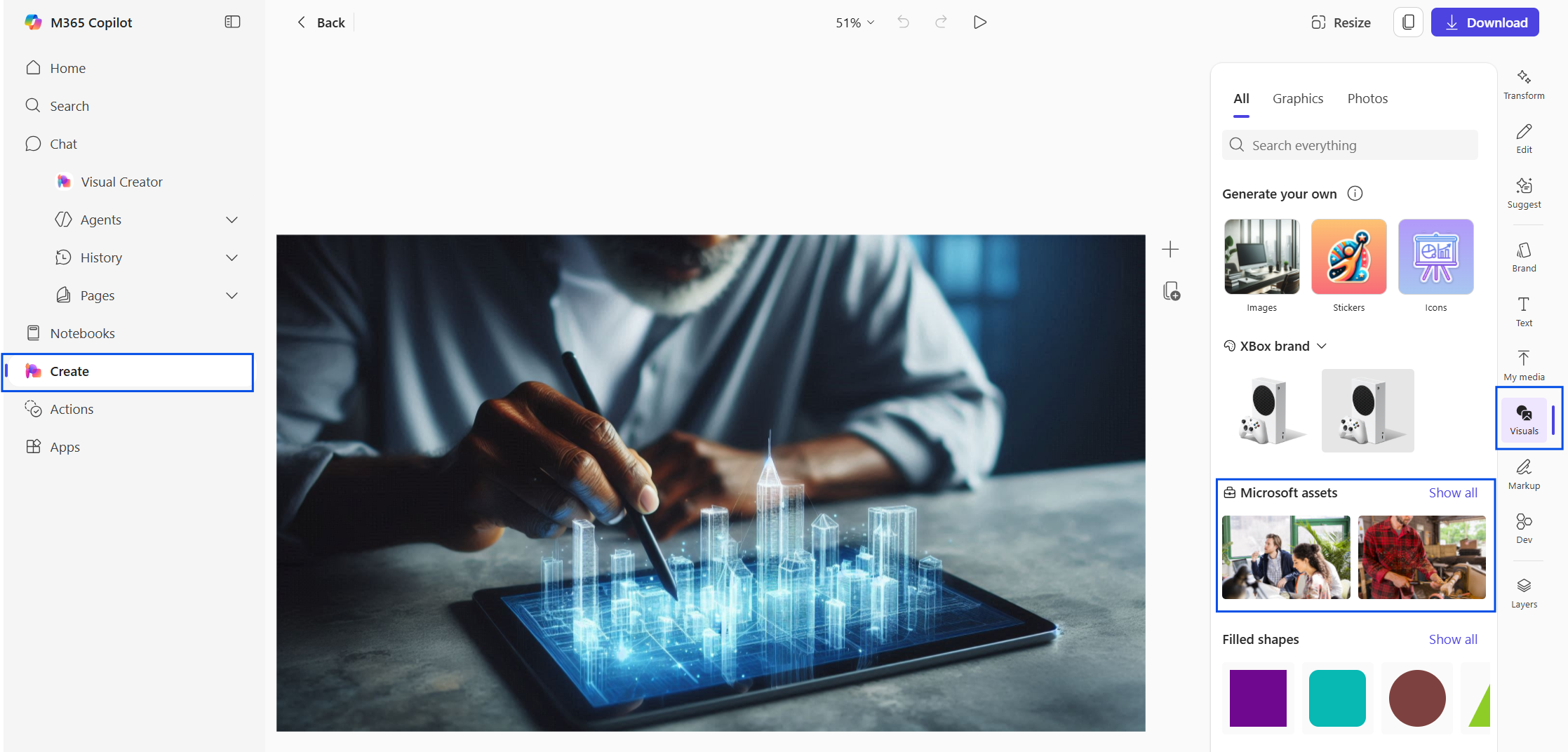
Seamless integration in the Create experience Within the Microsoft 365 Copilot app, users can access these assets directly from the Create tab. The integration makes it easy to incorporate brand visuals into new content without needing to search external sources or local folders.
Visuals pane support for editing images When editing an image in the Create experience, users can open the Visuals pane to explore available assets. The visuals appear under a label that reflects your tenant name, making it clear that the content is organization-approved.