Note
Access to this page requires authorization. You can try signing in or changing directories.
Access to this page requires authorization. You can try changing directories.
This article is not available for the selected development language.
This guide turns your Teams bot into an MCP server, enabling external AI agents to interact with users in Teams. Through this server, agents can find users by name, send messages into chats, ask questions, and trigger workflows such as notifications or approvals — turning Teams into a communication surface for agent-to-human interaction.
The bot and the MCP server run in the same process, exposing two HTTP surfaces: /api/messages for Teams and /mcp for agents.
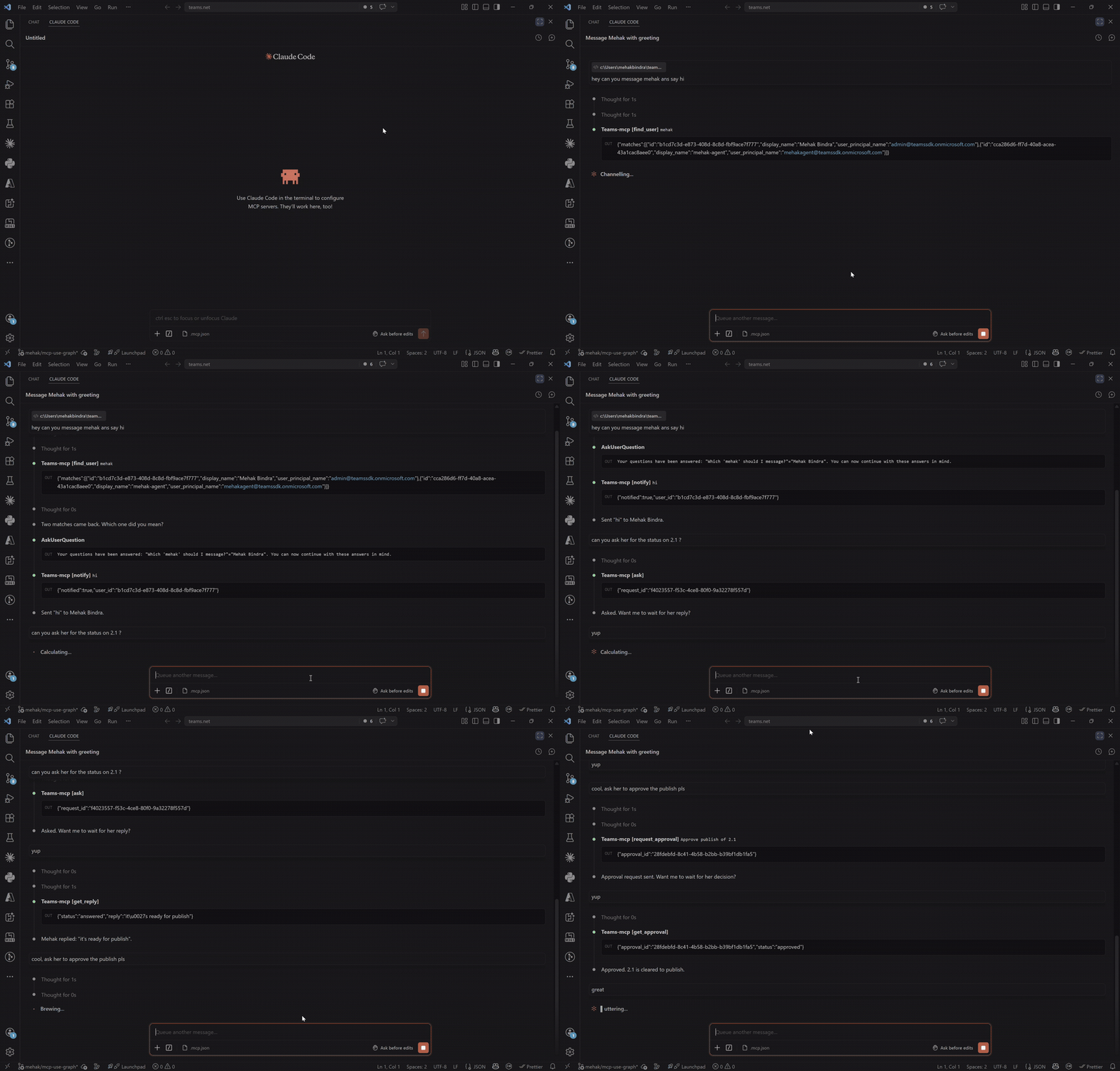
The setup uses the official MCP Python SDK (FastMCP) mounted onto the same FastAPI
server that hosts the Teams bot. One process, two HTTP surfaces: /api/messages for Teams, /mcp for agents.
Full source: examples/mcp-server.
Defining a tool
An MCP tool is a function exposed by the server and discoverable by clients. The function signature defines the input schema, the return type defines the output, and the description tells the agent when to use it.
Tools are defined with the @mcp.tool() decorator. The function signature defines the input schema, the return type the output, and the docstring the tool description for agent consumption.
from mcp.server.fastmcp import FastMCP

mcp = FastMCP("teams-bot")

@mcp.tool()
async def echo(message: str) -> str:
    """Echo back whatever was sent."""
    return f"You said: {message}"
Finding users by name
The agent talks in terms of names ("message Mehak about the deploy"), but every other tool needs an AAD object id. find_user bridges that gap by searching the tenant directory through Microsoft Graph, using the bot's own app identity.
from msgraph.generated.users.users_request_builder import UsersRequestBuilder

@mcp.tool()
async def find_user(query: str) -> FindUserResult:
    """Find users in this tenant by partial name, email, or UPN.

    Returns up to 5 matches with their AAD object ids — pass an id to
    notify, ask, or request_approval.
    """
    graph = app.get_app_graph()
    params = UsersRequestBuilder.UsersRequestBuilderGetQueryParameters(
        search=f'"displayName:{query}" OR "userPrincipalName:{query}"',
        select=["id", "displayName", "userPrincipalName"],
        top=5,
    )
    config = UsersRequestBuilder.UsersRequestBuilderGetRequestConfiguration(query_parameters=params)
    config.headers.add("ConsistencyLevel", "eventual")
    result = await graph.users.get(request_configuration=config)
    matches = [
        UserMatch(id=u.id, display_name=u.display_name, user_principal_name=u.user_principal_name)
        for u in (result.value or [])
        if u.id
    ]
    return FindUserResult(matches=matches)
This requires the bot's app registration to have the User.ReadBasic.All (Microsoft Graph, Application) permission with admin consent granted.
Sending proactive messages from a tool
A one-way notification needs no response. The tool resolves the user's 1:1 conversation — opening one proactively if the user hasn't messaged the bot — and sends the message.
@mcp.tool()
async def notify(user_id: str, message: str) -> dict:
    """Send a one-way notification to a Teams user."""
    conversation_id = await _get_or_create_conversation(user_id)
    await app.send(conversation_id=conversation_id, activity=message)
    return {"notified": True, "user_id": user_id}
_get_or_create_conversation returns the cached 1:1 conversation id for the user, or opens one proactively via app.api.conversations.create(...) if the user hasn't messaged the bot yet.
See Proactive Messaging for the full story on app.send and how Teams handles bot-initiated conversations.
Asking the user a question
Unlike notifications, questions need a response. The flow is split into two tools: ask sends an Adaptive Card with a reply box and returns a requestId; wait_for_reply blocks until the user submits (or a timeout fires). Recording the pending ask before sending the card means a fast reply is never lost.
@mcp.tool()
async def ask(user_id: str, question: str) -> AskResult:
    """Ask a Teams user a question. Returns a request_id — call wait_for_reply with it to get the answer."""
    conversation_id = await _get_or_create_conversation(user_id)
    request_id = str(uuid.uuid4())
    # Record the pending ask BEFORE sending so a fast reply is never lost.
    pending_asks[request_id] = PendingAsk(user_id=user_id)
    card = AdaptiveCard(body=[
        TextBlock(text=question, weight="Bolder", size="Medium", wrap=True),
        TextInput(id="reply", placeholder="Type your reply...", is_multiline=True, is_required=True),
    ], actions=[
        ExecuteAction(title="Send")
        .with_data(SubmitData("ask_reply", {"request_id": request_id}))
        .with_associated_inputs("auto"),
    ])
    await app.send(conversation_id=conversation_id, activity=card)
    return AskResult(request_id=request_id)


@mcp.tool()
async def wait_for_reply(request_id: str, timeout_seconds: int = 30) -> ReplyResult:
    """Wait for the user's reply to an earlier ask. Blocks up to timeout_seconds (default 30)."""
    entry = pending_asks.get(request_id)
    if not entry:
        raise ValueError(f"No ask found with request_id {request_id}.")
    if entry.status == "answered":
        return ReplyResult(status=entry.status, reply=entry.reply)
    try:
        await asyncio.wait_for(entry.event.wait(), timeout=float(timeout_seconds))
    except asyncio.TimeoutError:
        pass
    return ReplyResult(status=entry.status, reply=entry.reply)
PendingAsk carries its own asyncio.Event; wait_for_reply parks on it and returns the moment the user submits, or status="pending" if the timeout fires first.
The user's typed reply arrives through a card-action handler, which records the answer and wakes up any wait_for_reply caller parked on it.
@app.on_card_action_execute("ask_reply")
async def handle_ask_reply(ctx: ActivityContext[AdaptiveCardInvokeActivity]) -> AdaptiveCardInvokeResponse:
    data = ctx.activity.value.action.data
    request_id = data.get("request_id")
    reply = data.get("reply") or ""
    if request_id in pending_asks and pending_asks[request_id].status == "pending":
        pending_asks[request_id].reply = reply
        pending_asks[request_id].status = "answered"
        pending_asks[request_id].event.set()  # wake wait_for_reply
        return AdaptiveCardActionCardResponse(
            value=AdaptiveCard(body=[TextBlock(text="Reply recorded", weight="Bolder", color="Good")])
        )
    return AdaptiveCardActionMessageResponse(
        status_code=200, type="application/vnd.microsoft.activity.message",
        value="Unable to record reply. The ask may be invalid or expired.",
    )
Requesting an approval via Adaptive Card
For decisions that need a clear outcome — approving a deployment, confirming an action — an Adaptive Card with explicit Approve / Reject buttons is clearer than free text. The shape mirrors the ask flow: request_approval returns an approvalId, and wait_for_approval blocks for the decision.
from microsoft_teams.cards import AdaptiveCard, ExecuteAction, SubmitData, TextBlock

approvals: dict[str, str] = {}  # approval_id -> "pending" | "approved" | "rejected"

@mcp.tool()
async def request_approval(user_id: str, title: str, description: str) -> ApprovalRequestResult:
    """Send an approval request to a Teams user. Returns an approval_id."""
    conversation_id = await _get_or_create_conversation(user_id)
    approval_id = str(uuid.uuid4())
    card = AdaptiveCard(body=[
        TextBlock(text=title, weight="Bolder", size="Large", wrap=True),
        TextBlock(text=description, wrap=True),
    ], actions=[
        ExecuteAction(title="Approve").with_data(
            SubmitData("approval_response", {"approval_id": approval_id, "decision": "approved"})),
        ExecuteAction(title="Reject").with_data(
            SubmitData("approval_response", {"approval_id": approval_id, "decision": "rejected"})),
    ])
    pending_approvals[approval_id] = PendingApproval(user_id=user_id)
    await app.send(conversation_id=conversation_id, activity=card)
    return ApprovalRequestResult(approval_id=approval_id)


@mcp.tool()
async def wait_for_approval(approval_id: str, timeout_seconds: int = 30) -> ApprovalResult:
    """Wait for an approval decision. Returns 'approved', 'rejected', or 'pending' on timeout."""
    entry = pending_approvals.get(approval_id)
    if entry is None:
        raise ValueError(f"No approval found with approval_id {approval_id}.")
    if entry.status != "pending":
        return ApprovalResult(approval_id=approval_id, status=entry.status)
    try:
        await asyncio.wait_for(entry.event.wait(), timeout=float(timeout_seconds))
    except asyncio.TimeoutError:
        pass
    return ApprovalResult(approval_id=approval_id, status=entry.status)
wait_for_approval mirrors wait_for_reply — it parks on the approval's event and returns the decision the moment the user clicks, or "pending" on timeout.
The user's choice arrives through the same card-action mechanism as the ask flow — the approval_response handler records the decision and wakes up any wait_for_approval caller.
@app.on_card_action_execute("approval_response")
async def handle_approval_response(ctx: ActivityContext[AdaptiveCardInvokeActivity]) -> AdaptiveCardInvokeResponse:
    data = ctx.activity.value.action.data
    approval_id = data.get("approval_id")
    decision = data.get("decision")
    if (
        approval_id in pending_approvals
        and decision in ("approved", "rejected")
        and pending_approvals[approval_id].status == "pending"
    ):
        pending_approvals[approval_id].status = decision
        pending_approvals[approval_id].event.set()  # wake wait_for_approval
        color = "Good" if decision == "approved" else "Attention"
        label = "Approved" if decision == "approved" else "Rejected"
        return AdaptiveCardActionCardResponse(
            value=AdaptiveCard(body=[TextBlock(text=label, weight="Bolder", color=color)])
        )
    return AdaptiveCardActionMessageResponse(
        status_code=200, type="application/vnd.microsoft.activity.message",
        value="Unable to record response. The approval request may be invalid or expired.",
    )
Wiring the MCP server into your Teams app
The Teams bot handles /api/messages, while the MCP server is mounted on the same HTTP server at /mcp.
Register the Teams routes first, then mount the MCP app onto the same FastAPI server.
import asyncio
from microsoft_teams.apps.http.fastapi_adapter import FastAPIAdapter

async def main() -> None:
    await app.initialize()

    adapter = app.server.adapter
    assert isinstance(adapter, FastAPIAdapter)

    mcp_http_app = mcp.streamable_http_app()
    adapter.lifespans.append(mcp_http_app.router.lifespan_context)
    adapter.app.mount("/mcp", mcp_http_app)

    await app.start()

if __name__ == "__main__":
    asyncio.run(main())
Testing with MCP Inspector
The easiest way to drive the server before wiring up a real agent is the MCP Inspector:
npx @modelcontextprotocol/inspector
Set the transport to Streamable HTTP and the URL to http://localhost:3978/mcp, then connect and call find_user → ask → wait_for_reply to drive a full round-trip with a real Teams user.
Note
Our AI libraries are deprecated: The Teams SDK has deprecated its own AI libraries — the @microsoft/teams.ai packages (ChatPrompt, Model, and the older @microsoft/teams.mcp / @microsoft/teams.a2a plugins) — in favor of dedicated AI frameworks. Use the pattern shown in these guides instead: bring the OpenAI SDK (or any framework you like), and wire MCP and A2A directly into your Teams app.
This guide turns your Teams bot into an MCP server, enabling external AI agents to interact with users in Teams. Through this server, agents can find users by name, send messages into chats, ask questions, and trigger workflows such as notifications or approvals — turning Teams into a communication surface for agent-to-human interaction.
The bot and the MCP server run in the same process, exposing two HTTP surfaces: /api/messages for Teams and /mcp for agents.
The setup uses the official MCP TypeScript SDK (McpServer) over a streamable-HTTP transport, mounted onto the same Express app that hosts the Teams bot.
Full source: examples/mcp-server.
Defining a tool
An MCP tool is a function exposed by the server and discoverable by clients. The function signature defines the input schema, the return type defines the output, and the description tells the agent when to use it.
Tools are defined with the @mcp.tool() decorator. The function signature defines the input schema, the return type the output, and the docstring the tool description for agent consumption.
import { McpServer } from '@modelcontextprotocol/sdk/server/mcp.js';
import { z } from 'zod';

const mcpServer = new McpServer({ name: 'teams-bot', version: '0.0.0' });

mcpServer.registerTool(
  'echo',
  {
    description: 'Echo back whatever was sent.',
    inputSchema: { message: z.string() },
    outputSchema: z.object({ echoed: z.string() }),
  },
  async ({ message }) => ({
    structuredContent: { echoed: message },
    content: [{ type: 'text', text: message }],
  })
);
Finding users by name
The agent talks in terms of names ("message Mehak about the deploy"), but every other tool needs an AAD object id. find_user bridges that gap by searching the tenant directory through Microsoft Graph, using the bot's own app identity.
import * as endpoints from '@microsoft/teams.graph-endpoints';

structuredTool(
  'find_user',
  {
    description:
      'Find users in this tenant by partial name, email, or UPN. Returns up to 5 matches ' +
      'with their AAD object ids — pass an id to notify, ask, or request_approval.',
    inputSchema: { query: z.string().describe('Name, email, or UPN fragment to search for.') },
    outputSchema: z.object({
      matches: z.array(
        z.object({ id: z.string(), displayName: z.string().nullable(), userPrincipalName: z.string().nullable() })
      ),
    }),
  },
  async ({ query }) => {
    const result = await app.graph.call(endpoints.users.list, {
      ConsistencyLevel: 'eventual',
      $search: `"displayName:${query}" OR "userPrincipalName:${query}"`,
      $select: ['id', 'displayName', 'userPrincipalName'],
      $top: 5,
    });
    const matches = (result.value ?? []).map((u) => ({
      id: u.id!,
      displayName: u.displayName ?? null,
      userPrincipalName: u.userPrincipalName ?? null,
    }));
    return { matches };
  }
);
app.graph calls Microsoft Graph as the bot's app identity — no extra credentials beyond CLIENT_ID / CLIENT_SECRET / TENANT_ID.
This requires the bot's app registration to have the User.ReadBasic.All (Microsoft Graph, Application) permission with admin consent granted.
Sending proactive messages from a tool
A one-way notification needs no response. The tool resolves the user's 1:1 conversation — opening one proactively if the user hasn't messaged the bot — and sends the message.
structuredTool(
  'notify',
  {
    description: 'Send a notification to a Teams user. No response expected.',
    inputSchema: {
      userId: z.string().describe('The AAD object id of the Teams user to notify.'),
      message: z.string().describe('The message text to send.'),
    },
    outputSchema: z.object({ notified: z.boolean(), userId: z.string() }),
  },
  async ({ userId, message }) => {
    const conversationId = await getOrCreateConversation(userId);
    await app.send(conversationId, message);
    return { notified: true, userId };
  }
);
_get_or_create_conversation returns the cached 1:1 conversation id for the user, or opens one proactively via app.api.conversations.create(...) if the user hasn't messaged the bot yet.
See Proactive Messaging for the full story on app.send and how Teams handles bot-initiated conversations.
Asking the user a question
Unlike notifications, questions need a response. The flow is split into two tools: ask sends an Adaptive Card with a reply box and returns a requestId; wait_for_reply blocks until the user submits (or a timeout fires). Recording the pending ask before sending the card means a fast reply is never lost.
structuredTool(
  'ask',
  {
    description:
      'Ask a Teams user a question via an Adaptive Card with a reply box. Returns a requestId — ' +
      'call wait_for_reply with it to get the answer.',
    inputSchema: {
      userId: z.string().describe('The AAD object id of the Teams user to ask.'),
      question: z.string().describe('The question to ask.'),
    },
    outputSchema: z.object({ requestId: z.string() }),
  },
  async ({ userId, question }) => {
    const conversationId = await getOrCreateConversation(userId);
    const requestId = randomUUID();
    const card = new AdaptiveCard(
      new TextBlock(question, { weight: 'Bolder', size: 'Medium', wrap: true }),
      new TextInput().withId('reply').withPlaceholder('Type your reply...').withIsMultiline(true).withIsRequired(true)
    ).withActions(
      new ExecuteAction({ title: 'Send' })
        .withData(new SubmitData('ask_reply', { request_id: requestId }))
        .withAssociatedInputs('auto')
    );
    // Record the pending ask BEFORE sending so a fast reply is never lost.
    state.pendingAsks.set(requestId, { userId, status: 'pending', event: makeEvent() });
    await app.send(conversationId, card);
    return { requestId };
  }
);

structuredTool(
  'wait_for_reply',
  {
    description: "Wait for the user's reply to an earlier ask. Blocks up to timeoutSeconds (default 30).",
    inputSchema: {
      requestId: z.string(),
      timeoutSeconds: z.number().optional().default(30),
    },
    outputSchema: z.object({ status: z.enum(['pending', 'answered']), reply: z.string().nullable() }),
  },
  async ({ requestId, timeoutSeconds }) => {
    const entry = state.pendingAsks.get(requestId);
    if (!entry) throw new Error(`No ask found with requestId ${requestId}.`);
    if (entry.status !== 'pending') return { status: entry.status, reply: entry.reply ?? null };

    let timeoutHandle: ReturnType<typeof setTimeout> | undefined;
    await Promise.race([
      entry.event.promise,
      new Promise<void>((resolve) => { timeoutHandle = setTimeout(resolve, (timeoutSeconds ?? 30) * 1000); }),
    ]);
    clearTimeout(timeoutHandle);
    return { status: entry.status, reply: entry.reply ?? null };
  }
);
makeEvent() is a minimal promise resolved exactly once. wait_for_reply races it against a timeout and returns the moment the user submits, or status: 'pending' if the timeout fires first.
The user's typed reply arrives through a card-action handler, which records the answer and wakes up any wait_for_reply caller parked on it.
app.on('card.action.ask_reply', async ({ activity }) => {
  const { request_id: requestId, reply } = activity.value.action.data as { request_id?: string; reply?: string };
  const entry = requestId ? state.pendingAsks.get(requestId) : undefined;
  if (entry?.status === 'pending') {
    entry.status = 'answered';
    entry.reply = reply ?? '';
    entry.event.set(); // wake wait_for_reply
    return {
      statusCode: 200,
      type: 'application/vnd.microsoft.card.adaptive',
      value: new AdaptiveCard(new TextBlock('Reply recorded', { weight: 'Bolder', color: 'Good' })),
    } satisfies AdaptiveCardActionCardResponse;
  }
  return {
    statusCode: 200,
    type: 'application/vnd.microsoft.activity.message',
    value: 'Unable to record reply. The ask may be invalid or expired.',
  } satisfies AdaptiveCardActionMessageResponse;
});
Requesting an approval via Adaptive Card
For decisions that need a clear outcome — approving a deployment, confirming an action — an Adaptive Card with explicit Approve / Reject buttons is clearer than free text. The shape mirrors the ask flow: request_approval returns an approvalId, and wait_for_approval blocks for the decision.
structuredTool(
  'request_approval',
  {
    description: 'Send an approval request to a Teams user. Returns an approvalId.',
    inputSchema: {
      userId: z.string(),
      title: z.string(),
      description: z.string(),
    },
    outputSchema: z.object({ approvalId: z.string() }),
  },
  async ({ userId, title, description }) => {
    const conversationId = await getOrCreateConversation(userId);
    const approvalId = randomUUID();
    const card = new AdaptiveCard(
      new TextBlock(title, { weight: 'Bolder', size: 'Large', wrap: true }),
      new TextBlock(description, { wrap: true })
    ).withActions(
      new ExecuteAction({ title: 'Approve' }).withData(
        new SubmitData('approval_response', { approval_id: approvalId, decision: 'approved' })),
      new ExecuteAction({ title: 'Reject' }).withData(
        new SubmitData('approval_response', { approval_id: approvalId, decision: 'rejected' }))
    );
    state.pendingApprovals.set(approvalId, { userId, status: 'pending', event: makeEvent() });
    await app.send(conversationId, card);
    return { approvalId };
  }
);

structuredTool(
  'wait_for_approval',
  {
    description:
      "Wait for an approval decision. Blocks up to timeoutSeconds (default 30). " +
      "Returns 'approved' or 'rejected' when the user clicks, or 'pending' if the timeout fires.",
    inputSchema: {
      approvalId: z.string(),
      timeoutSeconds: z.number().optional().default(30),
    },
    outputSchema: z.object({
      approvalId: z.string(),
      status: z.enum(['pending', 'approved', 'rejected']),
    }),
  },
  async ({ approvalId, timeoutSeconds }) => {
    const approval = state.pendingApprovals.get(approvalId);
    if (!approval) throw new Error(`No approval found with approvalId ${approvalId}.`);
    if (approval.status !== 'pending') return { approvalId, status: approval.status };

    let timeoutHandle: ReturnType<typeof setTimeout> | undefined;
    await Promise.race([
      approval.event.promise,
      new Promise<void>((resolve) => { timeoutHandle = setTimeout(resolve, (timeoutSeconds ?? 30) * 1000); }),
    ]);
    clearTimeout(timeoutHandle);
    return { approvalId, status: approval.status };
  }
);
wait_for_approval mirrors wait_for_reply — it parks on the approval's event and returns the decision the moment the user clicks, or "pending" on timeout.
The user's choice arrives through the same card-action mechanism as the ask flow — the approval_response handler records the decision and wakes up any wait_for_approval caller.
app.on('card.action.approval_response', async ({ activity }) => {
  const { approval_id: approvalId, decision } = activity.value.action.data as {
    approval_id?: string;
    decision?: string;
  };
  const approval = approvalId ? state.pendingApprovals.get(approvalId) : undefined;
  if (approval?.status === 'pending' && (decision === 'approved' || decision === 'rejected')) {
    approval.status = decision;
    approval.event.set(); // wake wait_for_approval
    const label = decision === 'approved' ? 'Approved ✅' : 'Rejected ❌';
    const color = decision === 'approved' ? 'Good' : 'Attention';
    return {
      statusCode: 200,
      type: 'application/vnd.microsoft.card.adaptive',
      value: new AdaptiveCard(new TextBlock(label, { weight: 'Bolder', color })),
    } satisfies AdaptiveCardActionCardResponse;
  }
  return {
    statusCode: 200,
    type: 'application/vnd.microsoft.activity.message',
    value: 'Unable to record response. The approval request may be invalid or expired.',
  } satisfies AdaptiveCardActionMessageResponse;
});
Wiring the MCP server into your Teams app
The Teams bot handles /api/messages, while the MCP server is mounted on the same HTTP server at /mcp.
Initialize the Teams app first (its plugins register /api/messages on the Express app), then mount the MCP transport at /mcp. The MCP SDK binds one server per client session, so spin up a transport + McpServer per Mcp-Session-Id.
import { StreamableHTTPServerTransport } from '@modelcontextprotocol/sdk/server/streamableHttp.js';
import { isInitializeRequest } from '@modelcontextprotocol/sdk/types.js';

await app.initialize();

const transports = new Map<string, StreamableHTTPServerTransport>();

expressApp.post('/mcp', express.json(), async (req, res) => {
  const sessionId = req.headers['mcp-session-id'] as string | undefined;
  let transport = sessionId ? transports.get(sessionId) : undefined;

  if (!transport && isInitializeRequest(req.body)) {
    // New client: one transport + server per session.
    transport = new StreamableHTTPServerTransport({
      sessionIdGenerator: () => randomUUID(),
      onsessioninitialized: (id) => transports.set(id, transport!),
    });
    await createMcpServer().connect(transport);
  }
  await transport!.handleRequest(req, res, req.body);
});

const server = http.createServer(expressApp);
server.listen(Number(process.env.PORT) || 3978);
Testing with MCP Inspector
The easiest way to drive the server before wiring up a real agent is the MCP Inspector:
npx @modelcontextprotocol/inspector
Set the transport to Streamable HTTP and the URL to http://localhost:3978/mcp, then connect and call find_user → ask → wait_for_reply to drive a full round-trip with a real Teams user.