Note
Access to this page requires authorization. You can try signing in or changing directories.
Access to this page requires authorization. You can try changing directories.
In a time-series workload, applications (such as some distributing_by_entity_id) query recent information while archiving old information.
To handle this workload, a single-node PostgreSQL database typically uses table partitioning to break a large table of time-ordered data into multiple inherited tables, with each table containing different time ranges.
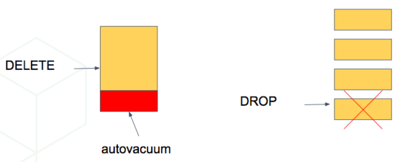
Storing data in multiple physical tables speeds up data expiration. In a single large table, deleting rows incurs the cost of scanning to find which rows to delete, and then vacuuming the emptied space. On the other hand, dropping a partition is a fast operation that's independent of data size. It's the equivalent of simply removing files on disk that contain the data.
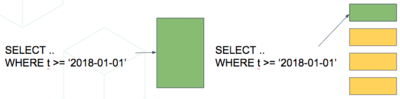
Partitioning a table also makes indices smaller and faster within each date range. Queries that operate on recent data likely operate on "hot" indices that fit in memory. This partitioning speeds up reads.
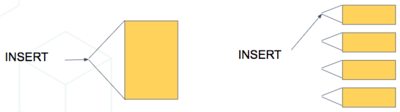
Also, inserts have smaller indices to update, so they go faster too.
Time-based partitioning makes the most sense when:
- Most queries access a small subset of the most recent data
- Older data is periodically expired (deleted or dropped)
Keep in mind that, in the wrong situation, reading all these partitions can hurt overhead more than it helps. However, in the right situations, it's helpful. For example, when keeping a year of time series data and regularly querying only the most recent week.
Scale time series data on Citus
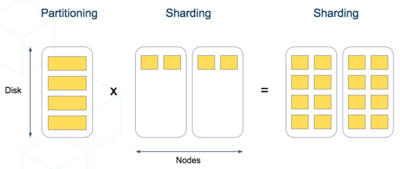
You can mix the single-node table partitioning techniques with Citus' distributed sharding to make a scalable time-series database. It's the best of both worlds. It's especially elegant atop PostgreSQL's declarative table partitioning.
Each record in this GitHub data set represents an event created in GitHub. Records include key information regarding the event such as event type, creation date, and the user who created the event.
The first step is to create and partition the table by time as you would in a single-node PostgreSQL database:
-- declaratively partitioned table
CREATE TABLE github_events (
  event_id bigint,
  event_type text,
  event_public boolean,
  repo_id bigint,
  payload jsonb,
  repo jsonb,
  actor jsonb,
  org jsonb,
  created_at timestamp
) PARTITION BY RANGE (created_at);
Notice the PARTITION BY RANGE (created_at). This clause tells PostgreSQL that the created_at column in ordered ranges partitions the table. You didn't yet create any partitions for specific ranges.
Before creating specific partitions, let's distribute the table in Citus. We shard by repo_id, meaning the events cluster into shards per repository.
SELECT create_distributed_table('github_events', 'repo_id');
At this point, Citus creates shards for this table across worker nodes. Internally, each shard is a table with the name github_events_N for each shard identifier N. Also, Citus propagates the partitioning information, and each of these shards declares Partition key: RANGE (created_at).
A partitioned table can't directly contain data. It's more like a view across its partitions. Thus, the shards aren't yet ready to hold data. You need to create partitions and specify their time ranges, after which you can insert data that match the ranges.
Automate partition creation
Citus provides helper functions for partition management. You can create a batch of monthly partitions by using create_time_partitions():
SELECT create_time_partitions(
  table_name         := 'github_events',
  partition_interval := '1 month',
  end_at             := now() + '12 months'
);
Citus also includes a view, time_partitions, for an easy way to investigate the partitions it creates.
SELECT partition
  FROM time_partitions
 WHERE parent_table = 'github_events'::regclass;

┌────────────────────────┐
│       partition        │
├────────────────────────┤
│ github_events_p2021_10 │
│ github_events_p2021_11 │
│ github_events_p2021_12 │
│ github_events_p2022_01 │
│ github_events_p2022_02 │
│ github_events_p2022_03 │
│ github_events_p2022_04 │
│ github_events_p2022_05 │
│ github_events_p2022_06 │
│ github_events_p2022_07 │
│ github_events_p2022_08 │
│ github_events_p2022_09 │
│ github_events_p2022_10 │
└────────────────────────┘
As time progresses, you need to do some maintenance to create new partitions and drop old ones. Set up a periodic job to run the maintenance functions with an extension like pg_cron:
-- set two monthly cron jobs:

-- 1. ensure we have partitions for the next 12 months

SELECT cron.schedule('create-partitions', '0 0 1 * *', $$
  SELECT create_time_partitions(
      table_name         := 'github_events',
      partition_interval := '1 month',
      end_at             := now() + '12 months'
  )
$$);

-- 2. (optional) ensure we never have more than one year of data

SELECT cron.schedule('drop-partitions', '0 0 1 * *', $$
  CALL drop_old_time_partitions(
      'github_events',
      now() - interval '12 months' /* older_than */
  );
$$);
Once you set up periodic maintenance, you no longer have to think about the partitions, they just work.
Note
Native partitioning in PostgreSQL is still new and has a few quirks. Maintenance operations on partitioned tables acquire aggressive locks that can briefly stall queries. There's currently work going on within the PostgreSQL community to resolve these issues, so expect time partitioning in PostgreSQL to only get better.
Archive with columnar storage
Some applications have data that logically divides into a small updatable part and a larger part that's "frozen." Examples include logs, clickstreams, or sales records. In this case, you can combine partitioning with columnar table storage <columnar> (introduced in Citus 10) to compress historical partitions on disk. Citus columnar tables are currently append-only, meaning they don't support updates or deletes, but you can use them for the immutable historical partitions.
A partitioned table can include any combination of row and columnar partitions. When you use range partitioning on a timestamp key, you can make the newest partition a row table, and periodically roll the newest partition into another historical columnar partition.
Let's see an example, using GitHub events again. You create a new table called github_columnar_events to differentiate it from the earlier example. To focus entirely on the columnar storage aspect, you don't distribute this table.
Next, download sample data:
wget http://examples.citusdata.com/github_archive/github_events-2015-01-01-{0..5}.csv.gz
gzip -c -d github_events-2015-01-01-*.gz >> github_events.csv
-- our new table, same structure as the example in
-- the previous section

CREATE TABLE github_columnar_events ( LIKE github_events )
PARTITION BY RANGE (created_at);

-- create partitions to hold two hours of data each

SELECT create_time_partitions(
  table_name         := 'github_columnar_events',
  partition_interval := '2 hours',
  start_from         := '2015-01-01 00:00:00',
  end_at             := '2015-01-01 08:00:00'
);

-- fill with sample data
-- (note that this data requires the database to have UTF8 encoding)

\COPY github_columnar_events FROM 'github_events.csv' WITH (format CSV)

-- list the partitions, and confirm they're
-- using row-based storage (heap access method)

SELECT partition, access_method
  FROM time_partitions
 WHERE parent_table = 'github_columnar_events'::regclass;
┌─────────────────────────────────────────┬───────────────┐
│                partition                │ access_method │
├─────────────────────────────────────────┼───────────────┤
│ github_columnar_events_p2015_01_01_0000 │ heap          │
│ github_columnar_events_p2015_01_01_0200 │ heap          │
│ github_columnar_events_p2015_01_01_0400 │ heap          │
│ github_columnar_events_p2015_01_01_0600 │ heap          │
└─────────────────────────────────────────┴───────────────┘
-- convert older partitions to use columnar storage

CALL alter_old_partitions_set_access_method(
  'github_columnar_events',
  '2015-01-01 06:00:00' /* older_than */,
  'columnar'
);

-- the old partitions are now columnar, while the
-- latest uses row storage and can be updated

SELECT partition, access_method
  FROM time_partitions
 WHERE parent_table = 'github_columnar_events'::regclass;
┌─────────────────────────────────────────┬───────────────┐
│                partition                │ access_method │
├─────────────────────────────────────────┼───────────────┤
│ github_columnar_events_p2015_01_01_0000 │ columnar      │
│ github_columnar_events_p2015_01_01_0200 │ columnar      │
│ github_columnar_events_p2015_01_01_0400 │ columnar      │
│ github_columnar_events_p2015_01_01_0600 │ heap          │
└─────────────────────────────────────────┴───────────────┘
To see the compression ratio for a columnar table, use VACUUM VERBOSE. The compression ratio for our three columnar partitions is good:
VACUUM VERBOSE github_columnar_events;
INFO: statistics for "github_columnar_events_p2015_01_01_0000":
storage id: 10000000003
total file size: 4481024, total data size: 4444425
compression rate: 8.31x
total row count: 15129, stripe count: 1, average rows per stripe: 15129
chunk count: 18, containing data for dropped columns: 0, zstd compressed: 18

INFO: statistics for "github_columnar_events_p2015_01_01_0200":
storage id: 10000000004
total file size: 3579904, total data size: 3548221
compression rate: 8.26x
total row count: 12714, stripe count: 1, average rows per stripe: 12714
chunk count: 18, containing data for dropped columns: 0, zstd compressed: 18

INFO: statistics for "github_columnar_events_p2015_01_01_0400":
storage id: 10000000005
total file size: 2949120, total data size: 2917407
compression rate: 8.51x
total row count: 11756, stripe count: 1, average rows per stripe: 11756
chunk count: 18, containing data for dropped columns: 0, zstd compressed: 18
One power of the partitioned table github_columnar_events is that you can query it in its entirety like a normal table.
SELECT COUNT(DISTINCT repo_id)
  FROM github_columnar_events;
┌───────┐
│ count │
├───────┤
│ 16001 │
└───────┘
You can update or delete entries as long as the WHERE clause on the partition key filters entirely into row table partitions.
Archive a row partition to columnar storage
When a row partition fills its range, you can archive it to compressed columnar storage. You can automate this process with pg_cron as follows:
-- a monthly cron job

SELECT cron.schedule('compress-partitions', '0 0 1 * *', $$
  CALL alter_old_partitions_set_access_method(
    'github_columnar_events',
    now() - interval '6 months' /* older_than */,
    'columnar'
  );
$$);
For more information, see Citus columnar quick start.