What are agents?
Agents are intelligent software tools in Microsoft 365 that help users work more efficiently. They can automate routine tasks, answer questions, and provide personalized recommendations. Powered by artificial intelligence (AI), agents learn from user behavior, adapt to individual needs, and simplify everyday work. In the dynamic landscape of Microsoft 365, agents play a pivotal role in enhancing productivity and streamlining workflows.
Agents in Microsoft 365 use cutting-edge technologies such as AI and machine learning to understand user behavior and preferences. This functionality allows them to deliver tailored solutions that adapt to individual needs, making everyday operations more efficient and effective. Whether you’re collaborating with colleagues, organizing your calendar, or analyzing complex data sets, agents are integral to creating a smarter, more connected work environment.
An agent takes the power of AI a step further, because instead of just assisting you, agents can work alongside you or even on your behalf. Agents can do a range of things, from responding to questions to more complicated or multistep assignments. What sets them apart from a personal assistant is that they can be tailored to have a particular expertise. For example, you could create an agent to know everything about your company’s product catalog so it can draft detailed responses to customer questions or automatically compile product details for an upcoming presentation.
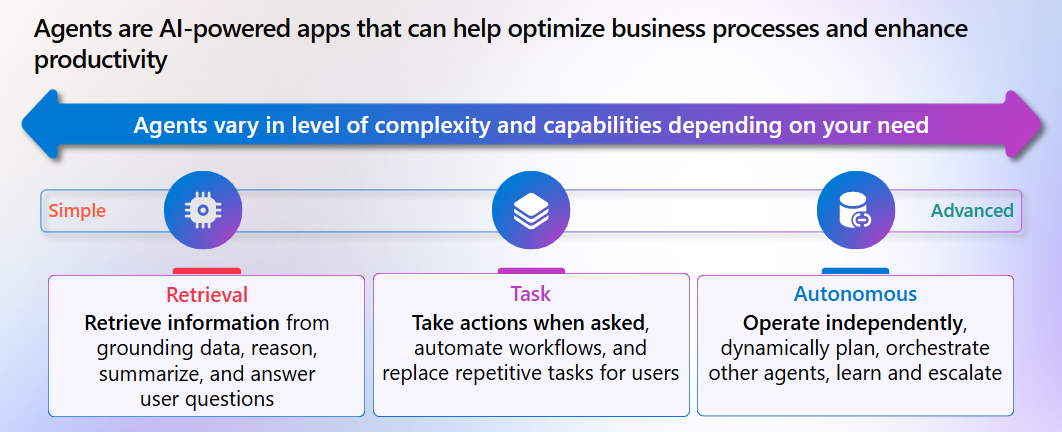
Other agents can act on your behalf, such as helping to fulfill sales orders. In doing so, they free you up to focus on building new customer relationships. Having agents handle some of these routine needs can boost productivity across industries, from manufacturing and research to finance and retail, helping businesses save time and money.
Types of agents
The following sections describe the different types of agents supported by Microsoft 365 Copilot:
- Prebuilt agents
- Ready-made SharePoint site agents
- Agents for the everyday business user
- Advanced agents
Prebuilt agents
A prebuilt agent is an agent that either Microsoft or a Microsoft-approved vendor created. Non-Microsoft agents undergo a rigorous approval process by Microsoft’s dedicated team of AI and machine learning experts to ensure they meet industry standards and best practices. If you find an agent that you wish to use, you can add it to your personal agent library. If you select a non-Microsoft agent that’s connected to a licensed service, then you must possess a corresponding license to be able to use it.
Prebuilt agents are designed to integrate seamlessly with existing workflows and provide immediate value without requiring extensive configuration or customization. Compared to custom, user-created agents, prebuilt agents offer the advantage of rapid deployment and reduced development costs. They come ready to use, with standardized features that can be easily adapted to specific business requirements. Examples of prebuilt agents created by Microsoft include:
Prompt Coach. This agent is designed to help users craft well-structured, effective prompts. This agent excels in both generating new prompts and analyzing existing ones, ensuring they align with your goals. With a focus on guiding users through the entire process, Prompt Coach offers valuable feedback, examples, and actionable suggestions for continuous improvement.
Writing Coach. This agent is an expert assistant dedicated to providing detailed, constructive feedback and helping you excel in any writing task. Whether you're refining an email, crafting a story, or developing a whitepaper, Writing Coach helps guide you every step of the way.
Researcher agent. This agent acts as an AI-powered research assistant that gathers, analyzes, and synthesizes information from your work data and the web to produce structured, well-cited reports. It’s designed for complex, multi-step research tasks like market analysis or preparing executive summaries, saving hours of manual effort.
Analyst agent. This agent serves as a virtual data scientist, using advanced reasoning and Python capabilities to transform raw data into actionable insights and visualizations. It excels at analyzing large, complex datasets, identifying trends, and generating clear summaries for decision-making, all within Microsoft 365 Copilot.
Note
Several of these prebuilt agents, including the Prompt Coach and Writing Coach, are also presented as templates that everyday business users can select from when creating agents in Microsoft 365 Copilot Chat and SharePoint.
Ready-made SharePoint site agents
A ready-made agent for a SharePoint site is an AI-powered tool that’s integrated within the site. It can automatically analyze and interact with the site’s content, providing users with insights, summaries, and assistance tailored to the site's data. It applies Microsoft 365 Copilot capabilities to enhance productivity by understanding and processing information within the SharePoint site.
Not every SharePoint site automatically includes a ready-made agent that can access all site content. When a new site is created, Microsoft 365 Copilot might generate a ready-made agent for it, but only if certain conditions are met. These conditions include the user having a valid Copilot license, the right permissions, and the organization’s Microsoft 365 environment being properly configured. Even when an agent is created, its ability to access and respond to site content depends on the user’s permissions and how the site is set up. This setup means the agent’s scope isn’t universal. Instead, it’s shaped by both technical requirements and access controls.
When Microsoft 365 Copilot does create a ready-made agent for a newly created SharePoint site, the agent is automatically scoped to the content within the site. This agent can answer questions about the content on the site, help users understand documents, and provide insights based on the information available on that site.
Note
When Microsoft 365 Copilot automatically creates a ready-made agent for a site, it also assigns the agent as the site’s default agent. However, the site owner or administrator can later set a custom agent as the site's default agent if they choose.
Agents for the everyday business user
Everyday business users with no programming or technical background can build and manage agents in both SharePoint and Microsoft 365 Copilot Chat. These agents are intentionally designed with limited capabilities to prioritize simplicity, ease of use, and security. These limited features make them ideal for nontechnical users who need personalized assistance without the complexity of advanced AI features. When an everyday business user creates an agent, they can either base it on a predefined template that contains preconfigured options and rules, or they can create an agent based on options and rules that they define.
These agents don’t use advanced features like generative AI, which is a type of AI that can create new content—such as text, images, or code—based on what it has learned. Generative AI requires more complex technology and processing power, so it’s typically reserved for more sophisticated agents built by developers. Instead, agents for the everyday business user include the following key features:
Ease of use. Everyday users can create and manage agents directly within SharePoint and Copilot Chat. You don't need any coding skills to create these agents.
Personalized assistance. These agents provide tailored assistance based on the specific content and context the user assigns to the agent.
Permission compliance. Agents adhere to the permissions set within Microsoft 365, ensuring users only see content they're allowed to access.
Advanced agents
Unlike agents designed for everyday business users, advanced agents require programming skills to create. They’re intended for developers who need to build highly customized solutions that unlock powerful features like custom connectors and generative AI. For example, developers can integrate advanced AI models and custom data connectors to enable highly sophisticated agents. While agents for the everyday business user require no programming background, programming expertise is required to create advanced agents using tools like Copilot Studio or Visual Studio Code.
Key features of advanced agents include:
Advanced customization. These highly customized agents provide advanced capabilities, such as integrating with over 1000+ prebuilt and custom data connectors.
Generative AI. Generative AI refers to artificial intelligence that can generate new content, such as text, images, or even code, based on the data the AI model is trained on. In the context of agents, generative AI enables the creation of sophisticated responses and actions by understanding and processing natural language inputs. These agents can apply generative AI to provide more sophisticated responses and actions.
Central administration. Copilot Studio and Visual Studio code/Teams toolkit provide the means for secure deployment, central administration, and compliance management.
Agents in Copilot Chat and SharePoint
Now that we’ve introduced the various types of agents that are available in Microsoft 365 Copilot, let’s examine more closely the agents that everyday business users can create in Copilot Chat and SharePoint. These agents are the focus of this training course.
Agents in Microsoft 365 Copilot Chat
Microsoft 365 Copilot Chat represents a significant leap forward in the realm of enterprise productivity tools. As an integral component of Microsoft 365, Copilot Chat harnesses the power of AI to provide users with tailored assistance across various tasks. In doing so, Copilot Chat can transform the way teams collaborate and manage information.
In Copilot Chat, agents serve as intelligent virtual assistants designed to streamline workflows and enhance the user experience. These agents are powered by advanced AI algorithms and are capable of understanding and responding to user inquiries in a natural, conversational manner. They play a critical role in helping users navigate the complexities of digital workspaces, ensuring that relevant information is accessible and actionable.
In Copilot Chat, you can use any of the prebuilt agents that you added to your personal agent library. You can also use Copilot Studio to create agents, which you can share with other users if you choose.
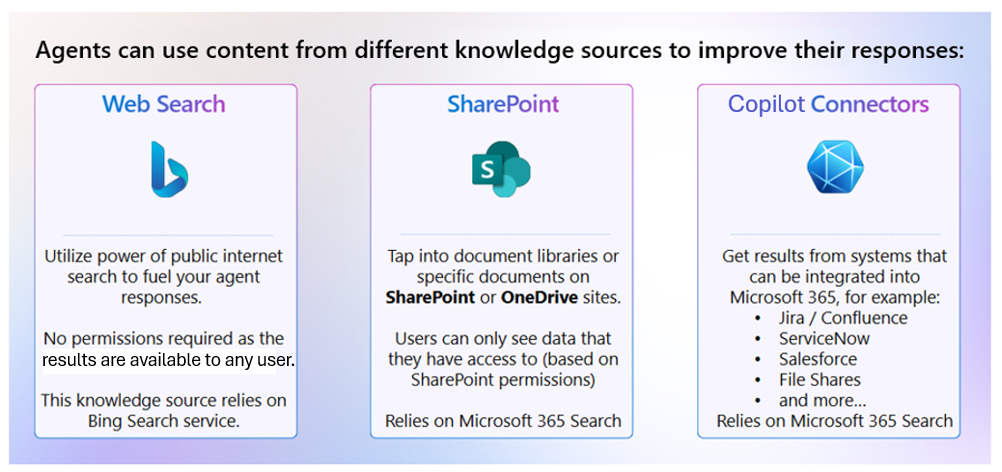
Agents in Copilot Chat can provide real-time support during conversations, automate responses, and even predict user needs based on the context of the discussion. This synergy between agents and Copilot Chat fosters a more interactive and responsive user experience, ultimately driving greater productivity and efficiency. To be effective, agents need access to reliable knowledge sources. When creating or customizing an agent, you can assign it one or more sources that shape how it responds to user prompts.
Web content. Agents can be connected to trusted websites so they can surface the most up-to-date information directly in a chat. For example, a marketing agent could reference a company’s public website to answer questions about product features. Or an HR agent could draw on government websites to provide accurate policy information.
SharePoint content. Many organizations store their critical documents, policies, and procedures in SharePoint. By connecting an agent to specific SharePoint sites or libraries, you enable it to pull in company-approved knowledge. For example, a new-hire support agent could answer questions about onboarding by referencing HR documents stored in SharePoint. Or a project agent could surface the latest project plans from a shared document library.
Copilot connectors. Microsoft Copilot connectors expand the reach of agents by linking them to external applications and services. Doing so allows agents to use business data from beyond Microsoft 365 while still respecting security and compliance rules. For instance, a sales agent could access customer data from Salesforce, a helpdesk agent could retrieve open tickets from ServiceNow, or a project management agent could pull task updates from Jira or Asana. With Copilot connectors, agents can provide context-rich responses that bring together information from multiple platforms in a single conversation.
Together, these knowledge sources give agents the flexibility to serve both general and organization-specific needs. By combining public web information with secure internal data, agents can deliver accurate, contextual, and actionable answers that stay aligned with enterprise security and compliance boundaries.
Additional viewing. For more information, watch the following short video that shows how Copilot agents can help improve your productivity.
Agents in SharePoint
Microsoft SharePoint is a foundational content management platform for enterprises powering OneDrive, SharePoint sites, Teams, Loop, Stream, and more. It facilitates team collaboration, business processes, knowledge management, and employee communication with robust content services. Every day, about 2 billion documents are added to Microsoft 365 SharePoint and OneDrive, and 2 million new SharePoint sites are created.
While this expansive amount of knowledge is key to an organization’s success, it’s often hard for employees to find, absorb, and act efficiently with all this information. Business users need a quick and accurate way to sift through this digital content and get the information they need. With AI-powered agents in SharePoint, site owners, site members, and site visitors can quickly access valuable information and insights for their projects and tasks.
Agents in SharePoint support you and your team with your workflows, projects, content discovery and knowledge sharing, based on the content in SharePoint sites, pages, and selected files. As previously mentioned, every SharePoint site comes with a ready-made agent specific to that site. Microsoft 365 Copilot creates this ready-made agent at the time the site is created. If you have Edit permissions or higher for the site, you can create custom agents for the site to get more specific answers tailored to your specific purpose.
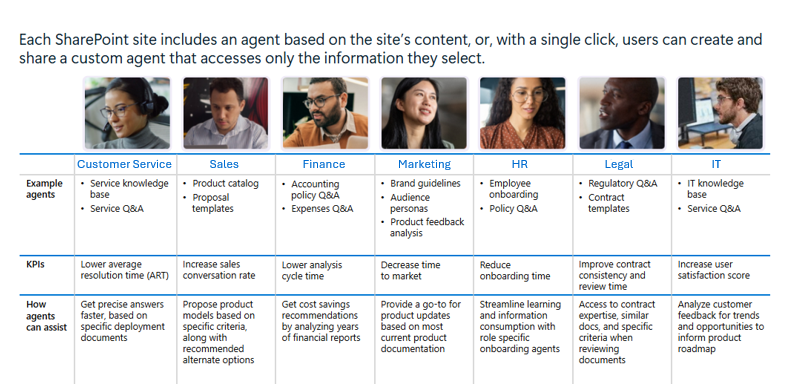
Consider the following case study. It provides an example of a user's AI-assisted journey, which starts with a SharePoint site's ready-made agent and ends with the creation of an agent in SharePoint.
Case study of an agent in SharePoint
A sales manager at Contoso Camera wants to use Copilot to generate a sales pitch for the company's latest video camera, the Digital Mega-300. The manager wants Copilot to use the product proposals and performance reviews from the marketing team’s Mega-300 SharePoint document library. The sales manager navigates to the marketing team's Mega-300 SharePoint site and enters the following prompt in Copilot, which uses the site's ready-made, default agent:
Create a 5-minute elevator pitch about the Contoso Digital Mega-300 video camera that I can present to a client.
After reviewing the sales pitch that Copilot created, the sales manager felt that it didn't do enough to differentiate the Mega-300 camera from the company's current video camera, the Digital Mega-200. The manager then realized that by using the ready-made site agent for the marketing team's Mega-300 SharePoint site, the sales pitch that Copilot generated was limited to that information only.
To address this situation, the manager decided to create a custom agent for the marketing team's Mega-300 document library that also accesses two other SharePoint sites - Contoso's Research & Development site and its Digital Mega-200 document library. The sales manager then uses this customized agent to answer the following prompt:
Create a custom sales pitch that compares Contoso's latest Digital Mega-300 video camera to the company's Digital Mega-200 camera. When doing so, identify the rigor of research and development that Contoso applied to the Mega-300 and provide a detailed list of the other product features and benefits provided by the Mega-300 to differentiate it from the Mega-200.
This agent allowed Copilot to access the three SharePoint sites and aggregate the information needed to create a more effective sales pitch for the Mega-300 camera, especially in relation to the company's older Mega-200 product.
Tools used for creating agents in Copilot Chat and SharePoint
Creating agents is an essential aspect of enhancing productivity and automating tasks within Microsoft 365. Two tools facilitate this process for everyday business users with no programming experience: Copilot Studio for Microsoft 365 Copilot Chat and the agent tool in SharePoint for SharePoint agents. Each tool offers unique capabilities tailored to different environments and use cases. While later training examines these tools in greater detail, here’s a summarized view of each tool:
Copilot Studio. Microsoft Copilot Studio is a unified platform that enables both developers and everyday business users to create Copilot Chat agents.
Software developers. Programmers can use Copilot Studio’s full-featured experience to build advanced agents that act as intelligent, task-specific assistants. This version includes powerful tools for integrating custom data connectors, applying generative AI, and managing deployment and compliance.
Everyday business users. Users with no programming experience can access a simplified, lite experience in Copilot Studio that’s designed for ease of use. This version allows nontechnical users to create and customize agents using guided prompts and natural language, without writing a single line of code. Copilot Studio’s lite experience empowers more people across an organization to harness the capabilities of AI, enhancing real-time communication and productivity.
Agent tool in SharePoint. This tool is a Microsoft 365 Copilot feature built into SharePoint. It allows everyday business users to create agents and integrates them directly into SharePoint sites. These agents are primarily focused on enhancing the functionality and user experience within SharePoint by automating tasks, providing content insights, and facilitating document management. While the SharePoint tool also supports integration with other Microsoft 365 services, its main strength lies in optimizing SharePoint-specific workflows and content management.
Keep in mind that while each application (Copilot Chat and SharePoint) uses a different tool for creating its agents, their user interfaces look somewhat similar, and they basically capture the same information in their agents. Besides some minor UI differences, the primary difference between the two tools is that Copilot Studio allows users to enable some features for Copilot Chat agents that aren’t applicable to SharePoint agents. These tools are examined in greater detail in the upcoming training on how to create agents in Copilot Chat and SharePoint.