Examine agent approval and governance
The process of approving, deploying, and governing Copilot agents is one of the most important responsibilities an administrator carries. Agents can extend functionality, provide users with direct access to business data, and automate complex tasks—but these benefits also bring risks. Poorly managed agents can create security vulnerabilities, introduce compliance challenges, or lead to fragmented user experiences. This training unit focuses on how to ensure Copilot agents are handled in a way that balances innovation with control.
Agent approval and governance aren’t one-time activities. Instead, they represent an ongoing cycle where admins and stakeholders evaluate requests, monitor usage, and enforce standards. Each decision, whether to approve, reject, or modify an agent, can affect not just a single department, but potentially the entire organization. This responsibility makes governance a critical skill for novice administrators to master early on.
Finally, it’s important to recognize that governance isn’t about blocking users but about enabling them to innovate responsibly. Properly implemented approval workflows, clear policies, and regular oversight allow end users to take advantage of Copilot’s capabilities while ensuring that administrators maintain visibility and control.
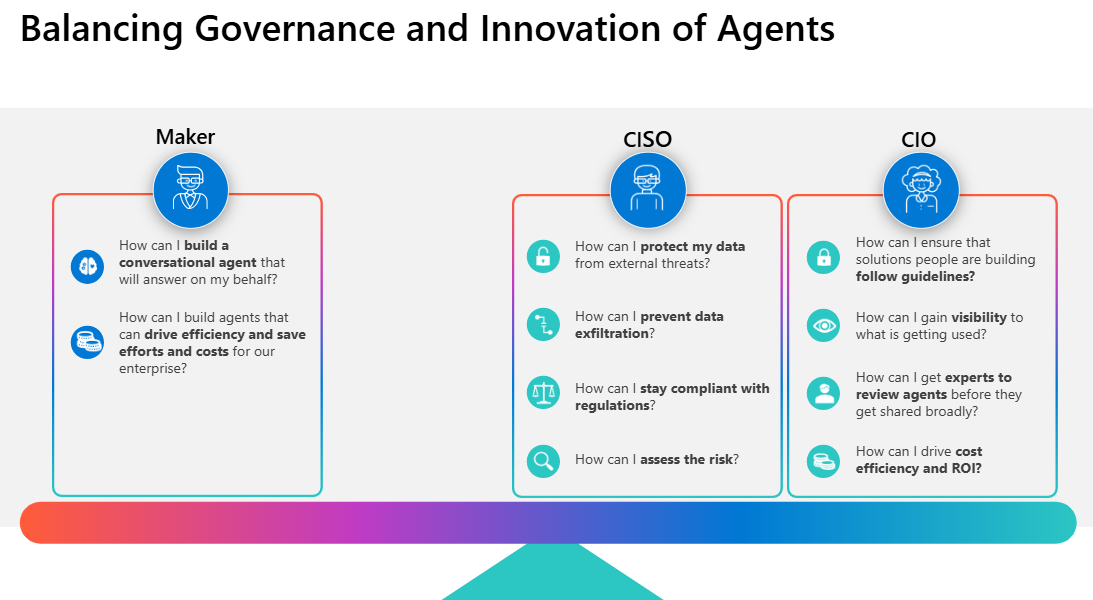
This unit explores each component of the approval and governance lifecycle in detail.
Agent types you can manage
Administrators can manage several types of agents in Microsoft 365 Copilot, each serving different purposes:
Custom agents. Built with predefined instructions and actions. These agents follow structured logic and are best for predictable, rule-based tasks. Before custom agents are available to users, they go through an admin approval and publishing process to ensure compliance and readiness.
Shared agents. Configured for use by multiple users or groups. Creators share these agents with other users.
First-party agents. Developed by Microsoft and integrated with Microsoft 365 services. These prebuilt agents include Researcher, Analyst, Writing Coach, and so on.
External agents. Created by external developers or vendors. You can control their availability and permissions.
Frontier agents. Experimental or advanced agents that use new capabilities or integrations. These agents might be in early stages of development or testing and could require more oversight or limited rollout.
Understanding the approval process for agents
The approval process for Copilot agents provides the structure needed to decide which agents are allowed to operate in your Microsoft 365 environment. Without an approval process, any agent—whether custom-built or sourced from the store—could be introduced within your organization, potentially creating risks with data access or operational disruption.
The following administrator roles can manage agents in the Microsoft 365 admin center:
- AI Administrator
- Global Reader (view-only, no edit)
Important
Use roles with the fewest permissions. Lower permissioned accounts help improve security for your organization. While the Global Administrator can approve requests, it’s a highly privileged role. Limit its use to emergency scenarios when you can't use an existing role.
A typical approval process has three stages:
Submission. During submission, a user or developer requests approval for an agent. The request often includes the agent’s purpose, intended audience, and required permissions.
Review. The review stage requires administrators and sometimes compliance officers to assess the request, considering both technical and organizational factors.
Decision. The final decision stage involves approving the agent for deployment, rejecting it, or sending it back for revisions.
Administrators can view pending agent requests by performing the following steps:
- Sign in to the Microsoft 365 admin center with your admin credentials.
- In the Microsoft 365 admin center, select Copilot > Agents in the navigation pane.
- On the Agents page, select the Requested agents tab to view pending submissions.
Each submission request displays details such as the agent name, description, and requested data connections. As an admin, you can select a request to open the review pane. It displays an overview of what the agent is designed to do, along with its data access requirements. It’s at this point where the technical vetting begins.
Role of admins and stakeholders in the approval process
While admins have the final authority, agent governance is rarely a one-person job. Different stakeholders bring perspectives that help ensure the approval process is comprehensive and aligned with organizational goals.
Administrators. Admins act as gatekeepers. They manage the approval interface, enforce governance policies, and confirm technical details such as API access, permissions, and compliance alignment.
Business owners. They bring context. For example, consider the scenario where the Sales department requests an agent that pulls data from Dynamics 365. Admins might not fully understand why this access is needed, but the business owner can clarify how the agent supports Sales operations.
Security and compliance officers. They help ensure that risks are minimized by spotting agents that request broad access to sensitive financial data without sufficient justification.
In practice, administrators must often consult with these groups before making a final decision. Microsoft 365 supports this process through approval workflows. For example, when reviewing an agent in the admin center, you can add stakeholders into the review process. Doing so ensures the right people are consulted before the request moves forward.
Admins should establish a practice of documenting every decision. For example, a SharePoint list can be used to record agent requests, reviewers, and decisions. Doing so not only helps with transparency but also provides a reference if questions arise later.
Managing agent updates and version control
Approving an agent isn’t the end of the story. Agents evolve as developers release new features, fix bugs, or expand their functionality. Without careful version control, an updated agent could introduce risks that weren’t present during the initial approval process.
Microsoft 365 provides admins with detailed information on each agent. To do so, select the Agent inventory tab on the Agents page. From there, select the agent in question to open the agent’s detail pane, which displays:
An overview of the agent, including its description, deployment status, version history, user availability, publisher, agent type, and more.
Availability options:
- No users in the organization can install and use this app.
- All users in the organization can install and use this app.
- Only selected users in the organization can install and use this app.
The agent’s capabilities, knowledge sources, and actions that it performs.
The agent’s overall security and compliance certification:
- Publisher attested
- Microsoft 365 certified
When an update is available, admins can review and approve it before deployment. Doing so prevents automatic upgrades that might bypass governance checks. For example, if a Marketing agent previously only pulled customer contact information but now requests full CRM access, the admin must re-evaluate whether this change is acceptable.
Administrators should also maintain rollback strategies. If an updated agent causes issues, you can revert to the previous version. Doing so ensures that disruptions are minimized, and users can continue working without extended downtime. Think of it like patch management in traditional IT, where control, testing, and rollback are essential for stability.
Governance policies for agent deployment
The governance capabilities of Microsoft 365 Copilot, combined with the powerful tools available in Microsoft Copilot Studio and the Power Platform admin center, provide IT administrators with unparalleled control and oversight. These features not only ensure that generative-AI solutions are deployed securely and efficiently but also empower organizations to expand their AI footprint with confidence.
IT admins play a pivotal role in this journey, acting as the architects of innovation and the guardians of data integrity. When they use the rich set of governance tools, they can manage sharing and data extensibility, gain visibility into usage patterns, and enforce robust governance strategies. This level of control fosters a secure and compliant environment, allowing organizations to fully embrace the transformative potential of generative AI.
Governance policies define the guardrails for how agents can be developed, approved, and deployed in your environment. Without such policies, admins are left making case-by-case decisions, which leads to inconsistency and potential oversight. A strong governance policy typically addresses:
Data access boundaries. Define which data sources agents are allowed to connect to and which are restricted. For example, an agent can be permitted to read SharePoint documents but not access HR files.
Approval workflows. Define who must review an agent request before it’s approved. For example, all Finance-related agents might require approval from both IT and compliance.
Usage monitoring. Define how agents are monitored after deployment, including metrics such as active users, data usage, and frequency of errors.
The Copilot Control System within the Microsoft 365 admin center (select Copilot in the navigation pane) is the central hub for Copilot agent governance. Here, administrators can:
- Block or allow agents (both Microsoft-installed and admin-installed).
- Assign agents to specific users or groups (though Microsoft-installed agents have limited granularity).
- Control agent extensibility across the organization.
- Configure agent usage settings by choosing between all users, no users, or specific groups.
- Manage billing policies for Copilot Chat and SharePoint agents.
Including Copilot Studio as part of Microsoft 365 Copilot significantly enhances the governance strategy for AI in your organization. For agents built in Copilot Studio, the Copilot governance page in the Microsoft Power Platform admin center provides a central administration page to empower admins with guidelines, visibility, and controls to manage their copilots and Copilot agents’ adoption at scale.
IT administrators can ensure that all Copilot experiences are managed, monitored, and governed effectively by using the Power Platform and Microsoft 365 admin center governance features. This comprehensive approach to governance not only enhances data security and compliance but also empowers organizations to innovate and scale their AI-powered solutions with confidence. Power Platform governance features include:
Data policies – managing Power Platform connectors. Data policies play a crucial role in ensuring data security and compliance. Data policies allow IT administrators to permit or restrict the use of specific Power Platform connectors, to prevent the use of unauthorized data sources
Data policies - blocking Anonymous Access, blocking Publish, and more. Data policies also enable admins to set access controls and prevent makers from building copilots for non-authenticated users, restrict makers from publishing to specific channels like Facebook, and block makers from publishing their solution before certifying the solution by IT.
Sharing limits. IT administrators can configure limits to prevent makers from sharing non-certified solutions too broadly. IT can ensure that copilots are shared only with a limited set of users until the solutions are reviewed and are certified, ensuring makers have followed the organization guidelines.
Environment rules, groups, and routing. These features allow IT administrators to create environment groups, define environment-specific rules, and route makers to personal development environments to build their copilots. Enterprises can use these features to adopt an advanced environment strategy that allows makers to create copilots and agents in personal environments
Maker onboarding. Maker onboarding simplifies the process of onboarding new makers and developers. IT can provide a custom welcome message to greet makers with step-by-step guidance and resources to help them start building and managing copilot applications. Admins can provide customized welcome content to help makers get started. This content can replace the default first-time help experience and include company-specific resources, training guides, and links to internal events.
Advisor. Advisor offers administrators a set of out-of-the-box recommendations and best practices guidance to help admins stay on top of the ongoing adoption of copilots and agents. The system continuously scans your environment and identifies copilots and agents that need IT attention. Administrators receive regular recommendations on gaps to address, along with clear actions they can take to properly respond. It helps IT administrators make informed decisions and ensures that their copilot implementations align with organizational guidelines and compliance requirements.
Catalog. Catalog provides a centralized repository for IT and Center of Enablement teams to offer standard and sharable controls, such as certified custom connectors, official organizational templates, and more. IT administrators can efficiently manage, categorize, and certify reusable controls that makers can readily consume. This process simplifies the creation of more complex solutions while promoting reusability and adherence to company guidelines.
Microsoft Information Protection (MIP) labels. MIP labels provide an extra layer of security and compliance. IT administrators can integrate the Microsoft Copilot Studio with Microsoft Purview sensitivity labels, forcing copilot content to get tagged with labels based on the MIP labels of the Microsoft 365 content, and ensure that sensitive data is properly labeled and managed according to organizational policies.
Audit logging to Microsoft Purview. Copilot audit logging to Microsoft Purview captures interactions and activities within the Copilot environment. This information includes logging user commands, responses generated by Copilot, and any administrative actions taken. These logs are securely stored and accessible through the Microsoft Purview portal, allowing for thorough auditing and compliance checks. Audit logging ensures transparency, security, and accountability in the use of Copilot, aligning with organizational compliance and security policies.
Copilot Security checker. Each copilot is designed to be secure by default, but there's a possibility for makers and their admins to adjust settings for specific needs, potentially without being aware of the risks involved. Copilot Studio can also alert makers to security concerns by performing security assessments that can warn makers before they publish a copilot.
Security page. In the Power Platform admin center, this page provides a consolidated experience that helps administrators navigate the complexities of managing security for Power Platform workloads, including Copilots and Copilot agents, at enterprise scale.
Security and compliance considerations
Security and compliance sit at the heart of agent governance. Every agent interacts with data, and in many cases, that data is sensitive. Admins must therefore enforce security standards that protect both the organization and its users.
Security considerations include:
Authentication. Agents should use secure authentication methods, such as OAuth, to ensure they aren't bypassing access controls.
Least privilege. Agents should request only the permissions they need. If an HR agent only needs to pull employee names, it shouldn’t request access to salary information.
Audit logging. Every agent action should be logged so that admins can review what data was accessed and when.
Compliance considerations include regulatory requirements. For example, a healthcare organization subject to HIPAA must ensure that no agent processes protected health information without the proper safeguards. Similarly, organizations operating in the European Union (EU) must ensure GDPR compliance, which might restrict how data is stored and processed.
To monitor agent compliance in Microsoft 365:
- In the Microsoft 365 admin center navigation pane, select Microsoft Purview under the Admin centers group.
- In the Microsoft Purview portal, select Solutions in the navigation pane and then select Audit in the Solutions menu that appears. Doing so returns the Search page.
- On the Search page, select the Activities – friendly names field. In the Search field that appears, enter Copilot or other Copilot keywords to filter the Copilot-related events. Scroll through the list of Copilot events and select the ones that you’re interested in.
- Review the logs to verify that agent activities align with your organization’s policies and don’t expose sensitive data.
Admins should also schedule periodic compliance reviews. For example, once every quarter, run an audit of all active agents, their permissions, and usage patterns. Doing so ensures that even after approval, agents continue to operate within acceptable security and compliance boundaries.