Note
Access to this page requires authorization. You can try signing in or changing directories.
Access to this page requires authorization. You can try changing directories.
Azure NetApp Files object REST API enables object-based access to data stored in Azure NetApp Files volumes. This capability allows applications to access the same dataset using both file-based protocols (NFS/SMB) and object APIs (S3-compatible) without duplicating or migrating data.
This unified access model allows existing file-based data to be used directly in analytics, AI, and modern application workflows without requiring separate storage systems, data translation solutions, or data copies.
Key concepts
Buckets
A bucket represents a mapped view of a directory within a volume and serves as the entry point for object-based access.
- Buckets are associated with volumes.
- Deleting a volume permanently deletes its associated buckets.
Objects
Each file within the mapped directory hierarchy is represented as an object.
- Object names are derived from file paths relative to the mapped directory.
- Object operations act directly on file content.
How object REST API works
Azure NetApp Files maps a directory within a volume to an object bucket, enabling applications and services that use object-based access patterns to interact with file-based data.
- A directory path, including the root of the volume, can be exposed as a bucket.
- Directories are represented as logical prefixes within a bucket.
- Each file is represented as an object.
- Object paths correspond directly to file system paths.
- Directory boundaries are represented using the
/delimiter. - Object operations can read, write, and enumerate data.
- Object operations are translated into equivalent file system operations.
This mapping enables applications to use object APIs to interact with data that remains stored as files.
Architecture overview
The following diagram illustrates simultaneous file and object access to the same Azure NetApp Files dataset:
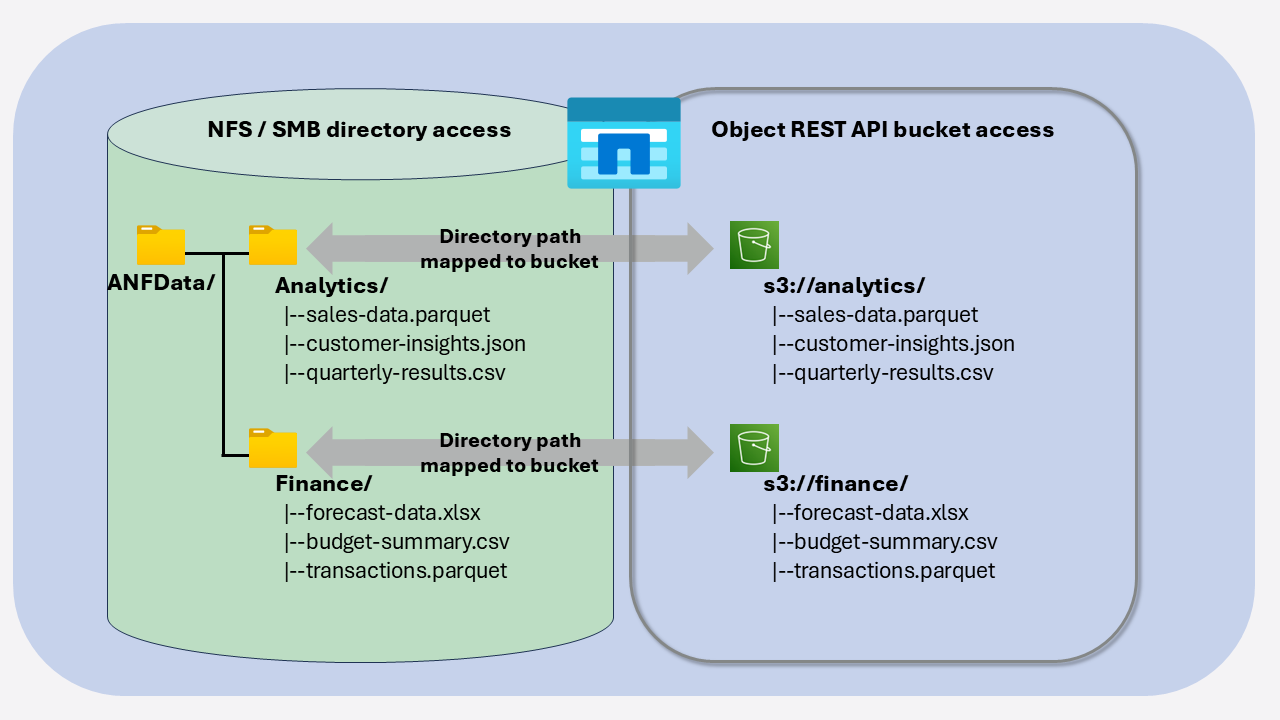
In this model:
- NAS clients and applications access data using NFS or SMB.
- Object clients access the same data through the object REST API.
- Analytics and AI services (such as Azure Databricks, Microsoft Fabric, and Azure AI services) integrate with Azure NetApp Files using object-based access.
- Data remains stored in Azure NetApp Files volumes.
Object access workflow
At a high level, object REST API access follows this flow:
- A bucket is created from a directory within an Azure NetApp Files volume.
- Applications and services connect using object-based APIs.
- Object operations (such as read, write, and list) are translated into file system operations.
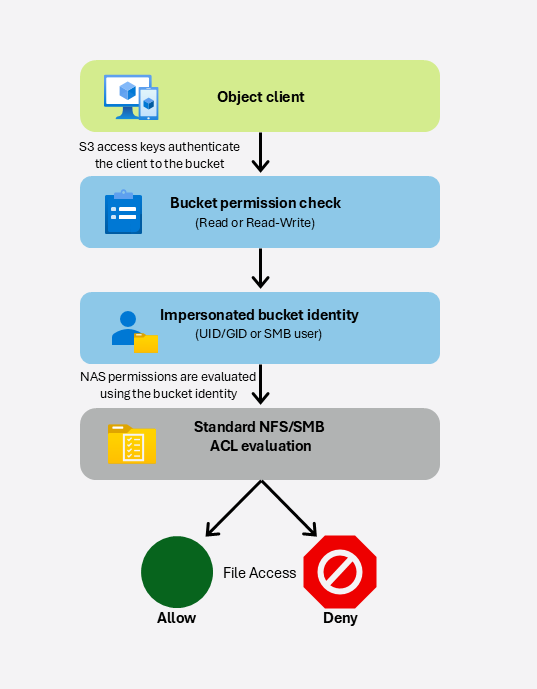
- Object REST API authenticates requests using access keys and evaluates file access using the configured impersonated identity.
- Data is returned to the client without being duplicated or moved.
This workflow allows applications to access data using object APIs while the underlying storage continues to operate as a file system.
Security and permissions
Object REST API introduces bucket-level permissions, which are the primary access controls specific to the object REST API. Bucket configuration also defines the file system identity that is impersonated when accessing data using the object REST API. Existing NAS file permissions continue to be enforced based on that impersonated identity.
- Bucket permissions define whether object REST API clients have read-only or read-write access to the bucket.
- Authentication identity and file-system authorization identity are separate concepts:
- S3 access keys authenticate the client to the bucket.
- The bucket's configured impersonated identity determines which files and directories can be accessed.
- Each bucket is configured with an impersonated file-system identity:
- NFS volumes use a user ID (UID) and group ID (GID).
- SMB volumes use a user account.
- Dual-protocol volumes use either UID/GID or user accounts depending on the configured security style.
- Object REST API requests access data using the configured impersonated identity. Standard file permissions and ACLs on the Azure NetApp Files volume continue to be enforced for that identity.
- Users can access only the files and directories that the configured impersonated identity already has permission to access through standard NFS or SMB permissions. Bucket access does not automatically grant access to all objects within the mapped directory or volume.
- Existing NAS ACLs and file permissions remain authoritative for object REST API access. Object REST API does not bypass or replace existing NAS access controls.
- File access through SMB and NFS protocols continues to use their existing authentication and authorization models without modification.
- Secure communication with object REST API requires TLS certificates configured for the object REST API endpoint.
Supported operations
- ListBucket
- ListObjects / ListObjectsV2
- GetObject
- PutObject
- DeleteObject
- HeadObject
Common scenarios
The object REST API enables new workload patterns for Azure NetApp Files.
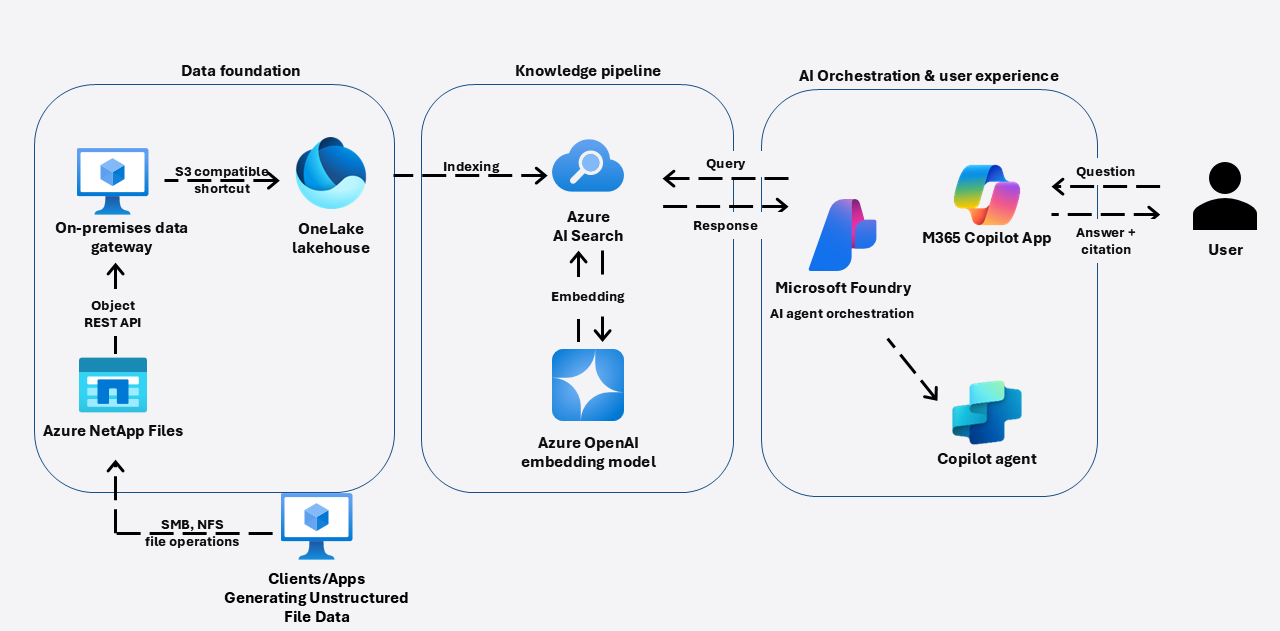
Data analytics and AI
A data engineering team needs to analyze a large dataset already stored in an Azure NetApp Files volume. Instead of copying the dataset into a separate object storage service, the team connects directly using object-based tools and begins processing the data in place. This approach enables faster onboarding of analytics workflows while minimizing storage duplication.
Hybrid and modernized applications
Applications that require both file-based and object-based access can operate on the same dataset without maintaining multiple copies. This enables coexistence between legacy applications and modern services, allowing gradual modernization without disrupting existing workloads.
Data processing pipelines
Data pipelines can ingest, transform, and process datasets using object-based tools while the data remains stored in Azure NetApp Files. This supports integration with a broad ecosystem of tools and services that rely on object-based access patterns.
Requirements and considerations
Consider the following requirements and limitations when using the Azure NetApp Files object REST API:
- Buckets are tied to volumes and are deleted when the volume is deleted.
- Buckets are supported with cool access-enabled and large volumes.
- Buckets are not supported on Azure NetApp Files cache volumes.
- Buckets require a volume with existing data; empty volumes are not supported.
- Certificate lifecycle management is required to maintain secure access to the object REST API endpoint.
- You are responsible for maintaining the lifecycle of bucket certificates.
- Enable diagnostic logging on all Azure Key Vaults to ensure audit trails are available for security investigations.
- Configure network access control lists (ACLs) to restrict Azure Key Vault access to authorized networks, including NetApp virtual network and authorized customer virtual networks.
- Consider using separate Azure Key Vaults for certificates and S3 credentials to align with least-privilege security practices.
- Separate Azure Key Vault access policies for certificates and S3 credentials, when possible, to maintain clear operational and security boundaries.
Note
The object REST API provides object-based access to file data but does not change how data is physically stored. Object-based access is governed by bucket configuration and object access mechanisms, while file access continues to follow SMB and NFS permission models.