Note
Access to this page requires authorization. You can try signing in or changing directories.
Access to this page requires authorization. You can try changing directories.
Learn how to run your Azure Stream Analytics (ASA) job in an Azure virtual network for network isolation and secure access to resources.
Virtual network support overview
Virtual network support enables you to lock down access to Azure Stream Analytics to your virtual network infrastructure. Virtual network integration provides the benefits of network isolation and can be accomplished by deploying a containerized instance of your ASA job inside your virtual network. Your virtual network injected ASA job can then privately access your resources within the virtual network via:
- Private endpoints, which connect your virtual network injected ASA job to your data sources over private links powered by Azure Private Link.
- Service endpoints, which connect your data sources to your virtual network injected ASA job.
- Service tags, which allow or deny traffic to Azure Stream Analytics.
Available regions
Virtual network integration is currently supported in the following regions:
East US, East US 2, West US, West US 2, Central US, North Central US, Central Canada, West Europe, North Europe, Southeast Asia, Brazil South, Japan East, UK South, Central India, Australia East, France Central, Germany West Central, and UAE North.
If your region isn't listed and you're interested in using this capability, fill out this form.
Requests are evaluated based on demand and feasibility. You're notified if the region can be supported.
Prerequisites
A General purpose V2 (GPV2) Storage account is required for virtual network injected ASA jobs.
Virtual network injected ASA jobs require access to metadata such as checkpoints to be stored in Azure tables for operational purposes.
If you already have a GPV2 account provisioned with your ASA job, no extra steps are required.
Users with higher scale jobs with Premium storage are still required to provide a GPV2 storage account.
If you want to protect storage accounts from public IP based access, consider configuring it using Managed Identity and Trusted Services.
For more information on storage accounts, see Storage account overview and Create a storage account.
An Azure virtual network. You can use an existing virtual network or create a new one.
An operational Azure NAT Gateway.
Important
ASA virtual network injected jobs use an internal container injection technology provided by Azure networking.
To enhance the security and reliability of your Azure Stream Analytics jobs, you need to either:
Configure a NAT Gateway: This configuration ensures that all outbound traffic from your virtual network is routed through a secure and consistent public IP address.
Disable Default Outbound Access: This setting prevents any unintended outbound traffic from your virtual network, enhancing the security of your network.
Azure NAT Gateway is a fully managed and highly resilient Network Address Translation (NAT) service. When configured on a subnet, all outbound connectivity uses the NAT gateway's static public IP addresses.
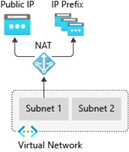
For more information about Azure NAT Gateway, see Azure NAT Gateway.
When configuring Azure IoT Hub with private endpoints, ensure that you also configure a private endpoint and corresponding DNS settings for the built-in Event Hubs-compatible endpoint. IoT Hub uses this endpoint to route messages, and without proper DNS resolution, services like Azure Stream Analytics might fail to connect.
For guidance on setting up private endpoints and DNS for IoT Hub and Event Hubs, see the following resources:
Subnet considerations
Virtual network integration depends on a dedicated subnet.
When configuring your delegated subnet, consider the IP range to accommodate both current and future requirements for your ASA workload. Since the subnet size can't be changed after creation, select a subnet size that can support the potential scale of your job. Azure Networking reserves the first five IP addresses within the subnet range for internal use.
The scale operation affects the real, available supported instances for a given subnet size.
Considerations for estimating IP ranges:
- Make sure the subnet range doesn't collide with ASA’s subnet range. Avoid IP range 10.0.0.0 to 10.0.255.255 as it's used by ASA.
- Reserve:
- Five IP addresses for Azure Networking
- One IP address is required to facilitate features such as sample data, test connection, and metadata discovery for jobs associated with this subnet.
- Two IP addresses are required for every six streaming units (SU) or one SU V2. For details about the V2 pricing model, see Azure Stream Analytics pricing.
Subnet Delegation and Release Behavior:
When you enable virtual network integration for an Azure Stream Analytics (ASA) job, the Azure portal automatically delegates the specified subnet to the ASA service.
ASA will automatically undelegate the subnet in either of the following cases:
- You disable virtual network integration for the last ASA job using that subnet via the Azure portal.
- You delete the last ASA job associated with the subnet.
Note
Multiple ASA jobs can share the same subnet. The "last job" refers to the point when no other ASA jobs are using that subnet. Once the last job is removed, ASA releases the delegated subnet. This release might take a few minutes to complete.
Subnet Must Allow Intra-Subnet Traffic:
- The subnet configuration must enable intra-subnet network traffic.
- This means that it must allow inbound and outbound traffic where both the source and destination IP addresses reside within the same subnet. For more information, see Intra-subnet traffic.
Set up virtual network integration
Azure portal
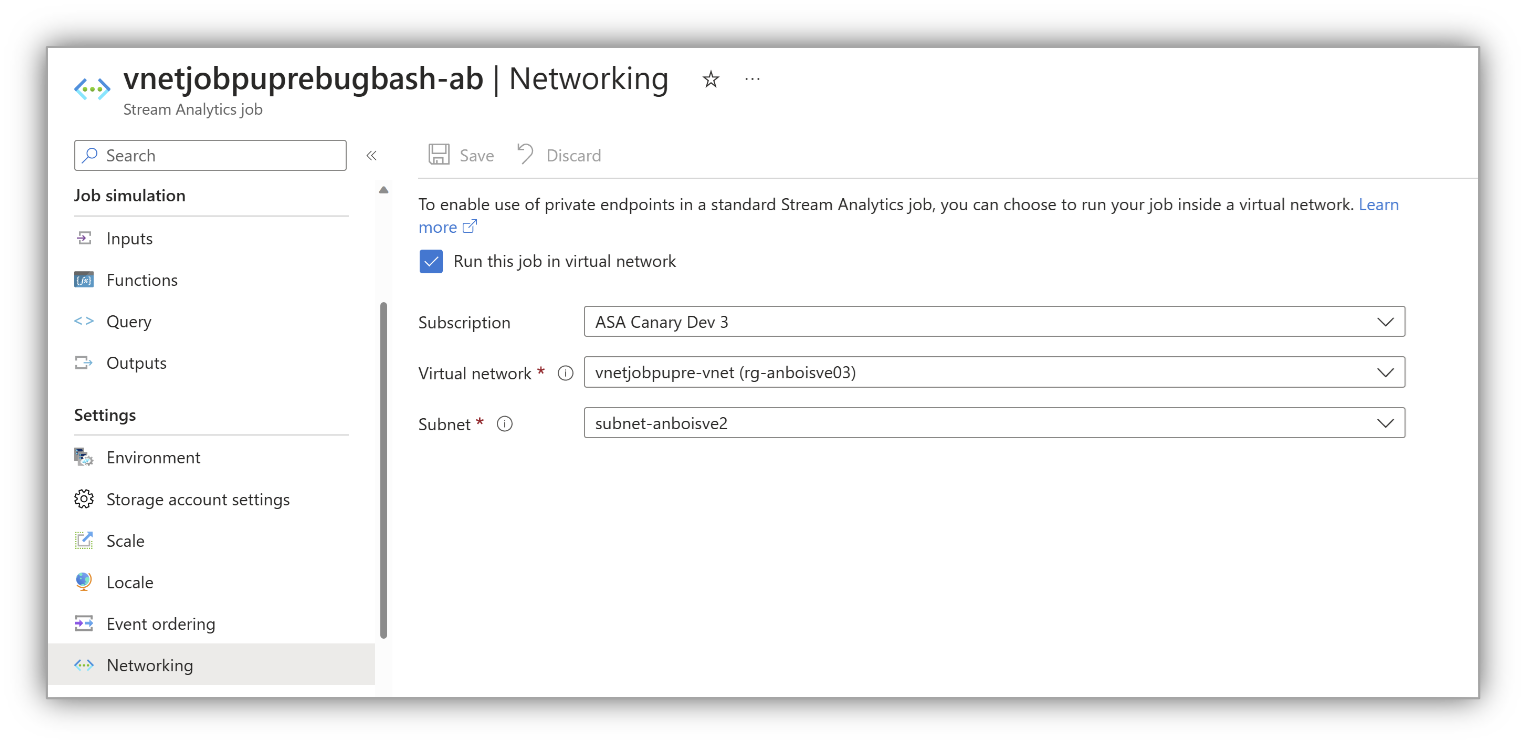
In the Azure portal, on your Stream Analytics job page, under Settings on the left menu, select Networking.
Select Run this job in virtual network, configure the settings as prompted, and select Save.
Set up virtual network integration in Visual Studio Code
In Visual Studio Code, reference the subnet within your ASA job. This step tells your job that it must work with a subnet.
In the
JobConfig.json, set up yourVirtualNetworkConfigurationas shown in the following image.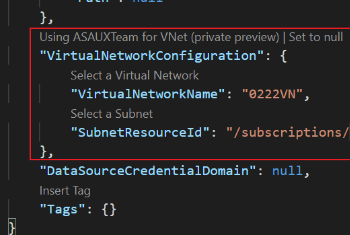
Set up an associated storage account
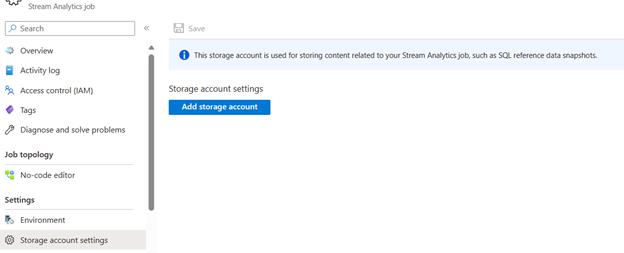
On your Stream Analytics job page, under Settings on the left menu, select Storage account settings.
On the Storage account settings page, select Add storage account.
Follow the instructions to configure your storage account settings.
Important
- To authenticate with connection string, you must disable the storage account firewall settings.
- To authenticate with Managed Identity, you must add your Stream Analytics job to the storage account's access control list for Storage Blob Data Contributor role and Storage Table Data Contributor role. If you don't give your job access, the job can't perform any operations. For more information on how to grant access, see Use Azure RBAC to assign a managed identity access to another resource.
Permissions
You must have at least the following Role-based access control permissions on the subnet or at a higher level to configure virtual network integration through Azure portal, CLI or when setting the virtualNetworkSubnetId site property directly:
| Action | Description |
|---|---|
Microsoft.Network/virtualNetworks/read |
Read the virtual network definition |
Microsoft.Network/virtualNetworks/subnets/read |
Read a virtual network subnet definition |
Microsoft.Network/virtualNetworks/subnets/join/action |
Joins a virtual network |
Microsoft.Network/virtualNetworks/subnets/write |
Optional. Required if you need to perform subnet delegation |
If the virtual network is in a different subscription than your ASA job, you must ensure that the subscription with the virtual network is registered for the Microsoft.StreamAnalytics resource provider. You can explicitly register the provider by following the steps in Register resource provider, but it's automatically registered when creating the job in a subscription.
Virtual network integration limitations
- Virtual network jobs require a minimum of one SU V2 (new pricing model) or six SUs (current)
- Make sure the subnet range doesn't collide with ASA subnet range (that is, don't use subnet range 10.0.0.0/16).
- ASA jobs and the virtual network must be in the same region.
- The delegated subnet can only be used by Azure Stream Analytics.
- You can't delete a virtual network when it's integrated with ASA. You must disassociate or remove the last job* on the delegated subnet.
- Domain Name System (DNS) refreshes aren't currently supported. If DNS configurations of your virtual network change, you must redeploy all ASA jobs in that virtual network (subnets also need to be disassociated from all jobs and reconfigured). For more information, see Name resolution for resources in Azure virtual networks.
Access on-premises resources
No extra configuration is required for the virtual network integration feature to reach through your virtual network to on-premises resources. You simply need to connect your virtual network to on-premises resources by using ExpressRoute or a site-to-site VPN.
Pricing details
Outside of basic requirements listed in this document, virtual network integration has no extra charge for use beyond the Azure Stream Analytics pricing charges.
Troubleshoot virtual network integration
If you encounter problems accessing your desired endpoint, contact Microsoft Support.
Note
For direct feedback on this capability, create an Azure support request.