Note
Access to this page requires authorization. You can try signing in or changing directories.
Access to this page requires authorization. You can try changing directories.
Starting with Visual Studio 17.8 Preview 1, Visual Studio provides an #include cleanup feature that improves the quality of your code in the following ways:
- Offers to add header files for code that compiles only because a needed header file is included indirectly by another header file.
- Offers to remove unused header files--improving build times and code cleanliness.
Include Cleanup is on by default. To learn how to configure it, see Config C/C++ Include Cleanup in Visual Studio.
Direct vs indirect headers
Some terminology:
- A direct header is a header that you explicitly
#includein your code. - An indirect header is included because a header you directly include, includes it. You can also say that an indirect header is included
transitively.
Include Cleanup analyzes your code and determines which headers aren't used and which are indirectly included. Consider the following header file:
// myHeader.h

#include <string>
#include <iostream>

void myFunc()
{
    std::string s = "myFunc()\n";
    std::cout << s;
}
And the program that uses it:
// myProgram.cpp
#include "myHeader.h"

int main()
{
    std::string s = "main()"; // string is indirectly included by myHeader.h
    std::cout << s; // cout is indirectly included by myHeader.h
    myFunc();
}
myHeader.h is a direct header because myProgram.cpp explicitly includes it. myHeader.h includes <string> and <iostream>, so those are indirect headers.
The problem is that myProgram.cpp uses std::string and std::cout, but doesn't directly include the headers that define them. This code compiles because myHeader.h includes those headers. This code is brittle because if myHeader.h ever stopped including either one, myProgram.cpp wouldn't compile anymore.
Per the C++ guidelines, it's better to explicitly include headers for all of your dependencies so that your code isn't subject to brittleness caused by changes to header files. For more information about the guideline, see SF.10: Avoid dependencies on implicitly #included names in the C++ Core Guidelines.
Include Cleanup analyzes your code to identify unused and indirectly included headers. It provides feedback based on the settings described in Config the C++ #include tool in Visual Studio. The feedback comes in the form of error list warnings and suggestions. For more details on the feedback provided by Include Cleanup, see Include Cleanup messages.
Unused headers
As your code evolves, you might no longer need some header files. It's hard to keep track of these headers in a complex project. Over time, your builds might take longer because the compiler processes unnecessary header files. Include Cleanup helps you find and remove unused headers. For example, what if you comment out myFunc() in myProgram.cpp:
// myProgram.cpp
#include "myHeader.h"

int main()
{
    std::string s = "main()"; // string is indirectly included from myHeader.h
    std::cout << s; // cout is indirectly included from myHeader.h
    // myFunc(); // directly included from myHeader.h
}
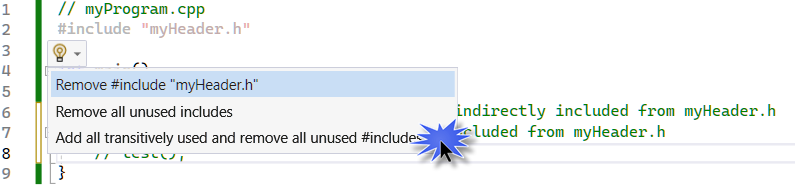
In the following screenshot, #include "myHeader.h" appears dimmed (a setting described in Config the C++ #include tool in Visual Studio) because it's no longer necessary since myFunc() is commented out.
Hover your cursor over the dimmed #include to bring up the quick action menu. Select the light bulb (or choose the Show potential fixes link) to see actions related to the unused file:
Add transitively used headers
You might choose to remove the unused header file, but that action breaks the code since <string> and <iostream> are indirectly included by myheader.h.
Instead, we can choose Add all transitively used and remove all unused #includes. This removes the unused header myHeader.h, but also adds any headers being used that are indirectly included via myHeader.h. The result, in this case, is adding #include <string> and #include <iostream> to myProgram.cpp, and removing #include "myHeader.h":
// myProgram.cpp
#include <iostream>
#include <string>

int main()
{
    std::string s = "main()"; // string is directly included from <string>
    std::cout << s; // cout is directly included from <string>
    // MyFunc();
}
The tool doesn't update the comments, but you can see that the code is now using std::string and std::cout directly. This code is no longer brittle because it doesn't depend on myHeader.h to include the other required headers.
Best practice
Don't remove what appear to be unused header files without first adding indirectly included header files. Your code might rely on indirect includes in a header file that is otherwise unused. Add transitively used headers first. Then, when you remove unused headers, you don't get compilation errors due to missing header files that are included indirectly by a header file you removed.
One way to do this is:
- Set the Include Cleanup setting for Add missing includes suggestion level to Suggestion (Tools > Options > Text Editor > C/C++ > Code Cleanup).
- Set Remove unused includes suggestion level to Suggestion.
One way to do this is:
- Set the dropdown for the Include Cleanup setting for Choose how to highlight missing #include statements that are transitively included to Suggestion (Tools > Options > All Settings > Languages > C/C++ > Code cleanup > Include cleanup).
- Set Choose how to highlight #include statements that are unused to Suggestion.
Then:
- In the error list, make sure the filter is set to Build + IntelliSense.
- Look for instances of "Content from #include x is used in this file and transitively included."
- Hover your cursor over a line with the suggestion. From the light bulb dropdown, select Add all transitively used includes.
- Repeat these steps in your project until all suggestions regarding transitive includes are addressed.
- Remove unused includes: in the error list, look for an instance of "#include x is not used in this file."
- Hover your cursor over the unused header. From the light bulb dropdown, select Remove all unused includes.
- Repeat these steps in your project until all Include Cleanup suggestions are addressed.
In this brief overview, you saw how Include Cleanup can help you remove unused headers and add headers that were indirectly included. This process helps you keep your code clean, potentially build faster, and reduces the brittleness of your code.
See also
Configure C/C++ Include Cleanup in Visual Studio
Include Cleanup messages