Note
Access to this page requires authorization. You can try signing in or changing directories.
Access to this page requires authorization. You can try changing directories.
Lookups help a user choose records from a related table. When you add a lookup column to a form, you automatically add a lookup component to the form.
For example, by using a lookup component, you can open an account record that relates to a sales invoice record.
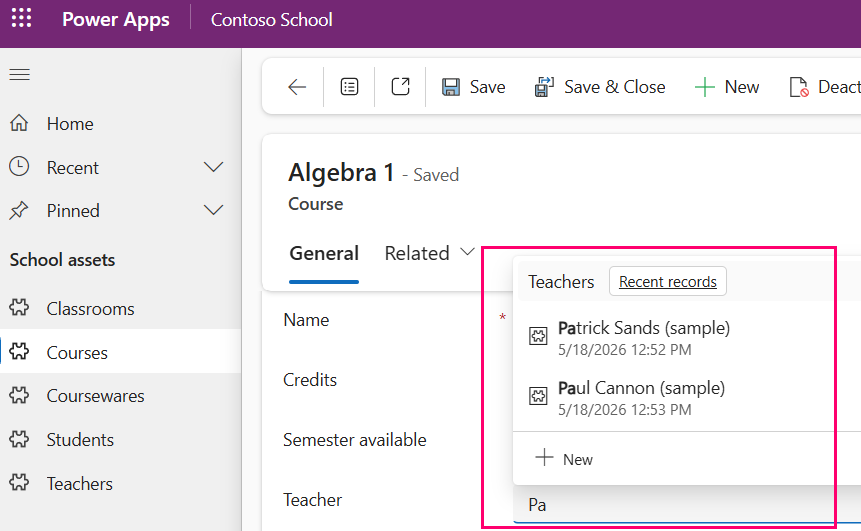
Learn more about the lookup field user experience
Configure a lookup component
Makers configure a lookup component by using the form designer.
- While working in the form designer, select New table column. For Data type, select Lookup > Lookup.
- Save the column to edit the properties. These properties are available to configure when using a lookup component on a form by using the form designer.
| Area | Name | Description |
|---|---|---|
| Display options | Label | The label text that displays next to the lookup column. |
| Display options | Hide label | When enabled, the label isn't displayed. |
| Display options | Hide on phone | When enabled, the lookup column doesn't display when running the app on a phone. |
| Display options | Hide | Don't display the lookup column. You can then display the lookup column by using code. |
| Display options | Lock | Make this column so that it can't be removed by you or other makers until the Lock property is disabled. |
| Display options | Read-only | When this property is enabled, users can't change the value in the lookup column. |
| Display options | Disable most recently used items | Disabling this option allows users to view recently used rows in the lookup dropdown list. Enabling this option disables the recent items. |
| Display options | Use Main Form Dialog for Create | Enabling this option allows users to create rows in a pop out dialog for this lookup field, instead of closing the current form and navigating away. |
| Display options | Use Main Form Dialog for Edit | Enabling this option allows users to edit rows in a pop out dialog for this lookup field, instead of closing the current form and navigating away. |
| Display options | Default view | The view of the table selected in the Table property that you can use to get and display the list of rows that app users can select in the lookup drop-down list. |
| Display options | Allow users to change view | When selected, app users can change from the Default view to another view of the table. |
| Display options | Show all views | When selected, app users can change from the Default view to all other views of the table selected in the Table property. This property is only available when Allow users to change view is selected. |
| Display options | Selected views | A list of views of the table selected in the Table property that app users can change to from the Default view. This property is only available when Allow users to change view is selected and Show all views is unselected. |
| Formatting | Form field width | Determines the width in number of columns for the lookup column. |
| Filtering | Filter by related rows | When this option is enabled, you can filter this lookup based on a row related to both the current table and this lookup. The rows that display in this lookup when users search for a row have additional filtering applied. This filter helps provide more relevant searches when setting the value of the lookup. By default, this option is turned off. |
| Filtering | Relationship to current table | This dropdown list defines the relationship from the table of the related row you want to filter by to the target lookup's table. The possible relationship combinations are listed in the table following this one. |
| Filtering | Relationship to this lookup's table | This dropdown list defines the relationship from the table of the related row you want to filter by to the target lookup's table. For the possible relationship combinations, see Table relationships available for a lookup column. |
| Filtering | Allow users to turn off filter | When this option is enabled, users can turn off the filter you define. |
| Components | +Component | Configure a control for the lookup column: - Form. Add the form component control that lets users edit related table records from the main form where the control resides. - Additional lookup controls. Add additional functionality to the lookup column. |
Lookup controls
You can use several lookup controls with a lookup column. You might need to select + Component > Get more components > Add to make the control available for your form.
- Lookup (default). The default control when you create a lookup column. This control appears in the Components section when you add one of the other lookup controls. Select client type Web, Mobile, or Tablet. No other properties are available to configure. Add one of the following controls for extended functionality.
- Lookup Control (simple). By disabling the Lookup clickthrough value, makers can disable the clickthrough behavior on the lookup column. By default, lookup values in forms appear as hyperlinks, so users can open related records by selecting them. You might want to prevent users from navigating away from the current form.
- Drawer Lookup Control. This control is optimized for mobile and tablet and offers fewer clicks and a modern bottom sheet. It also allows makers to disable the clickthrough behavior on lookup fields by disabling the Lookup clickthrough value.
- Look-up Control (classic). This control has these two properties:
- Related Virtual Entity. If there's a related table for the lookup that's a virtual table, you can bind to table column and add a static value.
- Virtual Entity Lookup View Id. Add an identifier for the virtual table lookup view.
Multi-table lookups
Lookup controls support all of the different types of lookups, including multi-table lookups. When you use a multi-table lookup on a form, the user sees only tables inside the model-driven app the lookup is currently in, even if the lookup column is configured to use tables not included in the model-driven app.
Possible relationship combinations for a lookup column
| Relationship to current table (Related table > Current table) | Relationship to this lookup's table (Related table > Lookup's table) | Available? |
|---|---|---|
| 1:N | 1:N | Yes |
| 1:N | N:1 | Yes |
| 1:N | N:N | Yes |
| N:1 | 1:N | No |
| N:1 | N:1 | No |
| N:1 | N:N | No |
| N:1 | Self | Yes |
| N:N | 1:N | No |
| N:N | N:1 | No |
| N:N | N:N | No |
| N:N | Self | Yes |