Note
Access to this page requires authorization. You can try signing in or changing directories.
Access to this page requires authorization. You can try changing directories.
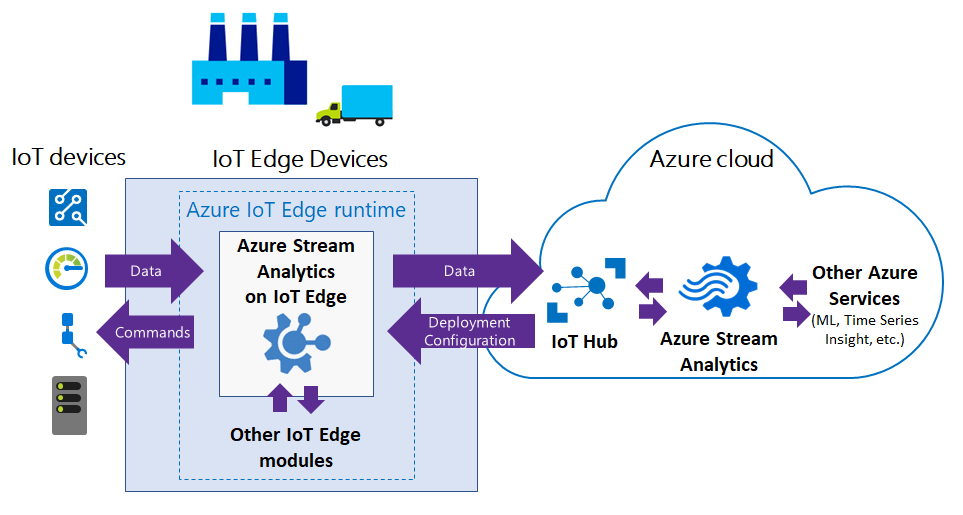
Azure Stream Analytics on IoT Edge is a lightweight version of Azure Stream Analytics that runs directly on IoT Edge devices for near-real-time analytics on device-generated data. Azure Stream Analytics on IoT Edge provides low latency, resiliency, efficient use of bandwidth, and regulatory compliance. You can deploy analytics and control logic close to industrial operations while using cloud-based Azure Stream Analytics for large-scale data processing.
Azure Stream Analytics on IoT Edge runs within the Azure IoT Edge framework. After you create a Stream Analytics job in the Azure portal, you can deploy and manage it by using IoT Hub.
Common scenarios for Stream Analytics on IoT Edge
The following diagram shows the flow of data between IoT devices and the Azure cloud.
Low-latency command and control
Manufacturing safety systems must respond to operational data with ultra-low latency. By using Stream Analytics on IoT Edge, you can analyze sensor data in near real-time, and issue commands when you detect anomalies to stop a machine or trigger alerts.
Limited connectivity to the cloud
Mission critical systems, such as remote mining equipment, connected vessels, or offshore drilling, need to analyze and react to data even when cloud connectivity is intermittent. By using Stream Analytics, your streaming logic runs independently of the network connectivity and you can choose what you send to the cloud for further processing or storage.
Limited bandwidth
The volume of data produced by jet engines or connected cars can be so large that you must filter or pre-process it before you send it to the cloud. By using Stream Analytics, you can filter or aggregate the data that you need to send to the cloud.
Regulatory compliance and local data processing
Regulatory compliance might require you to locally anonymize or aggregate some data before you send it to the cloud. By using Stream Analytics on IoT Edge, you can process sensitive data on-premises and send only compliant, transformed results to the cloud.
Edge jobs in Azure Stream Analytics
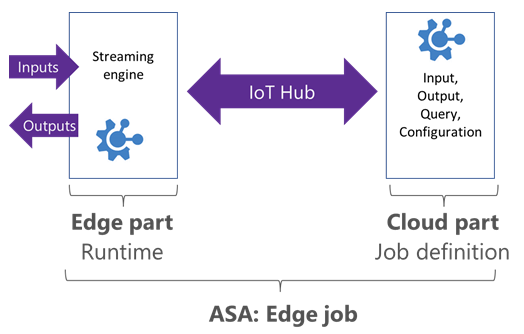
Stream Analytics edge jobs are containerized Stream Analytics workloads deployed to Azure IoT Edge devices. Edge jobs have two parts:
A cloud part that handles the job definition: you define inputs, output, query, and other settings, such as out-of-order events, in the cloud.
A module running on your IoT devices. The module contains the Stream Analytics engine and receives the job definition from the cloud.
Stream Analytics uses IoT Hub to deploy edge jobs to devices. For more information, see IoT Edge deployment.
Edge job limitations
Stream Analytics edge jobs aim for parity between edge and cloud deployments. A cloud job is a standard Azure Stream Analytics job that runs in Azure, while an edge job runs locally on an IoT Edge device. Stream Analytics supports most SQL query language features for both edge and cloud. However, edge jobs don't support the following features:
- User-defined functions (UDF) in JavaScript. UDFs are available in C# for IoT Edge jobs (preview).
- User-defined aggregates (UDA).
- Azure Machine Learning functions.
- AVRO format for input/output. Edge jobs support only CSV and JSON formats.
- The following SQL operators:
PARTITION BYGetMetadataPropertyValue
- Late arrival policy
Runtime and hardware requirements
To run Stream Analytics on IoT Edge, you need devices that run Azure IoT Edge.
Stream Analytics and Azure IoT Edge use Docker containers to provide a portable solution that runs on multiple host operating systems (Windows, Linux).
Stream Analytics on IoT Edge runs as Linux images on x86-64 and ARM architectures.
Inputs and outputs for Stream Analytics edge jobs
Stream Analytics edge jobs get inputs and outputs from other modules running on IoT Edge devices. To connect from and to specific modules, set the routing configuration at deployment time. For more information, see the IoT Edge module composition documentation.
Both inputs and outputs support CSV and JSON formats.
For each input and output stream you create in your Stream Analytics job, Stream Analytics creates a corresponding endpoint on your deployed module. Use these endpoints in the routes of your deployment.
Supported stream input types are:
- Edge Hub
- Event Hub
- IoT Hub
Supported stream output types are:
- Edge Hub
- SQL Database
- Event Hub
- Blob Storage/Azure Data Lake Storage Gen2
Reference input supports reference file type, which provides static or slow-changing data for lookups. To reach other output destinations, chain a cloud-hosted Stream Analytics job downstream. For example, a Stream Analytics job hosted on IoT Edge sends output to Edge Hub, which can then send output to IoT Hub. Use a second cloud-hosted Azure Stream Analytics job with input from IoT Hub and output to Power BI or another output type.
Azure Stream Analytics module image information
The following table lists the available Stream Analytics on IoT Edge module images. This version information was last updated on 2020-09-21. Check the Microsoft Container Registry for the latest available versions.
| Image | Base image | Architecture | OS |
|---|---|---|---|
mcr.microsoft.com/azure-stream-analytics/azureiotedge:1.0.9-linux-amd64 |
mcr.microsoft.com/dotnet/core/runtime:2.1.13-alpine |
amd64 | Linux |
mcr.microsoft.com/azure-stream-analytics/azureiotedge:1.0.9-linux-arm32v7 |
mcr.microsoft.com/dotnet/core/runtime:2.1.13-bionic-arm32v7 |
arm | Linux |
mcr.microsoft.com/azure-stream-analytics/azureiotedge:1.0.9-linux-arm64 |
mcr.microsoft.com/dotnet/core/runtime:3.0-bionic-arm64v8 |
arm64 | Linux |
Important
The base images listed in this table use .NET Core 2.1 and 3.0, which have reached end of life. Check the Microsoft Container Registry for updated Stream Analytics on IoT Edge images built on supported .NET versions.