Note
Access to this page requires authorization. You can try signing in or changing directories.
Access to this page requires authorization. You can try changing directories.
Content Understanding enables you to create custom classification workflows that categorize your content and route it to the right analyzer. With routing, you can send multiple data streams through the same pipeline and ensure your data is processed by the best analyzer for its type.
This guide walks you through two steps:
- Create a basic classifier that categorizes documents into custom categories.
- Classify and route with custom analyzers that combine classification with field extraction for each category.
Prerequisites
To get started, make sure you have the following resources and permissions:
- An Azure subscription. If you don't have an Azure subscription, create a free account.
- A Microsoft Foundry resource in the Azure portal, created in a supported region.
- This resource is listed under Foundry > Foundry in the portal.
- Set up default model deployments for your Content Understanding resource. By setting defaults, you create a connection to the Microsoft Foundry models you use for Content Understanding requests. Choose one of the following methods:
Go to the Content Understanding settings page.
Select the + Add resource button in the upper left.
Select the Foundry resource that you want to use and select Next > Save.
Make sure that the Enable autodeployment for required models if no defaults are available checkbox is selected. Different analyzers require different models. For the current list, see Supported generative models.
Important
The GPT-4.1 model family (
gpt-4.1,gpt-4.1-mini,gpt-4.1-nano) is being retired in October 2026. We recommend migrating togpt-5.2, which provides improved capabilities. For the full retirement schedule, see Azure OpenAI model retirements.
- cURL installed for your dev environment (if you use the REST API).
- Language-specific requirements for the SDK samples:
- Python: Python 3.9+ and the
azure-ai-contentunderstanding,azure-identity, andpython-dotenvpackages. Theto_llm_inputhelper used in the Python samples is available only in the prerelease SDK (azure-ai-contentunderstanding1.2.0b2 or later). Install it by runningpip install --pre azure-ai-contentunderstanding. - C#: .NET 8.0+ and the
Azure.AI.ContentUnderstandingandAzure.IdentityNuGet packages. - JavaScript / TypeScript: Node.js 20 LTS or later and the
@azure/ai-content-understanding,@azure/identity,@azure/core-auth, anddotenvpackages. - Java: JDK 11+, Maven or Gradle, and the
azure-ai-contentunderstandingandazure-identitydependencies.
- Python: Python 3.9+ and the
- Set the environment variables
CONTENTUNDERSTANDING_ENDPOINTand (optionally)CONTENTUNDERSTANDING_KEYbefore running any SDK sample. IfCONTENTUNDERSTANDING_KEYisn't set, the samples fall back toDefaultAzureCredential.
Step 1: Create a basic classifier
A basic classifier categorizes documents into custom content categories. You define the categories with names and descriptions, and the service uses those definitions to classify your input files. The enableSegment parameter controls whether the classifier splits multi-document files into segments or treats the entire file as a single document.
The following sections show how to create a basic classifier using Content Understanding Studio and how to create one programmatically with the REST API or an Azure SDK.
Create a classifier in Content Understanding Studio
Go to the Content Understanding Studio portal and sign in with your credentials. If you're familiar with the classic Azure Document Intelligence in Foundry Tools Studio experience, Content Understanding extends the same content and field extraction across all modalities—document, image, video, and audio. Select the option to try the new Content Understanding experience to access multimodal capabilities.
Start with a new project: Select Create project on the home page.
Select your project type: Select the option to
Classify and route with custom categories.Upload your data: Upload a piece of sample data to get started with classifying.
Create routing rules: Under the Routing rules tab, select
Add category. Give the category a name and description. For a basic classifier, you can skip assigning a specific analyzer to each category.Test your classification workflow: When your custom routing rules are ready for testing, select Run analysis to see the output of the rules on your data.
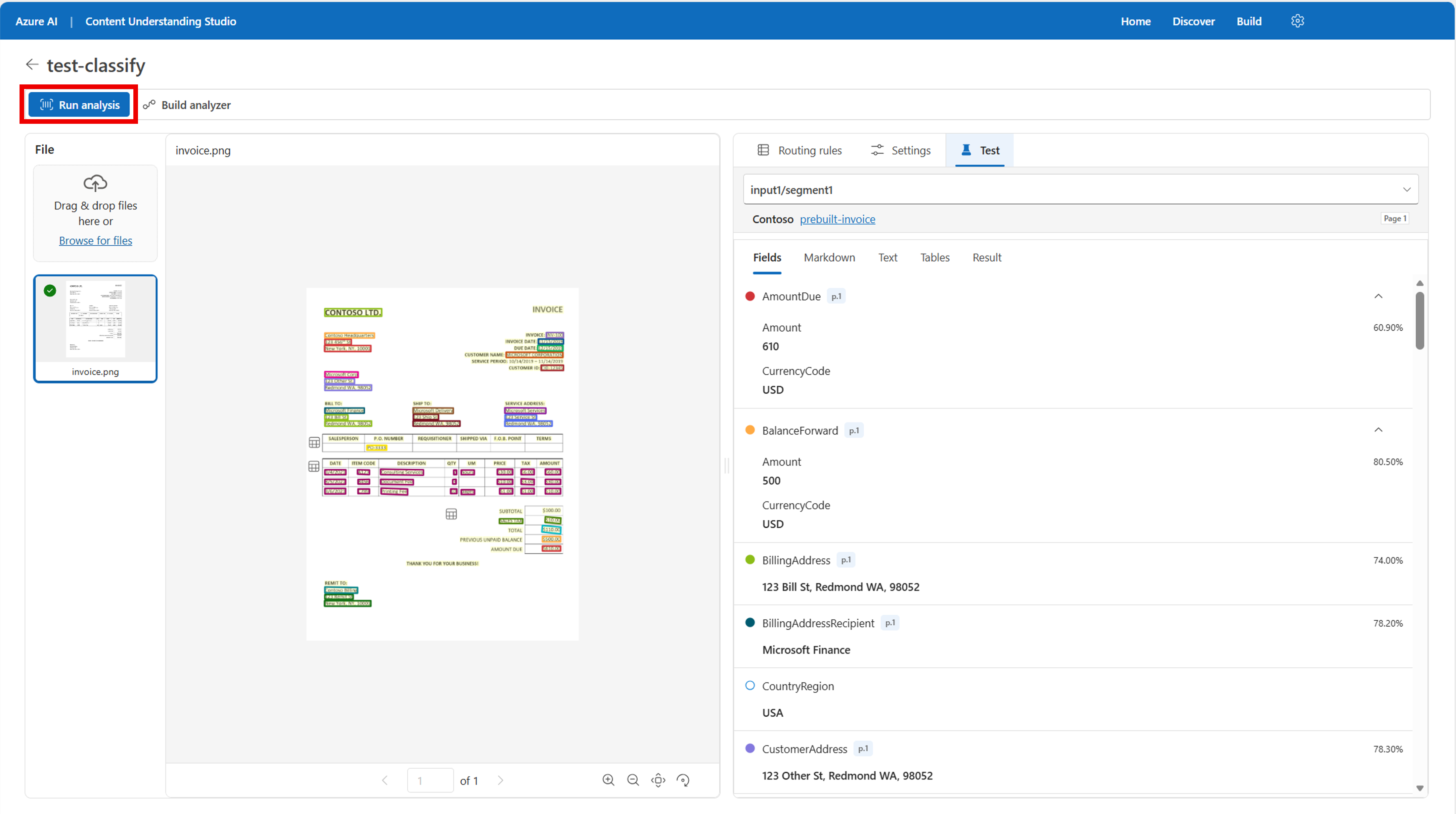
Build your classification analyzer: When you're satisfied with the output, select the Build analyzer button at the top of the page. Give the analyzer a name and select Save.
Create a classifier programmatically
Select your language or the REST API tab to see the steps for creating a basic classifier.
Before running any of the following cURL commands, replace {endpoint} and {key} with the corresponding values from your Foundry instance in the Azure portal. The examples use gpt-5.2. For current model options, see Supported generative models.
Define the classifier
Define contentCategories within the analyzer configuration. Each category has a name and description that the service uses to classify your input files.
Create a JSON file named classifier.json with the following content:
{
  "baseAnalyzerId": "prebuilt-document",
  "description": "Custom classifier for document categorization",
  "config": {
    "returnDetails": true,
    "enableSegment": true,
    "contentCategories": {
      "Loan_Application": {
        "description": "Documents submitted by individuals or businesses to request funding, typically including personal or business details, financial history, loan amount, purpose, and supporting documentation."
      },
      "Invoice": {
        "description": "Billing documents issued by sellers or service providers to request payment for goods or services, detailing items, prices, taxes, totals, and payment terms."
      },
      "Bank_Statement": {
        "description": "Official statements issued by banks that summarize account activity over a period, including deposits, withdrawals, fees, and balances."
      }
    }
  },
  "models": {"completion": "gpt-5.2"}
}
The key fields in this definition are:
| Field | Description |
|---|---|
baseAnalyzerId |
The prebuilt analyzer to extend. Use prebuilt-document for document classification. |
contentCategories |
A dictionary of up to 200 category names and descriptions. |
enableSegment |
When true, automatically splits and classifies different document types within a single file. When false, treats the entire file as a single document. |
Create the classifier
Use a PUT request to create the classifier analyzer.
curl -i -X PUT "{endpoint}/contentunderstanding/analyzers/{classifierId}?api-version=2025-11-01" \
  -H "Ocp-Apim-Subscription-Key: {key}" \
  -H "Content-Type: application/json" \
  -d @classifier.json
The 201 Created response includes an Operation-Location header with a URL that you can use to track the status of the asynchronous creation operation.
201 Created
Operation-Location: {endpoint}/contentunderstanding/analyzers/{classifierId}/operations/{operationId}?api-version=2025-11-01
When the operation finishes, an HTTP GET on the operation location URL returns "status": "succeeded".
curl -i -X GET "{endpoint}/contentunderstanding/analyzers/{classifierId}/operations/{operationId}?api-version=2025-11-01" \
  -H "Ocp-Apim-Subscription-Key: {key}"
Reference: Content Analyzers - Create or Replace
Classify a document
Submit a document for classification by using the :analyze endpoint. Replace {classifierId} with the name of the classifier you created.
curl -i -X POST "{endpoint}/contentunderstanding/analyzers/{classifierId}:analyze?api-version=2025-11-01" \
  -H "Ocp-Apim-Subscription-Key: {key}" \
  -H "Content-Type: application/json" \
  -d '{
        "inputs": [
          {
            "url": "https://github.com/Azure-Samples/azure-ai-content-understanding-python/raw/refs/heads/main/data/mixed_financial_docs.pdf"
          }
        ]
      }'
The response includes an Operation-Location header. Use that URL to retrieve the analysis results.
Get classification results
curl -i -X GET "{Operation-Location}" \
  -H "Ocp-Apim-Subscription-Key: {key}"
A successful response returns "status": "Succeeded" with classification results in the result object. Each segment includes a category, startPageNumber, and endPageNumber.
Reference: Analyzer Results - Get
Clean up
Delete the classifier when you're done.
curl -i -X DELETE "{endpoint}/contentunderstanding/analyzers/{classifierId}?api-version=2025-11-01" \
  -H "Ocp-Apim-Subscription-Key: {key}"
Install the required packages. Use --pre to pull the prerelease build of azure-ai-contentunderstanding (1.2.0b2 or later), which is the first version that exports the to_llm_input helper used in this sample. The current stable release (1.1.0) doesn't include it.
pip install --pre azure-ai-contentunderstanding
pip install azure-identity python-dotenv
The following sample creates a classifier, analyzes a multi-document PDF, converts the classification result to LLM-friendly text, and then deletes the classifier. The Invoice category also sets analyzer_id="prebuilt-invoice" to demonstrate optional per-category routing (covered in Step 2).
import os
import time
from typing import cast

from dotenv import load_dotenv
from azure.ai.contentunderstanding import ContentUnderstandingClient
from azure.ai.contentunderstanding import to_llm_input
from azure.ai.contentunderstanding.models import (
    ContentAnalyzer,
    ContentAnalyzerConfig,
    ContentCategoryDefinition,
    AnalysisResult,
    DocumentContent,
)
from azure.core.credentials import AzureKeyCredential
from azure.identity import DefaultAzureCredential

load_dotenv()


def main() -> None:
    endpoint = os.environ["CONTENTUNDERSTANDING_ENDPOINT"]
    key = os.getenv("CONTENTUNDERSTANDING_KEY")
    credential = AzureKeyCredential(key) if key else DefaultAzureCredential()

    client = ContentUnderstandingClient(endpoint=endpoint, credential=credential)

    # Generate a unique analyzer ID
    analyzer_id = f"my_classifier_{int(time.time())}"

    print(f"Creating classifier '{analyzer_id}'...")

    # Define content categories for classification.
    # Each category has a description that helps the AI model identify matching documents.
    # Optionally, set analyzer_id on a category to route matched segments to a prebuilt
    # or custom analyzer for field extraction. For example, setting
    # analyzer_id="prebuilt-invoice" on the Invoice category will automatically extract
    # invoice fields (vendor, line items, totals, etc.) from segments classified as Invoice.
    categories = {
        "Loan_Application": ContentCategoryDefinition(
            description="Documents submitted by individuals or businesses to request funding, "
            "typically including personal or business details, financial history, "
            "loan amount, purpose, and supporting documentation."
        ),
        "Invoice": ContentCategoryDefinition(
            description="Billing documents issued by sellers or service providers to request "
            "payment for goods or services, detailing items, prices, taxes, totals, "
            "and payment terms.",
            analyzer_id="prebuilt-invoice",  # Route Invoice segments for field extraction
        ),
        "Bank_Statement": ContentCategoryDefinition(
            description="Official statements issued by banks that summarize account activity "
            "over a period, including deposits, withdrawals, fees, and balances."
        ),
    }

    # Create analyzer configuration
    config = ContentAnalyzerConfig(
        return_details=True,
        enable_segment=True,  # Enable automatic segmentation by category
        content_categories=categories,
    )

    # Create the classifier analyzer
    classifier = ContentAnalyzer(
        base_analyzer_id="prebuilt-document",
        description="Custom classifier for financial document categorization",
        config=config,
        models={"completion": "gpt-5.2"},
    )

    # Create the classifier
    poller = client.begin_create_analyzer(
        analyzer_id=analyzer_id,
        resource=classifier,
    )
    result = poller.result()  # Wait for creation to complete

    # Get the full analyzer details after creation
    result = client.get_analyzer(analyzer_id=analyzer_id)

    print(f"Classifier '{analyzer_id}' created successfully!")
    if result.description:
        print(f"  Description: {result.description}")

    file_path = "sample_files/mixed_financial_docs.pdf"

    with open(file_path, "rb") as f:
        file_bytes = f.read()

    print(f"\nAnalyzing document with classifier '{analyzer_id}'...")

    analyze_poller = client.begin_analyze_binary(
        analyzer_id=analyzer_id,
        binary_input=file_bytes,
    )
    analyze_result: AnalysisResult = analyze_poller.result()

    # Display classification results
    if analyze_result.contents and len(analyze_result.contents) > 0:
        document_content = cast(DocumentContent, analyze_result.contents[0])
        print(
            f"Pages: {document_content.start_page_number}-{document_content.end_page_number}"
        )

        # Display segments (classification results)
        if document_content.segments and len(document_content.segments) > 0:
            print(f"\nFound {len(document_content.segments)} segment(s):")
            for segment in document_content.segments:
                print(f"  Category: {segment.category or '(unknown)'}")
                print(f"  Pages: {segment.start_page_number}-{segment.end_page_number}")
                print(f"  Segment ID: {segment.segment_id or '(not available)'}")
                print()
        else:
            print("No segments found (document classified as a single unit).")
    else:
        print("No content found in the analysis result.")

    # Convert classification results to LLM-friendly text.
    # to_llm_input automatically detects classification results: it expands the parent
    # into per-segment blocks, each with its category label in the YAML front matter.
    # Segments are separated by a ***** divider.
    print("\n" + "=" * 60)
    print("CLASSIFICATION RESULT AS LLM INPUT")
    print("=" * 60)

    text = to_llm_input(analyze_result)
    print(text)

    # Clean up - delete the classifier
    print(f"\nCleaning up: deleting classifier '{analyzer_id}'...")
    client.delete_analyzer(analyzer_id=analyzer_id)
    print(f"Classifier '{analyzer_id}' deleted successfully.")


if __name__ == "__main__":
    main()
Reference: azure-ai-contentunderstanding Python samples
Install the required NuGet packages:
dotnet add package Azure.AI.ContentUnderstanding
dotnet add package Azure.Identity
Create the ContentUnderstandingClient:
// Example: https://your-foundry.services.ai.azure.com/
string endpoint = "<endpoint>";
var credential = new DefaultAzureCredential();
var client = new ContentUnderstandingClient(new Uri(endpoint), credential);
Or authenticate with an API key:
// Example: https://your-foundry.services.ai.azure.com/
string endpoint = "<endpoint>";
string apiKey = "<apiKey>";
var client = new ContentUnderstandingClient(new Uri(endpoint), new AzureKeyCredential(apiKey));
Create a classifier analyzer with content categories:
// Define content categories for classification
var categories = new Dictionary<string, ContentCategoryDefinition>
{
    ["Loan_Application"] = new ContentCategoryDefinition
    {
        Description = "Documents submitted by individuals or businesses to request funding, typically including personal or business details, financial history, loan amount, purpose, and supporting documentation."
    },
    ["Invoice"] = new ContentCategoryDefinition
    {
        Description = "Billing documents issued by sellers or service providers to request payment for goods or services, detailing items, prices, taxes, totals, and payment terms.",
        AnalyzerId = "prebuilt-invoice" // Route Invoice segments for field extraction
    },
    ["Bank_Statement"] = new ContentCategoryDefinition
    {
        Description = "Official statements issued by banks that summarize account activity over a period, including deposits, withdrawals, fees, and balances."
    }
};

// Create analyzer configuration
var config = new ContentAnalyzerConfig
{
    ShouldReturnDetails = true,
    EnableSegment = true // Enable automatic segmentation by category
};

// Add categories to config
foreach (var kvp in categories)
{
    config.ContentCategories.Add(kvp.Key, kvp.Value);
}

// Create the classifier analyzer
var classifier = new ContentAnalyzer
{
    BaseAnalyzerId = "prebuilt-document",
    Description = "Custom classifier for financial document categorization",
    Config = config
};
classifier.Models["completion"] = "gpt-5.2";

// Create the classifier
string analyzerId = $"my_classifier_{DateTimeOffset.UtcNow.ToUnixTimeSeconds()}";
var operation = await client.CreateAnalyzerAsync(
    WaitUntil.Completed,
    analyzerId,
    classifier);

ContentAnalyzer result = operation.Value;
Console.WriteLine($"Classifier '{analyzerId}' created successfully!");
Analyze a document with automatic segmentation:
// Analyze a document (EnableSegment=true automatically segments by category)
string filePath = "<file_path>";
byte[] fileBytes = File.ReadAllBytes(filePath);
Operation<AnalysisResult> analyzeOperation = await client.AnalyzeBinaryAsync(
    WaitUntil.Completed,
    analyzerId,
    BinaryData.FromBytes(fileBytes));

var analyzeResult = analyzeOperation.Value;

// Display classification results with automatic segmentation
DocumentContent docContent = (DocumentContent)analyzeResult.Contents!.First();
Console.WriteLine($"Found {docContent.Segments?.Count ?? 0} segment(s):");
foreach (var segment in docContent.Segments ?? Enumerable.Empty<DocumentContentSegment>())
{
    Console.WriteLine($"  Category: {segment.Category ?? "(unknown)"}");
    Console.WriteLine($"  Pages: {segment.StartPageNumber}-{segment.EndPageNumber}");
    Console.WriteLine($"  Segment ID: {segment.SegmentId ?? "(not available)"}");
}
Convert classification results to LLM-friendly text:
// Convert classification results to LLM-friendly text.
// ToLlmInput automatically detects classification results: it expands the parent
// into per-segment blocks, each with its category label in the YAML front matter.
// Segments are separated by a ***** divider.
string llmText = analyzeResult.ToLlmInput();
Console.WriteLine(llmText);
Clean up:
// Clean up: delete the classifier (for testing purposes only)
// In production, classifiers are typically kept and reused
await client.DeleteAnalyzerAsync(analyzerId);
Console.WriteLine($"Classifier '{analyzerId}' deleted successfully.");
Reference: Azure.AI.ContentUnderstanding .NET samples
Add the required dependencies to your pom.xml:
<dependency>
  <groupId>com.azure</groupId>
  <artifactId>azure-ai-contentunderstanding</artifactId>
</dependency>
<dependency>
  <groupId>com.azure</groupId>
  <artifactId>azure-identity</artifactId>
</dependency>
The following sample creates a classifier, analyzes a multi-document PDF, converts the classification result to LLM-friendly text, and then deletes the classifier. The Invoice category also sets analyzerId to prebuilt-invoice to demonstrate optional per-category routing (covered in Step 2).
// Copyright (c) Microsoft Corporation. All rights reserved.
// Licensed under the MIT License.
// Code generated by Microsoft (R) TypeSpec Code Generator.

package com.azure.ai.contentunderstanding.samples;

import com.azure.ai.contentunderstanding.ContentUnderstandingClient;
import com.azure.ai.contentunderstanding.ContentUnderstandingClientBuilder;
import com.azure.ai.contentunderstanding.models.ContentAnalyzer;
import com.azure.ai.contentunderstanding.models.ContentAnalyzerConfig;
import com.azure.ai.contentunderstanding.models.ContentAnalyzerOperationStatus;
import com.azure.ai.contentunderstanding.models.ContentCategoryDefinition;
import com.azure.ai.contentunderstanding.models.AnalysisResult;
import com.azure.ai.contentunderstanding.models.ContentAnalyzerAnalyzeOperationStatus;
import com.azure.ai.contentunderstanding.models.DocumentContent;
import com.azure.ai.contentunderstanding.models.DocumentContentSegment;
import com.azure.ai.contentunderstanding.LlmInputHelper;
import com.azure.core.credential.AzureKeyCredential;
import com.azure.core.util.BinaryData;
import com.azure.core.util.polling.SyncPoller;
import com.azure.identity.DefaultAzureCredentialBuilder;

import java.io.IOException;
import java.nio.file.Files;
import java.nio.file.Paths;
import java.util.HashMap;
import java.util.Map;

public class Sample05_CreateClassifier {

    private static String createdAnalyzerId;

    public static void main(String[] args) throws IOException {
        String endpoint = System.getenv("CONTENTUNDERSTANDING_ENDPOINT");
        String key = System.getenv("CONTENTUNDERSTANDING_KEY");

        // Build the client with appropriate authentication
        ContentUnderstandingClientBuilder builder = new ContentUnderstandingClientBuilder().endpoint(endpoint);
        ContentUnderstandingClient client;
        if (key != null && !key.trim().isEmpty()) {
            // Use API key authentication
            client = builder.credential(new AzureKeyCredential(key)).buildClient();
        } else {
            // Use default Azure credential (for managed identity, Azure CLI, etc.)
            client = builder.credential(new DefaultAzureCredentialBuilder().build()).buildClient();
        }

        // Generate a unique classifier analyzer ID
        String analyzerId = "document_classifier_" + System.currentTimeMillis();

        System.out.println("Creating classifier analyzer '" + analyzerId + "'...");

        // Define content categories for classification.
        Map<String, ContentCategoryDefinition> categories = new HashMap<>();

        categories.put("Loan_Application", new ContentCategoryDefinition()
            .setDescription("Documents submitted by individuals or businesses to request funding, "
                + "typically including personal or business details, financial history, loan amount, "
                + "purpose, and supporting documentation."));

        categories.put("Invoice", new ContentCategoryDefinition()
            .setDescription("Billing documents issued by sellers or service providers to request payment "
                + "for goods or services, detailing items, prices, taxes, totals, and payment terms.")
            .setAnalyzerId("prebuilt-invoice")); // Route Invoice segments for field extraction

        categories.put("Bank_Statement", new ContentCategoryDefinition()
            .setDescription("Official statements issued by banks that summarize account activity over a period, "
                + "including deposits, withdrawals, fees, and balances."));

        // Create analyzer configuration with content categories
        ContentAnalyzerConfig config = new ContentAnalyzerConfig()
            .setReturnDetails(true)
            .setSegmentEnabled(true) // Enable automatic segmentation by category
            .setContentCategories(categories);

        // Create the classifier analyzer
        // Note: models are specified using model names, not deployment names
        Map<String, String> models = new HashMap<>();
        models.put("completion", "gpt-5.2");

        ContentAnalyzer classifier = new ContentAnalyzer()
            .setBaseAnalyzerId("prebuilt-document")
            .setDescription("Custom classifier for financial document categorization")
            .setConfig(config)
            .setModels(models);

        // Create the classifier
        SyncPoller<ContentAnalyzerOperationStatus, ContentAnalyzer> operation
            = client.beginCreateAnalyzer(analyzerId, classifier, true);

        ContentAnalyzer result = operation.getFinalResult();
        System.out.println("Classifier '" + analyzerId + "' created successfully!");

        createdAnalyzerId = analyzerId; // Track for cleanup

        // Analyze a multi-page document with the classifier
        String filePath = "src/samples/resources/mixed_financial_docs.pdf";
        byte[] fileBytes = Files.readAllBytes(Paths.get(filePath));

        System.out.println("\nAnalyzing document with classifier '" + analyzerId + "'...");

        SyncPoller<ContentAnalyzerAnalyzeOperationStatus, AnalysisResult> analyzePoller
            = client.beginAnalyzeBinary(analyzerId, BinaryData.fromBytes(fileBytes));
        AnalysisResult analyzeResult = analyzePoller.getFinalResult();

        // Display classification results
        if (analyzeResult.getContents() != null && !analyzeResult.getContents().isEmpty()) {
            DocumentContent documentContent = (DocumentContent) analyzeResult.getContents().get(0);
            System.out.println("Pages: " + documentContent.getStartPageNumber()
                + "-" + documentContent.getEndPageNumber());

            // Display segments (classification results)
            if (documentContent.getSegments() != null && !documentContent.getSegments().isEmpty()) {
                System.out.println("\nFound " + documentContent.getSegments().size() + " segment(s):");
                for (DocumentContentSegment segment : documentContent.getSegments()) {
                    System.out.println("  Category: "
                        + (segment.getCategory() != null ? segment.getCategory() : "(unknown)"));
                    System.out.println("  Pages: "
                        + segment.getStartPageNumber() + "-" + segment.getEndPageNumber());
                    System.out.println("  Segment ID: "
                        + (segment.getSegmentId() != null ? segment.getSegmentId() : "(not available)"));
                    System.out.println();
                }
            } else {
                System.out.println("No segments found (document classified as a single unit).");
            }
        } else {
            System.out.println("No content found in the analysis result.");
        }

        // Convert classification results to LLM-friendly text.
        System.out.println("\n============================================================");
        System.out.println("CLASSIFICATION RESULT AS LLM INPUT");
        System.out.println("============================================================");

        String llmText = LlmInputHelper.toLlmInput(analyzeResult);
        System.out.println(llmText);

        // Cleanup - delete the created classifier analyzer
        System.out.println("\nCleaning up: deleting classifier analyzer '" + createdAnalyzerId + "'...");
        client.deleteAnalyzer(createdAnalyzerId);
        System.out.println("Classifier analyzer '" + createdAnalyzerId + "' deleted successfully.");
    }
}
Reference: azure-ai-contentunderstanding Java samples
Install the required packages:
npm install @azure/ai-content-understanding @azure/identity @azure/core-auth dotenv
The following sample creates a classifier, analyzes a multi-document PDF, and then deletes the classifier. The Invoice category also sets analyzerId: "prebuilt-invoice" to demonstrate optional per-category routing (covered in Step 2).
// Copyright (c) Microsoft Corporation.
// Licensed under the MIT License.

require("dotenv/config");
const fs = require("fs");
const path = require("path");
const { DefaultAzureCredential } = require("@azure/identity");
const { AzureKeyCredential } = require("@azure/core-auth");
const { ContentUnderstandingClient } = require("@azure/ai-content-understanding");

function getCredential() {
  const key = process.env["CONTENTUNDERSTANDING_KEY"];
  if (key) {
    return new AzureKeyCredential(key);
  }
  return new DefaultAzureCredential();
}

async function main() {
  console.log("== Create Classifier Sample ==");

  const endpoint = process.env["CONTENTUNDERSTANDING_ENDPOINT"];
  if (!endpoint) {
    throw new Error("CONTENTUNDERSTANDING_ENDPOINT is required.");
  }

  const client = new ContentUnderstandingClient(endpoint, getCredential());

  // Generate a unique analyzer ID
  const analyzerId = `my_classifier_${Math.floor(Date.now() / 1000)}`;
  console.log(`Creating classifier '${analyzerId}'...`);

  // Define content categories for classification
  const contentCategories = {
    Loan_Application: {
      description:
        "Documents submitted by individuals or businesses to request funding, " +
        "typically including personal or business details, financial history, " +
        "loan amount, purpose, and supporting documentation.",
    },
    Invoice: {
      description:
        "Billing documents issued by sellers or service providers to request " +
        "payment for goods or services, detailing items, prices, taxes, totals, " +
        "and payment terms.",
    },
    Bank_Statement: {
      description:
        "Official statements issued by banks that summarize account activity " +
        "over a period, including deposits, withdrawals, fees, and balances.",
    },
  };

  // Create analyzer configuration
  const config = {
    returnDetails: true,
    enableSegment: true, // Enable automatic segmentation by category
    contentCategories,
  };

  // Create the classifier analyzer
  const classifier = {
    baseAnalyzerId: "prebuilt-document",
    description: "Custom classifier for financial document categorization",
    config,
    models: { completion: "gpt-5.2" },
  };

  // Create the classifier
  const poller = client.createAnalyzer(analyzerId, classifier);
  await poller.pollUntilDone();

  // Get the full analyzer details after creation
  const result = await client.getAnalyzer(analyzerId);

  console.log(`Classifier '${analyzerId}' created successfully!`);
  if (result.description) {
    console.log(`  Description: ${result.description}`);
  }

  // Analyze a document with the classifier
  // Assets folder is at ../assets relative to samples/v1/javascript or samples/v1/typescript
  const filePath = path.join("..", "..", "assets", "mixed_financial_docs.pdf");
  const fileBytes = fs.readFileSync(filePath);
  console.log(`\nAnalyzing document with classifier '${analyzerId}'...`);

  const analyzePoller = client.analyzeBinary(analyzerId, fileBytes);
  const analyzeResult = await analyzePoller.pollUntilDone();

  // Display classification results
  if (analyzeResult.contents && analyzeResult.contents.length > 0) {
    const content = analyzeResult.contents[0];
    if (content.kind === "document") {
      const documentContent = content;
      console.log(`Pages: ${documentContent.startPageNumber}-${documentContent.endPageNumber}`);

      // Display segments (classification results)
      if (documentContent.segments && documentContent.segments.length > 0) {
        console.log(`\nFound ${documentContent.segments.length} segment(s):`);
        for (const segment of documentContent.segments) {
          console.log(`  Category: ${segment.category ?? "(unknown)"}`);
          console.log(`  Pages: ${segment.startPageNumber}-${segment.endPageNumber}`);
          console.log(`  Segment ID: ${segment.segmentId ?? "(not available)"}`);
        }
      } else {
        console.log("No segments found (document classified as a single unit).");
      }
    }
  } else {
    console.log("No content found in the analysis result.");
  }

  // Clean up - delete the classifier
  console.log(`\nCleaning up: deleting classifier '${analyzerId}'...`);
  await client.deleteAnalyzer(analyzerId);
  console.log(`Classifier '${analyzerId}' deleted successfully.`);
}

main().catch((err) => {
  console.error("The sample encountered an error:", err);
});

module.exports = { main };
Reference: @azure/ai-content-understanding JavaScript samples
Install the required packages:
npm install @azure/ai-content-understanding @azure/identity @azure/core-auth dotenv
npm install --save-dev typescript @types/node
// Copyright (c) Microsoft Corporation.
// Licensed under the MIT License.

import "dotenv/config";
import * as fs from "fs";
import * as path from "path";
import { DefaultAzureCredential } from "@azure/identity";
import { AzureKeyCredential } from "@azure/core-auth";
import { ContentUnderstandingClient } from "@azure/ai-content-understanding";
import type {
  ContentAnalyzer,
  ContentAnalyzerConfig,
  DocumentContent,
} from "@azure/ai-content-understanding";

function getCredential(): DefaultAzureCredential | AzureKeyCredential {
  const key = process.env["CONTENTUNDERSTANDING_KEY"];
  if (key) {
    return new AzureKeyCredential(key);
  }
  return new DefaultAzureCredential();
}

export async function main(): Promise<void> {
  console.log("== Create Classifier Sample ==");

  const endpoint = process.env["CONTENTUNDERSTANDING_ENDPOINT"];
  if (!endpoint) {
    throw new Error("CONTENTUNDERSTANDING_ENDPOINT is required.");
  }

  const client = new ContentUnderstandingClient(endpoint, getCredential());

  // Generate a unique analyzer ID
  const analyzerId = `my_classifier_${Math.floor(Date.now() / 1000)}`;
  console.log(`Creating classifier '${analyzerId}'...`);

  // Define content categories for classification
  const contentCategories = {
    Loan_Application: {
      description:
        "Documents submitted by individuals or businesses to request funding, " +
        "typically including personal or business details, financial history, " +
        "loan amount, purpose, and supporting documentation.",
    },
    Invoice: {
      description:
        "Billing documents issued by sellers or service providers to request " +
        "payment for goods or services, detailing items, prices, taxes, totals, " +
        "and payment terms.",
    },
    Bank_Statement: {
      description:
        "Official statements issued by banks that summarize account activity " +
        "over a period, including deposits, withdrawals, fees, and balances.",
    },
  };

  // Create analyzer configuration
  const config: ContentAnalyzerConfig = {
    returnDetails: true,
    enableSegment: true, // Enable automatic segmentation by category
    contentCategories,
  };

  // Create the classifier analyzer
  const classifier: ContentAnalyzer = {
    baseAnalyzerId: "prebuilt-document",
    description: "Custom classifier for financial document categorization",
    config,
    models: { completion: "gpt-5.2" },
  } as unknown as ContentAnalyzer;

  // Create the classifier
  const poller = client.createAnalyzer(analyzerId, classifier);
  await poller.pollUntilDone();

  // Get the full analyzer details after creation
  const result = await client.getAnalyzer(analyzerId);

  console.log(`Classifier '${analyzerId}' created successfully!`);
  if (result.description) {
    console.log(`  Description: ${result.description}`);
  }

  // Analyze a document with the classifier
  // Assets folder is at ../assets relative to samples/v1/javascript or samples/v1/typescript
  const filePath = path.join("..", "..", "assets", "mixed_financial_docs.pdf");
  const fileBytes = fs.readFileSync(filePath);
  console.log(`\nAnalyzing document with classifier '${analyzerId}'...`);

  const analyzePoller = client.analyzeBinary(analyzerId, fileBytes);
  const analyzeResult = await analyzePoller.pollUntilDone();

  // Display classification results
  if (analyzeResult.contents && analyzeResult.contents.length > 0) {
    const content = analyzeResult.contents[0];
    if (content.kind === "document") {
      const documentContent = content as DocumentContent;
      console.log(`Pages: ${documentContent.startPageNumber}-${documentContent.endPageNumber}`);

      // Display segments (classification results)
      if (documentContent.segments && documentContent.segments.length > 0) {
        console.log(`\nFound ${documentContent.segments.length} segment(s):`);
        for (const segment of documentContent.segments) {
          console.log(`  Category: ${segment.category ?? "(unknown)"}`);
          console.log(`  Pages: ${segment.startPageNumber}-${segment.endPageNumber}`);
          console.log(`  Segment ID: ${segment.segmentId ?? "(not available)"}`);
        }
      } else {
        console.log("No segments found (document classified as a single unit).");
      }
    }
  } else {
    console.log("No content found in the analysis result.");
  }

  // Clean up - delete the classifier
  console.log(`\nCleaning up: deleting classifier '${analyzerId}'...`);
  await client.deleteAnalyzer(analyzerId);
  console.log(`Classifier '${analyzerId}' deleted successfully.`);
}

main().catch((err) => {
  console.error("The sample encountered an error:", err);
});
Reference: @azure/ai-content-understanding TypeScript samples
Step 2: Classify and route with custom analyzers
To go beyond basic classification, you can route each category to a specific analyzer for field extraction. This approach combines classification with data extraction in a single pipeline: the classifier identifies the document type and then routes it to the correct analyzer, which extracts fields tailored to that category.
To successfully route your data, create custom analyzers for each category. For more information on building custom analyzers, see Create and improve your custom analyzer in Content Understanding Studio.
Create custom analyzers first: Build custom analyzers for each document type you want to route. For example, create a custom analyzer for loan applications with a field extraction schema specific to that document type.
Create or update routing rules: Under the Routing rules tab, select
Add category. Give the category a name and description, and select an analyzer to correspond to that route. The tool allows you to preview the schema for each analyzer to ensure you have the right one.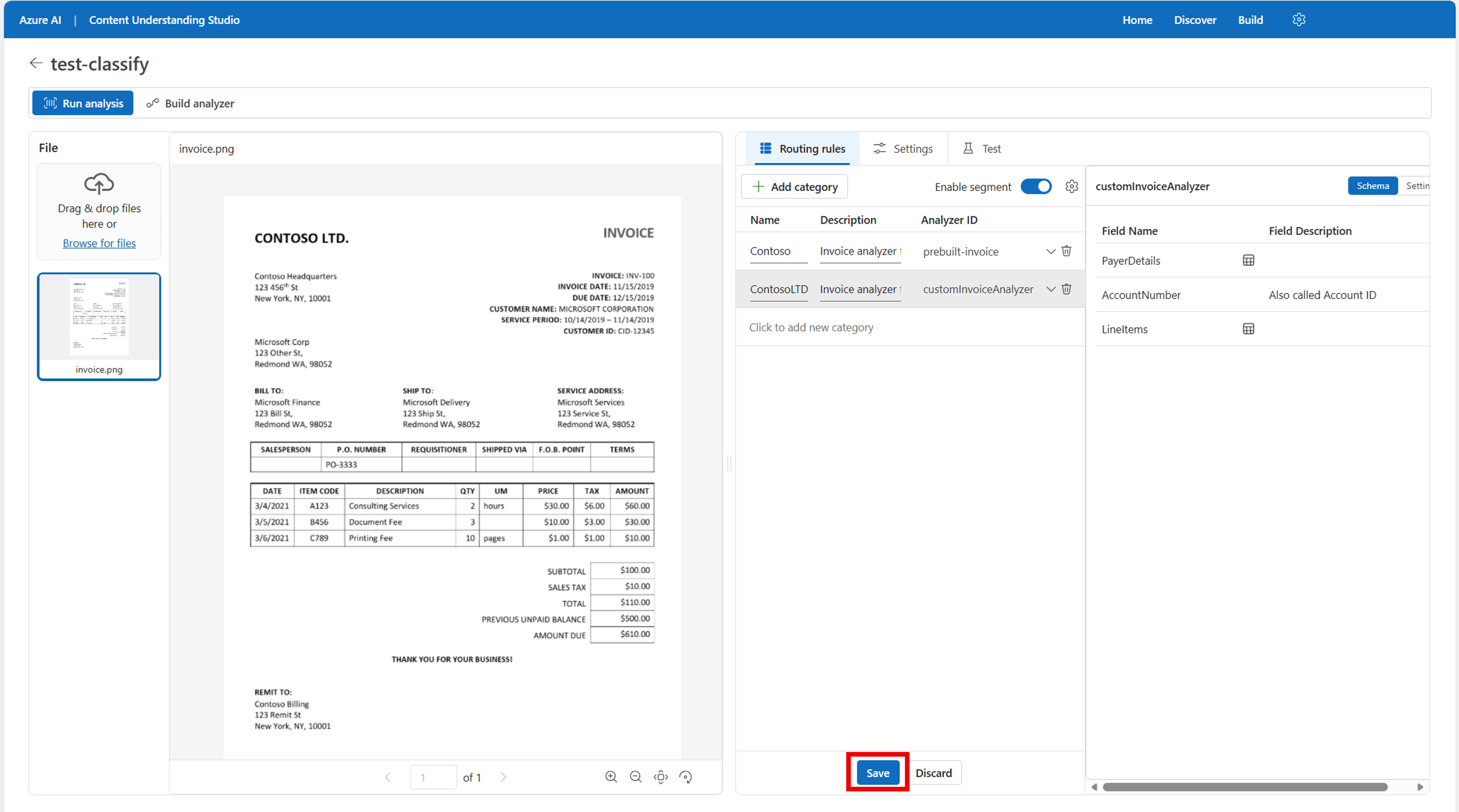
Test your classification workflow: Select Run analysis to see the output of the rules on your data. You can upload additional sample data for testing to see how it performs with multiple different rules.
Build your classification analyzer: When you're satisfied with the output, select the Build analyzer button at the top of the page. Give the analyzer a name and select Save.
Use your classification analyzer: Now you have an analyzer endpoint that you can use in your own application via the REST API.
Tip
For a complete end-to-end Python notebook, see the classifier sample on GitHub.
Step 3: Enable sub-page segmentation (preview)
You can complete steps 1 and 2 by using the GA API version 2025-11-01. This step requires using 2026-06-01-preview.
The 2026-06-01-preview API version adds sub-page (in-page) segmentation and richer per-segment metadata. Use this feature when a single page contains content from more than one document type, for example a scanned page that mixes a credit card and an identity card, or a medical record where a patient demographics section is followed by a referral order on the same page.
Important
Sub-page segmentation is in public preview. Preview capabilities are provided without a service-level agreement and aren't recommended for production workloads.
To enable sub-page segmentation on a classifier in Content Understanding Studio:
Open your classifier project and go to the Routing rules tab.
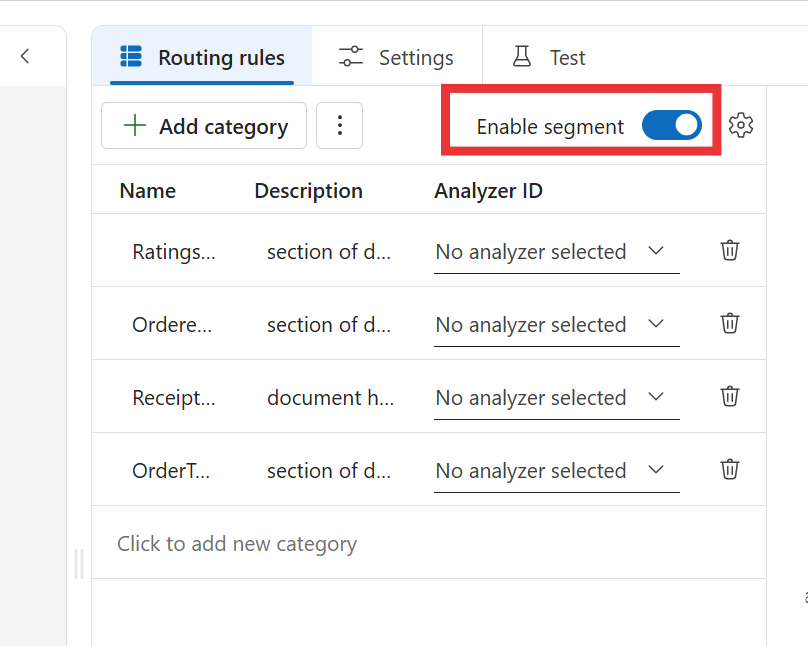
Confirm that Enable segment is turned on, and then select the settings (gear) icon next to it.
In the Segment Settings dialog, keep Auto segment content selected and select the Allow in-page segments checkbox.
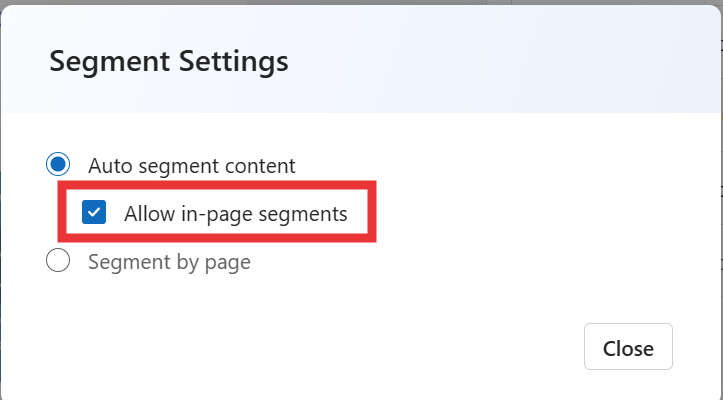
The Segment Settings dialog offers two segmentation modes:
- Auto segment content: Content Understanding automatically groups consecutive pages that belong to the same document into a single segment, so one segment can span 1-N pages. Select Allow in-page segments to also allow splits in the middle of a page when a page contains content from more than one document type.
- Segment by page: Content Understanding creates one segment for every single page in the document, regardless of content.
Select Close. The classifier now splits pages that contain more than one document type into separate in-page segments when you run analysis or build the analyzer.
For more information about how sub-page segmentation is computed and when to use it, see Classification enhancements (2026-06-01 preview).
Next steps
- Learn more about best practices for Azure Content Understanding in Foundry Tools.
- Follow the tutorial to create a custom analyzer using REST APIs.
- Explore classifier concepts for advanced scenarios.