Note
Access to this page requires authorization. You can try signing in or changing directories.
Access to this page requires authorization. You can try changing directories.
This page describes how to create, edit, view, and delete ABAC policies in Unity Catalog. For an overview of policy concepts, see Core concepts for ABAC.
Requirements
All policy operations (create, edit, delete, show, describe) require MANAGE on the securable or object ownership. Creating a policy also requires:
- Databricks Runtime 16.4 or above, or serverless compute. See Compute requirements.
- For the filtering or masking logic, a user-defined function (UDF) in Unity Catalog that you have
EXECUTEon, or a SQL function that you define inline when creating the policy. - Governed tags applied to target objects. See Governed tags.
Create a policy
You can create a policy using the Catalog Explorer UI, the CREATE POLICY SQL statement, or the Azure Databricks REST APIs, SDKs, and Terraform.
To create a policy, you must have MANAGE on the securable where the policy is attached (catalog, schema, or table) or own the securable, and EXECUTE on the UDF that implements the filtering or masking logic.
Catalog Explorer
In your Azure Databricks workspace, click
 Catalog.
Select the object that determines the policy scope, such as a catalog, schema, or table.
Click the Policies tab.
Click New policy.
Complete the Policy identification section. The following table summarizes each field:
Field Description Example Name A name for the policy. Must be unique among all policies defined on the same securable. hide_eu_customers,mask_ssnDescription Optional. A description for the policy. Appears in audit logs and helps administrators understand policy intent. Restrict EU customer rows from US analysts,Mask SSN for all account usersComplete the Principals and scope section. The following table summarizes each field:
Field Description Example Applied to... The users, groups, or service principals subject to the policy. When these principals query tables in scope, the row filter or column mask is applied. To apply the policy to all principals in the account, select All account users.us_analysts,All account usersExcept for Principals exempt from the policy. Exempt principals are not subject to filtering or masking and see the full, unmodified data. admins,compliance_teamScope The securable where the policy is attached. The policy evaluates against all tables within the selected scope. Select a catalog, schema, or table. Azure Databricks recommends attaching policies at the highest applicable level. Select catalog prod, then select schemacustomers.Table condition Determines which tables within the scope the policy applies to. No condition: Applies the policy to all tables in scope. Tables matching any of these tags: Applies the policy to the specified list of tag keys or tag key-value pairs. Tables that have any of these match the policy. Tables matching a custom expression: You can build a boolean expression using has_tagandhas_tag_value, combined withAND,OR, andNOTfor more complex matching logic. Applies the policy to tables where the expression evaluates toTRUEand matches the policy. If a table in scope does not match the condition, the policy does not apply to that table.Select Tables matching any of these tags, then choose tag key sensitivitywith valuehighto restrict the policy to sensitive tables only.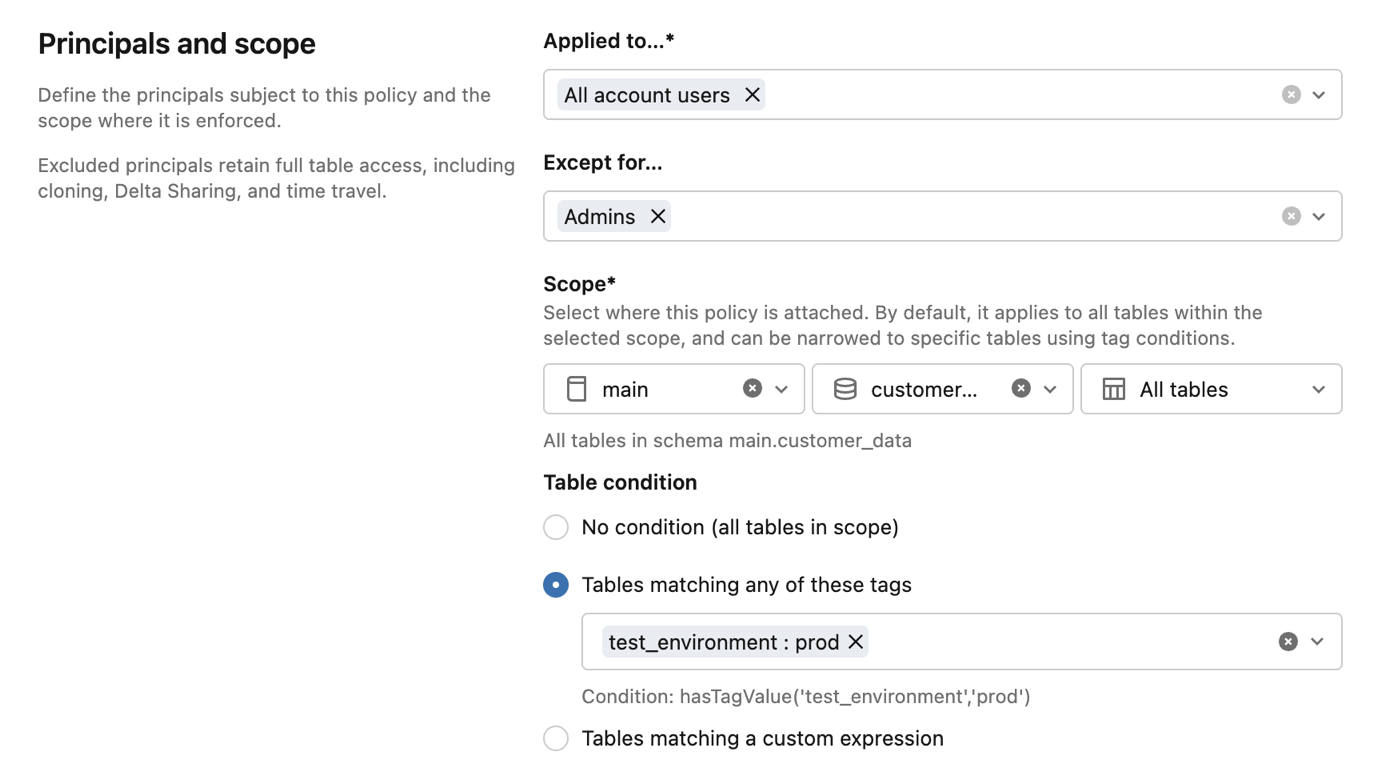
For Policy type, choose the type of access control to enforce:
Option Description Use when Row filter Creates a row filter policy. The UDF evaluates each row and returns a boolean. Rows where the UDF returns FALSEare excluded from query results.Access depends on the values in each row, such as filtering by the values in a column that contains geographic regions. Column mask Creates a column mask policy. The UDF takes the column value as input and returns the original or a masked version. The return type must be castable to the target column's data type. You need to redact sensitive fields, such as SSNs, phone numbers, or email addresses, while still allowing the principal to query the table. The next few sections depend on your Policy type selection. Expand the section that matches your selection:
Row filter
In the Row filter function section, choose how to specify the row filter function:
- Select existing: Select a UDF already defined in Unity Catalog. The UDF evaluates each row and returns a boolean. Rows where the function returns
FALSEare excluded from query results. You must haveEXECUTEon the UDF. - Create: Define a SQL function to use as the row filter logic.
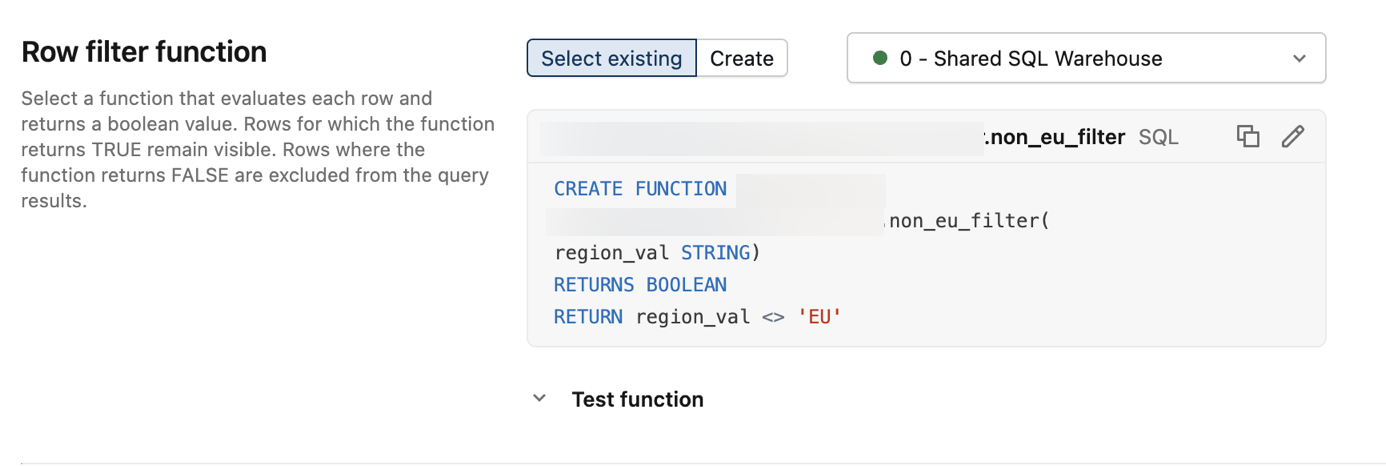
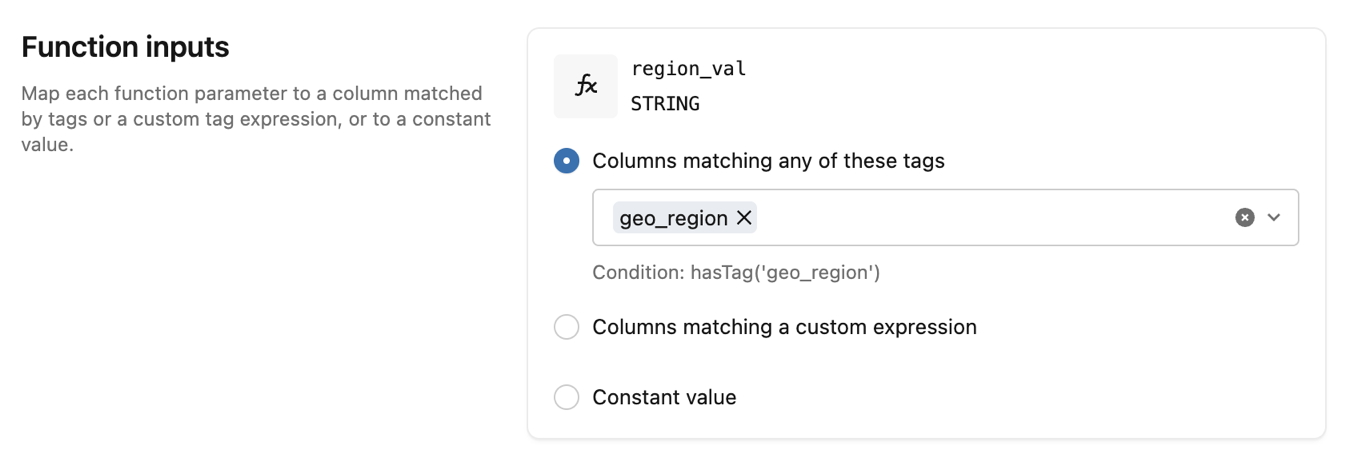
In the Function inputs section, provide a value for each function parameter. Each input can be a column matched by tags, a column matched by a custom expression, or a constant value.
Column mask
In the Column conditions section, choose how to identify the columns to mask:
- Columns matching any of these tags: Specify a list of tag keys or tag key-value pairs. Columns that have any of these are masked by the policy.
- Columns matching a custom expression: Build a boolean expression using
has_tagandhas_tag_value, combined withAND,OR, andNOTfor more complex matching logic. Columns where the expression evaluates toTRUEare masked.
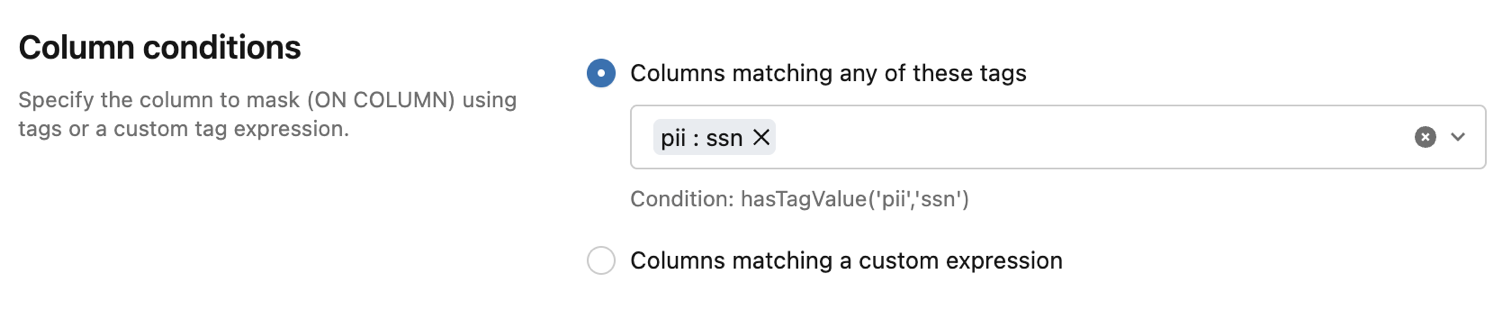
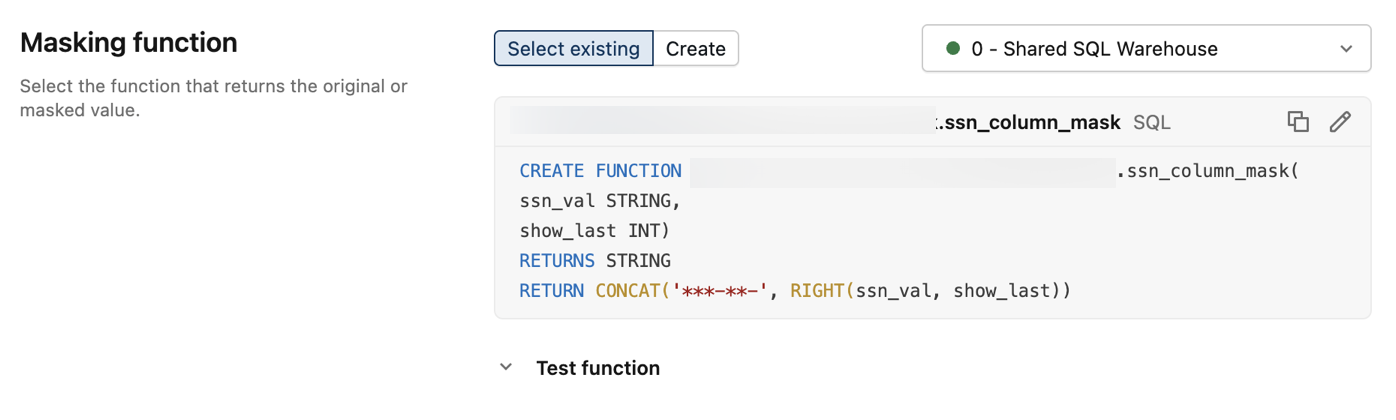
Then, choose the Masking function to apply to the matched columns:
- Select existing: Select a UDF already defined in Unity Catalog. The UDF returns the original or masked value. The return type must be castable to the target column's data type. You must have
EXECUTEon the UDF. - Create: Define a SQL function to use as the column masking logic.
In the Function inputs section, provide a value for each additional function parameter. Each input can be a column matched by tags, a column matched by a custom expression, or a constant value.
This example uses a constant value of
4to show the last 4 characters of the SSN.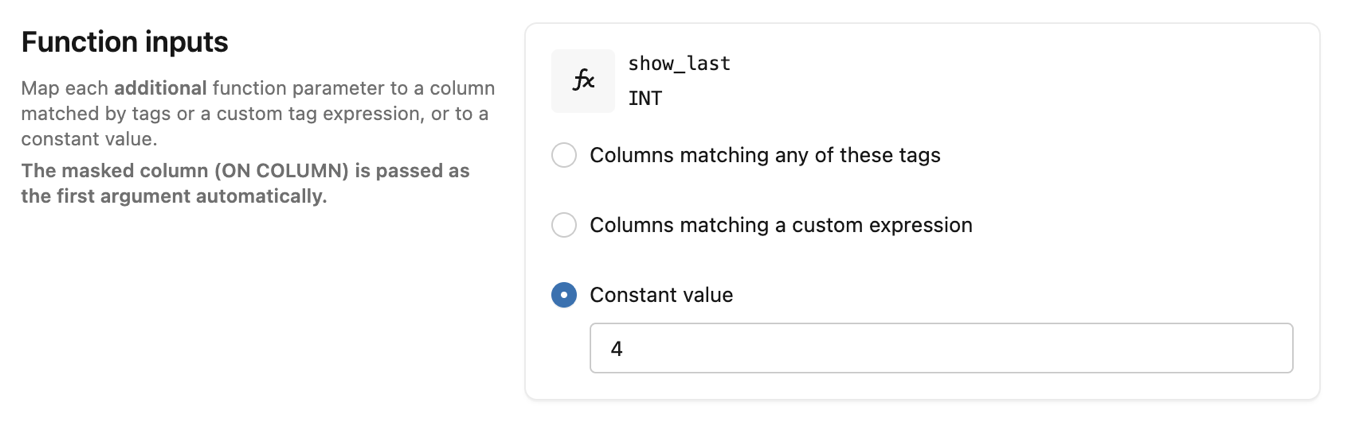
- Select existing: Select a UDF already defined in Unity Catalog. The UDF evaluates each row and returns a boolean. Rows where the function returns
Click Create policy.
SQL
For complete documentation, see CREATE POLICY.
CREATE [OR REPLACE] POLICY policy_name
ON { CATALOG catalog_name | SCHEMA schema_name | TABLE table_name }
[COMMENT description]
{ row_filter_body | column_mask_body }
Row filter body:
ROW FILTER function_name
TO principal [, ...]
[EXCEPT principal [, ...]]
FOR TABLES
[WHEN condition]
[MATCH COLUMNS condition [[AS] alias] [, ...]]
[USING COLUMNS (function_arg [, ...])]
Column mask body:
COLUMN MASK function_name
TO principal [, ...]
[EXCEPT principal [, ...]]
FOR TABLES
[WHEN condition]
[MATCH COLUMNS condition [[AS] alias] [, ...]]
ON COLUMN alias
[USING COLUMNS (function_arg [, ...])]
Parameters:
policy_name: A name for the policy. Must be unique among all policies defined on the same securable.ON { CATALOG | SCHEMA | TABLE }: The scope where the policy is attached. The policy evaluates against all tables that are descendants of this securable.function_name: The fully qualified name of the UDF that implements the filtering or masking logic.TO principal [, ...]: The users, groups, or service principals the policy applies to.EXCEPT principal [, ...]: Principals exempt from the policy. Exempt principals are not subject to filtering or masking.FOR TABLES: Specifies that the policy targets tables. Tables are currently the only supported securable type, and that includes streaming tables and Materialized views.WHEN condition: A boolean expression that determines which tables the policy applies to, based on their tags. Uses built-in functionshas_tag('tag_name')andhas_tag_value('tag_name', 'tag_value'). If omitted, defaults toTRUE(applies to all tables in scope).MATCH COLUMNS condition [[AS] alias] [, ...]: Column conditions that identify which columns the policy targets. Each condition is a boolean expression built fromhas_tag('tag_name')andhas_tag_value('tag_name', 'tag_value'), optionally combined withAND,OR, andNOT. Each condition can be assigned an alias for use inON COLUMNandUSING COLUMNS. A policy can include up to 3MATCH COLUMNSexpressions, and all must match for the policy to apply.ON COLUMN alias: For column mask policies, specifies the matched column to mask, referenced by its alias fromMATCH COLUMNS.USING COLUMNS (function_arg [, ...]): Arguments passed to the UDF. Each argument can be an alias fromMATCH COLUMNSor a constant literal.
Example: column mask policy. Mask all columns tagged with pii:ssn in the prod.customers schema, showing only the last 4 characters. The policy applies to us_analysts except admins.
CREATE FUNCTION ssn_to_last_nr (ssn STRING, nr INT) RETURNS STRING
  RETURN right(ssn, nr);

CREATE POLICY mask_ssn
ON SCHEMA prod.customers
COLUMN MASK ssn_to_last_nr
TO us_analysts EXCEPT admins
FOR TABLES
MATCH COLUMNS has_tag_value('pii', 'ssn') AS ssn
ON COLUMN ssn
USING COLUMNS (4);
Example: row filter policy. Exclude rows with European customers from tables tagged with sensitivity:high in the prod.customers schema. The policy applies to us_analysts and filters rows based on a geo_region column.
CREATE FUNCTION non_eu_region (geo_region STRING) RETURNS BOOLEAN
  RETURN geo_region <> 'eu';

CREATE POLICY hide_eu_customers
ON SCHEMA prod.customers
COMMENT 'Exclude rows with European customers from sensitive tables'
ROW FILTER non_eu_region
TO us_analysts
FOR TABLES
WHEN has_tag_value('sensitivity', 'high')
MATCH COLUMNS has_tag('geo_region') AS region
USING COLUMNS (region);
Python SDK
For complete documentation, see the Databricks SDK for Python documentation.
This example creates a row filter policy that excludes rows with European customers for US-based analysts:
from databricks.sdk import WorkspaceClient
from databricks.sdk.service.catalog import (
    FunctionArgument,
    MatchColumn,
    PolicyInfo,
    PolicyType,
    RowFilterOptions,
    SecurableType,
)

w = WorkspaceClient()

w.policies.create_policy(PolicyInfo(
    name="hide_eu_customers",
    comment="Exclude rows with European customers from sensitive tables",
    on_securable_type=SecurableType.SCHEMA,
    on_securable_fullname="prod.customers",
    for_securable_type=SecurableType.TABLE,
    policy_type=PolicyType.POLICY_TYPE_ROW_FILTER,
    to_principals=["us_analysts"],
    match_columns=[
        MatchColumn(condition="has_tag('geo_region')", alias="region"),
    ],
    row_filter=RowFilterOptions(
        function_name="prod.customers.non_eu_region",
        using=[FunctionArgument(alias="region")],
    ),
))
This example creates a column mask policy that masks social security numbers for US analysts, except those in the admins group:
from databricks.sdk import WorkspaceClient
from databricks.sdk.service.catalog import (
    ColumnMaskOptions,
    FunctionArgument,
    MatchColumn,
    PolicyInfo,
    PolicyType,
    SecurableType,
)

w = WorkspaceClient()

w.policies.create_policy(PolicyInfo(
    name="mask_ssn",
    comment="Mask social security numbers",
    on_securable_type=SecurableType.SCHEMA,
    on_securable_fullname="prod.customers",
    for_securable_type=SecurableType.TABLE,
    policy_type=PolicyType.POLICY_TYPE_COLUMN_MASK,
    to_principals=["us_analysts"],
    except_principals=["admins"],
    match_columns=[
        MatchColumn(condition="has_tag_value('pii', 'ssn')", alias="ssn"),
    ],
    column_mask=ColumnMaskOptions(
        function_name="prod.customers.ssn_to_last_nr",
        on_column="ssn",
        using=[FunctionArgument(constant="4")],
    ),
))
Edit a policy
Catalog Explorer
- In your Azure Databricks workspace, click Catalog.
- Select the object the policy is attached to.
- Click the Policies tab.
- Select the policy you want to edit.
- Update any fields you want to change. You can modify the description, principals, policy type, conditions, and function input mappings. The policy name and the securable object where the policy is applied cannot be edited. For field descriptions, see Create a policy.
- Click Update policy.
SQL
CREATE OR REPLACE POLICY replaces the entire policy definition. Specify all clauses, not just the fields you want to change. The replacement policy must have the same name and be on the same securable.
CREATE OR REPLACE POLICY mask_ssn
ON SCHEMA prod.customers
COLUMN MASK ssn_to_last_nr
TO us_analysts EXCEPT admins, compliance_team
FOR TABLES
MATCH COLUMNS has_tag_value('pii', 'ssn') AS ssn
ON COLUMN ssn
USING COLUMNS (4);
Python SDK
Unlike CREATE OR REPLACE POLICY in SQL, update_policy supports partial updates. Use the update_mask parameter to specify which fields to change. Only those fields are updated. If update_mask is "*" or empty, all fields in policy_info are applied.
from databricks.sdk import WorkspaceClient
from databricks.sdk.service.catalog import PolicyInfo

w = WorkspaceClient()

w.policies.update_policy(
    on_securable_type="SCHEMA",
    on_securable_fullname="prod.customers",
    name="mask_ssn",
    policy_info=PolicyInfo(
        except_principals=["admins", "compliance_team"],
    ),
    update_mask="except_principals",
)
Delete a policy
Catalog Explorer
- In your Azure Databricks workspace, click Catalog.
- Select the object the policy is attached to.
- Click the Policies tab.
- Select the policy.
- Click Delete policy.
SQL
Use DROP POLICY to delete a policy.
DROP POLICY policy_name ON { CATALOG | SCHEMA | TABLE } securable_name
Examples:
DROP POLICY mask_ssn ON SCHEMA prod.customers;
DROP POLICY hide_eu_customers ON SCHEMA prod.customers;
Python SDK
from databricks.sdk import WorkspaceClient

w = WorkspaceClient()

w.policies.delete_policy(
    on_securable_type="SCHEMA",
    on_securable_fullname="prod.customers",
    name="mask_ssn",
)
Show policies
Use SHOW POLICIES to list the policies defined on a securable. Use SHOW EFFECTIVE POLICIES to also include policies from parent scopes, such as catalog-level policies that affect a table.
SHOW [EFFECTIVE] POLICIES ON { CATALOG | SCHEMA | TABLE } securable_name
The result includes policy name, policy type, and the catalog, schema, or table where each policy is defined.
Viewing effective policies for a table does not require permissions on the parent catalog or schema. This allows a table admin to see the rules that apply without having read access to sibling tables' policies.
Example:
SHOW EFFECTIVE POLICIES ON SCHEMA prod.customers;
| policy_name | policy_type | catalog | schema | comment |
|---|---|---|---|---|
| hide_eu_customers | ROW FILTER | prod | customers | |
| mask_ssn | COLUMN MASK | prod | customers |
Describe a policy
Use DESCRIBE POLICY to view the details of a specific policy. Requires MANAGE on the target securable or object ownership.
{ DESC | DESCRIBE } POLICY policy_name ON { CATALOG | SCHEMA | TABLE } securable_name
The result shows the policy's properties as key-value pairs, including name, securable type, securable name, principals, conditions, function name, and timestamps.
Example:
DESCRIBE POLICY hide_eu_customers ON SCHEMA prod.customers;
| info_name | info_value |
|---|---|
| Name | hide_eu_customers |
| On Securable Type | SCHEMA |
| On Securable | prod.customers |
| To Principals | us_analysts |
| For Securable Type | TABLE |
| Match Columns | has_tag('geo_region') AS region |
| Policy Type | ROW_FILTER |
| Function Name | prod.customers.non_eu_region |
| Using Columns | region |
Audit logging
Azure Databricks logs governed tag and ABAC policy operations in the audit log system table. Below are example queries. For more information, see Audit logs.
-- All tag assignment and deletion events from the audit log
SELECT
  event_time,
  action_name,
  user_identity.email AS actor,
  request_params.workspace_id,
  request_params.metastore_id,
  request_params.tag_assignment,
  response.status_code,
  source_ip_address
FROM system.access.audit
WHERE service_name = 'unityCatalog'
  AND action_name IN (
    'createEntityTagAssignment',
    'deleteEntityTagAssignment'
  )
ORDER BY event_time DESC;

-- All ABAC policy CRUD operations
SELECT
  event_time,
  action_name,
  user_identity.email AS actor,
  request_params.name AS policy_name,
  request_params.on_securable_type,
  request_params.on_securable_fullname,
  request_params.policy_info,
  response.status_code
FROM system.access.audit
WHERE service_name = 'unityCatalog'
  AND action_name IN ('createPolicy', 'deletePolicy', 'getPolicy', 'listPolicies')
ORDER BY event_time DESC;