Note
Access to this page requires authorization. You can try signing in or changing directories.
Access to this page requires authorization. You can try changing directories.
Important
Don't use the classic Deep Research tool for new workloads. The tool is deprecated, classic agents retire on March 31, 2027, and the o3-deep-research model version 2025-06-26 retires on December 26, 2026.
For the current path, use the o3-deep-research model with web search or an MCP tool on the 2025-11-15-preview API. Use this article only to maintain a classic workload while you migrate.
Note
- The parent Foundry project resource and the contained
o3-deep-researchmodel and GPT models must exist in the same Azure subscription and region. Supported regions are West US and Norway East. - This tool is only available in the
2025-05-15-previewAPI. Migrate to the2025-11-15-previewAPI to use theo3-deep-researchmodel with web search or an MCP tool.
Use the deprecated samples in this article only with the pinned classic packages and 2025-05-15-preview API.
Prerequisites
The requirements in the Deep Research overview.
Sign in locally by using
az login. The samples useDefaultAzureCredentialand require access to the Foundry project and its Grounding with Bing Search connection.Your Microsoft Foundry Project endpoint.
You can find your endpoint in the overview for your project in the Microsoft Foundry portal, under Libraries > Foundry.
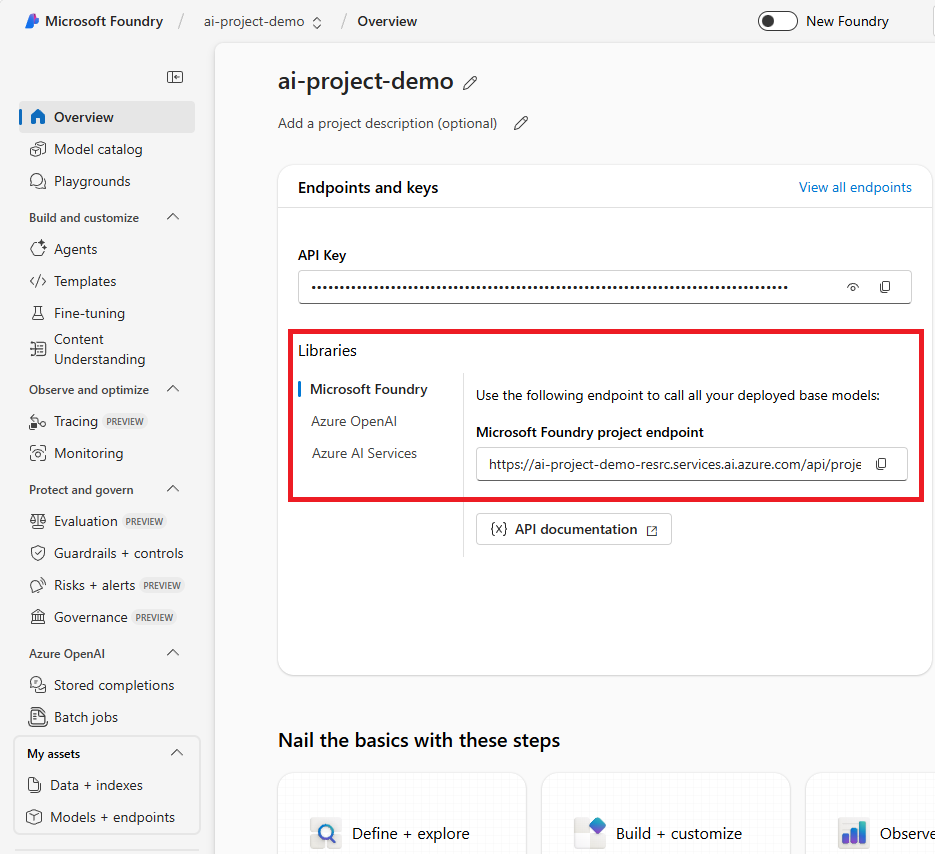
Save this endpoint to an environment variable named
PROJECT_ENDPOINT.A deployment of the
o3-deep-researchmodel and a compatible orchestration model. Deployment names are user-defined; find them in Models + Endpoints in the left navigation menu.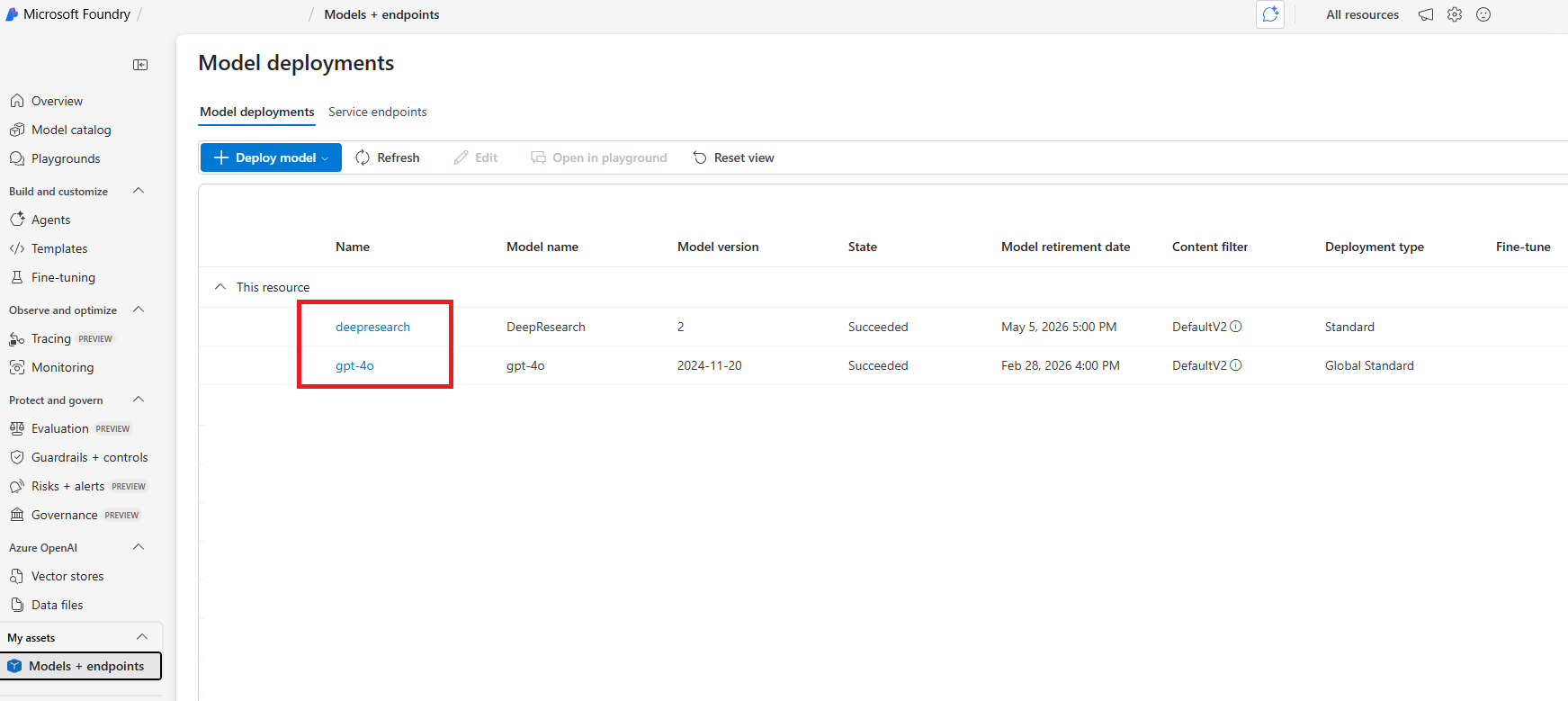
Save the
o3-deep-researchdeployment name asDEEP_RESEARCH_MODEL_DEPLOYMENT_NAMEand the orchestration-model deployment name asMODEL_DEPLOYMENT_NAME.- A Grounding with Bing Search project connection. For C# and TypeScript, save its full connection ID as
AZURE_BING_CONNECTION_ID. For Python, save its connection name asBING_RESOURCE_NAME.
Use only these classic runtime and package combinations:
Language Runtime Packages C# .NET 8 or later Azure.AI.Agents.Persistent1.2.0-beta.6andAzure.IdentityTypeScript Node.js 20 or later @azure/ai-agents1.2.0-beta.2and@azure/identityPython Python 3.9 or later azure-ai-projects1.1.0b4,azure-ai-agents1.2.0b6, andazure-identityDon't install a 2.x Foundry SDK package for these samples. The 2.x packages use the current Foundry API surface, not classic threads and runs.
- A Grounding with Bing Search project connection. For C# and TypeScript, save its full connection ID as
Note
Other GPT-series models including GPT-4o-mini and the GPT-4.1 series aren't supported for scope clarification.
Install and authenticate
dotnet add package Azure.AI.Agents.Persistent --version 1.2.0-beta.6
dotnet add package Azure.Identity
az login
Set environment variables
$env:PROJECT_ENDPOINT = "<your-project-endpoint>"
$env:MODEL_DEPLOYMENT_NAME = "<your-orchestration-model-deployment>"
$env:DEEP_RESEARCH_MODEL_DEPLOYMENT_NAME = "<your-deep-research-deployment>"
$env:AZURE_BING_CONNECTION_ID = "<your-bing-connection-id>"
Run the maintained sample
Use the complete C# Deep Research sample. It contains synchronous and asynchronous paths that create the agent and thread, poll the run, render citations, write research_summary.md, and delete the resources.
In the linked sample, correct the environment-variable lookup from AZURE_BING_CONECTION_ID to AZURE_BING_CONNECTION_ID before you run it.
Expected output resembles:
Start processing the message... this might take a few minutes to finish.
<timestamp> - Agent: <research summary with citation links>
Keep the sample's DeleteThread and DeleteAgent calls enabled so the run doesn't leave classic agent resources behind.
Install and authenticate
npm install @azure/ai-agents@1.2.0-beta.2 @azure/identity
az login
Set environment variables
export PROJECT_ENDPOINT="<your-project-endpoint>"
export MODEL_DEPLOYMENT_NAME="<your-orchestration-model-deployment>"
export DEEP_RESEARCH_MODEL_DEPLOYMENT_NAME="<your-deep-research-deployment>"
export AZURE_BING_CONNECTION_ID="<your-bing-connection-id>"
Run the TypeScript sample
The package release doesn't include a complete Deep Research sample, so use this inline sample for an existing classic workload.
import type {
  MessageTextContent,
  ThreadMessage,
  DeepResearchToolDefinition,
  MessageTextUrlCitationAnnotation,
} from "@azure/ai-agents";
import { AgentsClient, isOutputOfType } from "@azure/ai-agents";
import { DefaultAzureCredential } from "@azure/identity";

const projectEndpoint = process.env["PROJECT_ENDPOINT"];
const modelDeploymentName = process.env["MODEL_DEPLOYMENT_NAME"];
const deepResearchModelDeploymentName =
  process.env["DEEP_RESEARCH_MODEL_DEPLOYMENT_NAME"];
const bingConnectionId = process.env["AZURE_BING_CONNECTION_ID"];

/**
 * Fetches and prints new agent response from the thread
 * @param threadId - The thread ID
 * @param client - The AgentsClient instance
 * @param lastMessageId - The ID of the last message processed
 * @returns The ID of the newest message, or undefined if no new message
 */
async function fetchAndPrintNewAgentResponse(
  threadId: string,
  client: AgentsClient,
  lastMessageId?: string,
): Promise<string | undefined> {
  const messages = client.messages.list(threadId);
  let latestMessage: ThreadMessage | undefined;
  for await (const msg of messages) {
    if (msg.role === "assistant") {
      latestMessage = msg;
      break;
    }
  }

  if (!latestMessage || latestMessage.id === lastMessageId) {
    return lastMessageId;
  }

  console.log("\nAgent response:");

  // Print text content
  for (const content of latestMessage.content) {
    if (isOutputOfType<MessageTextContent>(content, "text")) {
      console.log(content.text.value);
    }
  }

  const urlCitations = getUrlCitationsFromMessage(latestMessage);
  if (urlCitations.length > 0) {
    console.log("\nURL Citations:");
    for (const citation of urlCitations) {
      console.log(`URL Citations: [${citation.title}](${citation.url})`);
    }
  }

  return latestMessage.id;
}

/**
 * Extracts URL citations from a thread message
 * @param message - The thread message
 * @returns Array of URL citations
 */
function getUrlCitationsFromMessage(message: ThreadMessage): Array<{ title: string; url: string }> {
  const citations: Array<{ title: string; url: string }> = [];

  for (const content of message.content) {
    if (isOutputOfType<MessageTextContent>(content, "text")) {
      for (const annotation of content.text.annotations) {
        if (isOutputOfType<MessageTextUrlCitationAnnotation>(annotation, "url_citation")) {
          citations.push({
            title: annotation.urlCitation.title || annotation.urlCitation.url,
            url: annotation.urlCitation.url,
          });
        }
      }
    }
  }

  return citations;
}

/**
 * Creates a research summary from the final message
 * @param message - The thread message containing the research results
 * @param filepath - The file path to write the summary to
 */
function createResearchSummary(message: ThreadMessage): void {
  if (!message) {
    console.log("No message content provided, cannot create research summary.");
    return;
  }

  let content = "";

  // Write text summary
  const textSummaries: string[] = [];
  for (const contentItem of message.content) {
    if (isOutputOfType<MessageTextContent>(contentItem, "text")) {
      textSummaries.push(contentItem.text.value.trim());
    }
  }
  content += textSummaries.join("\n\n");

  // Write unique URL citations, if present
  const urlCitations = getUrlCitationsFromMessage(message);
  if (urlCitations.length > 0) {
    content += "\n\n## References\n";
    const seenUrls = new Set<string>();
    for (const citation of urlCitations) {
      if (!seenUrls.has(citation.url)) {
        content += `- [${citation.title}](${citation.url})\n`;
        seenUrls.add(citation.url);
      }
    }
  }

  // writeFileSync(filepath, content, "utf-8");
  console.log(`Research summary created:\n${content}`);
  // console.log(`Research summary written to '${filepath}'.`);
}

export async function main(): Promise<void> {
  if (
    !projectEndpoint ||
    !modelDeploymentName ||
    !deepResearchModelDeploymentName ||
    !bingConnectionId
  ) {
    throw new Error("Set all environment variables listed in this section");
  }

  // Create an Azure AI Client
  const client = new AgentsClient(projectEndpoint, new DefaultAzureCredential());

  // Create Deep Research tool definition
  const deepResearchTool: DeepResearchToolDefinition = {
    type: "deep_research",
    deepResearch: {
      model: deepResearchModelDeploymentName,
      bingGroundingConnections: [
        {
          connectionId: bingConnectionId,
        },
      ],
    },
  };

  // Create agent with the Deep Research tool
  const agent = await client.createAgent(modelDeploymentName, {
    name: "my-agent",
    instructions: "You are a helpful Agent that assists in researching scientific topics.",
    tools: [deepResearchTool],
  });
  console.log(`Created agent, ID: ${agent.id}`);

  // Create thread for communication
  const thread = await client.threads.create();
  console.log(`Created thread, ID: ${thread.id}`);

  // Create message to thread
  const message = await client.messages.create(
    thread.id,
    "user",
    "Research recent peer-reviewed studies of orca intelligence " +
      "and communication. Include notable authors and papers.",
  );
  console.log(`Created message, ID: ${message.id}`);

  console.log("Start processing the message... this might take a few minutes to finish.");

  // Create and poll the run
  const run = await client.runs.create(thread.id, agent.id);
  let lastMessageId: string | undefined;

  // Poll the run status
  let currentRun = run;
  while (currentRun.status === "queued" || currentRun.status === "in_progress") {
    await new Promise((resolve) => setTimeout(resolve, 1000)); // Wait 1 second
    currentRun = await client.runs.get(thread.id, run.id);

    lastMessageId = await fetchAndPrintNewAgentResponse(thread.id, client, lastMessageId);
    console.log(`Run status: ${currentRun.status}`);
  }

  console.log(`Run finished with status: ${currentRun.status}, ID: ${currentRun.id}`);

  if (currentRun.status === "failed") {
    console.log(`Run failed: ${currentRun.lastError}`);
  }

  // Fetch the final message from the agent and create a research summary
  const messages = client.messages.list(thread.id, { order: "desc", limit: 10 });
  let finalMessage: ThreadMessage | undefined;

  for await (const msg of messages) {
    if (msg.role === "assistant") {
      finalMessage = msg;
      break;
    }
  }

  if (finalMessage) {
    createResearchSummary(finalMessage);
  }

  // Clean up the thread and agent once the run is finished
  await client.threads.delete(thread.id);
  await client.deleteAgent(agent.id);
  console.log("Deleted thread and agent");
}

main().catch((err) => {
  console.error("The sample encountered an error:", err);
});
Expected output
The report content varies. A successful run produces output similar to:
Created agent, ID: <agent-id>
Created thread, ID: <thread-id>
Created message, ID: <message-id>
Run finished with status: completed, ID: <run-id>
Research summary created:
<research summary with URL citations>
Deleted thread and agent
Install and authenticate
Create a virtual environment, install the exact classic preview packages, and sign in:
python -m venv .venv
.\.venv\Scripts\Activate.ps1
python -m pip install --pre "azure-ai-projects==1.1.0b4" "azure-ai-agents==1.2.0b6"
python -m pip install azure-identity
az login
Set environment variables
$env:PROJECT_ENDPOINT = "<your-project-endpoint>"
$env:MODEL_DEPLOYMENT_NAME = "<your-orchestration-model-deployment>"
$env:DEEP_RESEARCH_MODEL_DEPLOYMENT_NAME = "<your-deep-research-deployment>"
$env:BING_RESOURCE_NAME = "<your-bing-connection-name>"
Run the Python sample
The inline sample is synchronous. For a complete asynchronous variant from the same classic SDK generation, see the version-pinned Python sample.
import os
import time
from typing import Optional
from azure.ai.projects import AIProjectClient
from azure.identity import DefaultAzureCredential
from azure.ai.agents import AgentsClient
from azure.ai.agents.models import DeepResearchTool, MessageRole, ThreadMessage

def fetch_and_print_new_agent_response(
    thread_id: str,
    agents_client: AgentsClient,
    last_message_id: Optional[str] = None,
) -> Optional[str]:
    response = agents_client.messages.get_last_message_by_role(
        thread_id=thread_id,
        role=MessageRole.AGENT,
    )
    if not response or response.id == last_message_id:
        return last_message_id  # No new content

    print("\nAgent response:")
    print("\n".join(t.text.value for t in response.text_messages))

    for ann in response.url_citation_annotations:
        print(f"URL Citation: [{ann.url_citation.title}]({ann.url_citation.url})")

    return response.id

def create_research_summary(
        message : ThreadMessage,
        filepath: str = "research_summary.md"
) -> None:
    if not message:
        print("No message content provided, cannot create research summary.")
        return

    with open(filepath, "w", encoding="utf-8") as fp:
        # Write text summary
        text_summary = "\n\n".join([t.text.value.strip() for t in message.text_messages])
        fp.write(text_summary)

        # Write unique URL citations, if present
        if message.url_citation_annotations:
            fp.write("\n\n## References\n")
            seen_urls = set()
            for ann in message.url_citation_annotations:
                url = ann.url_citation.url
                title = ann.url_citation.title or url
                if url not in seen_urls:
                    fp.write(f"- [{title}]({url})\n")
                    seen_urls.add(url)

    print(f"Research summary written to '{filepath}'.")

project_client = AIProjectClient(
    endpoint=os.environ["PROJECT_ENDPOINT"],
    credential=DefaultAzureCredential(),
)

conn_id = project_client.connections.get(name=os.environ["BING_RESOURCE_NAME"]).id

# Initialize a Deep Research tool with Bing Connection ID and Deep Research model deployment name
deep_research_tool = DeepResearchTool(
    bing_grounding_connection_id=conn_id,
    deep_research_model=os.environ["DEEP_RESEARCH_MODEL_DEPLOYMENT_NAME"],
)

# Create Agent with the Deep Research tool and process Agent run
agents_client = AgentsClient(
    endpoint=os.environ["PROJECT_ENDPOINT"],
    credential=DefaultAzureCredential()
)

# Create a new agent that has the Deep Research tool attached.
# NOTE: To add Deep Research to an existing agent, fetch it with `get_agent(agent_id)` and then,
# update the agent with the Deep Research tool.
agent = agents_client.create_agent(
    model=os.environ["MODEL_DEPLOYMENT_NAME"],
    name="my-agent",
    instructions="You are a helpful Agent that assists in researching scientific topics.",
    tools=deep_research_tool.definitions,
)

# agent = agent_poller.result()  # Wait for completion

# [END create_agent_with_deep_research_tool]
print(f"Created agent, ID: {agent.id}")

# Create thread for communication
thread = agents_client.threads.create()
print(f"Created thread, ID: {thread.id}")

# Create message to thread
message = agents_client.messages.create(
    thread_id=thread.id,
    role="user",
    content=(
      "Assess the UK outlook for 2026 economic growth and inflation "
      "from IMF sources. Provide a detailed report."
    ),
)
print(f"Created message, ID: {message.id}")

print("Start processing the message... this might take a few minutes to finish.")
# Poll the run as long as run status is queued or in progress
run = agents_client.runs.create(thread_id=thread.id, agent_id=agent.id)
last_message_id = None
while run.status in ("queued", "in_progress"):
    time.sleep(1)
    run = agents_client.runs.get(thread_id=thread.id, run_id=run.id)

    last_message_id = fetch_and_print_new_agent_response(
        thread_id=thread.id,
        agents_client=agents_client,
        last_message_id=last_message_id,
    )
    print(f"Run status: {run.status}")

print(f"Run finished with status: {run.status}, ID: {run.id}")

if run.status == "failed":
    print(f"Run failed: {run.last_error}")

# Fetch the final message from the agent in the thread and create a research summary
final_message = agents_client.messages.get_last_message_by_role(
    thread_id=thread.id, role=MessageRole.AGENT
)
if final_message:
    create_research_summary(final_message)

# Clean up the thread, agent, and clients once the run is finished.
agents_client.threads.delete(thread.id)
agents_client.delete_agent(agent.id)
agents_client.close()
project_client.close()
print("Deleted thread and agent, and closed the clients")
Expected output
The report content varies. A successful run produces output similar to:
Created agent, ID: <agent-id>
Created thread, ID: <thread-id>
Created message, ID: <message-id>
Run finished with status: RunStatus.COMPLETED, ID: <run-id>
Research summary written to 'research_summary.md'.
Deleted thread and agent, and closed the clients
Note
- Limitation: The Deep Research tool is currently recommended only in nonstreaming scenarios. Using it with streaming can work, but it might occasionally time out and is therefore not recommended.
- The Foundry Agent Playground only starts streaming runs, so you might experience connection drops and timeouts. Use the nonstreaming samples in this article.
Troubleshooting
| Symptom | Resolution |
|---|---|
| The sample reports a missing deployment variable | Set DEEP_RESEARCH_MODEL_DEPLOYMENT_NAME to your o3-deep-research deployment name and MODEL_DEPLOYMENT_NAME to your orchestration-model deployment name. |
| The deployment isn't available | Confirm both deployments are supported in the project region and belong to the same subscription and region as the parent Foundry resource. |
| The TypeScript sample doesn't compile | Use Node.js 20 or later and install the preview packages specified in this article. |
| Bing grounding fails | Verify the Bing project connection ID and the calling identity's access to the connection. |
| A run takes several minutes or times out | Use nonstreaming runs, poll until a terminal status, and increase the client timeout for long research tasks. |