Note
Access to this page requires authorization. You can try signing in or changing directories.
Access to this page requires authorization. You can try changing directories.
Microsoft Azure includes tools to safeguard data according to your company's security and compliance needs. This article focuses on:
- How data is protected at rest across Microsoft Azure.
- The various components that take part in the data protection implementation.
- The pros and cons of different key management protection approaches.
Encryption at rest is a common security requirement. In Azure, data is encrypted at rest by default by using platform-managed keys. This approach provides organizations with automatic encryption without the risk or cost of a custom key management solution. Organizations can rely on Azure to completely manage encryption at rest by using platform-managed keys, or they can use customer-managed keys when they need extra control over encryption keys and key management policies.
What is encryption at rest?
Encryption is the secure encoding of data used to protect the confidentiality of data. The encryption at rest designs in Azure use symmetric encryption to encrypt and decrypt large amounts of data quickly according to a simple conceptual model:
- A symmetric encryption key encrypts data as it's written to storage.
- The same encryption key decrypts that data as it's readied for use in memory.
- Data can be partitioned, and different keys can be used for each partition.
- Keys must be stored in a secure location with identity-based access control and audit policies. If data encryption keys are stored outside of secure locations, they're encrypted by using a key encryption key that's kept in a secure location.
In practice, key management and control scenarios, as well as scale and availability assurances, require additional constructs. The following sections describe Microsoft Azure encryption at rest concepts and components.
Purpose of encryption at rest
Encryption at rest protects stored data (at rest). Attacks against data at rest include attempts to obtain physical access to the hardware where the data is stored, and then compromise the contained data. In such an attack, a server's hard drive might be mishandled during maintenance, which allows an attacker to remove the hard drive. The attacker later puts the hard drive into a computer under their control to attempt to access the data.
Encryption at rest is designed to prevent the attacker from accessing the unencrypted data by ensuring the data is encrypted when on disk. If an attacker obtains a hard drive with encrypted data but not the encryption keys, the attacker must defeat the encryption to read the data. This attack is much more complex and resource consuming than accessing unencrypted data on a hard drive. For this reason, encryption at rest is highly recommended and is a high priority requirement for many organizations.
An organization's need for data governance and compliance efforts might also require encryption at rest. Industry and government regulations such as HIPAA, PCI, and FedRAMP, lay out specific safeguards regarding data protection and encryption requirements. Encryption at rest is a mandatory measure required for compliance with some of those regulations. For more information on Microsoft's approach to FIPS 140-2 validation, see Federal Information Processing Standard (FIPS) Publication 140-2.
In addition to satisfying compliance and regulatory requirements, encryption at rest provides defense-in-depth protection. Microsoft Azure provides a compliant platform for services, applications, and data. It also provides comprehensive facility and physical security, data access control, and auditing. However, it's important to provide additional "overlapping" security measures in case one of the other security measures fails. Encryption at rest provides such a security measure.
Microsoft is committed to encryption at rest options across cloud services and giving customers control of encryption keys and logs of key use. Additionally, Microsoft is working towards encrypting all customer data at rest by default.
Key management options
Azure provides two primary approaches for managing encryption keys:
Platform-managed keys (Default) (also sometimes called service-managed keys): Azure automatically handles all aspects of encryption key management, including key generation, storage, rotation, and backup. This approach provides encryption at rest with zero configuration required from customers and is enabled by default across Azure services. Platform-managed keys offer the highest level of convenience and require no additional cost or management overhead.
Customer-managed keys (Optional): Customers who require greater control over their encryption keys can choose to manage their own keys by using Azure Key Vault or Azure Managed HSM. This approach allows customers to control key lifecycle, access policies, and cryptographic operations. Customer-managed keys provide additional control at the cost of increased management responsibility and complexity.
The choice between these approaches depends on your organization's security requirements, compliance needs, and operational preferences. Most organizations can rely on platform-managed keys for robust encryption protection, while organizations with specific regulatory or security requirements might opt for customer-managed keys.
Azure encryption at rest components
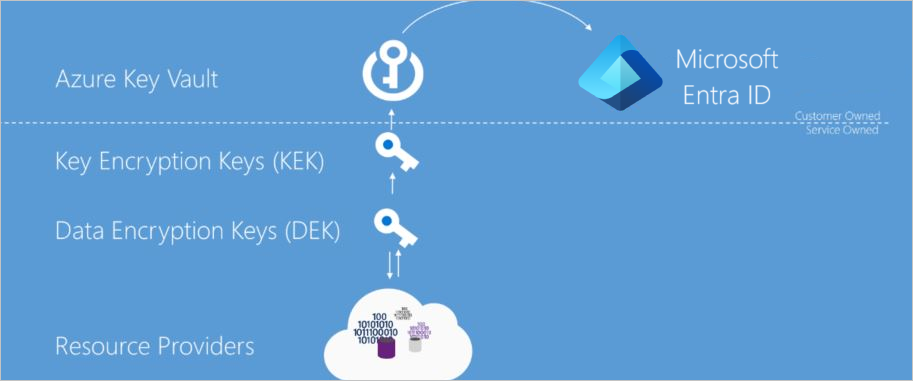
As described previously, the goal of encryption at rest is that data persisted on disk is encrypted with a secret encryption key. To achieve that goal, secure key creation, storage, access control, and management of the encryption keys must be provided. Though details might vary, Azure services encryption at rest implementations can be described in terms illustrated in the following diagram.
Azure Key Vault
The storage location of the encryption keys and access control to those keys is central to an encryption at rest model. You need to highly secure the keys but make them manageable by specified users and available to specific services. For Azure services, Azure Key Vault is the recommended key storage solution and provides a common management experience across services. You store and manage keys in key vaults, and you can give users or services access to a key vault. Azure Key Vault supports customer creation of keys or import of customer keys for use in customer-managed encryption key scenarios.
Microsoft Entra ID
You can give Microsoft Entra accounts permissions to use the keys stored in Azure Key Vault, either to manage or to access them for Encryption at Rest encryption and decryption.
Envelope encryption with a key hierarchy
You use more than one encryption key in an encryption at rest implementation. Storing an encryption key in Azure Key Vault ensures secure key access and central management of keys. However, service local access to encryption keys is more efficient for bulk encryption and decryption than interacting with Key Vault for every data operation, allowing for stronger encryption and better performance. Limiting the use of a single encryption key decreases the risk that the key is compromised and the cost of re-encryption when a key must be replaced. Azure encryption at rest models use envelope encryption, where a key encryption key encrypts a data encryption key. This model forms a key hierarchy which is better able to address performance and security requirements:
- Data Encryption Key (DEK) – A symmetric AES256 key used to encrypt a partition or block of data, sometimes also referred to as simply a Data Key. A single resource can have many partitions and many Data Encryption Keys. Encrypting each block of data with a different key makes crypto analysis attacks more difficult. Keeping DEKs local to the service encrypting and decrypting data maximizes performance.
- Key Encryption Key (KEK) – An encryption key used to encrypt the Data Encryption Keys by using envelope encryption, also referred to as wrapping. By using a Key Encryption Key that never leaves Key Vault, you can encrypt and control the data encryption keys. The entity that has access to the KEK can be different from the entity that requires the DEK. An entity can broker access to the DEK to limit the access of each DEK to a specific partition. Since the KEK is required to decrypt the DEKs, customers can cryptographically erase DEKs and data by disabling the KEK.
Resource providers and application instances store the encrypted Data Encryption Keys as metadata. Only an entity with access to the Key Encryption Key can decrypt these Data Encryption Keys. Different models of key storage are supported. For more information, see data encryption models.
Encryption at rest in Microsoft cloud services
You use Microsoft Cloud services in all three cloud models: IaaS, PaaS, and SaaS. The following examples show how they fit in each model:
- Software services, referred to as Software as a Service or SaaS, which have applications provided by the cloud such as Microsoft 365.
- Platform services in which customers use the cloud for things like storage, analytics, and service bus functionality in their applications.
- Infrastructure services, or Infrastructure as a Service (IaaS) in which customer deploys operating systems and applications that are hosted in the cloud and possibly leveraging other cloud services.
Encryption at rest for SaaS customers
Software as a Service (SaaS) customers typically have encryption at rest enabled or available in each service. Microsoft 365 has several options for customers to verify or enable encryption at rest. For information about Microsoft 365 services, see Encryption in Microsoft 365.
Encryption at rest for PaaS customers
Platform as a Service (PaaS) customers typically store their data in a storage service such as Blob Storage. However, the data might also be cached or stored in the application execution environment, such as a virtual machine. To see the encryption at rest options available to you, examine the Data encryption models for the storage and application platforms that you use.
Encryption at rest for IaaS customers
Infrastructure as a Service (IaaS) customers can use a variety of services and applications. IaaS services can enable encryption at rest in their Azure hosted virtual machines by using encryption at host.
Encrypted storage
Like PaaS, IaaS solutions can leverage other Azure services that store data encrypted at rest. In these cases, you can enable the encryption at rest support as provided by each consumed Azure service. The Data encryption models enumerates the major storage, services, and application platforms and the model of encryption at rest supported.
Encrypted compute
All Managed Disks, Snapshots, and Images are encrypted by default by using Storage Service Encryption with platform-managed keys. This default encryption requires no customer configuration or additional cost. A more comprehensive encryption solution ensures that all data is never persisted in unencrypted form. While processing data on a virtual machine, the system can persist data to the Windows page file or Linux swap file, a crash dump, or to an application log. To ensure this data is also encrypted at rest, IaaS applications can use encryption at host on an Azure IaaS virtual machine, which by default uses platform-managed keys but can optionally be configured with customer-managed keys for additional control.
Custom encryption at rest
Whenever possible, IaaS applications should leverage encryption at host and encryption at rest options provided by any consumed Azure services. In some cases, such as irregular encryption requirements or non-Azure based storage, a developer of an IaaS application might need to implement encryption at rest themselves. Developers of IaaS solutions can better integrate with Azure management and customer expectations by leveraging certain Azure components. Specifically, developers should use the Azure Key Vault service to provide secure key storage as well as provide their customers with key management options consistent with that of Azure platform services. Additionally, custom solutions should use Azure managed service identities to enable service accounts to access encryption keys. For developer information on Azure Key Vault and Managed Service Identities, see their respective SDKs.
Azure resource providers encryption model support
Microsoft Azure Services each support one or more of the encryption at rest models. For some services, however, one or more of the encryption models might not be applicable. For services that support customer-managed key scenarios, they might support only a subset of the key types that Azure Key Vault supports for key encryption keys. Additionally, services might release support for these scenarios and key types at different schedules. This section describes the encryption at rest support at the time of this writing for each of the major Azure data storage services.
Azure VM disk encryption
Any customer using Azure Infrastructure as a Service (IaaS) features can encrypt at rest their IaaS VM disks through encryption at host. For more information, see Encryption at host - End-to-end encryption for your VM.
Azure storage
All Azure Storage services (Blob storage, Queue storage, Table storage, and Azure Files) support server-side encryption at rest and some services additionally support client-side encryption.
- Server-side (Default): All Azure Storage Services automatically enable server-side encryption by default using platform-managed keys. This encryption is transparent to the application and requires no configuration. For more information, see Azure Storage Service Encryption for Data at Rest. Customers can optionally choose to use customer-managed keys in Azure Key Vault for additional control. For more information, see Storage Service Encryption using customer-managed keys in Azure Key Vault.
- Client-side (Optional): Azure Blobs, Tables, and Queues support client-side encryption for customers who need to encrypt data before it reaches Azure. When using client-side encryption, customers encrypt the data and upload the data as an encrypted blob. Key management is done by the customer. For more information, see Client-Side Encryption and Azure Key Vault for Microsoft Azure Storage.
Azure SQL Database
Azure SQL Database currently supports encryption at rest for platform-managed service side and client-side encryption scenarios.
Support for server encryption is currently provided through the SQL feature called Transparent Data Encryption. Once an Azure SQL Database customer enables TDE, keys are automatically created and managed for them. You can enable encryption at rest at the database and server levels. As of June 2017, Transparent Data Encryption (TDE) is enabled by default on newly created databases. Azure SQL Database supports RSA 2048-bit customer-managed keys in Azure Key Vault. For more information, see Transparent Data Encryption with Bring Your Own Key support for Azure SQL Database and Data Warehouse.
Client-side encryption of Azure SQL Database data is supported through the Always Encrypted feature. Always Encrypted uses a key that the client creates and stores. Customers can store the master key in a Windows certificate store, Azure Key Vault, or a local Hardware Security Module. Using SQL Server Management Studio, SQL users choose what key they'd like to use to encrypt which column.
Conclusion
Protection of customer data stored within Azure Services is of paramount importance to Microsoft. All Azure hosted services are committed to providing encryption at rest options. Azure services support either platform-managed keys, customer-managed keys, or client-side encryption. Azure services are broadly enhancing encryption at rest availability and new options are planned for preview and general availability in the upcoming months.
Next steps
- See data encryption models to learn more about platform-managed keys and customer-managed keys.
- Learn how Azure uses double encryption to mitigate threats that come with encrypting data.
- Learn what Microsoft does to ensure platform integrity and security of hosts traversing the hardware and firmware build-out, integration, operationalization, and repair pipelines.