Note
Access to this page requires authorization. You can try signing in or changing directories.
Access to this page requires authorization. You can try changing directories.
As you consider and evaluate public cloud services, it's critical to understand the shared responsibility model and which security tasks the cloud provider handles and which tasks you handle. Workload responsibilities vary depending on whether the workload is hosted on software as a service (SaaS), platform as a service (PaaS), infrastructure as a service (IaaS), or in an on-premises datacenter:
- IaaS (infrastructure as a service): You manage virtual machines, operating systems, and applications. Examples include Azure Virtual Machines, Azure Disk Storage, and virtual networks.
- PaaS (platform as a service): You deploy applications without managing VMs or operating systems. Examples include Azure App Service, Azure Functions, Azure SQL Database, and Azure Storage.
- SaaS (software as a service): You use ready-made applications. Examples include Microsoft 365, Dynamics 365, and other cloud applications.
Many Azure solutions use a combination of service models. For more detailed guidance on choosing compute services, see Choose an Azure compute service.
For generative AI workloads, see the AI shared responsibility model. For autonomous, tool-using AI agents, see the AI agent shared responsibility model.
Note
This article uses "responsibility" in a governance sense: who is expected to configure, operate, and monitor each control. It is illustrative guidance and is not intended to convey legal conclusions or to modify or contradict the terms of any agreement between you and Microsoft.
Division of responsibility
In an on-premises datacenter, you own the whole stack. As you move to the cloud, some responsibilities transfer to Microsoft. The following diagram illustrates the areas of responsibility between you and Microsoft, according to the type of deployment of your stack.
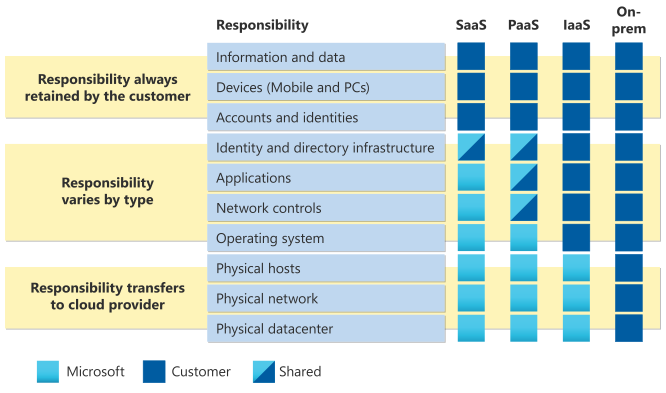
For all cloud deployment types, you own your data and identities. You're responsible for protecting the security of your data and identities, on-premises resources, and the cloud components you control. Cloud components you control vary by service type.
Responsibility matrix
The following table details the division of responsibility between you and Microsoft for each area of your stack:
| Responsibility area | On-premises | IaaS | PaaS | SaaS |
|---|---|---|---|---|
| Customer data | Customer | Customer | Customer | Customer |
| Configurations and settings | Customer | Customer | Customer | Customer |
| Identities and users | Customer | Customer | Customer | Customer |
| Client devices | Customer | Customer | Customer | Shared |
| Applications | Customer | Customer | Shared | Shared |
| Network controls | Customer | Customer | Shared | Microsoft |
| Operating system | Customer | Customer | Microsoft | Microsoft |
| Physical hosts | Customer | Microsoft | Microsoft | Microsoft |
| Physical network | Customer | Microsoft | Microsoft | Microsoft |
| Physical datacenter | Customer | Microsoft | Microsoft | Microsoft |
Responsibilities you always retain
Regardless of the type of deployment, you always retain the following responsibilities:
- Data - You're responsible for your data, including data classification, data protection, encryption decisions, and compliance with data governance requirements.
- Endpoints - You're responsible for protecting client devices and endpoints that access your cloud services, including mobile devices, laptops, and desktops.
- Accounts - You're responsible for managing user accounts, including creating, managing, and removing user access.
- Access management - You're responsible for implementing and managing access controls, including role-based access control (RBAC), multifactor authentication, and conditional access policies.
Shared responsibilities explained
Some responsibilities are shared between you and Microsoft, with the division varying by service model:
- Applications - In IaaS, you're fully responsible for deployed applications. In PaaS and SaaS, Microsoft manages parts of the application stack, but you're responsible for application configuration, code security, and access controls.
- Network controls - In IaaS, you configure all network security including firewalls and network segmentation. In PaaS, Microsoft provides baseline network security, but you configure application-level network controls. In SaaS, Microsoft manages network security.
- Client devices - In SaaS scenarios, Microsoft can provide some device management capabilities, but you're responsible for endpoint protection and compliance.
Microsoft responsibilities
Microsoft is responsible for the underlying cloud infrastructure, which includes:
- Physical security - Securing datacenters, including facilities, physical access controls, and environmental controls.
- Physical network - Managing network infrastructure, including routers, switches, and cables within datacenters.
- Physical hosts - Managing and maintaining the physical servers that host cloud services.
- Hypervisor - Managing the virtualization layer that enables virtual machines in IaaS and PaaS.
- Platform services - In PaaS and SaaS, Microsoft manages operating systems, runtime environments, and middleware.
Cloud security advantages
The cloud offers significant advantages for solving longstanding information security challenges. In an on-premises environment, organizations likely have unmet responsibilities and limited resources to invest in security. This situation creates an environment where attackers can exploit vulnerabilities at all layers.
Common examples of unmet responsibilities in traditional on-premises environments include:
- Delayed patching - Security updates aren't applied promptly due to limited IT staff or concerns about system downtime, leaving known vulnerabilities exposed.
- Inadequate physical security - Server rooms might lack proper access controls, environmental monitoring, or surveillance due to budget constraints.
- Incomplete network monitoring - Organizations might not have tools or expertise to detect intrusions, monitor traffic anomalies, or respond to threats in real time.
- Outdated hardware - Aging infrastructure might no longer receive security updates from vendors, which creates permanent security gaps.
- Insufficient backup and disaster recovery - Backups might be infrequent, untested, or stored on-site, which leaves data vulnerable to ransomware or physical disasters.
The following diagram shows a traditional approach where limited resources lead to many unmet security responsibilities. In the cloud-enabled approach, you can shift day-to-day security responsibilities to your cloud provider and reallocate your resources.
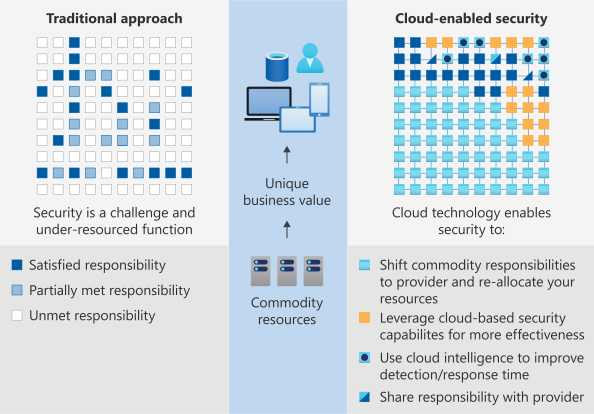
In the cloud-enabled approach, you can also apply cloud-based security capabilities more effectively and use cloud intelligence to improve threat detection and response time. By shifting responsibilities to the cloud provider, organizations can get more security coverage. This shift helps them reallocate security resources and budget to other business priorities.
Next step
Learn more about shared responsibility and strategies to improve your security posture in the Well-Architected Framework's overview of the security pillar.