Note
Access to this page requires authorization. You can try signing in or changing directories.
Access to this page requires authorization. You can try changing directories.
The User and Entity Behavior Analytics (UEBA) behavior layer in Microsoft Sentinel aggregates and summarizes high-volume raw logs into clear, plain-language patterns of security actions, explaining “who did what to whom” in a structured way.
Unlike alerts or anomalies, behaviors don’t necessarily indicate risk - they create an abstraction layer that optimizes your data for investigations, hunting, and detection by enhancing:
- Efficiency: Reduce investigation time by stitching related events into cohesive stories.
- Clarity: Translate noisy, low-level logs into plain-language summaries.
- Context: Add MITRE ATT&CK mapping and entity roles for instant security relevance.
- Consistency: Provide a unified schema across diverse log sources.
This abstraction layer enables faster threat detection, investigation, and response across your security operations, without requiring deep familiarity with every log source.
This article explains how the UEBA behaviors layer works, how to enable the behaviors layer, and how to use behaviors to enhance security operations.
How the UEBA behaviors layer works
Behaviors are part of Microsoft Sentinel’s User and Entity Behavior Analytics (UEBA) capabilities, providing normalized, contextualized activity summaries that complement anomaly detection and enrich investigations. This table shows how behaviors differ from anomalies and alerts:
| Capability | What it represents | Purpose |
|---|---|---|
| Anomalies | Patterns that deviate from established baselines | Highlight unusual or suspicious activity |
| Alerts | Signal a potential security issue requiring attention | Trigger incident response workflows |
| Behaviors | Neutral, structured summaries of activity - normal or abnormal- based on time windows or triggers, enriched with MITRE ATT&CK mappings and entity roles | Provide context and clarity for investigations, hunting, and detection |
When you enable the UEBA behaviors layer, Microsoft Sentinel processes supported security logs you collect into your Sentinel workspace in near real-time and summarizes two types of behavioral patterns:
| Behavior Type | Description | Examples | Use case |
|---|---|---|---|
| Aggregated behaviors | Detect volume-based patterns by collecting related events over time windows |
|
Convert high-volume logs into actionable security insights. This behavior type excels at identifying unusual activity levels. |
| Sequenced behaviors | Identify multi-step patterns or complex attack chains that aren't obvious when you look at individual events | Access key created > used from new IP > privileged API calls | Detect sophisticated attack sequences and multi-stage threats. |
The UEBA behaviors layer summarizes behaviors at tailored time intervals specific to each behavior's logic, creating behavior records immediately when it identifies patterns or when the time windows close.
Each behavior record includes:
- A simple, contextual description: A natural language explanation of what happened in security-relevant terms - for example, who did what to whom, and why it matters.
- Unified schema and references to the underlying raw logs: All behaviors use a consistent data structure across different products and log types, so analysts don't need to translate different log formats or join high-volume tables.
- MITRE ATT&CK mapping: Every behavior is tagged with relevant MITRE tactics and techniques, providing industry-standard context at a glance. You don't just see what happened, but also how it fits in an attack framework or timeline.
- Entity relationship mapping: Each behavior identifies involved entities (users, hosts, IP addresses) and their roles (actor, target, or other).
The UEBA behaviors layer stores behavior records in two dedicated tables, integrating seamlessly with your existing workflows for detection rules, investigations, and incident analysis. It processes all types of security activity - not just suspicious events - and provides comprehensive visibility into both normal and anomalous behavior patterns. For information about using behaviors tables, see Best practices and troubleshooting tips for querying behaviors.
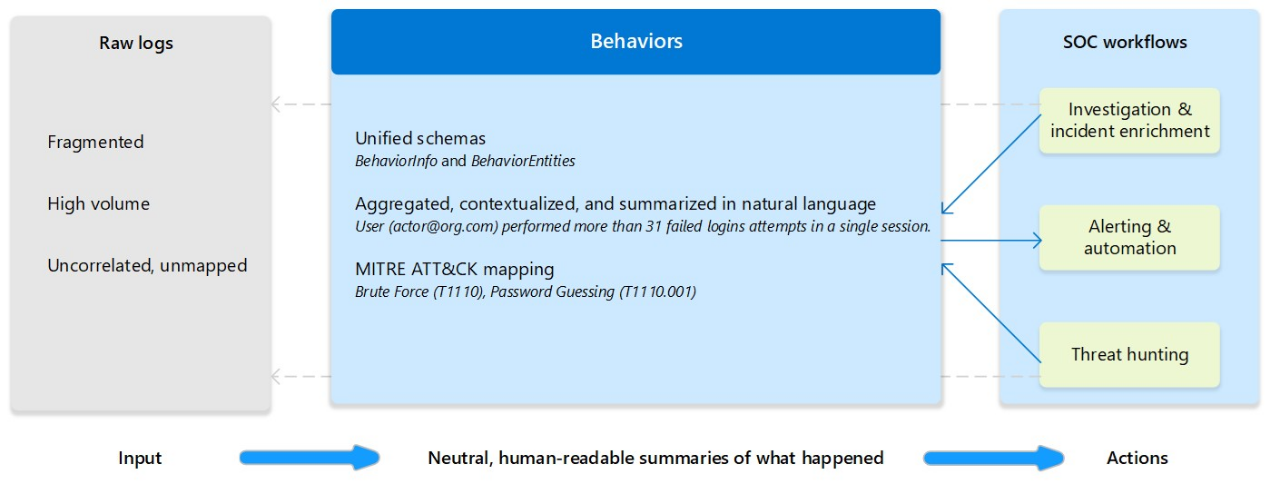
This diagram illustrates how the UEBA behaviors layer transform raw logs into structured behavior records that enhance security operations:
Important
Generative AI powers the UEBA Behaviors layer to create and scale the insights it provides. Microsoft designed the Behaviors feature based on privacy and responsible AI principles to ensure transparency and explainability. Behaviors don't introduce new compliance risks or opaque "black box" analytics into your SOC. For details about how AI is applied in this feature and Microsoft’s approach to responsible AI, see Responsible AI FAQ for the Microsoft UEBA behaviors layer.
Use cases and examples
Here's how analysts, hunters, and detection engineers can use behaviors during investigations, hunting, and alert creation.
Investigation and incident enrichment
Behaviors give SOC analysts immediate clarity about what happened around an alert, without pivoting across multiple raw log tables.
Workflow without behaviors: Analysts often need to reconstruct timelines manually by querying event‑specific tables and stitching results together.
Example: An alert fires on a suspicious AWS activity. The analyst queries the
AWSCloudTrailtable, then pivots to firewall data to understand what the user or host did. This requires knowledge of each schema and slows triage.Workflow with behaviors: The UEBA behaviors layer automatically aggregates related events into behavior entries that can be attached to an incident or queried on demand.
Example: An alert indicates possible credential exfiltration. In the
BehaviorInfotable, the analyst sees the behavior Suspicious mass secret access via AWS IAM by User123 mapped to MITRE Technique T1552 (Unsecured Credentials). The UEBA behaviors layer generated this behavior by aggregating 20 AWS log entries. The analyst immediately understands that User123 accessed many secrets – crucial context to escalate the incident – without manually reviewing all 20 log entries.
Threat hunting
Behaviors allow hunters to search on TTPs and activity summaries, rather than writing complex joins or normalizing raw logs by themselves.
Workflow without behaviors: Hunts require complex KQL, table joins, and familiarity with every data source format. Important activity might be buried in large datasets with little built‑in security context.
Example: Hunting for signs of reconnaissance might require scanning
AWSCloudTrailevents and certain firewall connection patterns separately. Context exists mostly in incidents and alerts, making proactive hunting harder.Workflow with behaviors: Behaviors are normalized, enriched, and mapped to MITRE tactics and techniques. Hunters can search for meaningful patterns without depending on each source’s schema.
A hunter can filter the BehaviorInfo table by tactic (
Categories), technique, title, or entity. For example:BehaviorInfo | where Categories has "Discovery" | summarize count() by TitleHunters can also:
- Identify rare behaviors, using
count distincton theTitlefield. - Explore an interesting behavior type, identify the entities involved, and investigate further.
- Drill down to raw logs using the
BehaviorIdandAdditionalFieldscolumns, which often reference the underlying raw logs.
Example: A hunter searching for stealthy credential access queries for behaviors with “enumerate credentials” in the
Titlecolumn. The results return a few instances of "Attempted credential dump from Vault by user AdminJoe" (derived fromCyberArklogs). Although alerts weren't fired, this behavior is uncommon for AdminJoe and prompts further investigation - something that's difficult to detect in verbose Vault audit logs.Hunters can also hunt by:
MITRE tactic:
// Find behaviors by MITRE tactic
BehaviorInfo
| where Categories == "Lateral Movement"
Technique:
// Find behaviors by MITRE technique
BehaviorInfo
| where AttackTechniques has "T1078" // Valid Accounts
| extend AF = parse_json(AdditionalFields)
| extend TableName = tostring(AF.TableName)
| project TimeGenerated, Title, Description, TableName
Specific user:
// Find all behaviors for a specific user over last 7 days
BehaviorInfo
| join kind=inner BehaviorEntities on BehaviorId
| where TimeGenerated >= ago(7d)
| where EntityType == "User" and AccountUpn == "user@domain.com"
| project TimeGenerated, Title, Description, Categories
| order by TimeGenerated desc
Rare behaviors (potential anomalies):
// Find rare behaviors (potential anomalies)
BehaviorInfo
| where TimeGenerated >= ago(30d)
| summarize Count=count() by Title
| where Count < 5 // Behaviors seen less than 5 times
| order by Count asc
- Identify rare behaviors, using
Alerting and automation
Behaviors simplify rule logic by providing normalized, high‑quality signals with built‑in context, and enable new correlation possibilities.
Workflow without behaviors: Cross‑source correlation rules are complex because each log format is different. Rules often require:
- Normalization logic
- Schema‑specific conditions
- Multiple separate rules
- Reliance on alerts rather than raw activity
Automation might also trigger too frequently if it's driven by low‑level events.
Workflow with behaviors: Behaviors already aggregate related events and include MITRE mappings, entity roles, and consistent schemas, so detection engineers can create simpler, clearer detection rules.
Example: To alert on a potential key compromise and privilege escalation sequence, a detection engineer writes a detection rule using this logic: "Alert if a user has a 'Creation of new AWS access key' behavior followed by an 'Elevation of privileges in AWS' behavior within 1 hour."
Without the UEBA behaviors layer, this rule would require stitching together raw
AWSCloudTrailevents and interpreting them in the rule logic. With behaviors, it's straightforward and resilient to log schema changes because the schema is unified.Behaviors also serve as reliable triggers for automation. Instead of creating alerts for non-risky activities, use behaviors to trigger automation - for example, to send an email or initiate verification.
Supported data sources
The list of supported data sources and vendors or services that send logs to these data sources is evolving. The UEBA behaviors layer automatically aggregates insights for all supported vendors based on the logs you collect.
During public preview, the UEBA behaviors layer focuses on these non-Microsoft data sources that traditionally lack easy behavioral context in Microsoft Sentinel:
| Data source | Supported vendors, services, and logs | Connector |
|---|---|---|
| CommonSecurityLog |
|
|
| AWSCloudTrail |
|
|
| GCPAuditLogs |
|
GCP Pub/Sub Audit Logs |
Important
These sources are separate from other UEBA capabilities and need to be enabled specifically. If you enabled AWSCloudTrail for UEBA behaviorAnalytics and Anomalies, you still need to enable it for behaviors.
Prerequisites
To use the UEBA behaviors layer, you need:
- A Microsoft Sentinel workspace that's onboarded to the Defender portal.
- Ingest one or more of the supported data sources into the Analytics tier. For more information about data tiers, see Manage data tiers and retention in Microsoft Sentinel.
Permissions required
To enable and use the UEBA behaviors layer, you need these permissions:
| User action | Permission required |
|---|---|
| Enable behaviors | At least the Security Administrator role in Microsoft Entra ID. |
| Query behaviors tables |
|
For more information about unified RBAC in the Defender portal, see Microsoft Defender XDR Unified role-based access control (RBAC).
Enable the UEBA behaviors layer
To enable the UEBA behaviors layer in your workspace:
In the Defender portal, select System > Settings > Microsoft Sentinel > SIEM workspaces.
Select the Sentinel workspace where you want to enable the UEBA behaviors layer.
Select Enable behavior analytics > Configure UEBA > New! Behaviors layer.
Toggle on Enable Behaviors layer.
Select Connect all data sources or select the specific data sources from the list.
If you haven't yet connected any supported data sources to your Sentinel workspace, select Go to Content Hub to find and connect the relevant connectors.
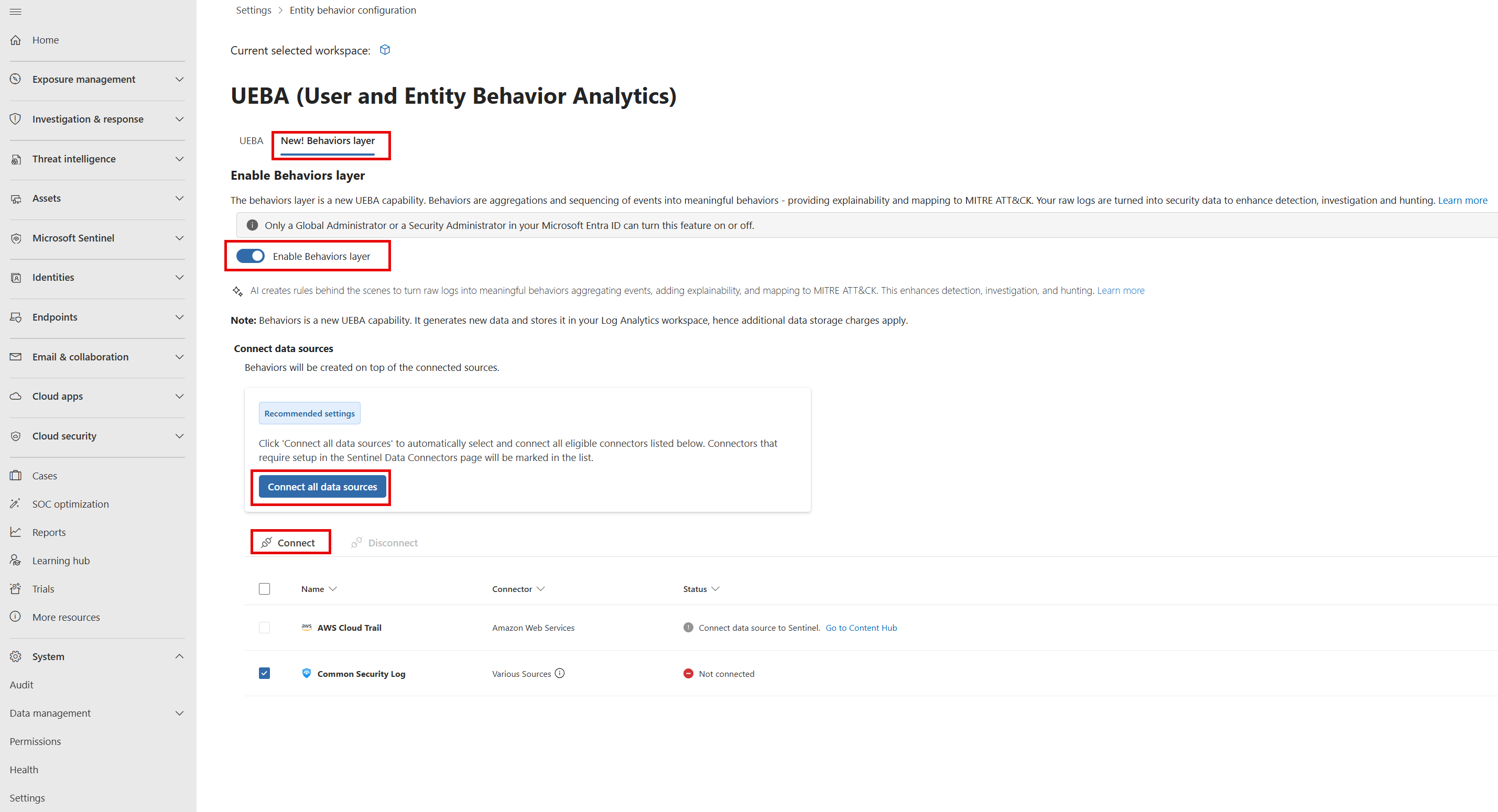
Select Connect.
Important
During public preview, you can only enable behaviors in a single workspace in your tenant.
Pricing model
Using the UEBA behaviors layer results in the following costs:
No extra license cost: Behaviors are included as part of Microsoft Sentinel (currently in preview). You don’t need a separate SKU, UEBA add‑on, or additional licensing. If your workspace is connected to Sentinel and onboarded to the Defender portal, you can use behaviors at no extra feature cost.
Log data ingestion charges: Behavior records are stored in the
SentinelBehaviorInfoandSentinelBehaviorEntitiestables in your Sentinel workspace. Each behavior contributes to your workspace’s data ingestion volume and is billed at your existing Log Analytics/Sentinel ingestion rate. Behaviors are additive - they don’t replace your existing raw logs.
Best practices and troubleshooting tips for querying behaviors
This section provides best practices and troubleshooting tips for querying behaviors in the Defender portal and in your Sentinel workspace. For more practical examples of using behaviors, see Use cases and examples.
For more information about Kusto Query Language (KQL), see Kusto query language overview.
Access behavior data in the Defender portal by querying BehaviorInfo and BehaviorEntities
The
BehaviorInfotable contains one record for each behavior instance to explain “what happened”. For more information about the table schemas, see BehaviorInfo (Preview).The
BehaviorEntitiestable lists the entities involved in each behavior. For more information about the table schema, BehaviorEntities (Preview).Unified view: The
BehaviorInfoandBehaviorEntitiestables include all UEBA behaviors and might also include behaviors from Microsoft Defender for Cloud Apps and Microsoft Defender for Cloud, if you're collecting behaviors from these services.To filter for behaviors from the Microsoft Sentinel UEBA behaviors layer, use the
ServiceSourcecolumn. For example:BehaviorInfo | where ServiceSource == "Microsoft Sentinel"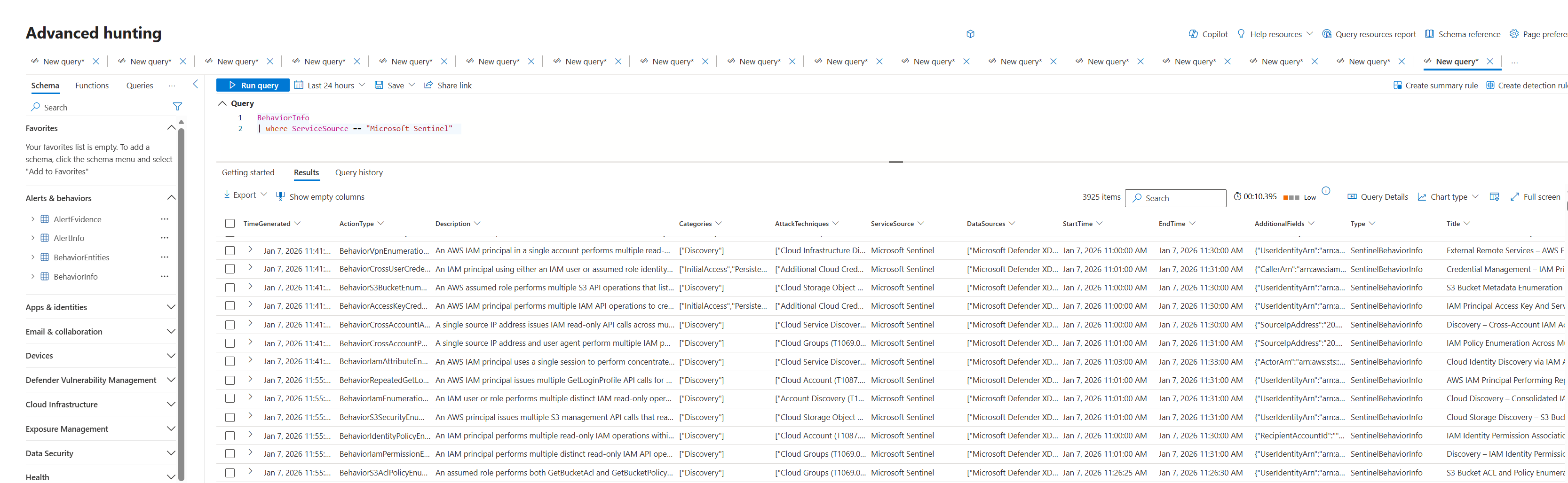
Drill down from behaviors to raw logs: Use the
AdditionalFieldscolumn inBehaviorInfo, which contains references to the original event IDs in theSupportingEvidencefield.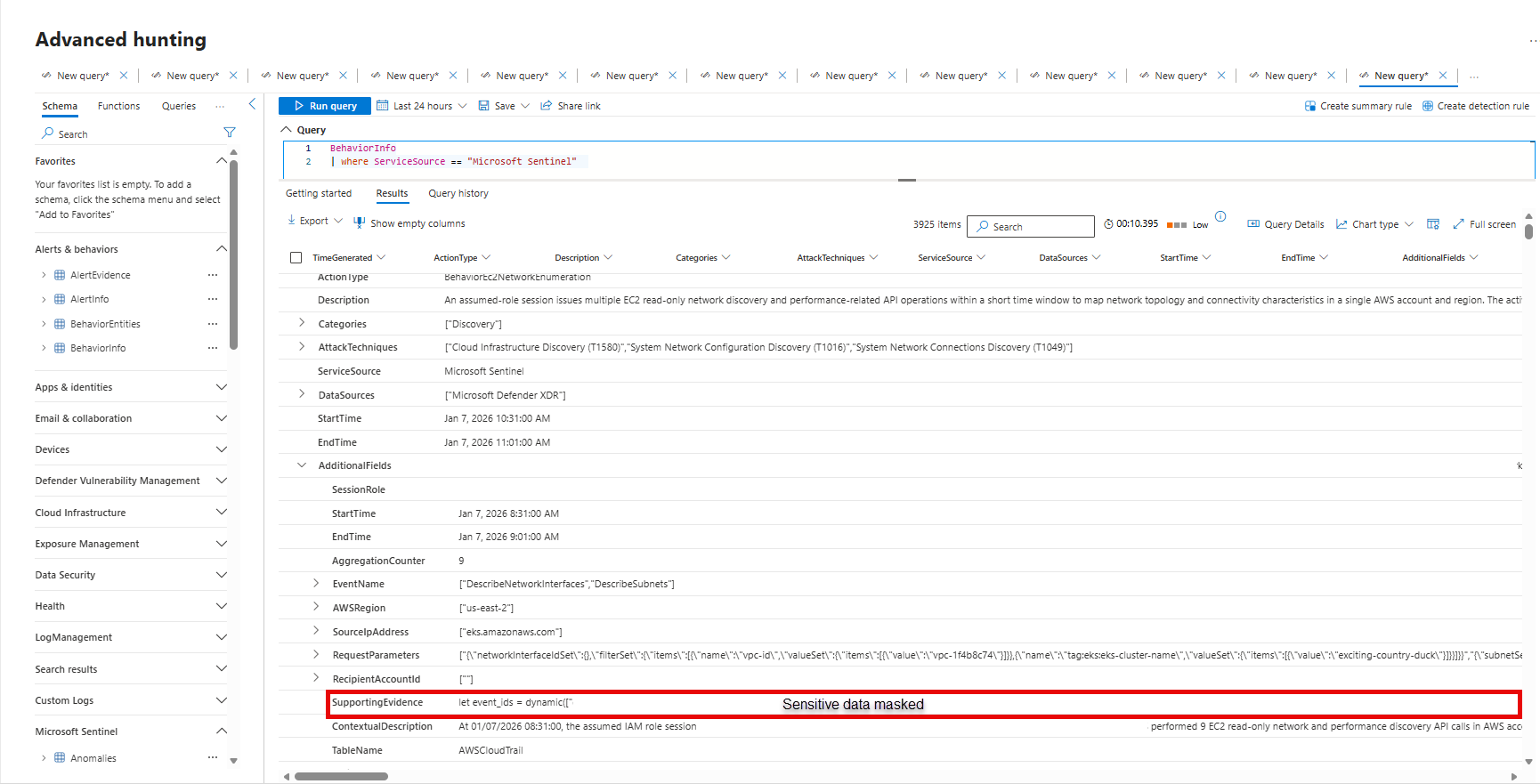
Run a query on the
SupportingEvidencefield value to find the raw logs that contributed to a behavior.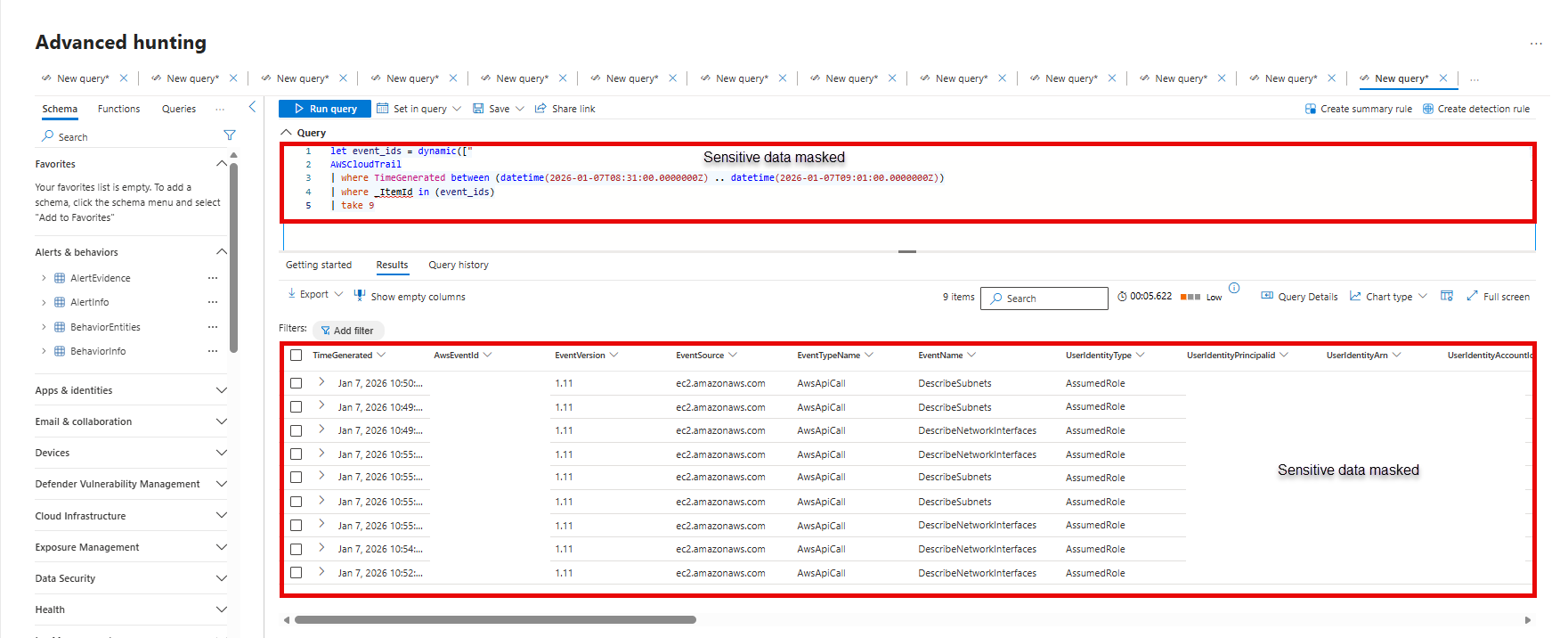
Join BehaviorInfo and BehaviorEntities: Use the
BehaviorIdfield to joinBehaviorInfowithBehaviorEntities.For example:
BehaviorInfo
| join kind=inner BehaviorEntities on BehaviorId
| where TimeGenerated >= ago(1d)
| project TimeGenerated, Title, Description, EntityType, EntityRole, AccountUpn
This gives you each behavior and each entity involved in it. The
AccountUpnor identifying information for the entity is inBehaviorEntities, whereasBehaviorInfomight refer to “User” or “Host” in the text.Where is behavior data stored in my Sentinel workspace?:
- In your Sentinel workspace, behavior data is stored in the
SentinelBehaviorInfoandSentinelBehaviorEntitiestables. For more information about the table schemas, see SentinelBehaviorInfo and SentinelBehaviorEntities. - To monitor data usage, look for the table names
SentinelBehaviorInfoandSentinelBehaviorEntitiesin theUsagetable.
- In your Sentinel workspace, behavior data is stored in the
Create automation, workbooks, and detection rules based on behaviors:
- Use the
BehaviorInfotable as a data source for detection rules or automation playbooks in the Defender portal. For example, create a scheduled query rule that triggers when a specific behavior appears. - For Azure Monitor workbooks and any artifacts built directly on your Sentinel workspace, make sure to query the
SentinelBehaviorInfoandSentinelBehaviorEntitiestables in your Sentinel workspace.
- Use the
Troubleshooting
- If behaviors aren't being generated: Ensure supported data sources are actively sending logs to the Analytics tier, confirm the data source toggle is on, and wait 15–30 minutes after enabling.
- I see fewer behaviors than expected: Our coverage of supported behavior types is partial and growing. The UEBA behaviors layer might also not be able to detect a behavior pattern if there are very few instances of a specific behavior type.
- Behavior counts: A single behavior might represent tens or hundreds of raw events - this is designed to reduce noise.
Limitations in public preview
These limitations apply during the public preview of the UEBA behaviors layer:
- You can enable behaviors on a single Sentinel workspace per tenant.
- The UEBA behaviors layer generates behaviors for a limited set of supported data sources and vendors or services.
- The UEBA behaviors layer doesn't currently capture every possible action or attack technique, even for supported sources. Some events might not produce corresponding behaviors. Don't assume that the absence of a behavior means no activity occurred. Always review raw logs if you suspect something might be missing.
- Behaviors aim to reduce noise by aggregating and sequencing events, but you might still see too many behavior records. We welcome your feedback on specific behavior types to help improve coverage and relevance.
- Behaviors aren't alerts or anomalies. They're neutral observations, not classified as malicious or benign. The presence of a behavior means “this happened,” not “this is a threat.” Anomaly detection remains separate in UEBA. Use judgment or combine behaviors with UEBA anomaly data to identify noteworthy patterns.