Note
Access to this page requires authorization. You can try signing in or changing directories.
Access to this page requires authorization. You can try changing directories.
Azure routing preference enables you to choose how your traffic routes between Azure and the Internet. You can choose to route traffic either via the Microsoft network or via the ISP network (public internet). These options are also referred to as cold potato routing and hot potato routing respectively. Egress data transfer price varies based on the routing selection. You can choose the routing option when creating a public IP address. You can associate the public IP address with resources such as virtual machine, virtual machine scale sets, internet-facing load balancer, and more. You can also set the routing preference for Azure storage resources such as blobs, files, web, and Azure Data Lake. By default, traffic routes via the Microsoft global network for all Azure services.
Routing via Microsoft global network
Routing your traffic via the Microsoft global network delivers your traffic over one of the largest networks in the world, spanning over 160,000 miles of fiber with over 165 edge Point of Presence (POP). The network is well provisioned with multiple redundant fiber paths to ensure exceptionally high reliability and availability. The software-defined WAN controller manages traffic engineering, ensuring low-latency path selection for your traffic and offering premium network performance.
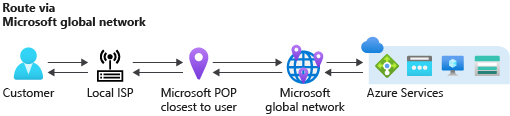
Ingress traffic: The global BGP Anycast announcement ensures ingress traffic enters Microsoft network closest to the user. When a user from Singapore accesses Azure resources hosted in Chicago, the traffic enters the Microsoft global network at the Singapore edge POP. The traffic then travels on the Microsoft network to the service hosted in Chicago.
Egress traffic: The egress traffic follows the same principle. Traffic travels most of its journey on Microsoft global network and exits closest to the user. For example, if traffic from Azure in Chicago is destined to a user from Singapore, then traffic travels on the Microsoft network from Chicago to Singapore, and exits the Microsoft network at Singapore edge POP.
Both ingress and egress traffic remain on the Microsoft global network whenever possible. This process is also known as cold potato routing.
Routing over public Internet (ISP network)
The new routing choice Internet routing minimizes travel on the Microsoft global network. It uses the transit ISP network to route your traffic. This cost-optimized routing option offers network performance that's comparable to other cloud providers.

Ingress traffic: The ingress path uses hot potato routing, which means that traffic enters the Microsoft network that's closest to the hosted service region. For example, if a user from Singapore accesses Azure resources hosted in Chicago, traffic travels over the public internet and enters the Microsoft global network in Chicago.
Egress traffic: The egress traffic follows the same principle. Traffic exits Microsoft network in the same region that the service is hosted. For example, if traffic from your service in Azure in Chicago is destined to a user in Singapore, the traffic exits the Microsoft network in Chicago. It then travels over the public internet to the user in Singapore.
Note
When you use a public IP with routing preference Internet, all traffic that goes to a destination within Azure continues to use the direct path within the Microsoft Wide Area Network.
Important
You can't change a public IP routing preference after creation.
Supported services
You can associate a public IP with the routing preference choice Microsoft Global Network with any Azure service. However, you can associate a public IP with the routing preference choice Internet with the following Azure resources:
Virtual machine
Virtual Machine Scale Set
Azure Kubernetes Service (AKS)
Public load balancer (NIC-based backend only)
Application Gateway
Azure Firewall
For storage, primary endpoints always use the Microsoft global network. You can enable secondary endpoints with Internet as your choice for traffic routing. Supported storage services are:
Blobs
Files
Web
Azure Data Lake
Pricing
The price difference between both options is reflected in the internet egress data transfer pricing. Routing via Microsoft global network data transfer price is the same as the current internet egress price. For the latest pricing information, visit the Azure bandwidth pricing page.
Limitations
Internet routing preference works only with the zone-redundant standard SKU of public IP addresses. It doesn't support standard v2 SKU or basic SKU public IP addresses.
Internet routing preference currently supports only IPv4 public IP addresses. It doesn't support IPv6 public IP addresses.
You can't use internet routing preference public IP addresses with NAT gateways or IP-based public load balancers.
Regional availability
Internet routing preference is available in all regions listed in the following list:
- Australia Central
- Australia Central 2
- Australia East
- Australia Southeast
- Brazil South
- Brazil Southeast
- Canada Central
- Canada East
- Central India
- Central US
- Central US EUAP
- East Asia
- East US
- East US 2
- East US 2 EUAP
- France Central
- France South
- Germany North
- Germany West Central
- Israel Central
- Italy North
- Japan East
- Japan West
- Jio India Central
- Jio India West
- Korea Central
- Korea South
- Mexico Central
- North Central US
- North Europe
- Norway East
- Norway West
- Poland Central
- Qatar Central
- South Africa North
- South Africa West
- South Central US
- South Central US STG
- South India
- Southeast Asia
- Spain Central
- Sweden Central
- Switzerland North
- Switzerland West
- Taiwan North
- UAE Central
- UAE North
- UK South
- UK West
- West Central US
- West Europe
- West India
- West US
- West US 2
- West US 3
Note
This list is subject to change and doesn't include recently added Azure regions as of January 12, 2026. Supported regions will be added to this list over time. You can also check the routing preference option when creating a public IP address in the Azure portal to see if it's available in your desired region. Some regions may support the feature but not be listed here yet.