Note
Access to this page requires authorization. You can try signing in or changing directories.
Access to this page requires authorization. You can try changing directories.
Important
This feature is for public preview customers only. Features in preview might not be complete and could undergo changes before becoming available in the broader release. This preview feature allows personal data processing. See the "Previews" section of the Microsoft Products and Services Data Protection Addendum for more information.
You can download de-identified user-level Microsoft 365 Copilot metrics using the Copilot Dashboard's data export feature. You can download week-level metrics spanning the past six months, or day-level metrics spanning the past 28 days. Personal identifiers are removed and replaced with anonymized IDs.
With this feature, you can create custom reports, communications, and insightful analyses to support your organization.
This capability helps you:
Understand Microsoft 365 Copilot adoption across applications and plan adoption strategies.
Track Copilot Chat adoption, including activity and usage from users without Copilot licenses.
Measure and evaluate the impact of Copilot usage across employees.
Gain deeper visibility into Copilot usage trends and patterns.
Prerequisites
License requirement – Your tenant must have at least 50 Copilot or Viva Insights licenses assigned.
Note
Data processing in Copilot Analytics takes up to seven days following license assignment, unless you're exporting day-level metrics, which provides more recent data. If you export day- level metrics within two days of making Copilot license assignments or license removals, the export will not reflect those license changes. Any day-level exports you run after the two-day window will accurately reflect those license changes. Data in previously exported files won't be automatically updated after the export is generated.
Access requirement – You must have global access to the Copilot Dashboard. This includes:
Senior leaders automatically identified through Entra ID data. Learn more about how automatic access is determined.
Users manually assigned global access by admins
Delegates assigned by users with global access. Learn more about how to delegate access to Copilot Dashboard and Copilot Insights.
Viva Insights Analysts with global access
Microsoft 365 Global Administrators
Note
Users with non-global access, such as managers with team-level views, can't access this feature to export data.
Key differences between week-level and day-level exports
The table below provides a high-level summary of the key differences between the two export options. Use the table to help you decide which export option to use.
| Characteristic | Week-level export by week | Day-level export by day |
|---|---|---|
| Duration of export | The last six months | The last 28 days |
| Data refresh frequency | Every week | Every day |
| Data freshness | Up to six days old | Up to three days old |
| When to use | Use if your organization began deploying Copilot some time ago, and you'd like a longer-term view of Copilot adoption and usage trends over time. | Use if your organization has just recently deployed Copilot, and/or you're more interested in analyzing short-term trends and day-level usage patterns. |
| Metric differences | See the table below for a complete list of all metrics available in week-level exports. | Day-level exports include the same metrics as week-level exports, except: |
Admin management
The feature is on by default for eligible tenants and users. Global admins can disable or re-enable the feature for the tenant or specific groups through Viva Feature Access Management (VFAM) in the Microsoft 365 admin center. Learn more. The VFAM control is a single unified control for both the week-level and day-level export options. Changes can take up to 24 hours to appear in the web app.
How to export data
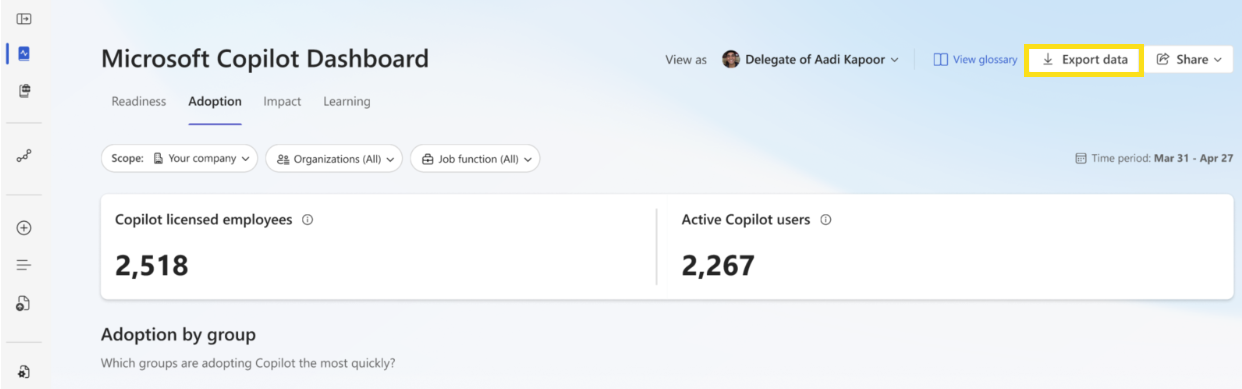
Eligible tenants and users can export directly from the Copilot Dashboard by selecting Export data.
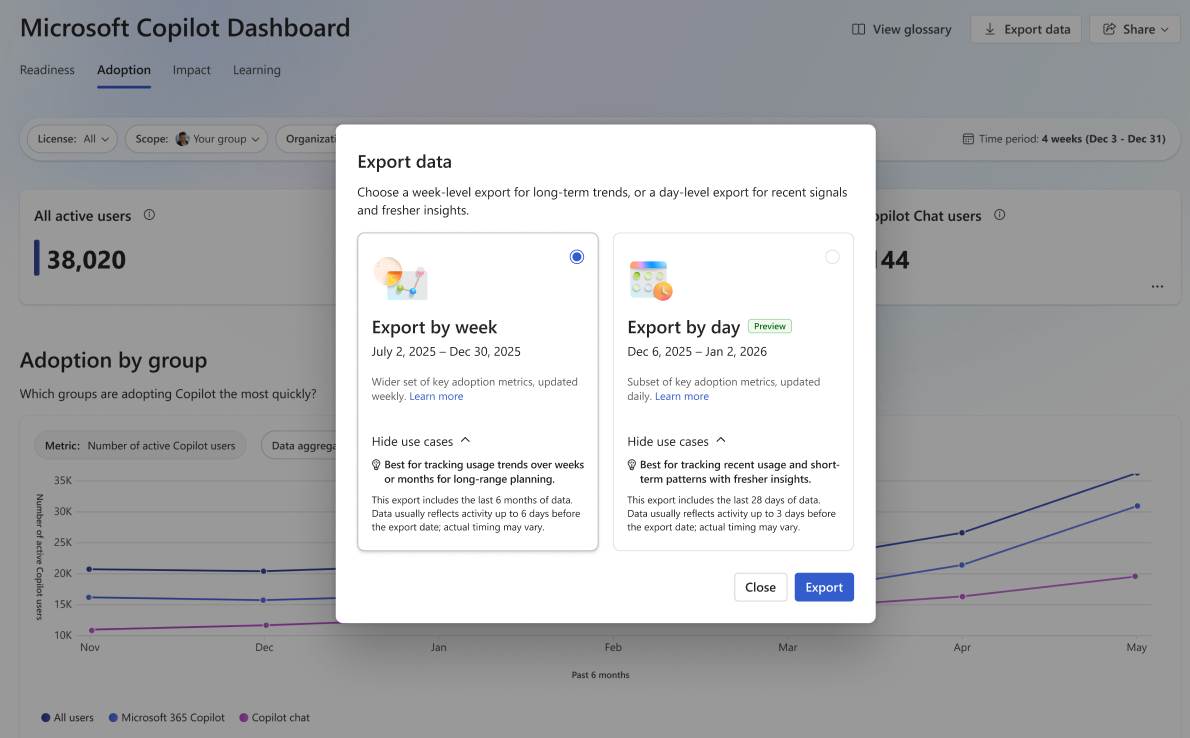
Select Export by week, to download the last six months of data; or select Export by day, to download the last 28 days of data.
Tip
Use Export by week if you want a broader, longer-term view of Copilot usage and adoption trends. Use Export by day to track more recent trends, to analyze short term or day-level usage patterns.
Note
If you select Export by week, the export's data will reflect activity up to six days before the export date. If you select Export by day, the export's data will reflect activity up to three days before the export date.
After you select Export data, the download starts automatically in your browser.
Example week-level export

Note
Each week-level export contains six months of week-level aggregated Copilot metrics at the user level (with identifiers removed) across the adoption and impact pages. Each day-level export contains 28 days of aggregated metrics with removed identifiers. You can't customize the exports.
Metrics included in the exported data
Important
Copilot Chat (work) and Copilot Chat (web) metrics have been merged into a single new metric, Copilot Chat, which captures both types of activities.
The metric previously known as "Copilot Chat (web)" is now Copilot Chat (legacy web), whose values will eventually become 0, because those activities over time will eventually be fully captured under the aforementioned Copilot Chat metric.
Note
Zero values might appear for some metrics in the exported data because it includes Copilot usage for users both with and without Copilot licenses. For users with Copilot licenses, Copilot Chat metrics (without Copilot license) remain zero because their activity is counted under Microsoft 365 Copilot metrics. For users without Copilot licenses, the pattern is reversed.
Use the Total Copilot enabled days metric to identify which users have Copilot enabled.
To learn the definitions of the metrics below, refer to the Viva Insights metrics guide.
| Type | Metric | Availability in export type |
|---|---|---|
| Microsoft 365 Copilot metrics | Add content to presentation actions taken | Week-level and Day-level |
| Chat (Copilot in Excel) prompts submitted | Week-level and Day-level | |
| Chat (Copilot in PowerPoint) prompts submitted | Week-level and Day-level | |
| Chat (Copilot in Word) prompts submitted | Week-level and Day-level | |
| Compose chat message actions taken using Copilot in Teams | Week-level and Day-level | |
| Copilot actions taken in Microsoft 365 Copilot app | Week-level and Day-level | |
| Copilot actions taken in Copilot Chat | Week-level and Day-level | |
| Copilot actions taken in Excel | Week-level and Day-level | |
| Copilot actions taken in Outlook | Week-level and Day-level | |
| Copilot actions taken in PowerPoint | Week-level and Day-level | |
| Copilot actions taken in Teams | Week-level and Day-level | |
| Copilot actions taken in Word | Week-level and Day-level | |
| Copilot actions taken in Edge | Week-level and Day-level | |
| Copilot actions taken in OneNote | Week-level and Day-level | |
| Copilot Chat (legacy web) prompts submitted | Week-level and Day-level | |
| Copilot Chat (legacy web) prompts submitted in Teams | Week-level and Day-level | |
| Copilot Chat (legacy web) prompts submitted in Outlook | Week-level and Day-level | |
| Copilot Chat (legacy web) prompts submitted in Word | Week-level and Day-level | |
| Copilot Chat (legacy web) prompts submitted in PowerPoint | Week-level and Day-level | |
| Copilot Chat (legacy web) prompts submitted in Excel | Week-level and Day-level | |
| Copilot Chat enabled days | Week-level and Day-level | |
| Copilot Chat prompts submitted | Week-level and Day-level | |
| Copilot Chat prompts submitted in Outlook | Week-level and Day-level | |
| Copilot Chat prompts submitted in Teams | Week-level and Day-level | |
| Copilot Chat prompts submitted in Word | Week-level and Day-level | |
| Copilot Chat prompts submitted in PowerPoint | Week-level and Day-level | |
| Copilot Chat prompts submitted in Excel | Week-level and Day-level | |
| Copilot enabled days for Intelligent Search | Week-level and Day-level | |
| Copilot enabled days for Power Platform connectors | Week-level and Day-level | |
| Copilot enabled days for Productivity App | Week-level and Day-level | |
| Copilot enabled days for Teams | Week-level and Day-level | |
| Create Excel formula actions taken using Copilot | Week-level and Day-level | |
| Excel formatting actions taken using Copilot | Week-level and Day-level | |
| Excel analysis actions taken using Copilot | Week-level and Day-level | |
| Excel clean data actions taken using Copilot | Week-level and Day-level | |
| Excel chat helper actions taken using Copilot | Week-level and Day-level | |
| Excel formula by example actions taken using Copilot | Week-level and Day-level | |
| Create presentation actions taken using Copilot | Week-level and Day-level | |
| Suggest presentation actions taken using Copilot | Week-level and Day-level | |
| Translate presentation actions taken using Copilot | Week-level and Day-level | |
| Rewrite presentation actions taken using Copilot | Week-level and Day-level | |
| Days of active Copilot Chat (legacy web) usage | Week-level and Day-level | |
| Days of active Copilot Chat usage | Week-level and Day-level | |
| Days of active Copilot usage in Excel | Week-level and Day-level | |
| Days of active Copilot usage in Loop | Week-level and Day-level | |
| Days of active Copilot usage in OneNote | Week-level and Day-level | |
| Days of active Copilot usage in Outlook | Week-level and Day-level | |
| Days of active Copilot usage in PowerPoint | Week-level and Day-level | |
| Days of active Copilot usage in Teams | Week-level and Day-level | |
| Days of active Copilot usage in Word | Week-level and Day-level | |
| Draft Word document actions taken using Copilot | Week-level and Day-level | |
| Coach Word document actions taken using Copilot | Week-level and Day-level | |
| Email coaching actions taken using Copilot | Week-level and Day-level | |
| Generate email draft actions taken using Copilot in Outlook | Week-level and Day-level | |
| Highlight rewrite email actions taken using Copilot | Week-level and Day-level | |
| Suggested reply email actions taken using Copilot | Week-level and Day-level | |
| Intelligent recap actions taken | Week-level and Day-level | |
| Meeting hours recapped by Copilot | Week-level only | |
| Meeting hours summarized by Copilot in Teams | Week-level only | |
| Meetings recapped by Copilot | Week-level only | |
| Rewrite text actions taken using Copilot in Word | Week-level and Day-level | |
| Summarize chat actions taken using Copilot in Teams | Week-level and Day-level | |
| Summarize email thread actions taken using Copilot in Outlook | Week-level and Day-level | |
| Summarize meeting actions taken using Copilot in Teams | Week-level and Day-level | |
| Summarize presentation actions taken using Copilot in PowerPoint | Week-level and Day-level | |
| Summarize Word document actions taken using Copilot in Word | Week-level and Day-level | |
| Total chat conversations summarized by Copilot in Teams | Week-level and Day-level | |
| Total Copilot actions taken | Week-level and Day-level | |
| Total Copilot active days | Week-level and Day-level | |
| Total Copilot enabled days | Week-level and Day-level | |
| Total emails sent using Copilot in Outlook | Week-level and Day-level | |
| Total meetings summarized by Copilot in Teams | Week-level and Day-level | |
| Visualize as table actions taken using Copilot in Word | Week-level and Day-level | |
| Total meetings summarized or recapped by Copilot | Week-level only | |
| Total meeting hours summarized or recapped by Copilot | Week-level only | |
| Copilot Chat metrics (without Copilot license) | Days of active Copilot Chat usage (without Copilot license) | Week-level and Day-level |
| Days of active Copilot Chat usage in Edge (without Copilot license) | Week-level and Day-level | |
| Days of active Copilot Chat usage in Copilot app (without Copilot license) | Week-level and Day-level | |
| Days of active Copilot Chat usage in Teams (without Copilot license) | Week-level and Day-level | |
| Days of active Copilot Chat usage in Outlook (without Copilot license) | Week-level and Day-level | |
| Days of active Copilot Chat usage in Word (without Copilot license) | Week-level and Day-level | |
| Days of active Copilot Chat usage in Excel (without Copilot license) | Week-level and Day-level | |
| Days of active Copilot Chat usage in PowerPoint (without Copilot license) | Week-level and Day-level | |
| Copilot Chat prompts submitted (without Copilot license) | Week-level and Day-level | |
| Copilot Chat prompts submitted in Edge (without Copilot license) | Week-level and Day-level | |
| Copilot Chat prompts submitted in Copilot app (without Copilot license) | Week-level and Day-level | |
| Copilot Chat prompts submitted in Teams (without Copilot license) | Week-level and Day-level | |
| Copilot Chat prompts submitted in Outlook (without Copilot license) | Week-level and Day-level | |
| Copilot Chat prompts submitted in Word (without Copilot license) | Week-level and Day-level | |
| Copilot Chat prompts submitted in Excel (without Copilot license) | Week-level and Day-level | |
| Copilot Chat prompts submitted in PowerPoint (without Copilot license) | Week-level and Day-level | |
| Usage intensity and returning users metrics | Returning Copilot Chat user (most recent and prior 28 days) | Week-level and Day-level |
| Returning Copilot Chat user (most recent and prior 7 days) | Week-level and Day-level | |
| Returning Microsoft 365 Copilot user (most recent and prior 28 days) | Week-level and Day-level | |
| Returning Microsoft 365 Copilot user (most recent and prior 7 days) | Week-level and Day-level | |
| Number of weeks active in Microsoft 365 Copilot (most recent 28 days) | Week-level and Day-level | |
| Number of weeks active in Copilot Chat (most recent 28 days) | Week-level and Day-level |
HR attributes included in the exported data
| Attribute name | Description |
|---|---|
| Organization | Determined by Entra ID or through an organizational data file uploaded by admins. |
| FunctionType (Job function) | Determined by the organizational data file uploaded by admins. If the file doesn't include this field, the column appears blank in the export. |
Learn more about the attributes used in the Copilot Dashboard.
FAQs
Q1: My organization only wants certain users to access the data export feature. Can I configure that?
The data export feature is available by default to users with global access to the Copilot Dashboard. Global admins can disable or re-enable access for specific tenants or groups through VFAM in the Microsoft 365 admin center at any time. Allow up to 24 hours for changes to appear in the web app.
Q2: I'm a senior leader with access to the data export feature. If I delegate my access to my chief of staff, will they automatically have access too?
Yes. Delegates of users with global access automatically inherit data export access, unless your organization's admin policy disables it. Admins can adjust these settings at any time through VFAM in the Microsoft 365 admin center.
Q3: I have access to the Copilot Dashboard, but I don't see the data export option. Why?
Data export is available only to users with global access to the Copilot Dashboard. Managers or their delegates with team-level views don't have access. If you do have global access and still can't see the feature, your admins might have disabled it. Contact them for details.
Q4: How often is the export data updated?
The week-level export includes the past six months of week-level Copilot metrics at the user level (anonymized IDs), up to the most recent complete week (Sunday–Saturday) for which metrics are available.
For example, if metrics are available through October 22 (Wednesday), a partial week, the export includes data through the week of October 12–18. The dataset refreshes at the week level.
The day-level export, meanwhile, includes the past 28 days of Copilot metrics at the user level (anonymized IDs) for which metrics are available, up to three days from the current date.
For example, if metrics are available from October 1 through October 28, an export run on October 31 would include metrics for those days. The dataset refreshes at the day level.
Q5: Why doesn't the data in my export match what I see on the Copilot Dashboard?
The export and the dashboard might show different numbers because they cover different time periods. The export only includes data for completed weeks, while the dashboard includes partial week(s) along with completed weeks. For example, if the current week is still in progress and is counted as a partial week, the totals between the two won't match.
Q6: How should I interpret the usage intensity and returning user metrics?
These metrics show whether users are engaging with Microsoft 365 Copilot or Copilot Chat over consecutive 7- or 28-day periods.
For example:
Returning Microsoft 365 Copilot user (28 days): This metric shows whether a user performed any Copilot activity during two consecutive 28-day periods. For example, if a user was active between Aug. 31 and Sept. 27 and again between Sept. 28 and Oct. 25, they would be counted as a returning user. This helps identify users who are maintaining ongoing engagement with Copilot.
Number of weeks active in Copilot Chat (28 days): This metric shows how many weeks within the past four weeks a user was active in Copilot Chat. For example, if a person used Copilot Chat for three out of the past four weeks, the metric value would be 3. This helps assess how consistently users interact with Copilot Chat.
Q7: How do these metric values compare with metrics in advanced analysis for Viva Insights Analysts?
Metric definitions remain consistent across both experiences, as long as the same time period and filters are used.
Exported data, however, includes additional metrics – such as Copilot Chat (without license) and usage intensity metrics – that can help deepen your understanding of Copilot adoption and support AI transformation across your organization.
Q8: We're a large organization, and the export file is sometimes very large. What's the best way to open it?
For smaller datasets, you can open the export file directly in supported applications such as Microsoft Excel.
However, for larger files, use business intelligence (BI) tools such as Power BI to import and analyze the data. These tools are better suited for handling large datasets efficiently and provide more flexibility for analysis, filtering, and visualization.
Q9: We don't see the "Copilot assisted hours" metric in this export. Will it be available in the future?
The data export feature is focused on Copilot actions and usage metrics. Additional metrics will be included over time.
Q10: I don't see the download, or the download seems stuck. What should I do?
Large files might take additional time to process and download. If the browser download doesn't start right away, stay on the page and avoid closing it until the download begins. If you see an error message, wait a little bit, then select Export data again later.
If the download still appears to be stuck, check for any network connectivity issues.