Share via

Accidentally installed Windows Server 2022 core

Itstudent2025 26 Reputation points
2022-09-10T17:30:23.567+00:00

I am very new to this so bare with me. I am an I.T student in university and I needed to download Windows Server 2022 for one of my courses. Well I accidentally installed the core version and now I can’t exit back to windows. I have checked the boot settings and it seems like the Windows Server has deleted the Windows 11 boot settings. Do I need to buy a Windows 11 product key or is there a Powershell command I can use.

Windows for business | Windows Server | User experience | Other
Windows for business | Windows Client for IT Pros | User experience | Other
0 comments No comments

Answer accepted by question author

Anonymous
2022-09-10T18:11:45.19+00:00

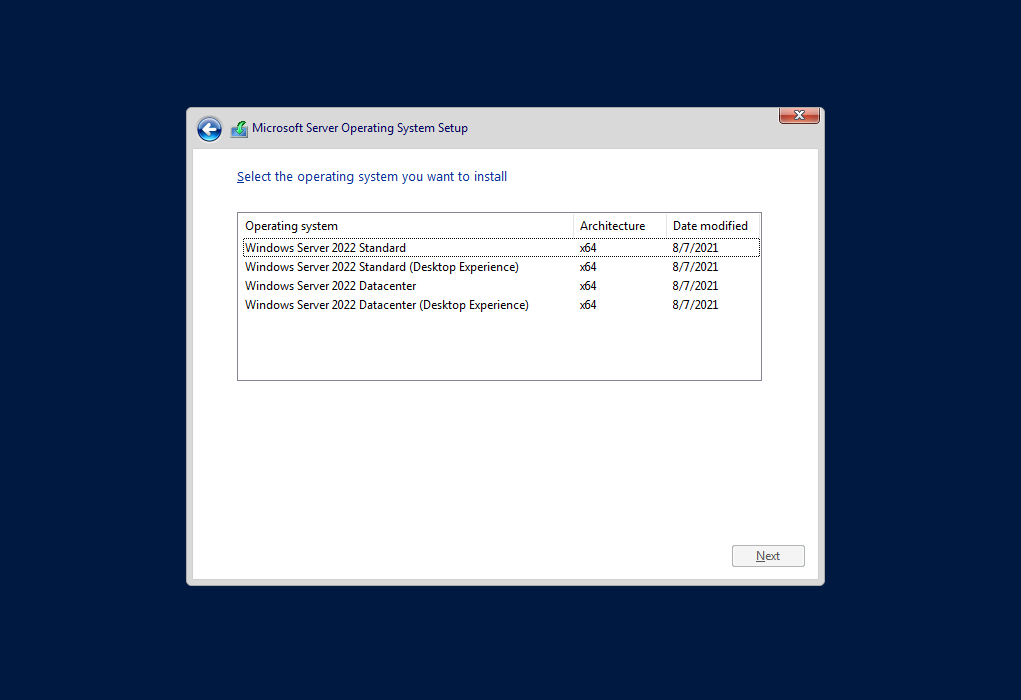
You can no longer convert windows server core to GUI. That option existed with Server 2012 R2 but was wrought with issues so they removed the option. You'll just need to clean install it again but select one of the Desktop Experience options, or to reinstall windows 11, same steps, boot the install media, delete / recreate partition, continue the install.

--please don't forget to upvote and Accept as answer if the reply is helpful--
Was this answer helpful?

1 person found this answer helpful.

2 additional answers

Sort by: Most helpful
  1. Itstudent2025 26 Reputation points
    2022-09-10T17:59:09.387+00:00

    Hello @Anonymous ,
    The problem is Windows Server is already installed, how do I get to that. Is there a command on the Powershell that I should use?

    Was this answer helpful?

    0 comments No comments

  2. Anonymous
    2022-09-10T17:42:21.687+00:00

    You should be able to reinstall windows 11 by booting from the install media, most likely it is a digital license tied to the hardware or your microsoft account. As to installing Server 2022, select one of the Desktop Experience options to get a GUI.

    --please don't forget to upvote and Accept as answer if the reply is helpful--

    239754-image.png

    Was this answer helpful?

    0 comments No comments

Your answer

Answers can be marked as 'Accepted' by the question author and 'Recommended' by moderators, which helps users know the answer solved the author's problem.
