Microsoft 365 and Office | SharePoint Server | For business
A family of Microsoft on-premises document management and storage systems.

This browser is no longer supported.
Upgrade to Microsoft Edge to take advantage of the latest features, security updates, and technical support.
' cx='32' cy='32' r='32' /%3E%3Ctext x='50%25' y='55%25' dominant-baseline='middle' text-anchor='middle' fill='%23FFF' %3ES%3C/text%3E%3C/svg%3E)
Two Employees submitted a new item in this list, she filled all columns whichrequired, but after submitted, the required “Person or Group” type got blank.
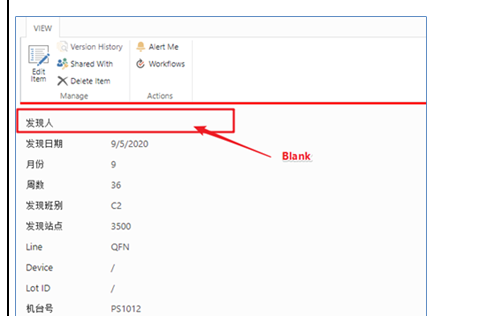
it is happening while editing the form. Please help.
A family of Microsoft on-premises document management and storage systems.
Answer accepted by question author

Hi @sns
This seems to be a strange phenomenon, please try to delete this column and recreate it.
Update:
It seems that this question always only revolves around these two specific users. Please try to delete these two users and give them permissions again.
If an Answer is helpful, please click "Accept Answer" and upvote it.
Note: Please follow the steps in our documentation to enable e-mail notifications if you want to receive the related email notification for this thread.
Hi Itch sun,
Tried that one also, you can see end user response below:
If that particular user creates the column does it have issue? -> Yes.
If you or someone creates, does this issue exist?-> No, only for the two particular users
Did you or user try to delete and create new column? -> Both. If I create a new column which submit the user’s name, it’s still blank.
Please advise what needs to be done. Thank you.
Hi @sns
It seems that this question always only revolves around these two specific users? Please try to delete these two users and give them permissions again
Hi @sns
I'm glad this helped you.😊
If you think the replies are helpful to you, please remember to accept them Answer. It will help others who meet the similar question in this forum.
it is not showing accept as answer for the statement delete two users. I could vote it.
Hi @sns
I have updated my initial response, please accept it as an answer.
Thanks~

Might be some custom code has been placed for the edit form .aspx, see is there any custom code for the aspx page.
Thanks Regards,
HI Sharth,
It is not customized. you can see response below from end user:
Is this list customized? -> No.