


Share via

Unexpected system shutdown

Joy Qiao 5,812 Reputation points Moderator
2020-03-02T05:02:08.473+00:00

Hi,

i have a PC of my LAN that sometimes shutdown without any advice.

if i go to explore the events i notice ID6008 = "The previous system shutdown at 4:23:44 PM on ‎2/‎12/‎2020 was unexpected."

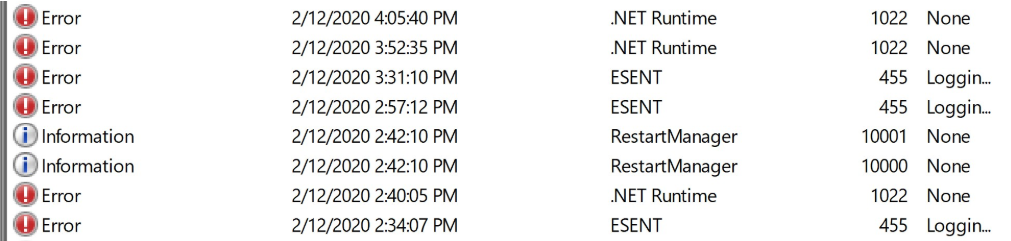
Under "Application" i have those errors just before the shutdown:
3603-%E6%8D%95%E8%8E%B7.png

What can i do? .NET errors refers to a profiler that cannot connect, but i don't know if it's related to the shutdowns

Source link:https://social.technet.microsoft.com/Forums/windowsserver/en-US/f9a15d40-3a56-44c1-9806-09978a7d3852/unexpected-system-shutdown?forum=win10itprogeneral

Windows for business | Windows Client for IT Pros | User experience | Other
0 comments No comments

Answer accepted by question author

Jenny Feng 711 Reputation points
2020-03-02T05:45:41.62+00:00

Hi,

Welcome to our new Microsoft Q&A Platform.

This event is written during startup following an unexpected restart or shutdown. This can be due to one of the hardware component is malfunctioning in your system.

Check if your CPU is overheating. You can check the CPU temperature using any third-party app. If on a desktop computer, check if the Sink fan is working.

Try to clean the heat sink fan by removing the dirt using compressed air.

You need to also check your power supply unit (PSU) for any malfunction. If you have older PSU running on modern hardware, it can create power issues and the system may shut down to prevent any damage to the hardware component.

Also, check the system event log for other events that occurred around the same time as the unexpected shutdown.

Hope above information can help you.

Was this answer helpful?

0 comments No comments

0 additional answers

Sort by: Most helpful

Your answer

Answers can be marked as 'Accepted' by the question author and 'Recommended' by moderators, which helps users know the answer solved the author's problem.