

SCCM Bitlocker Management

EduardsGrebezs 1,191 Reputation points
2020-10-23T08:37:07.877+00:00

Hello, i have a few question about SCCM Bitlocker .

  1. About self-service and help desk portal - if there a possibility to make "username" an optional option when using recovery?
    as it was with MBAM.
    1. If there a possibility to encrypt D: drive on computer and then this will send it to the SCCM database?

I now got encrypted C: drive but some computer have D; drive is there a possibility to do this with policy?

Or should i use -> manage-bde -on d: command in powershell?

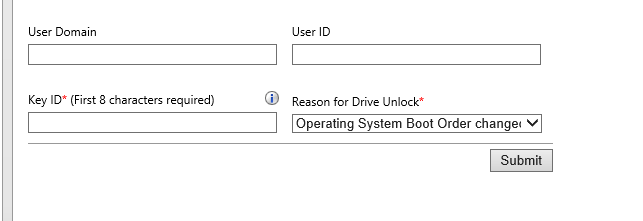
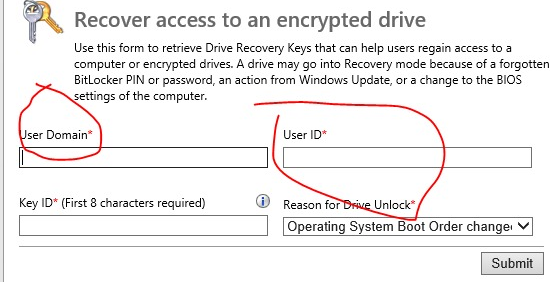
I enter and see this on helpdesk portal
34594-image.png

But my colleague see this?
34508-image.png

How could this be possible? we are in one group -- This one i fixed the user was domain admin user, but no in the group.

Also when connecting to helpdesk portal is there a possibility to remove authentication window? So i could authorize immediately?

And when i'm connecting to the helpdesk portal i've been asking for client Certificate instead of login\pass

Windows for business | Windows Client for IT Pros | Devices and deployment | Configure application groups
0 comments No comments

Answer accepted by question author

EduardsGrebezs 1,191 Reputation points
2020-10-27T12:20:42.347+00:00

Ok thank but.

If now i have SCCM collection to which is deployed SCCM Bitlocker Management policy without fixed drive options.

If i change this policy then it will apply for all workstations in this collection there are 400+ workstations.

But really i have only 5 with 2 partitions - that will be encrypted.

What will happen to other 395 workstations? - Policy will show non-compliant? <- if so then there will not be new Bitlocker keys in sccm sql DB and other workstation that will not have 2nd partition will not be able to escrow the key.

Or i need to create separate collection and deploy this new policy with fixed drive to them?

@Teemo Tang

Was this answer helpful?


1 additional answer

Sort by: Most helpful
  1. Teemo Tang 11,581 Reputation points
    2020-10-26T02:00:54.01+00:00

    Question 1: No.
    Question 2: Yes.
    About Q1, there is not a GPO can modify/control portal, we can’t make User Domain and User ID become optional options.
    About Q2, you could try the following steps:
    1.) Configure use of Passwords for fixed data drives : disabled
    2.) Fixed data drives encryption Settings: enabled -> Require Auto-Unlock
    3.) Encryption Policy Enforcement Settings:enabled -> grace period as you like , i set it to 0
    4.)Choose how Bitlocker protected Drives can be recovered: I think you have to enable and configure this too and check the "Omit recovery Options ..." Checkbox.
    Source:
    https://social.technet.microsoft.com/Forums/en-US/9849abe2-d257-43de-8f00-72254daf5694/mbam-gpo-settings-to-encrypt-multiple-hard-drives?forum=mdopmbam

    -------------------------------------------------------------------------------------

    If the Answer is helpful, please click "Accept Answer" and upvote it.
    Note: Please follow the steps in our documentation to enable e-mail notifications if you want to receive the related email notification for this thread.

    Was this answer helpful?

    0 comments No comments

Your answer

Answers can be marked as 'Accepted' by the question author and 'Recommended' by moderators, which helps users know the answer solved the author's problem.