Exchange | Exchange Server | Management
The administration and maintenance of Microsoft Exchange Server to ensure secure, reliable, and efficient email and collaboration services across an organization.
This browser is no longer supported.
Upgrade to Microsoft Edge to take advantage of the latest features, security updates, and technical support.
' cx='32' cy='32' r='32' /%3E%3Ctext x='50%25' y='55%25' dominant-baseline='middle' text-anchor='middle' fill='%23FFF' %3ER%3C/text%3E%3C/svg%3E)
Hi,
Can someone guide me through configuring Auto reply to the deleted or non existing mail box with a custom message, tried to create hub transport rule but didn't work. Pls. suggest
Thanks
The administration and maintenance of Microsoft Exchange Server to ensure secure, reliable, and efficient email and collaboration services across an organization.
' cx='32' cy='32' r='32' /%3E%3Ctext x='50%25' y='55%25' dominant-baseline='middle' text-anchor='middle' fill='%23FFF' %3EEY%3C/text%3E%3C/svg%3E)
How did you set your transport rule?
I would try something like this:

If:the header "to" contains "@yourdomain.com", or you can test if "the recipient domain is..." or "the recipient address includes specific words " would work.
Do: Reject the message with explaination...
Except: the recipient is a member of this group (this groups contains all existing users) or the recipient is this person(ctrl+A to select all users)
If an Answer is helpful, please click "Accept Answer" and upvote it.
Note: Please follow the steps in our documentation to enable e-mail notifications if you want to receive the related email notification for this thread.

That's not an auto-reply however. The end-user will get back a NDR that says the message couldn't be delivered and all the diagnostic information.
In other words pretty much the same as the NDR they sender would get if there was no rule at all since the mailbox does not exist.
I am writing here to confirm with you how the thing going now?
If you need further help, please provide more detailed information, so that we can give more appropriate suggestions.
If an Answer is helpful, please click "Accept Answer" and upvote it.
Note: Please follow the steps in our documentation to enable e-mail notifications if you want to receive the related email notification for this thread.
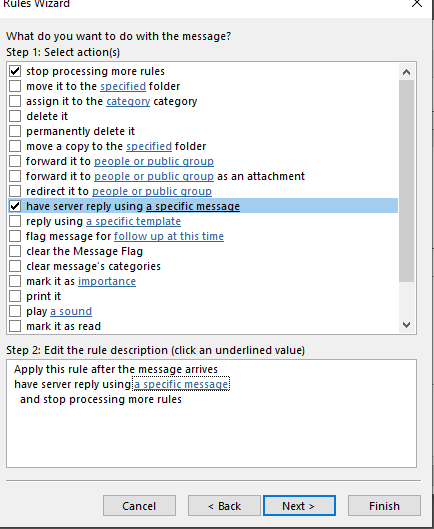
HI there. Not really possible if the mailbox does not exist. You would have to add it as an additional alias to an existing mailbox and create an Outlook reply rule using a template/ server side message or create a new mailbox for it and do the same thing.