SQL Server | Other
Additional SQL Server features and topics not covered by specific categories
This browser is no longer supported.
Upgrade to Microsoft Edge to take advantage of the latest features, security updates, and technical support.
' cx='32' cy='32' r='32' /%3E%3Ctext x='50%25' y='55%25' dominant-baseline='middle' text-anchor='middle' fill='%23FFF' %3EE%3C/text%3E%3C/svg%3E)
Hello,
I am using Database Mail with SQL Server 2019 CU8 standard edition, on the Server 2019 standard (update).
My SMTP server is gmail.smtp.com 587 with secure
Google Apps Email account - Turn Allow less secure apps ON
No FireWall
Some days after we moved to our new server (SQL server 2019), I notice that my customers stop getting emails.
using query
SELECT sent_status, *
FROM dbo.sysmail_allitems WITH(NOLOCK READUNCOMMITTED)
ORDER BY send_request_date desc
returns a lot of fails\unsent emails
When I checked the log viewer
I found strange errors
Cannot send mails to the mail server. (The SMTP server requires a secure connection or the client was not authenticated. The server response was: 5.7.0 Authentication Required. Learn more at)
OR
Sending Mail using Account 1 (2020-10-27T11:48:18). Exception Message: Cannot send mails to mail server. (The operation has timed out.).
My workaround
1.delete queue
DECLARE @GETDATE datetime
SET @GETDATE = GETDATE();
EXECUTE msdb.dbo.sysmail_delete_mailitems_sp @sent_before = @GETDATE;
GO
2.Kill Databasemail.exe process from the task manager
3.EXEC dbo.sysmail_stop_sp
4.EXEC dbo.sysmail_start_sp
And why it so strange?
Because from that point, everything works like a charm...
the service sends hundreds of emails with the same email account, same profile setting.
It looks like the Database Mail log errors not related to the case...
What's going on?
PS
With the same setting on our old SQL SERVER 2012 EXPRESS, everything works fine for years ...
Additional SQL Server features and topics not covered by specific categories
It`s true.
the problem was the network
a fault network card without any error
I change the card and everything works smooth

Hi @ErezK ,
Please close your firewall and antivirus softwares to have a test.
The mail could not be sent to the recipients because of the mail server failure. (Sending Mail using Account 1 (2020-10-28T09:43:16). Exception Message: Cannot send >mails to mail >server. (The operation has timed out.).
From this message, we can know the mail server failure. You need to check whether the mail server is running well.
Exception Message: Cannot send mails to mail server. (The SMTP server requires a secure connection or the client was not authenticated. The server response was: 5.7.0 >Must issue a >STARTTLS command first. w25sm2418286ejy.123 - gsmtp).
From this message, we can see that the SMTP server can not recognize your request. Or the SMTP thinks your request is not one secure one connection. So it refuse the client's request.Whether there are some security settings in your SMTP server side?
BR,
Mia
If the answer is helpful, please click "Accept Answer" and upvote it.
Hi,
As I mentioned before
No Firewall
No Antivirus
The server sends hundreds of emails and then stuck.
When it stuck I need to
1.delete queue
2.Kill Databasemail.exe process from the task manager
3.EXEC dbo.sysmail_stop_sp
4.EXEC dbo.sysmail_start_sp
Somebody told me that it has a connection to a DNS problem
nslookup - ok
ping - ok
any idea ?
Hi @ErezK ,
I think this is one network problem. How long is it when your ping your client to the server?
And maybe that is caused by the slow speed of the network. Please check with the one who charge your company's network.
Use wireshark to capture the packages to analize whether there are many broadcasts which use the port and cause the stuck of your network.
BR,
Mia
If the answer is helpful, please click "Accept Answer" and upvote it.
Hi @ErezK ,
So do you try to create one new profile and new account to have a test?
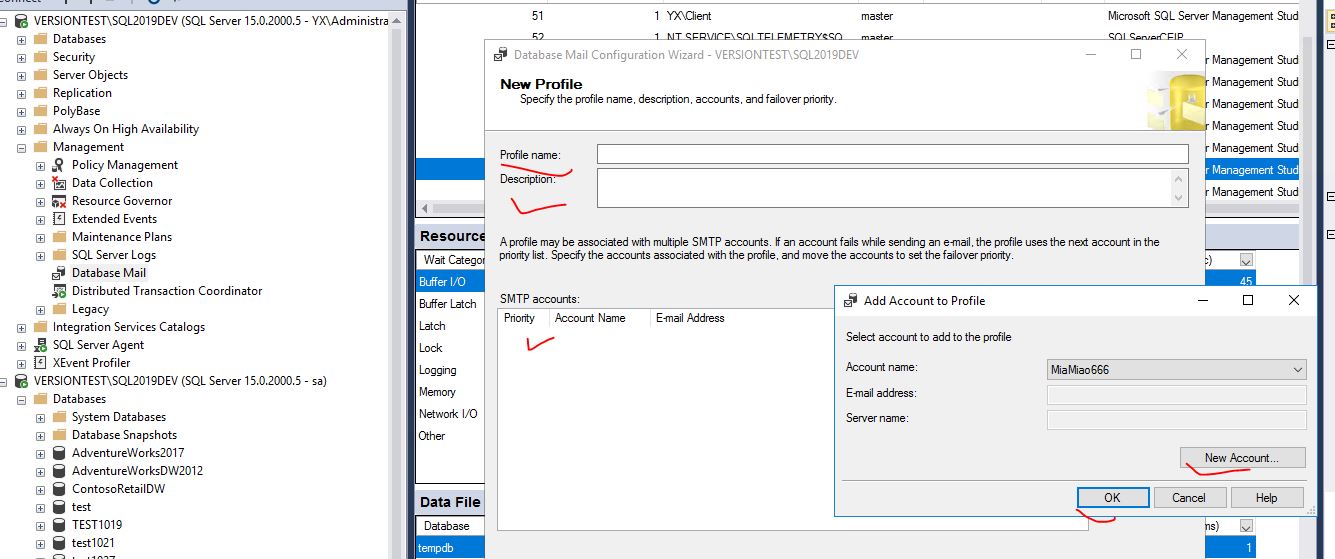
BR,
Mia
If the answer is helpful, please click "Accept Answer" and upvote it.
HI,
I create 4 accounts (1-4 priority).
and all 4 accounts work fine
until it`s stuck
Hi @ErezK ,
Cannot send mails to the mail server. (The SMTP server requires a secure connection or the client was not authenticated. The server response was: 5.7.0 Authentication Required. Learn more at) OR Sending Mail using Account 1 (2020-10-27T11:48:18). Exception Message: Cannot send mails to mail server. (The operation has timed out.).
Quote from this case: the-smtp-server-requires-a-secure-connection-or-the-client-was-not-authenticated
First check for gmail's security related issues. You may have enabled double authentication in gmail. Also check your gmail inbox if you are getting any security alerts.
You can also reconfigure your database mail to have a test.
More information: setup-sql-server-database-mail-to-use-a-gmail-hotmail-or-outlook-account
BR,
Mia
If the answer is helpful, please click "Accept Answer" and upvote it.
Hi,
You may have enabled double authentication in gmail - NO
check your gmail inbox if you are getting any security alerts. - NO
My configurations looks very good
As I mentioned before
the databasemail send 100 emails before it stuck\not sent email (
With that errors
The mail could not be sent to the recipients because of the mail server failure. (Sending Mail using Account 1 (2020-10-28T09:43:16). Exception Message: Cannot send mails to mail server. (The operation has timed out.).
Exception Message: Cannot send mails to mail server. (The SMTP server requires a secure connection or the client was not authenticated. The server response was: 5.7.0 Must issue a STARTTLS command first. w25sm2418286ejy.123 - gsmtp).
Sometimes
I can see "Retry" on the sent_status
and the second try works.
the same mail send without an error
)
' cx='32' cy='32' r='32' /%3E%3Ctext x='50%25' y='55%25' dominant-baseline='middle' text-anchor='middle' fill='%23FFF' %3ETP%3C/text%3E%3C/svg%3E)
You are likely running into the gmail SMTP limits. Please see:
Hi,
Our database mail send only 150 messages per day (24 hours)
1 Recipient each mail.
"
If your users exceed an email sending limit, they’ll see an error message, such as:
You have reached a limit for sending emails.
You reached a Gmail sending limit.
You exceeded the maximum recipients.
"
I didn't get any limit error message from Gmail.
After running my workaround steps (sometimes 3 4 each day), the mails start going on for hours again
I look at my old server sent_status table, all the messages always sent without any errors.