Windows 10 Update 1903

Larry S Saint Cyr 1 Reputation point
2020-03-17T22:47:58.727+00:00

Last night my note book needed to up date windows. I started it before going to bed and it seems to be updated windows 10 just fine. I got up to finish the process, when window restarted the update changed the monitor display way out of the norm. I have tried everything to get window to change the display size but unable to fix this problem.

I was going to restore the system back but unable to do so for I cant see all the information. Has any one seen this type of problem? The only solution I can think of is to reinstall windows 10 and start all over again.

Any advise would be great.
Larry S Saint Cyr - Brockton Massachusetts

Windows for business | Windows Client for IT Pros | User experience | Other
0 comments No comments

3 answers

Sort by: Most helpful
  1. Teemo Tang 821 Reputation points
    2020-03-23T02:39:22.97+00:00

    There is a possibility that new kb includes the driver which is not completely compatible with your computer, after update Windows you may install graphics driver from manufacturer website.

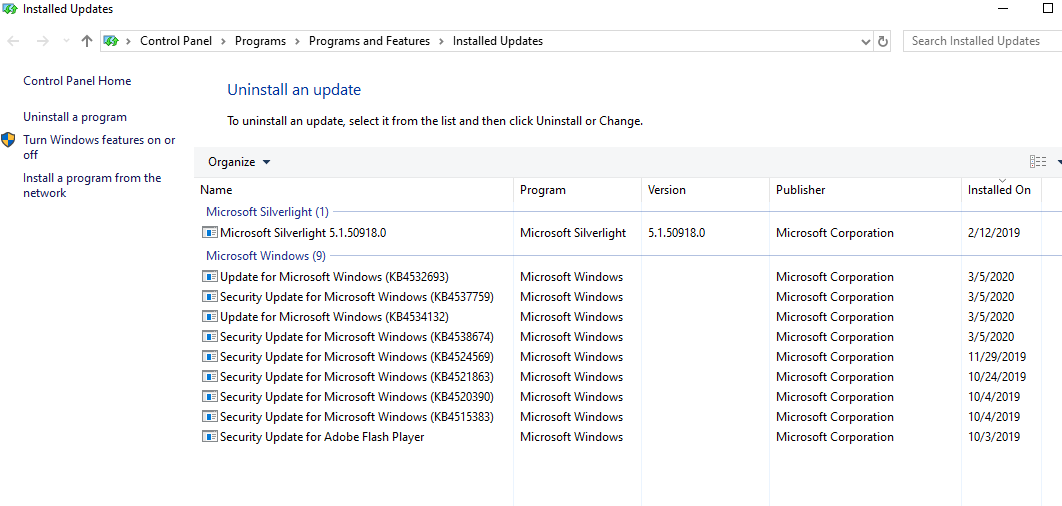
    Besides, if you only install the security update, the general roll back method is uninstall update rather than restore system… it’s easy to uninstall recent installed updates from Control Panel.
    5411-update.png

    Was this answer helpful?

    0 comments No comments

  2. Kapil Arya 37,981 Reputation points Volunteer Moderator
    2020-03-18T12:04:02.633+00:00

    Hello,

    Which update it was, can you provide us KB number?

    What exactly happens when you perform System Restore?

    Have you tried uninstalling update from Advanced recovery options screen?

    Regards.

    Was this answer helpful?

    0 comments No comments

  3. Anonymous
    2020-03-17T23:07:03.237+00:00

    What hardware details? I'd check with the manufacturer's site for an update ROM bios, firmware, chipset, and driver support pack.

    Was this answer helpful?

    0 comments No comments

Your answer

Answers can be marked as 'Accepted' by the question author and 'Recommended' by moderators, which helps users know the answer solved the author's problem.