Developer technologies | Universal Windows Platform (UWP)
A Microsoft platform for building and publishing apps for Windows devices.
This browser is no longer supported.
Upgrade to Microsoft Edge to take advantage of the latest features, security updates, and technical support.

Related to: strange-fileloadexceptions.html ( I edited the linked post because this turned out to be unrelated, just an issue with my usage)
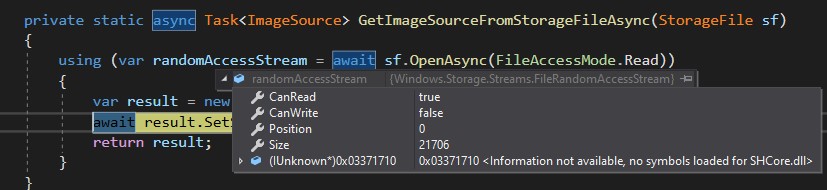
When I call SetSourceAsync on a BitmapImage, it never completes and the Xaml app hangs.
Here's a capture of the random access stream feeding into the call. It looks valid.
A Microsoft platform for building and publishing apps for Windows devices.
Answer accepted by question author

Hi,
your problem is the use of Task<T> and return type. Try following demo.
XAML
<Page
    x:Class="App1.Page04"
    xmlns="http://schemas.microsoft.com/winfx/2006/xaml/presentation"
    xmlns:x="http://schemas.microsoft.com/winfx/2006/xaml"
    xmlns:local="using:App04"
    xmlns:d="http://schemas.microsoft.com/expression/blend/2008"
    xmlns:mc="http://schemas.openxmlformats.org/markup-compatibility/2006"
    mc:Ignorable="d"
    Background="{ThemeResource ApplicationPageBackgroundThemeBrush}">
  <Page.DataContext>
    <local:ViewModel/>
  </Page.DataContext>
  <Grid>
    <Image Source="{Binding Picture}"/>
  </Grid>
</Page>
And ViewModel:
using System;
using System.ComponentModel;
using System.Runtime.CompilerServices;
using System.Threading.Tasks;
using Windows.ApplicationModel;
using Windows.Storage;
using Windows.UI.Xaml.Controls;
using Windows.UI.Xaml.Media;
using Windows.UI.Xaml.Media.Imaging;

namespace App04
{
  public class ViewModel : INotifyPropertyChanged
  {
    public ViewModel() => GetPicture();

    public ImageSource Picture { get; set; }
    private async void GetPicture()
    {
      string filePath = "Assets\\DwarfPortrait.png";
      StorageFile file = await Package.Current.InstalledLocation.GetFileAsync(filePath);
      Picture = await GetImageSourceFromStorageFile(file);
      OnPropertyChanged(nameof(Picture));
    }

    private static async Task<ImageSource> GetImageSourceFromStorageFile(StorageFile sf)
    {
      using (var randomAccessStream = await sf.OpenAsync(FileAccessMode.Read))
      {
        var result = new BitmapImage();
        await result.SetSourceAsync(randomAccessStream);
        return result;
      }
    }

    public event PropertyChangedEventHandler PropertyChanged;
    internal void OnPropertyChanged([CallerMemberName] string propName = "") =>
      PropertyChanged?.Invoke(this, new PropertyChangedEventArgs(propName));
  }
}
Thank you. I missed that type mismatch, I don't have a full understanding of async usage, so it's easy for me to get into trouble.