Developer technologies | VB
An object-oriented programming language developed by Microsoft that can be used in .NET.
This browser is no longer supported.
Upgrade to Microsoft Edge to take advantage of the latest features, security updates, and technical support.
' cx='32' cy='32' r='32' /%3E%3Ctext x='50%25' y='55%25' dominant-baseline='middle' text-anchor='middle' fill='%23FFF' %3EDR%3C/text%3E%3C/svg%3E)
Hi
Can someone please give me some guidance on implementing iLogger using VB.Net in a WinForms application?
Most documentation seems to cover C# and converting the code doesn't seem to work so not sure where I am going wrong.
Spent a while with Mr Google and trying various suggestions but nearly everything I read was C# and not using WinForms.
Reason for interest is that everyting I read seems to suggest iLogger is the future etc so wanted to learn how to use it, so any comments on this or better options etc would be useful to hear your opinions
An object-oriented programming language developed by Microsoft that can be used in .NET.

Hello @Darren Rose
As you've learned, the documentation and code sample are usually in C#. Would something like a file logger which implements ILogger help? If so I can convert one I have in C# to VB.NET.
Yes that would be handy, so I can see how to implement it in VB. As you say most examples on Microsoft website are in C# even if you choose VB as per LesHay reply
Answer accepted by question author
Hello @Darren Rose
The following are code snippets from this class project in this repository on GitHub converted from this C# cide in this repository on GitHub.
Hopefully this is of use to you and note what you were looking at is for use with web apps.
https://github.com/karenpayneoregon/csharp-features/tree/master/ConsoleApp_vb
Program.vb
Imports Microsoft.Extensions.DependencyInjection
Imports Microsoft.Extensions.Logging

Module Program
    Sub Main(args As String())

        Dim serviceCollection As New ServiceCollection()
        ConfigureServices(serviceCollection)

        Dim serviceProvider = serviceCollection.BuildServiceProvider()

        Dim someClass = serviceProvider.GetService(Of SomeClass)()

        someClass.LogInfo("Hello")

    End Sub
    Private Sub ConfigureServices(ByVal services As IServiceCollection)

        services.AddLogging(Function(configure) configure.AddConsole()).AddTransient(Of SomeClass)()

    End Sub

End Module
Supporting class
Imports Microsoft.Extensions.Logging
Public Class SomeClass
    Private ReadOnly _logger As ILogger(Of SomeClass)

    Private Sub New(logger As ILogger(Of SomeClass))
        _logger = logger
    End Sub

    Private Sub LogCritical(message As String)
        _logger.Log(LogLevel.Critical, message)
        _logger.LogInformation("")
    End Sub
    Public Sub LogInfo(message As String)
        _logger.LogInformation(message)
    End Sub
End Class
Public Enum LogLevel
    Warning
    Errors
    General
End Enum
Public Interface ILogger
    Property FileName() As String
    Sub LogWarning(message As String)
    Sub LogError(message As String)
    Sub LogGeneral(message As String)
    Sub Log(ByVal level As LogLevel, ByVal message As String)
End Interface
Public Class LogManager
    Implements ILogger

    Public Property FileName() As String Implements ILogger.FileName

    Public Sub LogWarning(message As String) Implements ILogger.LogWarning
        Log(LogLevel.Warning, message)
    End Sub

    Public Sub LogError(message As String) Implements ILogger.LogError
        Log(LogLevel.Errors, message)
    End Sub

    Public Sub LogGeneral(message As String) Implements ILogger.LogGeneral
        Log(LogLevel.General, message)
    End Sub

    Public Sub Log(ByVal level As LogLevel, ByVal message As String) Implements ILogger.Log
        If String.IsNullOrWhiteSpace(FileName) Then
            FileName = "ApplicationLog.csv"
        End If

        Try
            If File.Exists(FileName) Then
                Dim contents = File.ReadAllLines(FileName).ToList()
                contents.Add($"{DateTime.Now},{level},{message}")
                File.WriteAllLines(FileName, contents.ToArray())
            Else
                File.WriteAllText(FileName, $"{DateTime.Now},{level},{message}")
            End If
        Catch e As Exception
            Exceptions.Write(e)
        End Try
    End Sub
End Class
Public Class ConsoleLogger
    Implements ILogger
    Public Property FileName As String Implements ILogger.FileName

    Public Sub LogWarning(message As String) Implements ILogger.LogWarning
        Log(LogLevel.Warning, message)
    End Sub

    Public Sub LogError(message As String) Implements ILogger.LogError
        Log(LogLevel.Errors, message)
    End Sub

    Public Sub LogGeneral(message As String) Implements ILogger.LogGeneral
        Log(LogLevel.General, message)
    End Sub

    Public Sub Log(level As LogLevel, message As String) Implements ILogger.Log
        Console.WriteLine($"{level}, {message}")
    End Sub
End Class
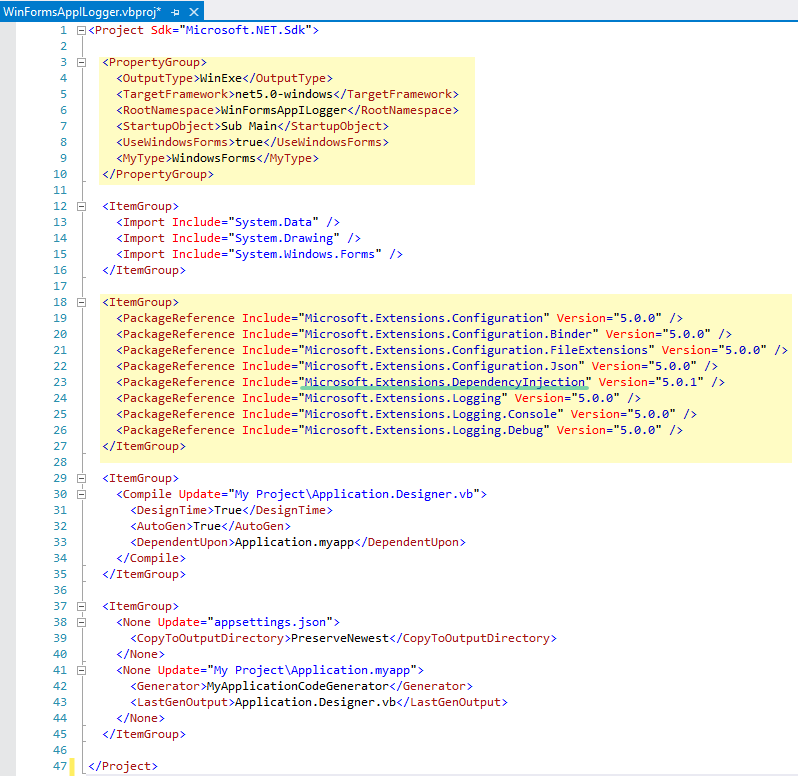
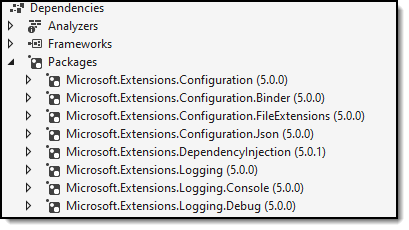
Make sure you have the NuGet package Microsoft.Extensions.DependencyInjection installed and the others I've listed below which is accessed by double clicking the project file in VS2019 or if a lower version of VS, upload the project and edit the project file.
<Project Sdk="Microsoft.NET.Sdk">

  <PropertyGroup>
    <OutputType>WinExe</OutputType>
    <TargetFramework>net5.0-windows</TargetFramework>
    <RootNamespace>WinFormsAppILogger</RootNamespace>
    <StartupObject>Sub Main</StartupObject>
    <UseWindowsForms>true</UseWindowsForms>
    <MyType>WindowsForms</MyType>
  </PropertyGroup>

  <ItemGroup>
    <Import Include="System.Data" />
    <Import Include="System.Drawing" />
    <Import Include="System.Windows.Forms" />
  </ItemGroup>

  <ItemGroup>
    <PackageReference Include="Microsoft.Extensions.Configuration" Version="5.0.0" />
    <PackageReference Include="Microsoft.Extensions.Configuration.Binder" Version="5.0.0" />
    <PackageReference Include="Microsoft.Extensions.Configuration.FileExtensions" Version="5.0.0" />
    <PackageReference Include="Microsoft.Extensions.Configuration.Json" Version="5.0.0" />
    <PackageReference Include="Microsoft.Extensions.DependencyInjection" Version="5.0.1" />
    <PackageReference Include="Microsoft.Extensions.Logging" Version="5.0.0" />
    <PackageReference Include="Microsoft.Extensions.Logging.Console" Version="5.0.0" />
    <PackageReference Include="Microsoft.Extensions.Logging.Debug" Version="5.0.0" />
  </ItemGroup>

  <ItemGroup>
    <Compile Update="My Project\Application.Designer.vb">
      <DesignTime>True</DesignTime>
      <AutoGen>True</AutoGen>
      <DependentUpon>Application.myapp</DependentUpon>
    </Compile>
  </ItemGroup>

  <ItemGroup>
    <None Update="appsettings.json">
      <CopyToOutputDirectory>PreserveNewest</CopyToOutputDirectory>
    </None>
    <None Update="My Project\Application.myapp">
      <Generator>MyApplicationCodeGenerator</Generator>
      <LastGenOutput>Application.Designer.vb</LastGenOutput>
    </None>
  </ItemGroup>

</Project>
Thanks Karen, will give it a try later tonight (or tomorrow after work) and feedback - much appreciated
Re "note what you were looking at is for use with web app" - I had found this site which mentioned using it with desktop apps as well
Re "note what you were looking at is for use with web app" - I had found this site which mentioned using it with desktop apps as well
That is what mine does in VB.NET found here

Okay thanks for that. How would I do same in a WinForms app?
Thanks Karen, is it just me or is the whole implementation of ILogger overly complicated? or is it just how you have demonstrated it here?
I just want to use it in a WinForm vb.net app, without having all the extra classes and confusing code - or is that not possible (or is it just me?)
e.g. why can't it be as simple as
 Dim _logger As ILogger
 _logger.LogInformation("INFO")
Why can't it be simple? Because using ILogging in Windows Forms requires more work then ASP.NET Core or Entity Framework Core because either or has part of the implementation built in, more so for ASP.NET than EF Core. This is why I created a C# class project for dealing with just configurations reading appsettings.json (not included) e.g.

That makes sense, thank you for the explanation. Microsoft seem to be pushing ILogger as the "future" but I can see why a lot of people use third party of custom solutions instread.
Thanks for all the information, I have learnt a lot and think I know it is probably not the solution for me for now as I only have basic needs.
:)
Okay so I have now switched my brain on (I blame festive period and too much drink), and read through all answers again and I get it now.
I have it working using method you posted initially e.g. the converted code snippets from first post
Thanks Karen, and sorry for vagueness earlier...
The most used third party is nlog https://www.nuget.org/packages?q=nlog
One question - I did also try the .NET Core version from same first post, but get error on line 19 of Program.vb (services.addlogging) as it gives me error as below image

@Karen Payne MVP - see question in last post please
@Darren Rose I will amend my answer with an edit section, give me about ten minutes.
Thanks
I had "Microsoft.Extensions.DependencyInjection" already
But I didn't have the below as previous method I used had added "Microsoft.Extensions.Logging.Abstractions" - once I added those it builds fine
<PackageReference Include="Microsoft.Extensions.Logging" Version="5.0.0" />
<PackageReference Include="Microsoft.Extensions.Logging.Console" Version="5.0.0" />
<PackageReference Include="Microsoft.Extensions.Logging.Debug" Version="5.0.0" />
But still won't run as get

Don't worry too much as think I prefer your other method anyway - just like to always fully try everything people show me
' cx='32' cy='32' r='32' /%3E%3Ctext x='50%25' y='55%25' dominant-baseline='middle' text-anchor='middle' fill='%23FFF' %3EA%3C/text%3E%3C/svg%3E)
Hi Can't help directly with the iLogger, but, are you aware of the lanfuage 'switch' at the top of the docs page(s)? ![51684-1.png][1] [1]: /api/attachments/51684-1.png?platform=QnA
anonymous user - yes I am aware of that and only some pages have it, and others even if you change it still only show C# examples...
