Developer technologies | Windows Presentation Foundation
A part of the .NET Framework that provides a unified programming model for building line-of-business desktop applications on Windows.
This browser is no longer supported.
Upgrade to Microsoft Edge to take advantage of the latest features, security updates, and technical support.
' cx='32' cy='32' r='32' /%3E%3Ctext x='50%25' y='55%25' dominant-baseline='middle' text-anchor='middle' fill='%23FFF' %3ELC%3C/text%3E%3C/svg%3E)
Hi,
I would like to use DocumentViewer for print preview of my XPS files. However, the ContentPresenter control known as PART_FindToolBarHost embedded inside DocumentViewer doesn't recognize my Windows language settings, so by default It's everything in English - Textbox watermark, menu names, tooltips etc.
I want It to be in my language (Slovenian) or be able to edit template via VS Blend to fix everything - which unfortunally I couldn't do It.
Here is a screenshot of this control in DocumentViewer:
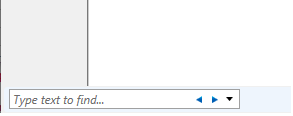
Is there ANY way I could achieve this ?
Regards, Luka
A part of the .NET Framework that provides a unified programming model for building line-of-business desktop applications on Windows.
Answer accepted by question author
' cx='32' cy='32' r='32' /%3E%3Ctext x='50%25' y='55%25' dominant-baseline='middle' text-anchor='middle' fill='%23FFF' %3EG%3C/text%3E%3C/svg%3E)
Hi LukaCiglar,
The string is hard coded in %windir%\Microsoft.NET\Framework\v4.0.30319\WPF\(language)\PresentationUI.resources.dll.
If there are no Slovenian resources, it will be in English.
private void DocumentViewer_Loaded(object sender, RoutedEventArgs e)
{
    var dv = (DocumentViewer)sender;
    var host = dv.Template.FindName("PART_FindToolBarHost", dv) as ContentControl;
    var content = host?.Content as Control;
    if (content == null)
    {
        return;
    }

    var label = content.FindName("FindTextLabel") as Label;
    if (label != null)
    {
        label.Content = label.Name;
    }

    var textBox = content.FindName("FindTextBox") as TextBox;
    if (textBox != null)
    {
        textBox.ToolTip = textBox.Name;
    }

    var prev = content.FindName("FindPreviousButton") as Button;
    if (prev != null)
    {
        prev.ToolTip = prev.Name;
    }

    var @next = content.FindName("FindNextButton") as Button;
    if (prev != null)
    {
        @next.ToolTip = next.Name;
    }

    var menu = content.FindName("OptionsMenu") as Menu;
    if (menu != null)
    {
        var menuItem = menu.Items[0] as MenuItem;
        menuItem.ToolTip = menuItem.Name;

        foreach (MenuItem submenu in menuItem.Items)
        {
            submenu.Header = submenu.Name;
        }
    }
}
Hi gekka,
now that's a relief, many thanks for this. Just one more thing - what do you mean by Slovenian resources, what should I install ?
Because I have Slovenian language pack for Windows 10. Beside that - Messageboxes are too in English, any way to fix that too ?
So what you're saying Is that everything would be fine If I would have correct language pack installed ?
Here is my screenshot from Windows 10 - (Isn't that enough?) :

Your showing languate pack is only for system of windows 10.
It changes the languate in explore, help and input system.
I tried installing the Slovenian language pack, but the language pack for .Net Framework is not included.