Azure App Service
Azure App Service is a service used to create and deploy scalable, mission-critical web apps.
This browser is no longer supported.
Upgrade to Microsoft Edge to take advantage of the latest features, security updates, and technical support.
' cx='32' cy='32' r='32' /%3E%3Ctext x='50%25' y='55%25' dominant-baseline='middle' text-anchor='middle' fill='%23FFF' %3EMM%3C/text%3E%3C/svg%3E)
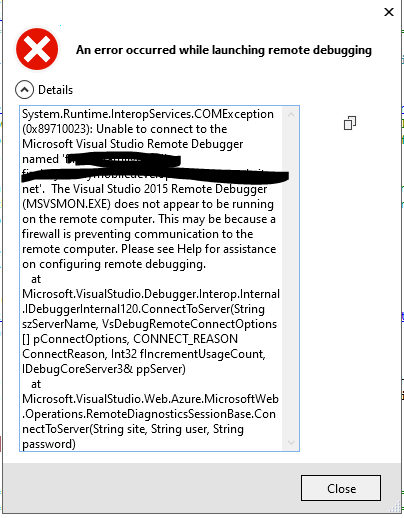
I tried to attach a remote debugger to my development slot, but got the following error:
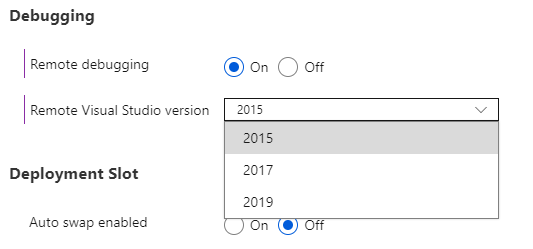
I then proceeded to open General Settings under Configuration on the slot, and switched Remote Debugging On and chose 2015 for my visual studio version.
After saving, I got this notification:
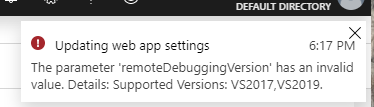
I haven't had issues in the past. 2015 is clearly listed under the available options. Why can't I use 2015 to debug my app service?
PS: I couldn't find a tag for app-service, please load one.
Azure App Service is a service used to create and deploy scalable, mission-critical web apps.

Hi MichelleMcCabe-5663,
Welcome to Microsoft Q&A! Thanks for posting this question.
If your Web App uses an IP based SSL certificate, get the IP address from your KUDU console and use that IP address for the *.azurewebsites.net hostname you are remote debugging by adding the IP HOSTNAME combination to the HOSTS file.
Please see this blog post for more information.
Hope that helps!
Thanks,
Grace