Microsoft 365 and Office | SharePoint | For business | Windows
A group of Microsoft Products and technologies used for sharing and managing content, knowledge, and applications.

This browser is no longer supported.
Upgrade to Microsoft Edge to take advantage of the latest features, security updates, and technical support.
' cx='32' cy='32' r='32' /%3E%3Ctext x='50%25' y='55%25' dominant-baseline='middle' text-anchor='middle' fill='%23FFF' %3EAS%3C/text%3E%3C/svg%3E)
Hi
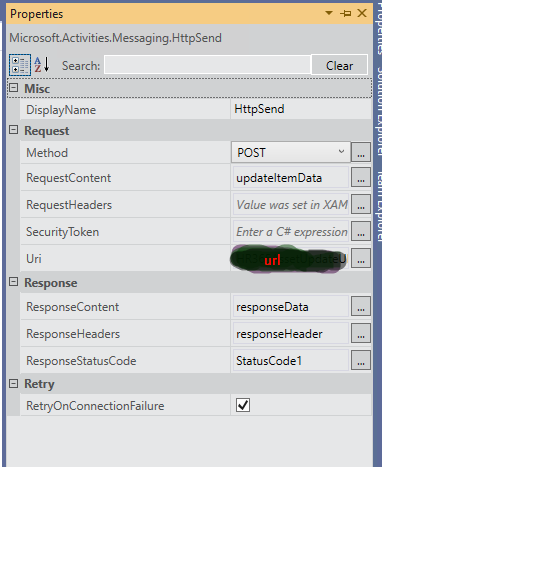
I was trying to update list item in workflow using HttpSend activity , it is giving bad request error always
Can any provide steps to do in proper way like how to pass RequestContent, RequestHeader, ResponseContent and ResponseHeader ?
I mentioned attachment below
Regards
Srinivas Are
A group of Microsoft Products and technologies used for sharing and managing content, knowledge, and applications.

Hi @Aare Srinivas Patel ,
Is there any update ? If the reply is helpful to resolve the question, I suggest you could accept as answer so that it could also help others who have the similiar question in the forum.
Thanks
Best Regards
Hi @Aare Srinivas Patel ,
Is there any update ? If the answer resolved the question, please remember to accept as answer so that it could also help others in the forum who have the similiar question.
Thanks
Best Regards
Hi @Aare Srinivas Patel ,
Please refer the sample update item Post Request:
function UpdateListItemUsingItemId(Id) {
       $.ajax
        ({
              // _spPageContextInfo.webAbsoluteUrl - will give absolute URL of the site where you are running the code.
        // You can replace this with other site URL where you want to apply the function
        url: _spPageContextInfo.webAbsoluteUrl + "/_api/web/lists/getByTitle('list name')/items(" + Id +")",
        type: "POST",
        headers:
        {
            // Accept header: Specifies the format for response data from the server.
            "Accept": "application/json;odata=verbose",
            //Content-Type header: Specifies the format of the data that the client is sending to the server
            "Content-Type": "application/json;odata=verbose",
            // IF-MATCH header: Provides a way to verify that the object being changed has not been changed since it was last retrieved.
            // "IF-MATCH":"*", will overwrite any modification in the object, since it was last retrieved.
             "IF-MATCH": "*",
            //X-HTTP-Method:  The MERGE method updates only the properties of the entity , while the PUT method replaces the existing entity with a new one that you supply in the body of the POST
            "X-HTTP-Method": "MERGE",
            // X-RequestDigest header: When you send a POST request, it must include the form digest value in X-RequestDigest header
            "X-RequestDigest": $("#__REQUESTDIGEST").val()
        },
         data: JSON.stringify({
         __metadata:
            {
              // Format of the "type" is: SP.Data.<<ListName>>ListItem. First character of the <<ListName>> should be in Capital
              type: "SP.Data.List_x0020_NameListItem"
            },
            description: "Updated Description"
        }),
        success: function(data, status, xhr)
        {
            console.log("Success");
        },
        error: function(xhr, status, error)
        {
            console.log("Failed");
        }
    });
}
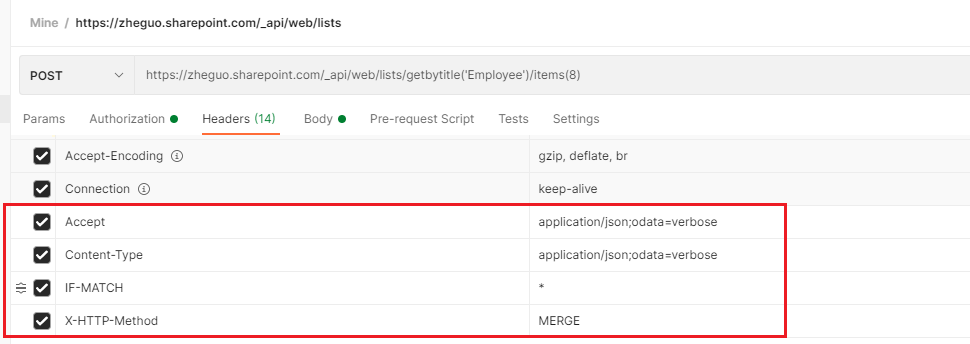
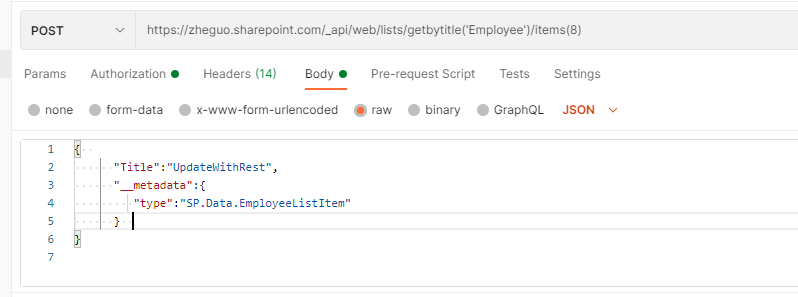
And in the Visual Studio custom workflow activity, the request body may need to prepend the parameter keyword, you can refer the following demo (create site with a Post Request) which should be similiar with update list item:
Custom Workflow Activity for Creating a SharePoint Site
Another important point, the __metadata type should be updated with this format:
type: "SP.Data.<ListName>ListItem"
Thanks
Best Regards
If an Answer is helpful, please click "Accept Answer" and upvote it.
Note: Please follow the steps in our documentation to enable e-mail notifications if you want to receive the related email notification for this thread.
Hi @ZhengyuGuo ,
Thanks for sharing
I have followed above article @Custom Workflow Activity for Creating a SharePoint Site
Statuscode giving always BadRequest error
I ma trying to update list item with below restapi url
string.Format("{0}/_api/web/lists/GetByTitle('ListName')/Items?$filter=Aid eq '{1}'", siteUrl, title);
RequestContent
 parameters/__metadata/type   > "SP.Data.ListNameListItem"
 parameters/Title   > "Update item from workflow"
Can you suggest me on this please , where exactly i am missing i am not able to rectify this since two days i was trying to achieve this but unfortunately not yet ?
Regards
Srinivas Are

did you check that query
string.Format("{0}/_api/web/lists/GetByTitle('ListName')/Items?$filter=Aid eq '{1}'", siteUrl, title);
returns any list item? (you may test it with HTTP GET for testing). What if title contains spaces or non-latin characters? Probably it should be encoded first. If this query will work you may get list item id from it and then use query shown in previous reply which updates using id:
/_api/web/lists/getByTitle('list name')/items(" + Id +")
Hi @Aare Srinivas Patel ,
You can follow sadomovalex's suggestion, check if you can get the valid List item data with a GET Request in browser and check out if the _metdata type is valid.
In general if there is space in the List Title, it will be encoded, you can check in GET Response:

Thanks
Best Regards
Hi @ Jerryzy/sadomovalex
I have followed sadomovalex's suggestion GET operation is working and i checked at browser as well __metadata also matching ,
But POST operation is giving BadRequest Error in workflow HttpSend call.
I observed few things that if use this /_api/web/lists/getByTitle('list name')/items(" + Id +") query working fine
if i go with this string.Format("{0}/_api/web/lists/GetByTitle('ListName')/Items?$filter=Aid eq '{1}'", siteUrl, title); query not working
Here can you confirm , Is filter query not support in VS Workflow ?
Is this only the way i have to go with /_api/web/lists/getByTitle('list name')/items(" + Id +") ?
Can i get sample example to update list item with POST operation with proper RequestContent, RequestHeader for my understanding ?
Regards
Srinivas Are
Hi @AareSrinivasPatel,
This make sense.
As $filter is using with GET Request to filter list items which may return single or multiple items.
For update list item(POST Request), just specify the Item Id _api/web/lists/getByTitle('list name')/items(" + Id +"), don't use $filter parameter, please see a example from official document:

Thanks
Best Regards
check this article: Call web services from SharePoint workflows. It contains example of calling web service from workflow using HttpSend activity - pretty similar to what you are looking for.
Hi @sadomovalex ,
Thanks for sharing this article , it was nice but if i get example with REST API call to share point list with POST operation instead if Webservice call it would be easy for me
Regards
Srinivas Are