SYSVOL folder not replicating polices while tests are passing

Arsalan Iqbal 1 Reputation point
2021-04-28T06:51:57.527+00:00

I am facing an issue in PDC. When ever I make change in GPO and update the gpupdate /force, polices folder in SYSVOL folder of PDC is not updating its policies while those are updated in DC02 and DC03. This is also causing GPO issue on clients. I have run many test specially DFS manager test and all of them are fine. Even if I created a test folder in polices Folder, it is instantly replicated in all 3 domains. And I have tried this from all servers to check to and from situation and it is working fine. replication test also gives 0 errors.

Source DSA largest delta fails/total %% error
ABCDAD01 34m:58s 0 / 10 0
ABCDAD02 30m:32s 0 / 10 0
ABCDAD03 34m:58s 0 / 10 0

Destination DSA largest delta fails/total %% error
ABCDAD01 30m:32s 0 / 10 0
ABCDAD02 34m:58s 0 / 10 0
ABCDAD03 25m:11s 0 / 10 0

DFR replication report from all server propagate same results

![92002-image.png][1]

DCDIAG /Test:sysvolcheck gives no error in any DC and result is same when run from any of the domain controller

"Doing primary tests

Testing server: Default-First-Site-Name\ABCDAD01
Starting test: SysVolCheck
......................... ABCDAD01 passed test SysVolCheck"

Tried restarting all of the domain controllers but did not help. Kindly note that I have noticed that this issue is from the beginning because DC02 and DC03 have same folders made in same exact time in polices folder but in DC01 it is different and some of them match while some does not.

I have also got result from GPRESULT /H and yesterday since the cleint was logged onto DC01, it gave an error in report while today the report is alert free. Yesterday the error was (mentioned below) because this policy is not present in DC01 while it is available in DC02 and DC02.

The processing of Group Policy failed. Windows attempted to read the file \ABCD.local\SysVol\ABCF.local\Policies{DD7F741B-1091-4FE8-ABF9-DA6D8B9C463E}\gpt.ini from a domain controller and was not successful.
Group Policy settings may not be applied until this event is resolved. This issue may be transient and could be caused by one or more of the following: a) Name Resolution/Network Connectivity to the current domain controller. b) File Replication Service Latency (a file created on another domain controller has not replicated to the current domain controller). c) The Distributed File System (DFS) client has been disabled

Windows for business | Windows Client for IT Pros | User experience | Other
{count} votes

2 answers

Sort by: Most helpful
  1. Anonymous
    2021-04-29T01:24:43.96+00:00

    Hello @Arsalan Iqbal ,

    Thank you for posting here.

    From the description above, I understand you have three DCs in the domain and AD replication between them works fine.

    But there is some issue on SYSVOL replication of three DCs.

    Please check SYSVOL DFSR replication issue:

    Step 1

    1.On all DCs, we can check if the number of the items under C:\Windows\SYSVOL\domain\Policies is the same or not.
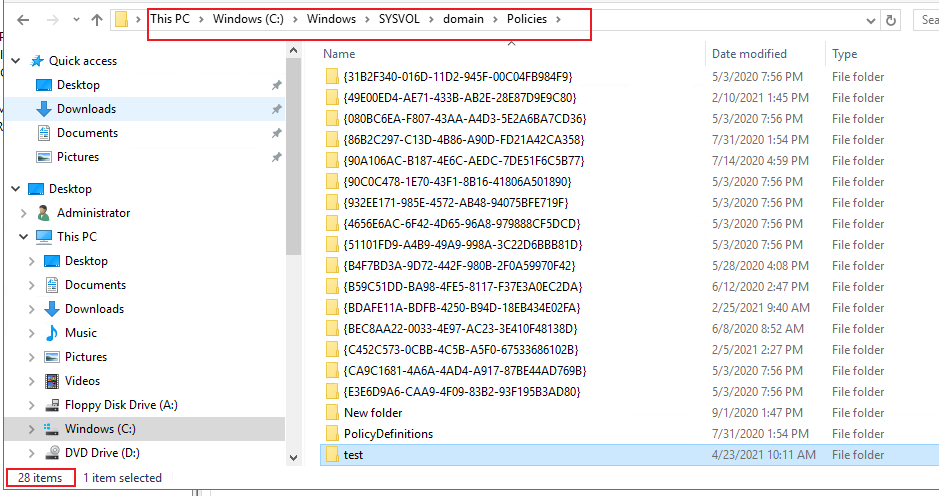
    92441-s1.png

    2.If the number of the items under C:\Windows\SYSVOL\domain\Policies on the three DCs you mentioned is not the same, SYSVOL is not in sync.

    Step 2

    1.Try to create a folder on all three DCs under the path C:\Windows\SYSVOL\domain\Policies.

    For example:
    folder1 on DC1
    folder2 on DC2
    folder3 on DC3

    Then check if folder1 will be replicated to DC2 and DC3.
    Then check if folder2 will be replicated to DC1 and DC3.
    Then check if folder3 will be replicated to DC1 and DC2.

    Tip: It may take several minutes or several hours or more to sync the folders.

    After SYSVOL syncs, folder1 and folder2 and folder3 will be in the path C:\Windows\SYSVOL\domain\Policies on all three DCs.

    Should you have any question or concern, please feel free to let us know.

    Best Regards,
    Daisy Zhou

    ============================================

    If the Answer is helpful, please click "Accept Answer" and upvote it.


  2. Arsalan Iqbal 1 Reputation point
    2021-05-05T16:30:11.27+00:00

    Moreover when I created new GPO the related folder was created successfully in All DCs instantly but now even after days and editing same policy multiple times, the updated time stamp is same in AD02 and AD03 but for AD01 it has not changed since the date of its creation. But the gpt files and other files inside that folder have updated time stamp in AD01 but parent date is old.

    0 comments No comments

Your answer

Answers can be marked as 'Accepted' by the question author and 'Recommended' by moderators, which helps users know the answer solved the author's problem.
