Developer technologies | VB
An object-oriented programming language developed by Microsoft that can be used in .NET.
This browser is no longer supported.
Upgrade to Microsoft Edge to take advantage of the latest features, security updates, and technical support.
' cx='32' cy='32' r='32' /%3E%3Ctext x='50%25' y='55%25' dominant-baseline='middle' text-anchor='middle' fill='%23FFF' %3EJJ%3C/text%3E%3C/svg%3E)
Hello,
Here is my program
Imports System.Windows.Forms
Imports System.Text.RegularExpressions
Imports System.Net.Sockets
Imports System.Text
Imports System.Threading
Imports System.IO
Imports System.Net


Public Class Form1

    Private TCP As Socket
    Private IPConfig As IPEndPoint

    Dim TCpThread As Thread

    Dim msg As String
    Private Sub Button1_Click(ByVal sender As System.Object, ByVal e As System.EventArgs) Handles Button1.Click

        Dim ipAddr As System.Net.IPAddress
        ipAddr = IPAddress.Parse("192.168.1.15")

        Try

            IPConfig = New IPEndPoint(ipAddr, 4000)
            TCP = New Socket(AddressFamily.InterNetwork, SocketType.Stream, ProtocolType.Tcp)
            TCP.Connect(IPConfig)

            If TCP.Connected = True Then
                TCpThread = New Thread(AddressOf Receive)
                TCpThread.Start()
            Else
                Throw New ArgumentException("Failed to connect")
            End If

        Catch ex As Exception
            Throw New ArgumentException(ex.Message)
        End Try
    End Sub


    Private Sub Receive()

        Dim h(1000) As Byte
        Dim i As Byte = 0

        While (1)
            Try

                If TCP.Available > 0 Then
                    TCP.Receive(h, TCP.Available, 0)
                    msg = System.Text.Encoding.ASCII.GetString(h)
                    i = 1
                ElseIf (i = 1) Then
                    i = 0
                    Application.OpenForms(0).Invoke(New EventHandler(AddressOf prin))
                End If

            Catch ex As Exception
            End Try
        End While
    End Sub

    Private Sub prin()
        ListBox1.Items.Add(msg)
        msg = ""
    End Sub

End Class
my transmitter send each packet each 10mS. My code works fine for some packet, but after a while it collects many packet to each other and causes an error in operation as you could see in the picture.
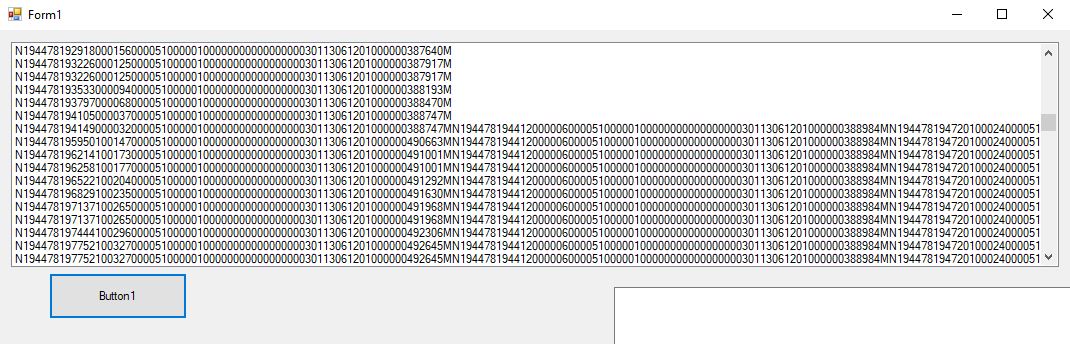

what is my problem?
An object-oriented programming language developed by Microsoft that can be used in .NET.
Answer accepted by question author
' cx='32' cy='32' r='32' /%3E%3Ctext x='50%25' y='55%25' dominant-baseline='middle' text-anchor='middle' fill='%23FFF' %3EXZ%3C/text%3E%3C/svg%3E)
Hi @John Jin ,
Check the following code to see if it works:
        Dim len As Integer = TCP.Receive(h, 0, 73, SocketFlags.None)
        msg = Encoding.ASCII.GetString(h, 0, len)
Thank you XingyuZhao-MSFT for your help. it works nice.
I tried to select your post as the answer but it doesn't show me accept answer for your comments.
Hi @John Jin ,
I have converted the comment to answer, and you can accept it.
Dear XingyuZhao-MSFT,
Thank you very much for you comment,
The transmitter send each 10ms a 73 bytes packet to the computer. I was wondering why my code works for some packets and after that it doesn't split the packet into 74 bytes based on my if condition ( If TCP.Available > 74 Then).
your mention code works fine
         Dim byteCounter As Integer = TCP.Receive(h)
         msg = Encoding.ASCII.GetString(h, 0, byteCounter)
but in some seconds it connect two 74 packet to each other (it think it is because of the hardware delay).
I changed the Receive() to
    Private Sub Receive()

        Dim h(1000) As Byte
        Dim i As Byte = 0

        While (1)
            Try

                If TCP.Available > 0 Then
                    If TCP.Available > 74 Then
                        TCP.Receive(h, 74, 0)
                    Else
                        TCP.Receive(h, TCP.Available, 0)
                    End If

                    msg = System.Text.Encoding.ASCII.GetString(h)
                    i = 1
                ElseIf (i = 1) Then
                    i = 0
                    Application.OpenForms(0).Invoke(New EventHandler(AddressOf prin))
                End If

            Catch ex As Exception
            End Try
        End While
    End Sub
but after some seconds it print (2*74) bytes in msg variables. I get confused
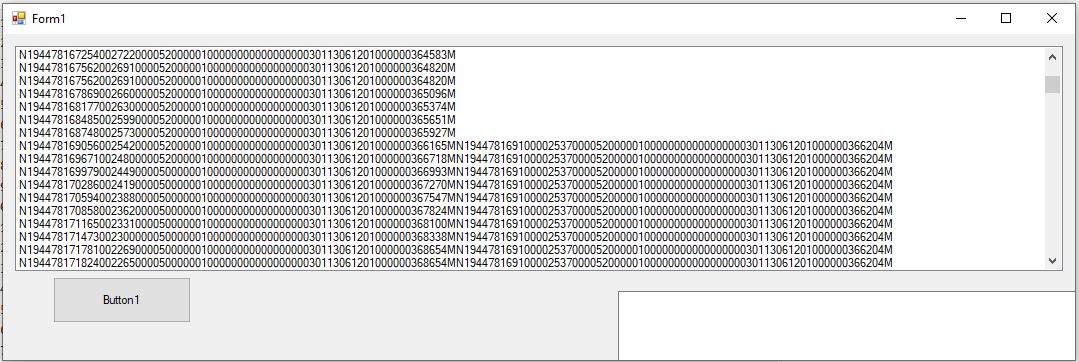
Hi @John Jin ,
I note that you set code accept 74 bytes,
    If TCP.Available > 74 Then
         TCP.Receive(h, 74, 0)
What's the content sent by the server?
Take a look at the following way to receive data:
    Dim byteCounter As Integer = TCP.Receive(h)
    msg = Encoding.ASCII.GetString(h, 0, byteCounter)