Microsoft Security | Microsoft Entra | Microsoft Entra External ID
Managing external identities to enable secure access for partners, customers, and other non-employees

This browser is no longer supported.
Upgrade to Microsoft Edge to take advantage of the latest features, security updates, and technical support.
' cx='32' cy='32' r='32' /%3E%3Ctext x='50%25' y='55%25' dominant-baseline='middle' text-anchor='middle' fill='%23FFF' %3ESR%3C/text%3E%3C/svg%3E)
Hi,
I want to increase the Access token lifetime to one day.I used the poilcy like below
New-AzureADPolicy -Definition @('{"TokenLifetimePolicy":{"Version":1,"AccessTokenLifetime":"23:59:59","MaxAgeSessionSingleFactor":"23:59:59"}}') -DisplayName "AzureAPIMAccessTokenPolicy" -IsOrganizationDefault $false -Type "TokenLifetimePolicy"
Then i have added to my app
Add-AzureADApplicationPolicy -Id XXXX-RefObjectId XXX
But when i generate the token using the below
https://login.microsoftonline.com/XXXX/oauth2/token
it still expires in 1hr.
i Have waited for more than 2 hrs.
Can you Please help me with this?
Managing external identities to enable secure access for partners, customers, and other non-employees
A cloud-based identity and access management service for securing user authentication and resource access
Additional Microsoft Entra services and features related to identity, access, and network security
' cx='32' cy='32' r='32' /%3E%3Ctext x='50%25' y='55%25' dominant-baseline='middle' text-anchor='middle' fill='%23FFF' %3ESM%3C/text%3E%3C/svg%3E)
If you run the following command:
Get-AzureADServicePrincipalPolicy -Id {object id of the servicePrincipal of the corresponding App ID}
are you able to see if the policy is attached with the Azure AD Policy successfully or not?
Answer accepted by question author
I tested the process in my lab and it works for me.
Policy Created using the PS Cmdlet:
    Set-AzureADPolicy -Definition @('{"TokenLifetimePolicy":{"Version":1,"AccessTokenLifetime":"23:00:00"}}') -Id "b477b9f2-3f7d-4ccf-a702-1af7224a8016" -IsOrganizationDefault $false -Type "TokenLifetimePolicy"

PS C:\windows\system32> $policyID = "b477b9f2-3f7d-4ccf-a702-1af7224a8016"
PS C:\windows\system32> $sp = Get-AzureADServicePrincipal -SearchString "Access"

PS C:\windows\system32> Add-AzureADServicePrincipalPolicy -Id $sp.ObjectId -RefObjectId $policyID
PS C:\windows\system32> Get-AzureADServicePrincipalPolicy -Id $sp.ObjectId

Id                                   DisplayName                       Type                IsOrganizationDefault
--                                   -----------                       ----                ---------------------
b477b9f2-3f7d-4ccf-a702-1af7224a8016 ExtendedAccessTokenLifetimePolicy TokenLifetimePolicy False
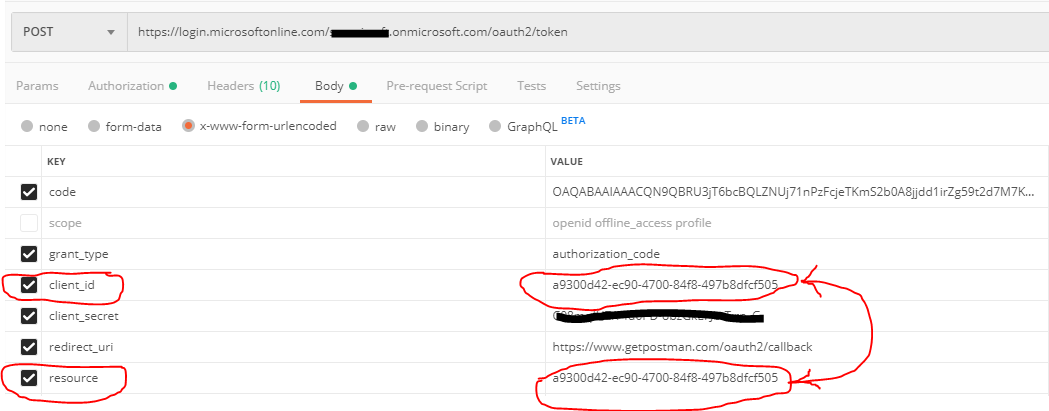
After that I tried getting an Access Token from Azure AD using the Authorization Code Grant Flow of OAuth2.0 protocol and got the token with the following lifetime mentioned:

Note: Inorder for this AzureADPolicy to work and provide you desired access token's lifetime, you need to keep in mind that when you make a request for the token by reaching the token endpoint of AzureAD, in the request body, for the resource parameter, you need to specify the "App ID" on whose corresponding Service Principal you have attached this Azure AD Policy.
Note: This custom lifetime for Access Tokens, cant be set for first party resources like Graph API etc.
Hope this helps.
Thanks Soumi Now i am able to do it
Hi Soumi,
I tried with the object ID i have to get the Service Principal like below
Get-AzureADServicePrincipal -ObjectId
But i am not able to fetch it
I have created my app in the portal and got the object ID from it.
Do i need to add any permissions ?
Is it because i have the client secret associated with it?
@sujith reddy komma , When you say that Get-AzureADServicePrincipal -ObjectID is not showing any results, in this case, are you copying the Object ID for this app from the Enterprise Application's blade of Azure AD?
If the Service Principal object for the corresponding application is listed in the portal and querying that same Service Principal's Object ID using Powershell and not showing any results, its not possible. I would request you to check once again and make sure that you are putting in the right.
@sujith reddy komma , you can also search for the Service Principal and its correct ObjectID by the running the following command:
Get-AzureADServicePrincipal -SearchString "Graph"
This command should give you an output containing all the Service Principals starting with the name "Graph"
and its corresponding ObjectID.
Hope this helps.
Hi,
Thanks for the above
I just want to increase the Access token lifetime of the APP that i created in Azure Active Directory
the policy has bee created.i can verify that
but when i run Get-AzureADServicePrincipal or Get-AzureADApplication neither this app or its object ID is visible in it. Is ti mandatory to create it at the Service Principal? How can i find my Servie Principal associated to this app? This policy has to be only assicated to one App registration which i created in the Azure Active DIrectory? is it posssible ?
How can i create it?
The Azure AD Policy always gets attached to the Service Principal of the corresponding App Registration.
If you have created an app registration using the Portal in Azure, the Service Principal for that App registration does get created automatically. But in case you have created the app registration using the Powershell or using MSGraph APIs, then you would have to separately run commands to created the Service Principal object by referencing the App Object that has been created previously.
Run get-AzureADServicePrincipal or get-AzureADApplication to confirm the creation of these objects in AAD. Once confirmed, then you can follow the cmdlets @theodorbrander has shared earlier and attach the Azure AD Policy with the corresponding Azure AD Service Principal object.
Once done, then try to run the command to check and confirm if the ID of the Azure AD Policy has successfully attached to the AzureADServicePrincipal or not:
Get-AzureADServicePrincipalPolicy -Id {object id of the servicePrincipal of the corresponding App ID}
Do let us know if this works or if there are any further queries around this, please feel free to get back to us so that we can help better.
' cx='32' cy='32' r='32' /%3E%3Ctext x='50%25' y='55%25' dominant-baseline='middle' text-anchor='middle' fill='%23FFF' %3ET%3C/text%3E%3C/svg%3E)
I assume you followed this guidance?
Below is the code snippets to create a policy. Just validate that it is created.
$policy = New-AzureADPolicy -Definition @('{"TokenLifetimePolicy":{"Version":1,"AccessTokenLifetime":"02:00:00","MaxAgeSessionSingleFactor":"02:00:00"}}') -DisplayName "WebPolicyScenario" -IsOrganizationDefault $false -Type "TokenLifetimePolicy"

Get-AzureADPolicy -Id $policy.Id

# Get ID of the service principal
$sp = Get-AzureADServicePrincipal -Filter "DisplayName eq ''"


# Assign policy to a service principal
Add-AzureADServicePrincipalPolicy -Id $sp.ObjectId -RefObjectId $policy.Id