Azure Cosmos DB
An Azure NoSQL database service for app development.
This browser is no longer supported.
Upgrade to Microsoft Edge to take advantage of the latest features, security updates, and technical support.
' cx='32' cy='32' r='32' /%3E%3Ctext x='50%25' y='55%25' dominant-baseline='middle' text-anchor='middle' fill='%23FFF' %3EPN%3C/text%3E%3C/svg%3E)
I am using Azure data factory(ADF) Pipeline-Copy Activity to copy data from cosmos db to datalake.I have created linkedservice for source (Cosmos db ) and destination (Data lake gen 2- Delimited format (.tsv))as I want my output in tsv format or csv..
which is working fine for me for simple objects.
But,I want some suggestion for copying complex objects from cosmos db to flattened tsv format.
eg:-> Source :->
{
"id":"30b00315-bae9343442333",
"TestId":"12345",
"Information":
[
{"Info":
[
{"InfoID":1,"result":"4"},
{"InfoID":2,"result":"3"},
{"InfoID":3,"result":"3"},
{"InfoID":4,"result":"4"},
]
"lastModified":"2021-01-2T08:36:09.4961916",
"lastModifiedBy":"SYSTEM",
"flag":1
}
],
"created":"2021-01-12T08:36:09.49561916",
"createdBy":"SYSTEM",
"isNew":true,
"eTag":"\"6100478c-0000-0700-342343440000\""
}
Destination ouput should be in:->
Id TestId InfoId Result LastModified LastModifiedBy CreatedBy flag
30b00315-bae9343442333 12345 1 4 2021-01-2 System 2021-01-2 1
30b00315-bae9343442333 12345 2 3 2021-01-2 System 2021-01-2 1
30b00315-bae9343442333 12345 3 3 2021-01-2 System 2021-01-2 1
30b00315-bae9343442333 12345 4 4 2021-01-2 System 2021-01-2 1
As you can see above in source,Information is array and inside it,there is another field Info which is another array.I want this complex nested arrays in flattened structure.
How we can achieve it? Please suggest some way.
Thanks in advance.
I have tried below options
1.Copy Activity Mapping schema :- But it will take only first index.
2.Data flow activity But it wont work for nested array objects.Let me know if i am missing something from my end.
An Azure NoSQL database service for app development.
An Azure service for ingesting, preparing, and transforming data at scale.

In Data Flow, add a Flatten transformation to unroll the arrays. Use a Derived Column transformation to refactor the structs into simple columns.
' cx='32' cy='32' r='32' /%3E%3Ctext x='50%25' y='55%25' dominant-baseline='middle' text-anchor='middle' fill='%23FFF' %3EKM%3C/text%3E%3C/svg%3E)
Hi @Prasad Nikumbh ,
Thanks for sharing the alternate solution details.
As mentioned by @MarkKromer-MSFT , you can use Flatten transformation to achieve your requirement.
I did tried using the source data you have provided and was able to flatten using the flatten transformation.
Here is the source data used for testing: 105845-nestjsonarraysource.txt
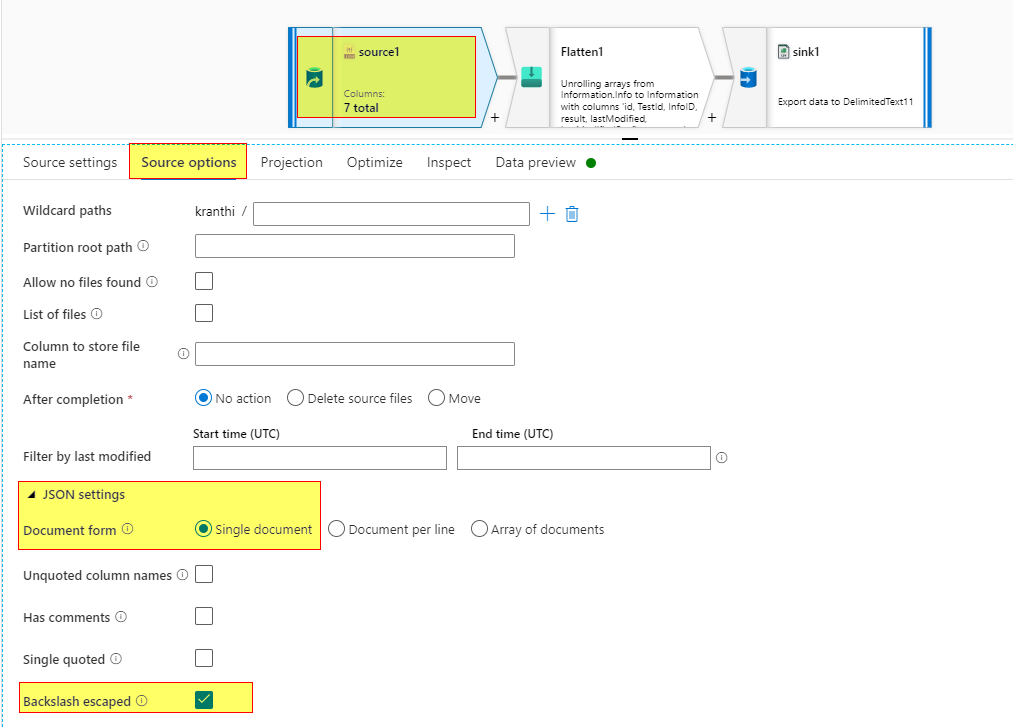
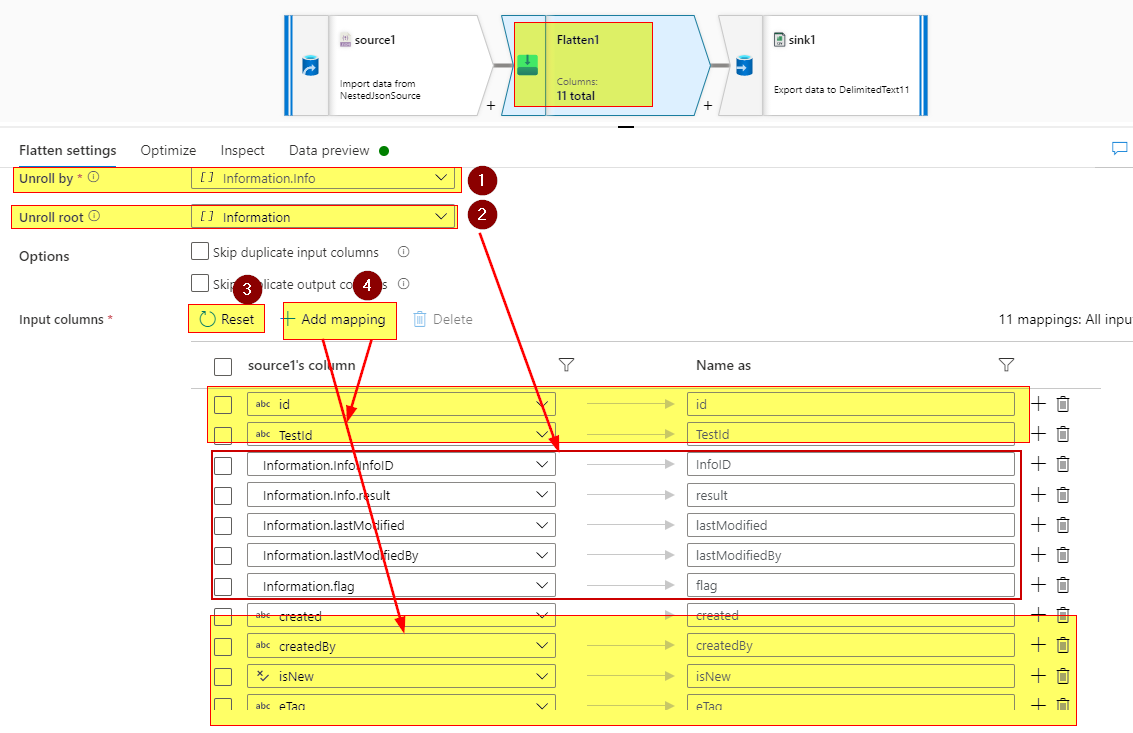
Then add flatten and unroll by deepest array, then click Reset input columns, it will display the nested array columns unrolled. Then click Add mapping and include the input columns from source that you would want in the sink.
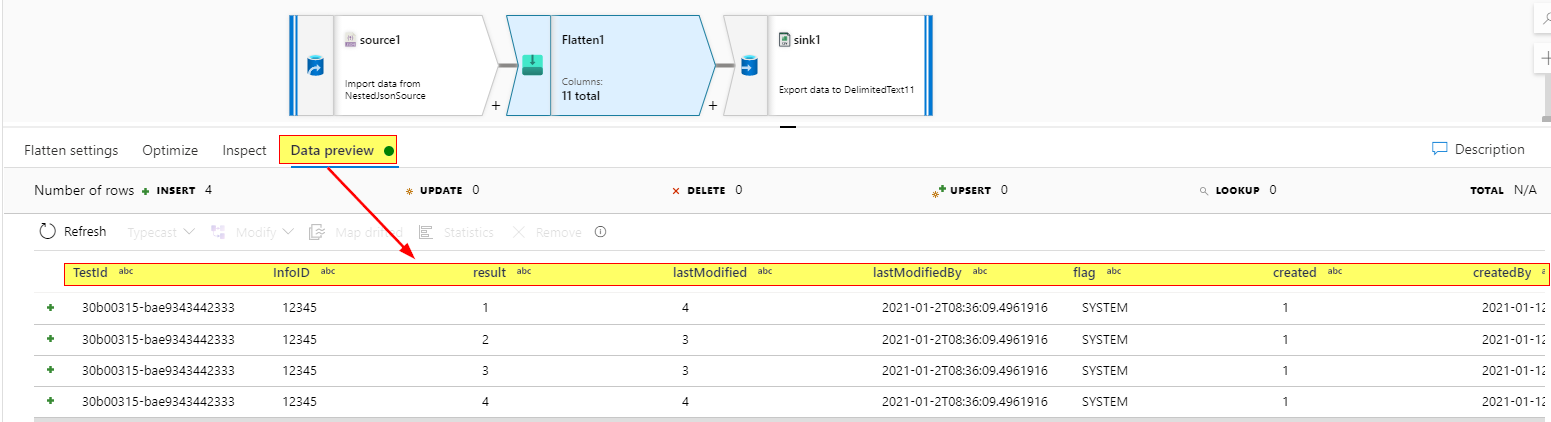
Then do data preview of the flatten transformation to check the output.
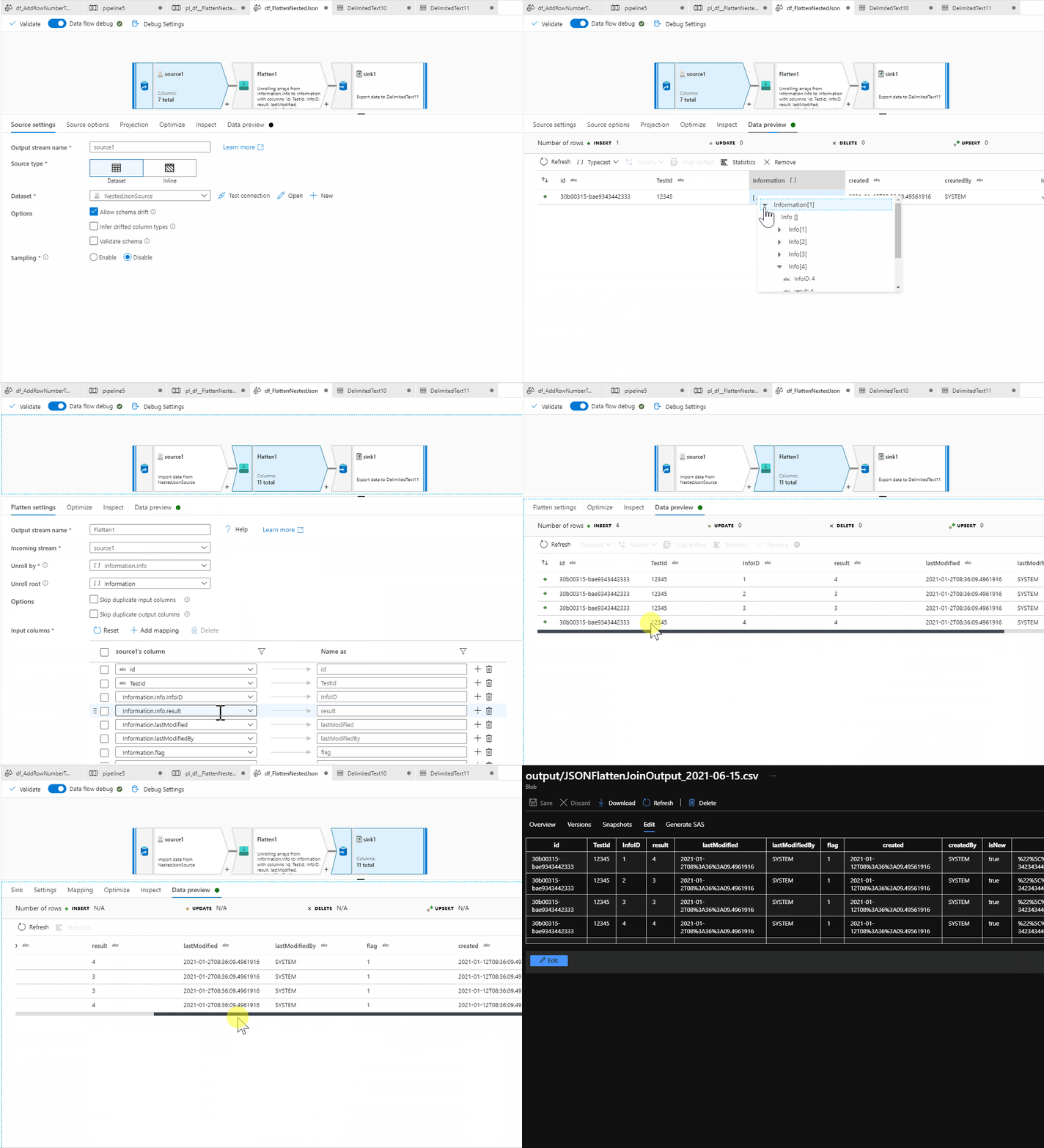
Here is the GIF of implementation:
Hope this helps.
----------
Please don’t forget to Accept Answer and Up-Vote wherever the information provided helps you, this can be beneficial to other community members.
Hi @Prasad Nikumbh ,
Following up to see if the above suggestion was helpful? Do let us know if you have further query.
Thanks
@MarkKromer-MSFT For now, If i want to flatten i can do it from source itself i.e. I can use join and write custom query (Cosmos) in source and then can push the same flatten data to datalake. Is there any way or feature by which complex objects directly gets flattened and can push to datalake or whatever way we want.(If not, Please let us know if any new feature related to this coming in future).
Today, you would have to start with the deepest array and unroll each individually. However, we have a new "deep traversal" feature landing soon that should help with this.
@MarkKromer-MSFT Thanks for your response.
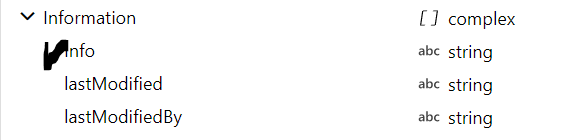
For the nested array,when i try to import projection.I can see only first array i.e. Information.Here,nested array shows string data type because of that I am not able to select unroll by for the Info .Please find below the source which contains nested array Info ...
{
"id":"30b00315-bae9343442333",
"TestId":"12345",
"Information":
[
{"Info":
[
{"InfoID":1,"result":"4"},
{"InfoID":2,"result":"3"},
{"InfoID":3,"result":"3"},
{"InfoID":4,"result":"4"},
]
"lastModified":"2021-01-2T08:36:09.4961916",
"lastModifiedBy":"SYSTEM",
"flag":1
}
],
"created":"2021-01-12T08:36:09.49561916",
"createdBy":"SYSTEM",
"isNew":true,
"eTag":"\"6100478c-0000-0700-342343440000\""
}
@MarkKromer-MSFT Screenshot for the same.
' cx='32' cy='32' r='32' /%3E%3Ctext x='50%25' y='55%25' dominant-baseline='middle' text-anchor='middle' fill='%23FFF' %3ESP%3C/text%3E%3C/svg%3E)
Hi @Prasad Nikumbh ,
I think that you could use the ADF Data flow Flatten transformation.
Here an example https://www.youtube.com/watch?v=VY2tFQJoAXE
Hope it helps.
— Remeber to accept answer if it solves you question —
@Stefano Peroli @MarkKromer-MSFT I have tried with flatten transformation but nested arrays wont work.As you can see in the above example "Information"
is the array..I have selected unroll by Information,But inside it there is another array Info which has list of array objects "InfoID,Result"..I want this to be flattened.Also,when i try to select Info in the unroll by it shows me as a string..Not sure why.