Microsoft 365 and Office | SharePoint Server | For business
A family of Microsoft on-premises document management and storage systems.

This browser is no longer supported.
Upgrade to Microsoft Edge to take advantage of the latest features, security updates, and technical support.
' cx='32' cy='32' r='32' /%3E%3Ctext x='50%25' y='55%25' dominant-baseline='middle' text-anchor='middle' fill='%23FFF' %3ESG%3C/text%3E%3C/svg%3E)
Hi, we have some old custom code that's sorting items based on "ID" rather than "Display Order". It's NOT done through the CQWP or the View.
Quickest way I can think of rectifying is by using Script Editor on the page with some orderby code. Any sample code? XLST, JavaScript,...?
Thanks!
A family of Microsoft on-premises document management and storage systems.
The process of building custom solutions for SharePoint Server.
' cx='32' cy='32' r='32' /%3E%3Ctext x='50%25' y='55%25' dominant-baseline='middle' text-anchor='middle' fill='%23FFF' %3EMM%3C/text%3E%3C/svg%3E)
Hi @sco gordo ,
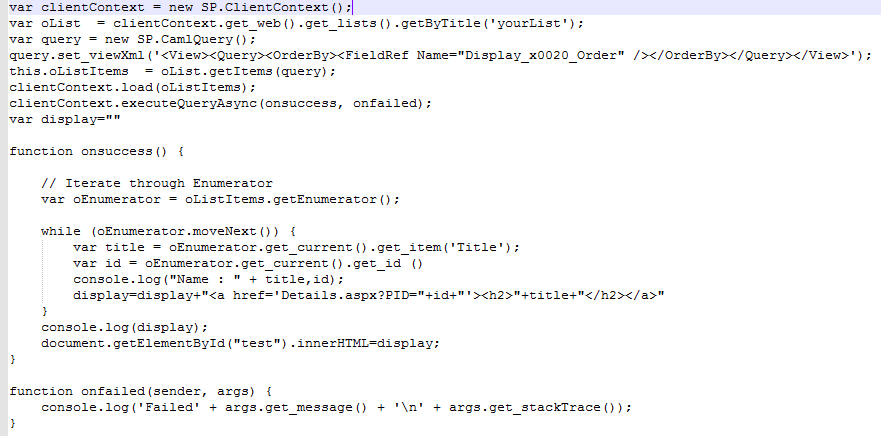
You could use camel query in JSOM code to sort the list item by the column Display order, Below is my demo for you: 103255-orderitems.txt
var clientContext = new SP.ClientContext();
var oList  = clientContext.get_web().get_lists().getByTitle('yourList');
var query = new SP.CamlQuery();
query.set_viewXml('<View><Query><OrderBy><FieldRef Name="Display_x0020_Order" /></OrderBy></Query></View>');
this.oListItems  = oList.getItems(query);
clientContext.load(oListItems);
clientContext.executeQueryAsync(onsuccess, onfailed);
If an Answer is helpful, please click "Accept Answer" and upvote it.
Note: Please follow the steps in our documentation to enable e-mail notifications if you want to receive the related email notification for this thread.
Hi @sco gordo ,
Is there any update on your issue? Have you tried the way I provided?
If my answer is helpful to you, you could accept it :)

didn't see your old custom code (is it written on C# (server OM or CSOM?) or javascript?) but in general it is possible to get list items and display them in needed order using javascript object model, e.g. Using Javascript to get list items, can I change item order.

office-scripts-dev tag is specifically for Office Scripts in Excel.
Thanks sadomovalex. I don't have access to the code at the moment. Rather than modify it, I'm hoping to supersede it with the on-page Script Editor, at least short-term.
More info:
I have list items, with metadata for Title, ID, and Display Order. The Display Order is obviously intended for presentation, but for whatever reason is not functioning. ID is associated with a details page and is currently determining the order on page as well.
Basically, the items are being displayed like:
<a href="Details.aspx?PID=7"><h2>item1</h2></a>
<a href="Details.aspx?PID=8"><h2>item2</h2></a>
<a href="Details.aspx?PID=9"><h2>item3</h2></a>
when I need the displayed like
<a href="Details.aspx?PID=9"><h2>item3</h2></a>
<a href="Details.aspx?PID=8"><h2>item2</h2></a>
<a href="Details.aspx?PID=7"><h2>item1</h2></a>
using the Display Order rather than ID.
I'm hoping there's some incredibly simple bit of code I can add ;)