Share via

Documents Folder Suddenly Empty

Anonymous
2022-09-26T10:05:40+00:00

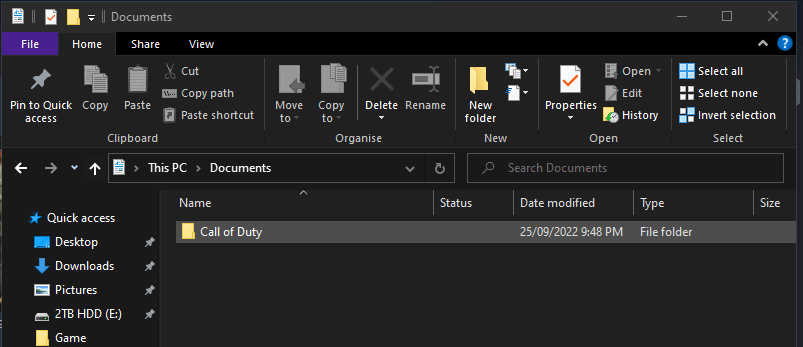
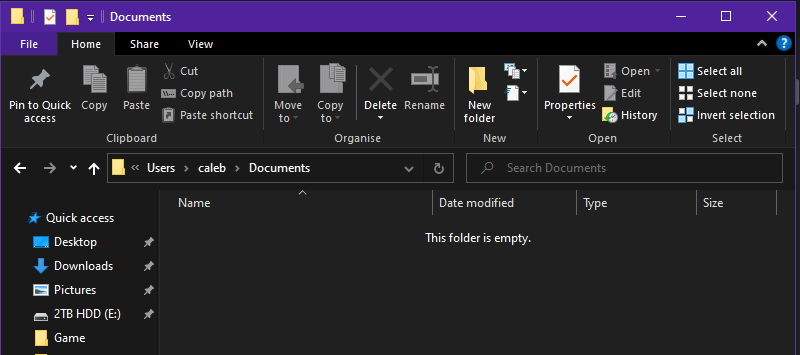
My Documents folder has seemingly deleted itself, just as if it's contents never existed. They contents have just disappeared overnight.

I've tried quite a few solutions, but none have helped in the slightest.

I've tried going into the Documents folder and ticking the "Hidden Items" box in the view tab, I've tried using 3rd party programs like EaseUS and Recuva but neither of them have helped with recovering the files. I've also tried checking to see if I'm signed into another user by going into C:\Users, but there is only *my name* and Public and I've gone straight into This PC > Documents and it is empty (besides one folder as I launched a game) too.

And yes, I've attempted restarting my computer on many occasions and yet there is no change.

The PC is also well over a year old and I've had no issues with it whatsoever. I haven't downloaded anything recently that could have tampered with the Documents folder either.

The final fix I tried was rolling back the PC to a previous day, but with just my luck the only thing that wasn't rolled back was the documents folder (said specifically by the computer)

if anyone knows a potential fix to this error, it'd be greatly appreciated.
Windows for home | Windows 10 | Files, folders, and storage

Locked Question. This question was migrated from the Microsoft Support Community. You can vote on whether it's helpful, but you can't add comments or replies or follow the question.

0 comments No comments

18 answers

Sort by: Most helpful
  1. Anonymous
    2022-09-26T11:21:26+00:00

    Hi Projjectt,

    Thank you for the screenshot, Windows is set to use the Documents folder in the OneDrive folder, your files may be in there.

    Open File Explorer, then navigate to C:\Users\caleb

    Open the OneDrive folder in there and there is another Documents folder in the OneDrive folder, are your files located in that folder?

    Was this answer helpful?

    1 person found this answer helpful.
    0 comments No comments
  2. Anonymous
    2022-09-26T11:35:33+00:00

    Hi Projjectt,

    Log into OneDrive online on this link: https://onedrive.live.com/

    Are your missing files stored on OneDrive?

    Was this answer helpful?

    0 comments No comments
  3. Anonymous
    2022-09-26T11:29:30+00:00

    That's empty too, besides the Call of Duty folder like the above screenshot.

    Image

    Was this answer helpful?

    0 comments No comments
  4. Anonymous
    2022-09-26T10:46:50+00:00

    Here it is.

    Was this answer helpful?

    0 comments No comments
  5. Anonymous
    2022-09-26T10:37:47+00:00

    Hi Projjectt,

    I am Dave, I will help you with this.

    Click your Start Button, type regedit and hit Enter to open the Registry Editor.

    Click View and make sure 'Address Bar' is turned on.

    Paste this into the Address Bar at the top and hit Enter.

    HKEY_CURRENT_USER\SOFTWARE\Microsoft\Windows\CurrentVersion\Explorer\User Shell Folders

    Please provide a screenshot of that Registry Editor page.

    Was this answer helpful?

    0 comments No comments
