Developer technologies | Transact-SQL
A Microsoft extension to the ANSI SQL language that includes procedural programming, local variables, and various support functions.
This browser is no longer supported.
Upgrade to Microsoft Edge to take advantage of the latest features, security updates, and technical support.

Hello everybody,
I have written the following query for SQL Server but an error occurs while executing it which is illogical and
does not make sense:
SELECT ac.name AS Column_Name, (SELECT COUNT(DISTINCT ac.name) FROM [Northwind].[Sales].[Orders])
        FROM [Northwind].sys.all_columns ac
        WHERE object_id = OBJECT_ID('[Northwind].[Sales].[Orders]')
The error is the following famous error:
Column 'Northwind.sys.all_columns.name' is invalid in the select list because it is not contained in either an aggregate function or the GROUP BY clause.
It is illogical because the aggregate function 'COUNT' belongs to the subquery, not to the main SELECT statement.
I also tried to trick SQL Server by rewriting the statement like below with 'MyFunction' function but I need to execute a dynamic SQL within that function which I figured out that it is not possible:
    SELECT ac.name AS Column_Name, MyFunction(ac.name) FROM [Northwind].[Sales].[Orders])
            FROM [Northwind].sys.all_columns ac
            WHERE object_id = OBJECT_ID('[Northwind].[Sales].[Orders]')
I also added the 'group by ac.name' clause to the first query which logically is not needed, for test purpose, and either of two scenarios occurs:
Subquery returned more than 1 value. This is not permitted when the subquery follows =, !=, <, <= , >, >= or when the subquery is used as an expression.
Which is again illogical because the subquery never returns more than 1 value. That is absurd.
What can the possible solution and workaround be? I really appreciate your help.
Best regards,
Ali
A Microsoft extension to the ANSI SQL language that includes procedural programming, local variables, and various support functions.
Answer accepted by question author

Hi @amomen-8749,
You could refer Viorel's solution if your version is SQL server 2017 and later.
If have an old version, you could refer below using STUFF:
declare @tablename varchar(max) = '[Northwind].[dbo].[Orders]'

declare @sql nvarchar(max)
select @sql= STUFF((
select ' union all select '+ quotename([name], '''')+' as Column_Name, count(distinct ', quotename([name]), ')*100.0/Count(*) as [crowdedness(in %)] '+
        'from '+ @tablename
FROM sys.all_columns
WHERE object_id = OBJECT_ID(@tablename)
FOR XML PATH('') ), 1, 10, '')

exec(@sql)
Output:
Column_Name	crowdedness(in %)
OrderID	100.000000000000
CustomerID	10.722891566265
EmployeeID	1.084337349397
OrderDate	57.831325301204
RequiredDate	54.698795180722
ShippedDate	46.626506024096
ShipVia	0.361445783132
Freight	96.265060240963
ShipName	10.843373493975
ShipAddress	10.722891566265
ShipCity	8.433734939759
ShipRegion	2.289156626506
ShipPostalCode	10.120481927710
ShipCountry	2.530120481927
In case you would like to list all columns of all tables in all databases in master, you could refer below and check whether it is a little helpful:
DROP TABLE IF EXISTS #AllTables

SET NOCOUNT ON
CREATE TABLE #AllTables (DbName sysname,SchemaName sysname, TableName sysname)
DECLARE
     @SearchDb nvarchar(200)
    ,@SearchSchema nvarchar(200)
    ,@SearchTable nvarchar(200)
    ,@SQL nvarchar(4000)
SET @SearchDb='%%'
SET @SQL='select ''?'' as DbName, s.name as SchemaName, t.name as TableName from [?].sys.tables t inner join sys.schemas s on t.schema_id=s.schema_id
WHERE ''?'' LIKE '''+@SearchDb+'''  AND ''?'' NOT IN (''master'',''model'',''msdb'',''tempdb'',''SSISDB'')'

INSERT INTO #AllTables (DbName, SchemaName, TableName)
    EXEC sp_msforeachdb @SQL
SET NOCOUNT OFF
SELECT * FROM #AllTables ORDER BY DbName, SchemaName, TableName
Best regards,
Melissa
If the answer is helpful, please click "Accept Answer" and upvote it.
Note: Please follow the steps in our documentation to enable e-mail notifications if you want to receive the related email notification for this thread.

Hi,
(1) For most cases (in my opinion), there is no sense to use Dynamic query when you can use direct query, which most likely will provide better performance. The goal of the dynamic query is to build the query dynamically but if your query do is always the same then why do use dynamic query?!?
Many users use dynamic query to for shorter query which is really a bad idea. You can use the dynamic query as a temporarily tool to help you write the query but as long as the query is consist then take the result of the dynamic query and use it as direct query is probably a very good idea.
Dynamic query usually fits when parameters changed or the DDL is "changing" over time or DDL is "unknown" at the time that you execute the query (for example if you have no idea what are the named of the relevant columns - which is not our case). In these cases many times we will need to re-compile the query each time in order to let the server build the execution plan each execution.
(2) This solution was given by @Viorel already :-)
Hi (again) :-)
OK, so assuming I understand your request (even so I have no idea why you need this information), please check the following solution using simple UNPIVOTE
;with pvt as (
 select
  'OrderID'        = count(distinct [OrderID])
 ,'CustomerID'     = count(distinct [CustomerID])
 ,'EmployeeID'     = count(distinct [EmployeeID])
 ,'OrderDate'      = count(distinct [OrderDate])
 ,'RequiredDate'   = count(distinct [RequiredDate])
 ,'ShippedDate'    = count(distinct [ShippedDate])
 ,'ShipVia'        = count(distinct [ShipVia])
 ,'Freight'        = count(distinct [Freight])
 ,'ShipName'       = count(distinct [ShipName])
 ,'ShipAddress'    = count(distinct [ShipAddress])
 ,'ShipCity'       = count(distinct [ShipCity])
 ,'ShipRegion'     = count(distinct [ShipRegion])
 ,'ShipPostalCode' = count(distinct [ShipPostalCode])
 ,'ShipCountry'    = count(distinct [ShipCountry])
 from [Northwind]..[Orders]
)
SELECT Column_Name, Counting
FROM(
 SELECT * FROM pvt
) p
UNPIVOT(
 Counting FOR Column_Name IN (
 OrderID       ,
 CustomerID    ,
 EmployeeID    ,
 OrderDate     ,
 RequiredDate  ,
 ShippedDate   ,
 ShipVia       ,
 Freight       ,
 ShipName      ,
 ShipAddress   ,
 ShipCity      ,
 ShipRegion    ,
 ShipPostalCode,
 ShipCountry
 )
)AS unpvt;
GO
The result looks like this:
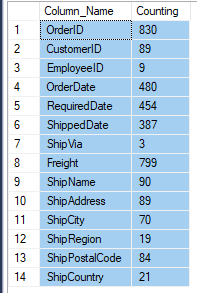
And another option (which I like less for this case) is executing multiple queries and UNIOIN ALL
          select 'OrderID'        as Column_Name, count(distinct [OrderID])        as [Count] from [Northwind]..[Orders]
union all select 'CustomerID'     as Column_Name, count(distinct [CustomerID])     as [Count] from [Northwind]..[Orders]
union all select 'EmployeeID'     as Column_Name, count(distinct [EmployeeID])     as [Count] from [Northwind]..[Orders]
union all select 'OrderDate'      as Column_Name, count(distinct [OrderDate])      as [Count] from [Northwind]..[Orders]
union all select 'RequiredDate'   as Column_Name, count(distinct [RequiredDate])   as [Count] from [Northwind]..[Orders]
union all select 'ShippedDate'    as Column_Name, count(distinct [ShippedDate])    as [Count] from [Northwind]..[Orders]
union all select 'ShipVia'        as Column_Name, count(distinct [ShipVia])        as [Count] from [Northwind]..[Orders]
union all select 'Freight'        as Column_Name, count(distinct [Freight])        as [Count] from [Northwind]..[Orders]
union all select 'ShipName'       as Column_Name, count(distinct [ShipName])       as [Count] from [Northwind]..[Orders]
union all select 'ShipAddress'    as Column_Name, count(distinct [ShipAddress])    as [Count] from [Northwind]..[Orders]
union all select 'ShipCity'       as Column_Name, count(distinct [ShipCity])       as [Count] from [Northwind]..[Orders]
union all select 'ShipRegion'     as Column_Name, count(distinct [ShipRegion])     as [Count] from [Northwind]..[Orders]
union all select 'ShipPostalCode' as Column_Name, count(distinct [ShipPostalCode]) as [Count] from [Northwind]..[Orders]
union all select 'ShipCountry'    as Column_Name, count(distinct [ShipCountry])    as [Count] from [Northwind]..[Orders]
GO
Thank you again Pituach! :))
But you are specifying the names of the columns and the table and database explicitly. My aim is to write a stored procedure, created in 'master' database that takes the name of the table and database and queries and fetches the names of columns from the RDBMS automatically itself.
and it must produce exactly the result grid that you posted. The ultimate purpose is to divide the 'crowdedness' column by count(*) to achieve a "Cardinality Factor". Well, this is the simplest idea to produce a cardinality factor to decide which column has more cardinality to be taken as the index column in tuning issues, because then we can sort the crowdedness column and see which column has a bigger cardinality factor. There may be other smarter ways to produce a cardinality factor which some R&D plans may have already been carried out about, which I don't know of. I'd be glad to hear from you if you are aware of.
This is only one criterion to opt for the index column.
Hi :-)
But you are specifying the names of the columns and the table and database explicitly.
True. This fit your original request. You spoke about specific database.
My aim is to write a stored procedure, created in 'master' database that takes the name of the table and database and queries and fetches the names of columns from the RDBMS automatically itself.
This is a totally new information that change the question totally!
For this you need a dynamic query which will probably provide lower performance
It is probably a bad idea to do so
For this request you can use the solution that @Viorel gave you.
If this fit your need we can change the comment to answer so you can mark it as the answer thta choose :-)
Hi @amomen-8749,
Could you please validate all the answers so far and provide any update?
Thanks.
Best regards,
Melissa
Thank you @MelissaMa-msft . I'd choose more than one answer if I could. Thank you everybody!!! :))

Maybe this dynamic query will work for you:
declare @tablename varchar(max) = '[Northwind]..[Orders]'

declare @sql nvarchar(max) =
  (select string_agg(
     concat('select ', quotename([name], ''''), ' as Column_Name, count(distinct ', quotename([name]), ') as [Count] ',
        'from ', @tablename),
     ' union all ')
FROM sys.all_columns
WHERE object_id = OBJECT_ID(@tablename))

exec(@sql)
Thank you so much @Viorel . I take your rewritten code by @MelissaMa-msft to avoid string_agg() function.
' cx='32' cy='32' r='32' /%3E%3Ctext x='50%25' y='55%25' dominant-baseline='middle' text-anchor='middle' fill='%23FFF' %3ETP%3C/text%3E%3C/svg%3E)
Counting the distinct values of all columns in a table is not that simple.
Good day,
It is illogical
Actually your queries are totally illogical and make no sense. The errors are pretty clear.
In your code you use aggregate function inside a sub-query on the main table out the sub-query and you select the column "name" from the main query. Since the aggregate is done on the main query and the column "name" is not part of the group by or aggregated columns then you get this error. This is very clear error.
Try to execute the following query and you will get the same error
SELECT COUNT(DISTINCT ac.name), ac.name
FROM [Northwind].sys.all_columns ac
Subquery returned more than 1 value
please check the code. There is no SELECT in a sub-query and missing the open of brackets probably.
Moreover, you did not provided the function so we cannot test the query. Make sure that this is a scalar function if you want to use it as a value in your query. If this is a table function then again, this is a very clear error that self-explanatory error.
It will be mush simpler to help you understand how to write the query if you can explain what you want to get and what is the expected result.
Thank you for your answer pituach! Well the error on the query you gave is obvious because the aggregate and column name are both from one table.
sub-query on the main table out the sub-query
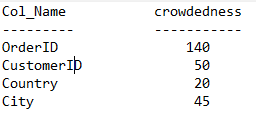
but in my query, the subquery is from a totally different table. Well the idea is to calculate the number of distinct entries (let's call it crowdedness) in every column of the noted table in subquery. So the result will look something like this:
I think this problem is because of the fact that 'ac.name' is a reference not a value. But sometimes column names are not treated like references like in 'join' clauses when we write "on Orders.name = Customers.name"